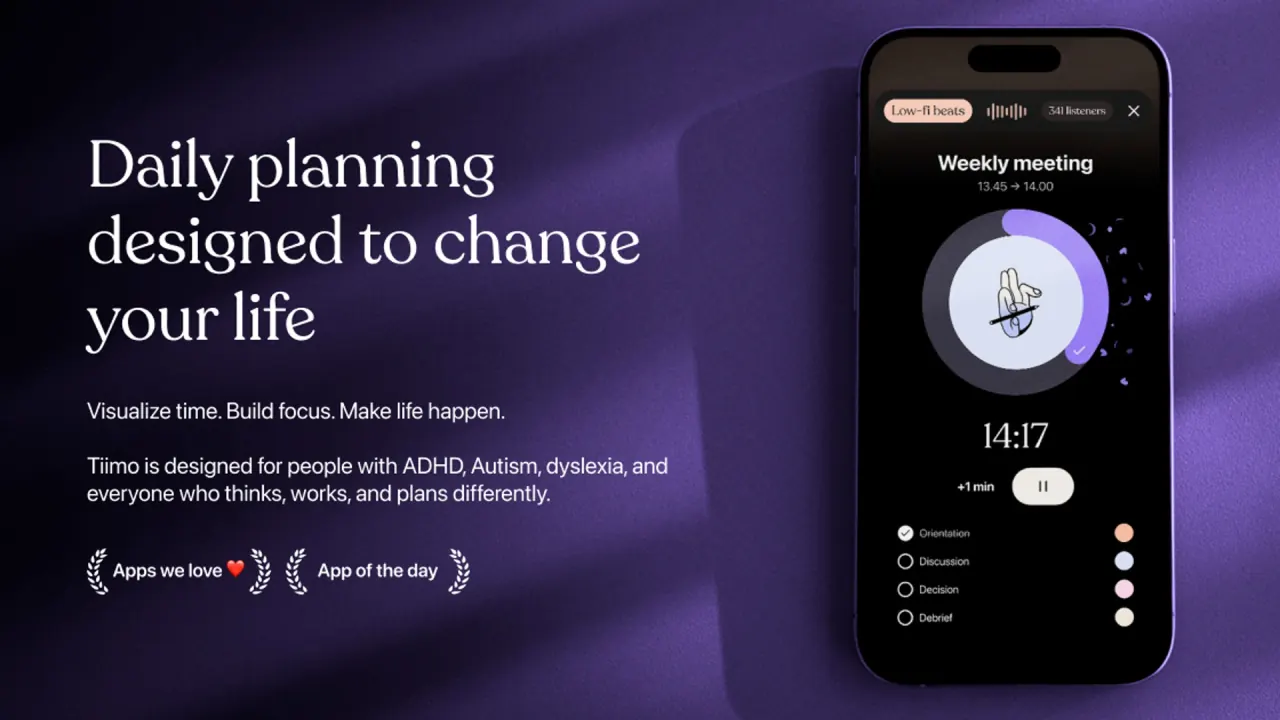

Tiimo combines a visual timeline, focus timer, to-do lists and an AI co-planner for ADHD, autism and other executive-function needs. It runs on iPhone, iPad, Apple Watch, Android and the web.
Used this tool? Rate it
Used this tool? Rate it


AI assistant for writing, analysis and tasks


From a prompt to a deck, site or doc


Real-time answers, images, and code in one chat


One workspace for every AI model


One workspace where your team and its AI agents think together


Public Codex reset tracker


AI assistant for structured work


Plan, build, and refine work with an AI agent
Tiimo is an ADHD planning app built around a visual daily planner, a focus timer and an AI co-planner. The company describes it as designed for neurodivergent brains and helpful to anyone who thrives with structure, reminders and flexibility, combining calendar planning, to-do lists, focus tools, gentle nudges and AI planning in one app that works across devices.
Tiimo was co-founded by Helene and Melissa in 2015 after a research project on technology for neurodivergent teenagers. The company is based in Copenhagen and says the app was named iPhone App of the Year 2025 and was a 2024 Apple Design Award finalist. The App Store listing also cites Best Assistive Technology 2022 at the Neurodiversity Awards.
The day is the unit of planning. The schedule becomes a visual timeline, the focus timer makes passing time visible, and the AI assistant turns a brain dump into steps with time estimates. Independent reporting in August 2024 described it as a visual planning app addressing executive-function challenges and counted 500,000 users and 1 million downloads at that time.
The feature set is organised around four jobs: seeing the day, capturing tasks, starting work and keeping the plan in view. The mobile apps carry the main tools; the web planner adds a larger desktop workspace for the same account.
Tiimo turns a schedule into a visual timeline that users can follow. Tasks carry colour and icons, and the planner offers more than 3,000 colours plus custom icons for building a personal visual system. The App Store listing describes a colour-coded daily overview with drag-and-drop tasks and AI priority grouping for the to-do list, which is the same split between a visual day and a capture area.
The AI Co-planner accepts typed or spoken input and breaks tasks into steps with time estimates, from packing for a trip to writing a paper. It is aimed at the moment when getting started feels impossible: the user describes what is on their mind, and the assistant proposes a plan that fits the day. The to-do tab holds ideas, errands and reminders, and AI can suggest what matters most when the list is long. The co-planner can also reshuffle the day when plans change and helps prioritise what makes sense to do now.
A countdown timer is designed to make time visible for starting, switching or staying on a task. Widgets, Live Activities and Dynamic Island keep the plan visible while switching apps, so the current task stays in view without reopening Tiimo. Widgets give access to the plan, to-do list and focus timer from the Home screen, Lock screen and Apple Watch. The same timer and task information appear on Apple Watch, where the day can be checked from the wrist. Streaks award trophies for sessions and completed tasks and are currently available on iOS only.
Tiimo can import Google, iCloud and Outlook calendars. An imported Google calendar syncs and is visible across devices and platforms, so it only needs to be imported once. Whether Google Calendar events are shown is a local setting per device, while the selection of visible calendars syncs across devices. Mood check-ins and daily reviews are part of the app, and multiple profiles under one subscription can keep separate schedules for a partner, child or caretaker. When a profile is set up on another iOS device, its settings are saved locally on that device. Personalisation extends to colours and icons, with the aim of reducing friction rather than adding another system to maintain. The App Store listing also mentions neuroinclusive courses, a community hub and personal insights alongside the planner.
Setup follows a few paths inside the app and the web planner. The steps below are the ones documented for the current apps.
Calendar connections are the main platform-dependent step. Google calendars sync across devices after one connection, multiple Google calendars can be connected to one account, and each can be given its own colour and icon. iCloud and Outlook follow different routes depending on the device, described under Limitations.
Tiimo fits routines that need a visible sequence rather than a backlog. Three examples recur in the company's own material.
The common thread is a day with several transitions: getting out of bed, starting a work or study block, switching tasks, and stopping. The timeline and timer are built for those moments more than for long-running projects.
Tiimo was built with ADHD and autism in mind, but the company presents it as supporting executive functioning for every brain, including self-diagnosed users and people who simply want planning to feel easier. That covers adults managing work and home, students, and families who need a shared structure without a shared login. The App Store listing also says Tiimo was co-designed with ADHD and autism experts.
The free tier suits one person with basic needs, while paid access opens the web planner. A desktop-first user needs a trial or subscription because the web planner is not part of the free version. Households that need more than one schedule can use profiles under a single subscription.
Tiimo is not positioned as a project-management tool for dependencies, sprints or resource planning. The product's public material stays on daily planning, routines, focus and follow-through, so teams with those needs sit outside its described scope.
| Platform | Availability at capture | Notes |
|---|---|---|
| iPhone and iPad | App Store, version 3.72.0 | Requires iOS 18.0 or later; Apple rates the app 4+ |
| Apple Watch | watchOS app | Today's tasks, lists by priority and a focus timer |
| Android | Google Play | Rebuilt app launched May 4, 2026; 100K+ downloads |
| Web | Browser at the Tiimo web planner | Requires an active trial or subscription |
| Mac | Listed in the FAQ | No separate Mac page was found in the pages reviewed |
Tiimo lists iOS, Apple Watch, iPad, Android, Mac and web through any browser as supported devices, and the same email address is needed to use it across devices. On Apple Watch, the app shows today's tasks, lists grouped by high, medium and low priority, and a focus timer; a task can be completed, extended by one minute, paused or restarted from the watch.
The Android app was rebuilt from the ground up and launched on May 4, 2026 with a daily timeline, focus timer, to-do lists, AI task breakdown and dark and light modes; the company described it as building toward full parity with iOS. The current Google Play listing advertises the Co-planner, AI task breakdown and Google Calendar integration.
Store signals differ by platform. As captured, the App Store version was 3.72.0, required iOS 18.0 or later and carried Apple's 4+ rating. Google Play showed a 4.6-star average, about 4.2K reviews and 100K+ downloads. An archived copy of Apple's US listing from November 16, 2026 shows 22K ratings. These figures describe different stores and are not a combined score. The web planner offers a weekly view and works on all computers and browsers, and Tiimo syncs across devices so the plan stays current between desktop, phone, tablet and watch. On desktop, the AI planner manages tasks, routines and reminders in a weekly overview and allows chat with the co-planner. A Tiimo widget is added to the Apple Watch face through the Watch app on the iPhone.
Tiimo has a free tier and a Tiimo Pro subscription. The free version is limited to the iOS and Android apps; the web planner requires an active trial or subscription. The 7-day trial applies only to yearly plans, and a monthly plan is charged immediately. The FAQ describes monthly and yearly billing, but gives no amount; it says the local price is shown at checkout in the App Store, Google Play or the web (Paddle).
| Free | Tiimo Pro | |
|---|---|---|
| Price | Not displayed on the site | Not displayed on the site; local price at checkout |
| Trial | None | 7 days with a yearly plan; monthly is charged immediately |
| Web planner | Not included | Included |
| AI | Limited AI chats | Not specified on the pricing page |
| Profiles | 1 | Up to 5, shareable with family |
| Billing | App Store or Google Play | App Store, Google Play or web (Paddle) |
The App Store listing defines the free tier as a basic planner, limited AI chats and one profile, with up to five profiles shareable on Pro. The subscription continues automatically after the trial unless cancelled at least 24 hours before it ends.
Billing is tied to the entry point: a subscription bought on the App Store or Google Play cannot be managed through the web Stripe or Paddle portal, and vice versa. Subscriptions are cancelled through the platform where they were bought, and deleting the app does not cancel a subscription. App Store refunds are requested through Apple, and Tiimo says it is not authorised to process them; web and Google Play refunds go through Tiimo support. Charges are generally nonrefundable, with no refunds for partially used periods.
A banner on product pages advertised 30% off a Tiimo subscription as a limited-time offer. The offer has no stated end date in the banner captured.
Tiimo's Google Play listing places Structured - Daily Planner in its Similar apps row. Structured is a daily planner that combines a to-do list with a calendar and offers a visual timeline and an AI planner. Its Google Play listing carries 33.1K reviews and 1M+ downloads.
Inflow is a different kind of alternative. Inflow's programmes are based on cognitive behavioural therapy principles and include an in-app community and live events with ADHD experts. It addresses ADHD education, strategies and support rather than the visual day schedule that Tiimo centres on.
The choice comes down to the job. Tiimo fits a visible day timeline with a countdown timer and an AI assistant. Structured fits a to-do list plus calendar with a timeline. Inflow fits guided learning, community and live sessions rather than a planner.
Platform support is uneven in specific places. iCloud calendar import is not available on Android, and Outlook or Exchange calendars must first be connected to Google Calendar and then imported through Google.
Individual reviews describe billing and cancellation friction. A one-star App Store review dated November 10, 2026 says the reviewer cancelled the subscription but was charged for a year and had no way to obtain a refund. A four-star review dated October 1, 2026 says items that were on the to-do list the day before had disappeared. A five-star review dated September 14, 2026 notes that linked calendars do not sync backwards to the linked calendar. These are individual accounts, not measured rates; the App Store listing shows 22K ratings overall.
Service availability is not guaranteed. The terms say Tiimo cannot guarantee 100% security and that occasional downtime may occur.
Tiimo says it collects only what is necessary and does not sell personal data, and that it may share data with trusted third-party providers. Some data may be processed outside the EU/EEA under Standard Contractual Clauses approved by the European Commission. Payments are processed by third-party processors such as the App Store and Google Play, and Tiimo says it does not store full payment details. The policy names payment processors, IT and hosting providers, and analytics services among the data recipients. It says Tiimo may collect name, email, subscription details, payment-related data, device information, IP address, approximate location and usage data. It lists GDPR rights to access, correction, deletion, restriction, portability, objection and withdrawal of consent. After cancellation Tiimo retains data for up to two years, then deletes it.
An account for a child under 13 must be created by a parent or legal guardian, who provides consent and supervises use. Tiimo describes the app as 100% ad-free.
Yes, with limits. The free version covers the iOS and Android apps with a basic planner, limited AI chats and one profile. The web planner and more than one profile require Tiimo Pro.
Yes, through the web planner in a browser. The web planner is one of the premium features and requires an active trial or subscription.
Cancel through the platform where you subscribed: the App Store, Google Play or the web billing portal. Deleting the app does not cancel the subscription.
Google Calendar import is available across platforms. iCloud import works on iOS and the web but not on Android, and Outlook or Exchange calendars must first be connected to Google Calendar.
Tiimo Pro adds the web planner and up to five profiles that can be shared with family. The site does not display a monthly or yearly amount; the local price appears at checkout, and the 7-day trial applies to yearly plans.
Tiimo supports multiple profiles under one subscription, and accounts for children under 13 must be created by a parent or guardian. Apple Family Sharing works for App Store subscriptions but not for Google Play or web purchases.