ByteDance
Seedream 5.5
Seedream 5.5 is ByteDance Seed’s image generation and editing model. Compare tools that offer ByteDance’s Seedream 5.5 and see which settings and limits apply to transparent product images.
Model released

Where to use Seedream 5.5
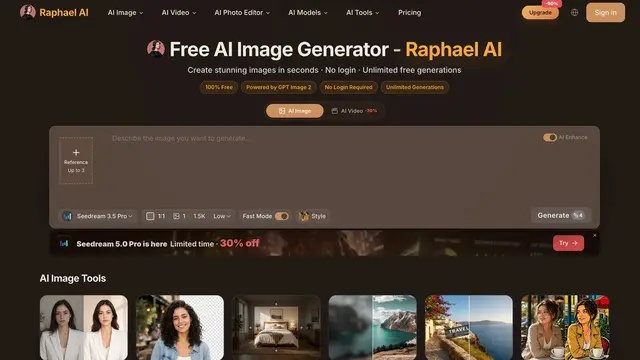
The dedicated form preselects 5.5 and offers Transparent + PNG. Signed-out generation prompts for login. The displayed rate was 6 credits at 1K/1.5K or 10 at 2K, plus 3 per reference.
Evidence source
- Capabilities
- 1K, 1.5K and 2K output; up to 10 references · Dedicated generator preselects Seedream 5.5 · Transparent and PNG are selectable
- Limitations
- Generated download and alpha not tested · Published credits vary by resolution and number of references · Sign-in required to generate

How to create transparent PNGs with Seedream 5.5
What Seedream 5.5 can do
Seedream 5.5 is ByteDance’s image generation and editing model. It supports fully transparent backgrounds and partially transparent details such as glass edges. Whether you can download that transparency depends on the controls exposed by the tool and how it exports the file. ByteDance Seed model page
Make a transparent product image
Start with a reference photo you own, such as an unbranded glass bottle. Select the exact Seedream 5.5 version. Choose Transparent and PNG where those controls are available. In NightCafe, start a new generation with a reference, since Prompt to Edit returns an opaque image.
Isolate the bottle from the reference. Preserve its shape, cap and reflections. Remove the backdrop and floor shadow. Keep the glass edges partly transparent.
Open the downloaded file over light and dark layers. Check that it has an alpha channel, that empty areas are fully transparent, and that glass edges retain intermediate alpha values. A checkerboard in a preview alone does not establish that the download keeps transparency. If the result is opaque, use Photoroom as a separate cutout step and check the exported PNG. Photoroom web instructions
What the access check found
On November 20, 2026, Toolso checked public interfaces and vendor documentation. Raphael displayed Transparent and PNG in its 5.5 form. OpenArt opened with 5.5 selected and required an account to change the background control. NightCafe, Runway Dev and fal document when transparent PNG is available. The tool cards note the corresponding plan and API conditions. Toolso inspected Runway’s published product-cutout PNG. The 1536 × 1536 file has an alpha channel with both fully and partly transparent pixels. This was a vendor sample. Account-specific generation and downloads for the other tools are still untested.
Krea documents transparent PNG for 5.5, but its public workspace opened on Krea 3 and searching for Seedream 5.5 returned zero models. Confirm the exact version in your signed-in account before relying on it. Krea’s model documentation
Toolso verified fully and partially transparent pixels in this 1536 × 1536 sample from Runway Dev. Open the verified PNG sample
What Seedream 5.5 does well
Light and material rendering
Specify the light direction and material for product shots, then check how reflections fall on glass, metal, and fabric. Soft side light can bring out a surface texture without losing detail in bright areas.
Text inside image layouts
Give it the exact headline, label, or packaging copy in quotes and say where each line belongs. Check generated prices, spelling, and small print before using the result in a listing or in print.
Consistent multi-step edits
Use the last approved image as the next reference. For a product series, change one element at a time, such as the background, and explicitly preserve the product outline, label, and camera angle.
Native PNG transparency
Generate a cutout from a prompt or reference image with full and partial transparency. This is useful for stickers, glass edges, and soft shadows that need to work on several backgrounds.
Compare Seedream Image Models
Workflow tools

For a separate background-removal step, import an existing photo and export a PNG. Web App sign-in is required and the Space’s plan sets export limits.

Seedream 5.5 FAQ
What is Seedream 5.5?
Seedream 5.5 is an image generation and editing model that ByteDance Seed introduced on November 9, 2026. You can start from a text prompt or use reference images to guide the output.
How is 5.5 different from Seedream 5.0 Pro and Flash?
5.5 improves consistency across edits and can generate transparent imagery from text or ordinary reference images. In the Ark API, 5.0 Pro and Flash require one existing transparent PNG reference for transparent generation.
Compare Seedream versionsHow do I get a transparent PNG from Seedream 5.5?
Choose the exact 5.5 version, select a transparent background and export as PNG. The Runway Dev API exposes these choices as background = transparent and outputFormat = png. Check whether your tool exposes both settings.
See Runway Dev input parametersHow do I tell whether a download really has transparency?
Open the original PNG over both light and dark backgrounds, then inspect its alpha channel. Fully transparent areas have an alpha value of zero. Translucent edges or shadows can have intermediate values.
Inspect an original PNG example