
Toolso.AI
Toolso.AI
All ToolsCategoriesTrendingLatest ToolsPricingBlog
Toolso.AI
Toolso.AI
Toolso.AI
Toolso.AI

Discover the best AI tools to boost your productivity

GitHubGitHubTwitterX (Twitter)YouTubeYouTubeTikTokEmail

Popular Categories

  • AI Writing
  • AI Image
  • AI Video
  • AI Coding
  • More Categories

Explore

  • Latest Tools
  • Popular Tools
  • More Tools
  • Submit Tool
  • Pricing

About

  • About Us
  • Contact
  • Blog
  • Changelog

Legal

  • Cookie Policy
  • Privacy Policy
  • Terms of Service
  • Refund Policy
© 2026 Toolso.AI All Rights Reserved
Limited timeLimited-time offerFeatured Listing24h priority review · No backlink · 30 days featured$29.90then $59.90Price rises to $59.90 after Oct 31Ends in--:--:--Submit now
  1. Home
  2. All Tools
  3. Time Management
  4. Reclaim
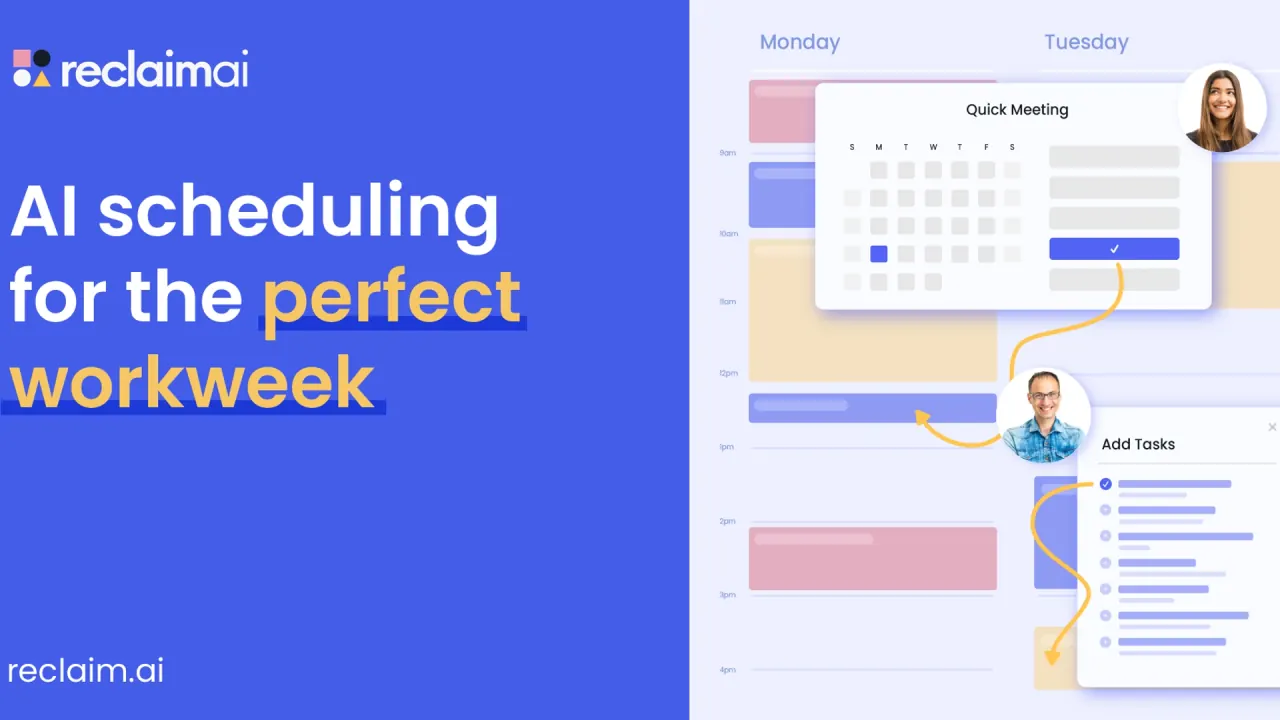
Reclaim interface preview
Reclaim logo

Reclaim

Reclaim is an AI calendar assistant for Google Calendar and Outlook that auto-schedules focus time, habits, tasks, breaks and recurring meetings, with team plans for scheduling links, analytics and shared out-of-office calendars.

Time ManagementProductivityAI Assistant#Task Management#Time Tracking#Scheduling
Try for Free
Saves
Visits
Views
Pricing
Free
Published
Oct 6, 2026
Domain
reclaim.ai
Community rating

Used this tool? Rate it

Rate this tool

Reclaim Product Information

Try for Free
Tool Information
Saves
Visits
Views
Pricing
Free
Published
Oct 6, 2026
Domain
reclaim.ai
Community rating

Used this tool? Rate it

Rate this tool

Featured Tools

Related Tools

Try for Free

What is Reclaim?

Reclaim (also written Reclaim.ai) is an AI calendar assistant that works alongside your existing calendar provider instead of replacing it. Reclaim runs on your Google Calendar or Outlook Calendar account and automatically schedules meetings, focus time, tasks and habits around the events already there. Blocks for deep work, routines, breaks and tasks are treated as flexible time that moves as meetings arrive.

The company describes its product as AI agents that schedule work, meetings and life, and says it is trusted by more than 600,000 users across 70,000 companies; that figure is the vendor's own claim, not an audited count. Reclaim.ai is now part of Dropbox. Independent technology press reported the acquisition in August 2024 and noted that Reclaim.ai was founded in 2019 by Henry Shapiro and Patrick Lightbody and planned to keep developing the product under its new owner.

The current generation, Reclaim 2.0, adds an in-app AI Assistant, a Planner with a Preview Mode sandbox and configurable agents.

Core features

Scheduling agents

  • Focus Time: you set a weekly Focus Time goal and Reclaim automatically defends time to get work done around your existing calendar events. A reactive mode only adds Focus Time when the week gets too full.
  • Habits: AI-powered recurring events, such as lunch, exercise or a weekly review, that find the best time within the scheduling windows you allow.
  • Buffer Time: breaks are defended automatically after video call events, and travel time can be protected around external events that require a commute.
  • Smart Meetings: recurring meetings can be converted in one click so Reclaim monitors, prioritizes and resolves scheduling conflicts across them.
  • Meeting Quality: an RSVP agent flags invites that still need your response and nudges you to accept, decline or propose a new time.

AI Assistant and Preview Mode

The AI Assistant is a chat panel that highlights what needs attention, such as conflicts, overloaded days or missing focus time, and suggests what to do next. Preview Mode is a staging area for the calendar: changes are made and reviewed there before anything is applied to your live Google or Outlook calendar, and attendees are not notified until you apply them. This split shapes how much control you keep. Agents can automatically manage flexible time like Habits, Focus blocks and Buffers based on your rules, while changes made through the AI Assistant or MCP integrations are first staged in Preview Mode for review.

Tasks and meeting follow-up

  • Task scheduling: Reclaim can auto-schedule tasks synced from Todoist, Asana, ClickUp, Jira, Linear and Google Tasks, placing them on the calendar by priority ahead of their due dates.
  • Time tracking: task timers measure and log time to the calendar for reporting.
  • Meeting transcripts: transcripts and notes from Zoom can be synced to generate recommended action items to defend time for.

Scheduling Links and Calendar Sync

Scheduling Links work like booking pages with priority settings: a high-priority link can show lower-priority smart events as available. You can add up to 3 meeting length options to a Scheduling Link, and team plans add round-robin links that schedule meetings on a rotating basis across a team. Calendar Sync copies events between Google and Outlook calendars so one schedule blocks the others; each sync policy controls how much detail appears, down to a "Busy for All" setting that shows only "Busy" with no details.

Team controls and analytics

Business and Enterprise add a Team OOO Calendar that automatically syncs employees' PTO and out-of-office events to a team calendar, plus Delegated Access. Enterprise adds SSO and SCIM user provisioning. Time analytics range from personal stats to workforce analytics dashboards that track meeting load, focus time and fragmented time across departments.

Guide

Getting started

  1. Sign up and connect the Google or Outlook calendar you want Reclaim to manage.
  2. Set your working hours, then add one Focus goal so the Focus agent has a target.
  3. Add a few Habits; Reclaim's own starting suggestion is 1–3 Habits, like lunch or exercise.
  4. Create one Scheduling Link and connect any task or chat integrations you already use.
  5. Stage changes with the Planner's Preview Mode toggle or an AI Assistant chat, then choose Review & apply changes or Discard changes.

Connecting Claude or ChatGPT

  1. In Claude, open Settings, go to Connectors, click Add custom connector and enter the Reclaim MCP URL, mcp.reclaim.ai.
  2. Complete the Reclaim OAuth flow and set per-tool permissions, for example auto-approve for read-only tools and approval for write actions.
  3. In ChatGPT, open Settings → Apps, search for Reclaim.ai and click Connect, then complete the same OAuth flow.

When an agent does not schedule

An agent can fail to place time when there is no free slot within its allowed hours, the scheduling window is too restrictive, the minimum duration cannot fit, higher-priority events fill the calendar, or the agent is disabled. Expanding Hours, widening move windows, or lowering minimum durations can help.

Reclaim use cases and examples

  • Keeping routines on the calendar: Habit agents can maintain recurring work routines like planning, admin, or follow-ups, and personal ones such as lunch.
  • Separating work and personal calendars: You can even sync multiple calendars across Google and Outlook to prevent conflicts and protect personal commitments on your work schedule.
  • Resolving conflicts after plans change: the Assistant identifies overlaps and suggested resolutions, and you can reschedule meetings with one click using suggested times after previewing them.
  • Turning a task backlog into calendar time: connected task lists from tools like Jira or Asana become scheduled work blocks that rebalance as deadlines move.

Who is it for

Reclaim describes itself as especially useful when a calendar is dynamic or overloaded, so manual time blocking keeps breaking.

  • Individuals: the free Lite plan is built for a single user who wants Focus Time, Habits and basic scheduling at no cost.
  • Managers: Reclaim positions itself for managers who want to protect team focus time, balance meeting load, and gain visibility into workloads and priorities.
  • Executive assistants and admins: Delegated Access lets team members manage another person's Reclaim account on their behalf.
  • Companies: organization-wide rollouts can automate focus and meeting policies and report on time allocation through executive dashboards.

It fits poorly for people who plan mainly on a phone or use a calendar other than Google or Outlook.

Platforms

  • Calendars: Reclaim currently supports Google Calendar and Outlook Calendar, and additional calendars can be connected in Settings → Calendars.
  • Web app: Reclaim is used in the browser. It can be installed as a Progressive Web App on desktop through Chrome or Safari.
  • Mobile: Reclaim doesn't have native mobile apps for iOS or Android today. The web app can be added to an iOS or Android home screen, and events Reclaim creates can be edited in the Google Calendar mobile app.
  • Google Workspace: a Google Calendar and Gmail add-on lets you create Tasks and Scheduling Links from a Gmail compose window.
  • Mac launcher: a Raycast extension manages your schedule from Raycast.
  • Chat and AI tools: Slack, Zoom, a Claude MCP connector that works in Claude Desktop, Claude web and Claude Code, and a ChatGPT app. The ChatGPT app is available on ChatGPT Plus, Team, and Enterprise plans, and Reclaim's integration pages list Starter, Business and Enterprise as the Reclaim plans for these two AI integrations.

Pricing

Reclaim prices paid plans per seat per month. As captured on October 6, 2026, the pricing page showed:

PlanYearly billingMonthly billingTeam sizeScheduling rangeConnected calendarsScheduling Links
LiteFreeFree1 user1 week21
Starter$10 per seat/month$12 per seat/monthUp to 10 seats8 weeksUnlimited3
Business$15 per seat/month$18 per seat/monthUp to 100 seats12 weeksUnlimitedUnlimited
Enterprise$22 per seat/monthUnavailable on monthly plansOver 100 seats12 weeksUnlimitedUnlimited

The scheduling range is how far ahead agents optimize and excludes Scheduling Links. Lite includes Google Tasks, Slack, Zoom, and Google Meet support, while Todoist, Asana, ClickUp, Jira and Linear require a paid plan. Business adds webhooks, the Team OOO Calendar and Delegated Access.

Billing rules

  • There is no seat minimum for Starter or Business, but Enterprise requires a minimum purchase of 100 seats.
  • All users on a team must be on the same plan type to upgrade.
  • The yearly toggle is labelled "SAVE 20%", while the pricing FAQ and billing help both describe a 29% discount for annual billing; the pages are inconsistent.
  • Payment is by major credit cards; other payment methods can be discussed by email, and some may require a minimum purchase.
  • Smart Meetings with three or more people count attendees without a paid seat as Attendee Users, sold in add-on packs; a launch promo line making them free "through July 31st" gives no year.

Trial, offers and refunds

Every new account gets a free 14-day trial of the Business plan and then rolls into Lite unless it upgrades. If your setup exceeds Lite limits at that point, the account moves into a free overage period for 28 days before you must disable extra events or upgrade. On October 6, 2026 a site banner advertised "Save 30% today-only on Starter & Business plans (special new user offer)".

Standing discounts are 50% for 12 months for students, educators, and faculty, 20% for 3 years for qualified nonprofits and startups, and a switching discount of 20% off any plan for 6 months, or 12 months for a team of 10 or more, for people moving from tools like Calendly, Clockwise or Motion.

Paid fees are non-refundable, with one exception: if you cancel an annual subscription within 30 days of its start, you can request a pro-rata refund equal to eleven months of the fee, less transaction fees or taxes.

Reclaim alternatives

The most common comparisons are other auto-scheduling and daily-planning tools. One former rival is gone: Reclaim's help center says Clockwise officially shut down and ended services on March 27, 2026, and Reclaim offers Clockwise users a data import and a one-year price match on individual and team subscriptions.

  • Motion: an AI suite spanning projects, tasks and a calendar. Its plans list iOS, Android and desktop apps and monthly AI credits per seat, which suits people who want task and project planning in one app with native mobile access.
  • Sunsama: positioned as a daily planner. It offers a 14-day free trial with no credit card required and apps for iOS/iPadOS, Android, macOS, Windows and Linux.
  • Akiflow: combines tasks, time blocking and a calendar, syncs with Google Calendar and Outlook Calendar, and lists desktop and mobile apps. It has no free plan; new customers get a 7-day trial that requires a card.

Against this group, Reclaim's free Lite plan contrasts with the trial-based access the three pricing pages describe, while Reclaim lacks the native phone apps all three list.

Limitations

  • No native phone apps: mobile use relies on the web app saved to a home screen or on editing Reclaim-created events in a calendar app.
  • Two calendar providers: only Google Calendar and Outlook Calendar are supported.
  • Split product generations: Reclaim 1.0 accounts must contact support to request early access to Reclaim 2.0, and some help articles still describe 1.0 workflows.
  • Short free horizon: Lite agents only schedule one week ahead, compared with 8 to 12 weeks on paid plans.
  • Mixed public reviews: a third-party consumer review platform showed a 2.2 rating from 23 reviews, with 70% at one star, as captured on October 6, 2026. The profile is unclaimed and the company had not invited customers to review, so the sample may not be representative.

Privacy and calendar data

  • What is collected: Reclaim collects and stores calendar data for calendars you authorize to connect, including event titles and descriptions, invitee emails, event locations and other calendar metadata. Calendar data is encrypted in transit and at rest.
  • Conflicting storage descriptions: the security page says only the primary calendar is stored and that data from other calendars connected for Calendar Sync is held in memory and discarded after each sync, while the privacy policy describes storing data for calendars you authorize. Both statements are current on the official site.
  • Permissions requested: on Google, the basic scopes include "View and edit events on all your calendars" plus access to contacts used for invitations. On Outlook, Reclaim requests Calendars.ReadWrite, MailboxSettings.Read to read your timezone, and Calendars.Read.Shared for shared and delegated calendars.
  • AI training: Reclaim states it will not use Personal Data, including Calendar Data, to train large language or other generative AI models unless you give prior consent or opt in.
  • Human access: staff may read calendar data with your consent, for security or legal reasons, or for internal operations such as resolving support issues or analyzing data to improve the service.
  • Location and certifications: personal data is transferred to servers in the United States. Reclaim says it is committed to complying with GDPR, SOC 2, CCPA and Data Privacy Framework standards.
  • Deletion and retention: a self-service delete job is designed to wipe calendar data within one hour and remove Reclaim-created events. Otherwise, personal data is kept as long as reasonably necessary or legally required.
  • Age: users under 13 may not use the service, and users under 18 need a parent or guardian's approval.

FAQ

Q1. Is Reclaim free?

Yes. The Lite plan is free forever for a single user, with a one-week scheduling range, two connected calendars and one Scheduling Link. Paid plans start at $10 per seat/month on yearly billing.

Q2. Is there a Reclaim mobile app?

No native iOS or Android app is offered; the web app can be added to a phone's home screen.

Q3. Does Reclaim use my calendar to train AI models?

Its privacy policy says calendar data is not used to train large language or other generative AI models unless you separately consent or opt in.

Q4. Will Reclaim change my calendar without asking?

Agents automatically move flexible time such as Focus blocks, Habits and Buffers within the rules you set. Changes proposed through the AI Assistant, Claude or ChatGPT are staged in Preview Mode until you apply them.

Know a Similar Tool?
If you know other great AI tools, feel free to submit them to us