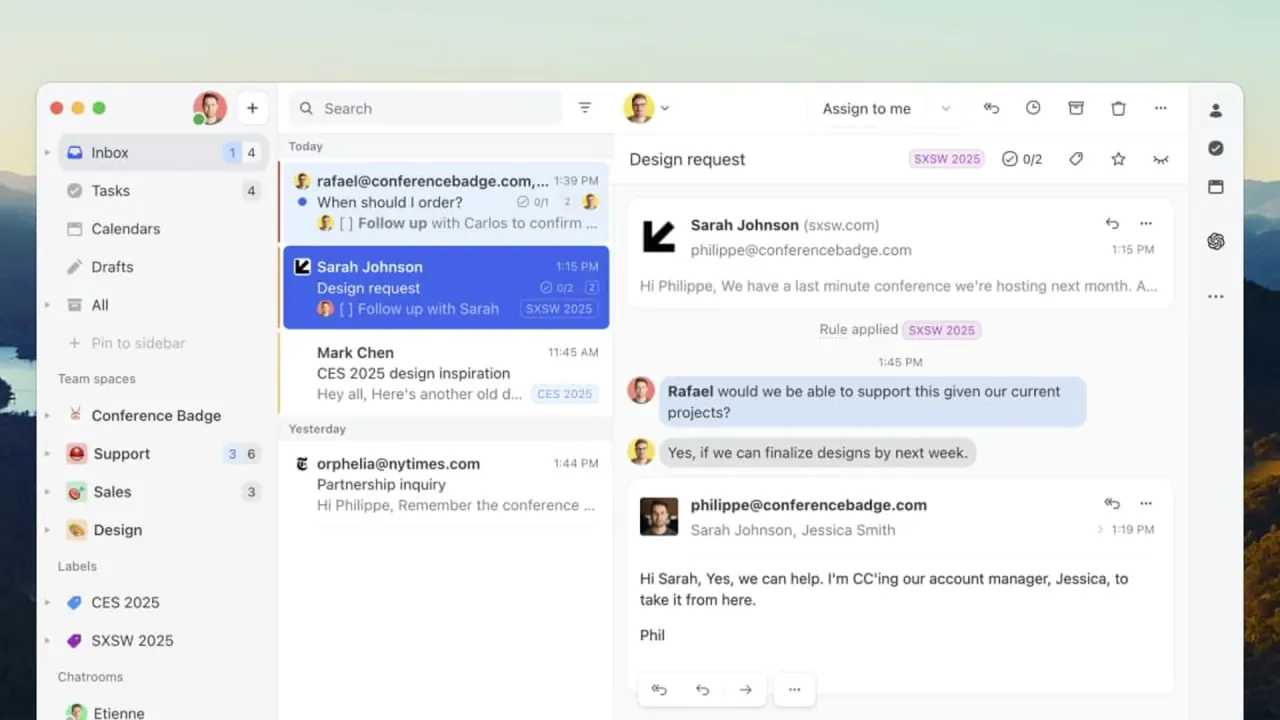

Missive lets teams share inboxes, assign conversations, chat inside email threads, and handle SMS, WhatsApp, and social messages in one app, with an optional AI assistant on the Productive and Business plans.
Used this tool? Rate it
Used this tool? Rate it
Missive is a collaborative email client for teams that work together on shared inboxes, discuss emails internally, and reply across email, SMS, WhatsApp, and more from one place. Missive pitches itself as inbox collaboration for teams that run on email, so teammates can see who is doing what and collaborate behind the scenes without changing their workflow.
The product is owned and operated by Heliom Inc. The homepage says 6000+ companies rely on Missive every day. The About page instead says Missive serves 5000+ customers from a headquarters in Quebec City, Canada, and that 30,000+ daily users rely on it.
Three points matter before choosing it: Missive works as shared inbox software layered on top of the email accounts a team already has, every plan is paid per user after a 30-day trial, and its AI assistant is optional and limited to the Productive and Business plans.
Missive's features cover four areas: working on email together, tasks and assignment, rule-based automation, and an optional AI layer that reads the same shared data.
Rules fire when a message arrives, when one is sent, or when someone takes an action, and then check conditions and run actions automatically. They are also what routes mail from a shared catch-all address into the right team inbox, which is how the use cases below are built.
The built-in AI assistant reads conversations, searches across all connected accounts, checks the calendar, looks up contacts, and drafts replies inside the inbox. AI rules go further by acting on incoming mail, for example creating a task when an email mentions a deadline, escalating an angry sender to a manager, or trashing spam. Prompts are reusable one-click actions on messages or drafts, such as summarize, translate, fix grammar, or generate a reply, while instructions set organization-wide guidelines so the assistant answers consistently for the whole team. Missive uses MCP in two directions: the assistant can reach out to third-party apps, and AI apps such as Claude and ChatGPT can reach into Missive data.
A team setup in Missive starts with connecting accounts and deciding what is shared, then adding rules and, optionally, AI.
Rules come in two scopes: personal rules run only on your private conversations, while organization rules run on conversations shared with the organization and can be managed only by admins and owners. A rule that should cover both has to be created twice, once in each scope.
Team inboxes, rules, and assignment combine differently depending on the kind of team using them.
Missive documents three setups that let an assistant run an executive's inbox without seeing mail meant to stay private. The recommended default is a two-person team inbox that contains only the executive and the assistant; the other two setups are a shared account with privacy rules and assignment-based delegation, which suits executives who want to keep working in their inbox as before.
Service firms are advised to structure team inboxes by client, by service line such as bookkeeping, tax, and payroll, or by department. Client mail arriving at a catch-all address can then be routed by an incoming rule that checks whether the sender is in a client contact book and moves the message to the matching team inbox. Onboarding a new client becomes a matter of adding them to the contact book rather than writing a new rule.
For freight brokerages, 3PLs, and shipping teams, Missive recommends organizing team inboxes by function, such as customer service, dispatch or operations, carrier or capacity, and billing or accounting, and keeping customer-facing mail apart from carrier-facing mail. Response time matters here because a dispatch message left waiting too long can mean a detention or penalty fee.
Missive suits teams that treat inbound messages as email to collaborate on rather than as tickets to close.
It is a weaker fit for anyone who needs a free tier or a built-in public knowledge base.
Missive is primarily a web app that runs in any browser, with mobile apps for iOS and Android and desktop apps for macOS and Windows.
Missive pricing is per active user across three plans, Starter, Productive, and Business, with monthly or yearly billing, and yearly billing saves 20%.
| Plan | Yearly billing | Monthly billing | Users | Adds on top of the previous plan |
|---|---|---|---|---|
| Starter | $14 per user/month | $18 per user/month | Up to 5 | Email, SMS, and social accounts; team inboxes; conversations and tasks |
| Productive | $24 per user/month | $30 per user/month | Up to 50 | Integrations, rules, basic analytics, API and MCP access, AI |
| Business | $36 per user/month | $45 per user/month | Unlimited | SAML SSO, IP restriction, advanced analytics, personalized onboarding |
Starter does not include integrations, rules, API access, or the AI Assistant.
Every new team starts with a 30-day free trial of the Productive plan, with no credit card required and nothing charged when it ends. During the trial an organization can have up to 25 users, 10 shared accounts, 2 personal accounts per user, and 30 days of history. The trial follows the person rather than the organization, so creating another organization does not start a second trial. On a paid plan, Missive imports the full email history regardless of provider, whether Gmail, Microsoft 365, or IMAP.
Each user can connect up to 10 personal accounts and 5 shared accounts, and more shared accounts can be bought. Extra shared accounts cost $15 per month for each block of 5.
Productive and Business organizations start with $5 of free Missive AI credits, and credits carry a 25% markup on the provider's price. Bringing your own OpenAI, Anthropic, or Google API key bills usage directly to that provider at its own price with no markup.
Under the terms, a customer on a monthly subscription can cancel within 30 days of account activation for a full refund. Otherwise, no refunds or credits are issued for partial periods, upgrades or downgrades, or unused time. On yearly plans, a removed user is still billed until the end of the period, although the seat can be reassigned to a new team member.
Both Missive alternatives below are built around customer support with ticketing or help desk features, and they differ from Missive on price and product model.
The knowledge base is a concrete dividing line: Missive's own comparison table with Front lists no knowledge base for Missive, while Front includes one from its Starter plan.
Most of Missive's limits come from plan gating, shared-account visibility, and how its optional AI is billed.
Missive's pages describe what happens after cancellation differently. The pricing FAQ says access to all features continues until the end of the billing cycle and content then stays available in read-only mode. The billing documentation says the organization stays active until the end of the billing period and then loses access until a new plan is chosen. The terms, last updated April 15, 2024, say that if a plan is not renewed, Customer Data stays available for electronic retrieval for 30 days, after which Missive may delete it.
As captured on October 5, 2026, a third-party consumer review platform showed a company-level rating of 4.4 from 165 reviews, and the profile notes that the company has not invited customers recently, so the reviews may not be representative.
No. Missive has no free plan, and once the trial ends, access is paused until the organization owner picks a plan in Settings > Billing.
No. Missive does not offer discounts for students, nonprofits, schools, or businesses.
Missive describes migration from Google Workspace or Outlook as straightforward and publishes a separate guide for teams coming from platforms like Front.
Yes. A custom MCP server can be added under Settings > Integrations > Custom MCP with no authentication, a bearer token, or OAuth 2.0, and the assistant can then use the tools that server exposes.
