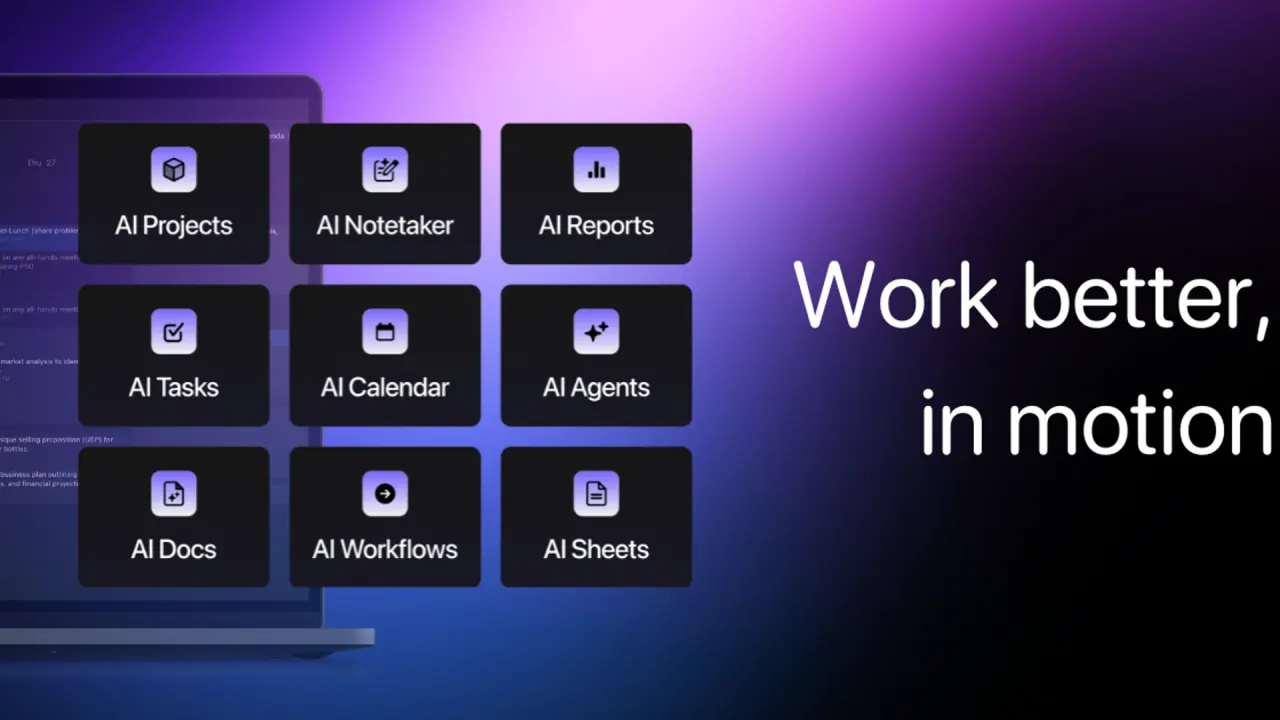

Motion is an AI productivity platform that combines an AI calendar, AI task manager, AI project manager, meeting notetaker and docs in one workspace. It schedules your tasks around deadlines and re-plans the day when something changes.
Used this tool? Rate it
Used this tool? Rate it


AI assistant for writing, analysis and tasks


From a prompt to a deck, site or doc


Real-time answers, images, and code in one chat


One workspace for every AI model


One workspace where your team and its AI agents think together


Public Codex reset tracker


AI assistant for structured work


Plan, build, and refine work with an AI agent
Motion is a productivity platform built around automatic planning. Its homepage describes it as the AI Powered SuperApp for Work, and the product bundles a task manager, a project manager, a calendar, a meeting notetaker, docs and an assistant into one workspace. The pitch is that you stop deciding when to do things: you enter the work, and Motion places it on your calendar.
The company says more than one million top performers and teams trust Motion, and that it is built for individuals and teams of all sizes, from a single user to a business of a thousand people. A separate page aimed at teams says more than 25,000 businesses use it. Those are vendor figures, and no independent audit of the counts is published. Seen from the user side, it is an AI calendar, an AI task manager and an AI project management tool reading from one set of projects and tasks.
The product is best understood as a replacement layer rather than a single app. The homepage lists what it stands in for: to-do lists, project management apps, automated meeting schedulers, AI notetakers and docs. It connects to Zapier, Zoom, Google Meet, Gmail, Outlook, Siri, HubSpot, Salesforce, Teams and Slack, and it ships an API for creating and updating projects and tasks.
Motion is also explicit about the models behind it. The homepage says it uses the most cutting-edge models available from Open AI, Anthropic and other labs, and that this is fully covered as part of the subscription. You are not bringing an API key or paying a model provider separately.
The first feature is the AI task planner. Motion takes projects and tasks with their priorities, dependencies, deadlines and durations and builds a plan, then re-optimizes that plan hundreds of times a day. It also surfaces your top priority each hour, so the next action is decided for you rather than hunted through notes and inboxes.
The second is the AI calendar. When a meeting runs long or an emergency appears, Motion recalculates the schedule and reshuffles the day and the week in seconds. It schedules tasks from your actual capacity and flags the case where you have scheduled more than you can handle, which is the moment to extend a deadline or delegate rather than discover the problem on Friday.
The third is the AI project manager. Motion describes the project manager as alerting you as soon as a project is off track, so you can course-correct before it is too late. Projects move forward on their own when team members finish their blocking tasks, and the company says this matters most across departments, where handoffs normally stall.
The fourth layer is the surrounding work tools: an AI meeting notetaker that takes notes and drafts follow-ups, an AI docs assistant that drafts and proofreads, an AI search assistant that looks across docs, notes, projects, tasks and communication, and an AI workflow builder that turns standard operating procedures into workflows. The homepage also lists an AI personal assistant for repetitive work.
The fifth is the operational scaffolding. Recurring tasks can be daily, weekly, monthly or quarterly, and Motion blocks time for them automatically. Tasks accept custom labels, blockers, priorities and dependencies, can be saved as templates, and can be shared with a colleague or client with comments and files in a single view.
Motion rewards setup more than most productivity tools, because the schedule is only as good as the constraints you give it.
One practical note on the trial. Motion offers a free trial and the terms describe a trial as lasting exactly 24 hours per day of its duration, so a seven-day trial ends 168 hours after it begins. Billing starts automatically on the first day of the subscription term after the trial unless you cancel first.
Consultants and agencies are the clearest fit. Their weeks are a set of competing client deadlines, and the value of automatic scheduling is highest when the calendar is already full. A review aimed at solo operators describes the buyer precisely: someone juggling many projects with hard deadlines who is already over-committed, and for whom manually re-planning a week is a felt pain rather than a theoretical one.
Project managers are the second group, and the project management page is written for them. The claims are about coordination cost: no daily standups to re-plan work, no chasing updates in Slack and email, and visibility into every task and project without asking. A team of fifteen to fifty people with dozens of live projects is the shape the Business plan is priced for.
Sales and client-facing teams get a narrower benefit. Motion schedules meetings automatically and can embed a booking calendar on a website so prospects pick from your real availability. The value here is less about project planning and more about removing the back-and-forth of finding a slot.
Solo professionals are supported but not the sweet spot. The individual plan exists and the homepage addresses the one-person case, yet an independent review argues that if your week is predictable, a free calendar plus a short daily plan will serve you better and cost nothing. The same review notes that Motion has no free tier, only a trial.
Short, high-volume task work is a poor fit. A review of the tool for busy professionals lists a steep learning curve, an AI calendar that can reschedule too aggressively, limited offline support and a mobile app that feels less polished than the desktop version. Anyone who wants a lightweight checklist will find the surface area heavy.
The primary audience is knowledge workers whose day is contested: managers, consultants, account leads and project owners who have more commitments than hours. The homepage frames the range as one person or a thousand-person team, and the plan structure follows that split, with an individual-and-small-team tier and a business tier that adds capacity planning, dashboards, Gantt charts, time tracking and access controls.
The second audience is operations and delivery teams that already run projects in another tool and pay a coordination tax for it. The project management page is explicit that the competitor is manual upkeep, and its testimonials describe companies leaving daily scrums and tool maintenance behind. Whether that holds depends on how much of the team's process lives in fields the product does not model.
The third audience is people who want one subscription instead of five. Motion positions itself against the combined cost of separate task, project, calendar, notetaker and docs tools, and says the context shared across those surfaces makes the AI more accurate. That argument is strongest for a small team that would otherwise buy and integrate all of them.
Teams that need deep customization or offline-first work are a weaker fit. An independent review puts the service overseas with an English-first interface and documentation, and rates external integration breadth as average next to scheduling specialists. A team whose workflow depends on a highly customized database, or on working without a connection, should test that before committing.
Motion runs as a web app and also ships iOS, Android and desktop apps, which the pricing page lists as included in both paid plans. The desktop and mobile clients matter for a scheduling tool, because capturing a task when it appears is most of the battle; an independent review nonetheless finds the mobile app less polished than the desktop version and offline support limited.
The calendar is designed to be shared outward as well as used inward. Motion can embed its calendar on a website so prospects book your ideal time slots, which turns the scheduler into a lightweight booking page without a second subscription.
Integration is the other half of the platform story. The homepage names Zapier, Zoom, Google Meet, Gmail, Outlook, Siri, HubSpot, Salesforce, Teams and Slack, plus an API for creating, updating and managing projects and tasks. A review of the product rates integration breadth as average and says syncing with Google Calendar is weaker than in tools built around scheduling alone.
Security claims are specific. Motion says it is SOC 2 Type 2 compliant after an independent audit, and that data is encrypted in transit and at rest. The privacy notice names Prescient Assurance as the auditor and adds that payment data is processed by Stripe, with no personally identifiable financial information retained.
Motion sells two plans and does not publish a free tier. The pricing page shows Pro at $19 per seat per month and Business at $29 per seat per month, with a monthly and annual toggle that advertises 33 percent savings on annual billing. An independent review reports the individual plan at about $19 a month billed annually and about $29 billed monthly, which is why the toggle is worth checking before you budget.
| Plan | Price shown | AI credits | Position |
|---|---|---|---|
| Pro | $19 per seat/month | 7,500 per seat/month | Professionals and small teams |
| Business | $29 per seat/month | 15,000 per seat/month | Power users and complex organizations |
Both plans include AI chat, AI projects and tasks, the AI calendar and meetings, AI docs, wiki and notes, the AI task planner, the AI writer and editor, unlimited storage, the mobile and desktop apps and integrations. Business adds team capacity planning, advanced dashboards and reports, timeline and Gantt charts, time tracking, permissions and access control, central billing and priority support. The pricing page also mentions white glove onboarding and support for the largest customers.
Credits are metered. Pro includes 7,500 AI credits per seat per month and Business includes 15,000, and the page lists overage at 25 cents per 100 credits on Pro and 19 cents per 100 credits on Business. Nothing on the page states that unused credits roll over.
The commercial rules come from the terms of service rather than the pricing page. Subscriptions renew automatically at the end of each term unless you cancel before the next term starts, and purchases are non-refundable, though Motion may refund at its discretion. If you cancel, you keep access to the end of the current term and receive no refund for unused time.
The first limit is the learning curve. An independent review of Motion for busy professionals says the number of AI modules can overwhelm a new user, and a second review says the breadth that makes the all-in-one case also makes the curve steeper than a simple to-do app. The product is fast once configured and slow to configure.
The second is that automatic re-planning can be too eager. The same professional review reports that the AI calendar sometimes overrides manually set focus blocks without asking, which is a real cost for anyone whose deep work depends on a protected morning. Motion supports custom time windows, but the behavior is worth testing in the trial.
The third is integration depth. A five-dimension review scores the product 3.7 out of 5 and singles out ecosystem fit: it says the tool is closely bound to its own suite and that syncing with Google Calendar is weaker than in tools built around scheduling. Its own comparison table puts Reclaim ahead for calendar-layer scheduling and habit protection.
The fourth is the edge of the scheduling engine. That review also notes that complex priorities and dependencies are occasionally scheduled poorly and need manual tuning, which matches the nature of an optimiser: it is reliable on ordinary workloads and less so where the constraints are unusual.
The fifth is access and polish on the move. The same reviews describe limited offline support and a mobile app that feels less polished than the desktop version, and one notes the service is hosted overseas with an English-first interface and documentation.
The sixth is the contract and the data. Purchases are non-refundable, subscriptions renew automatically, and disputes go to individual arbitration under Delaware law with a class action and jury trial waiver, with a thirty-day opt-out for new users by email. The privacy notice says information is used for training and developing machine learning algorithms, that aggregated or anonymized data may be shared with third parties at the company's discretion, and that data is retained for the life of the account and up to one year after deletion.
No. There is a free trial, and after it ends billing starts automatically on the first day of the subscription unless you cancel beforehand. Paid plans are Pro at $19 per seat per month and Business at $29 per seat per month as shown on the pricing page.
It schedules tasks onto your calendar from their priorities, deadlines and durations, re-plans the day when a meeting moves or runs long, and blocks time for recurring work. On the project side it moves work forward when blocking tasks finish and forecasts when a project will be done.
Pro includes 7,500 credits per seat per month and Business includes 15,000. Extra usage is billed at 25 cents per 100 credits on Pro and 19 cents per 100 on Business, and the pricing page does not say that unused credits carry over.
Motion lists Zapier, Zoom, Google Meet, Gmail, Outlook, Siri, HubSpot, Salesforce, Teams and Slack, and provides an API. An independent review rates integration breadth as average and says Google Calendar syncing is weaker than in scheduling-first tools.
It works, but an independent review aimed at solo operators argues that a predictable week is better served by a free calendar plus a short daily plan, and that Motion earns its price when many hard deadlines compete for the same hours.
The privacy notice lists training and developing machine learning algorithms among the purposes for which information is used, and says aggregated or anonymized data may be shared with third parties. Data is retained for the life of the account and up to one year after deletion.