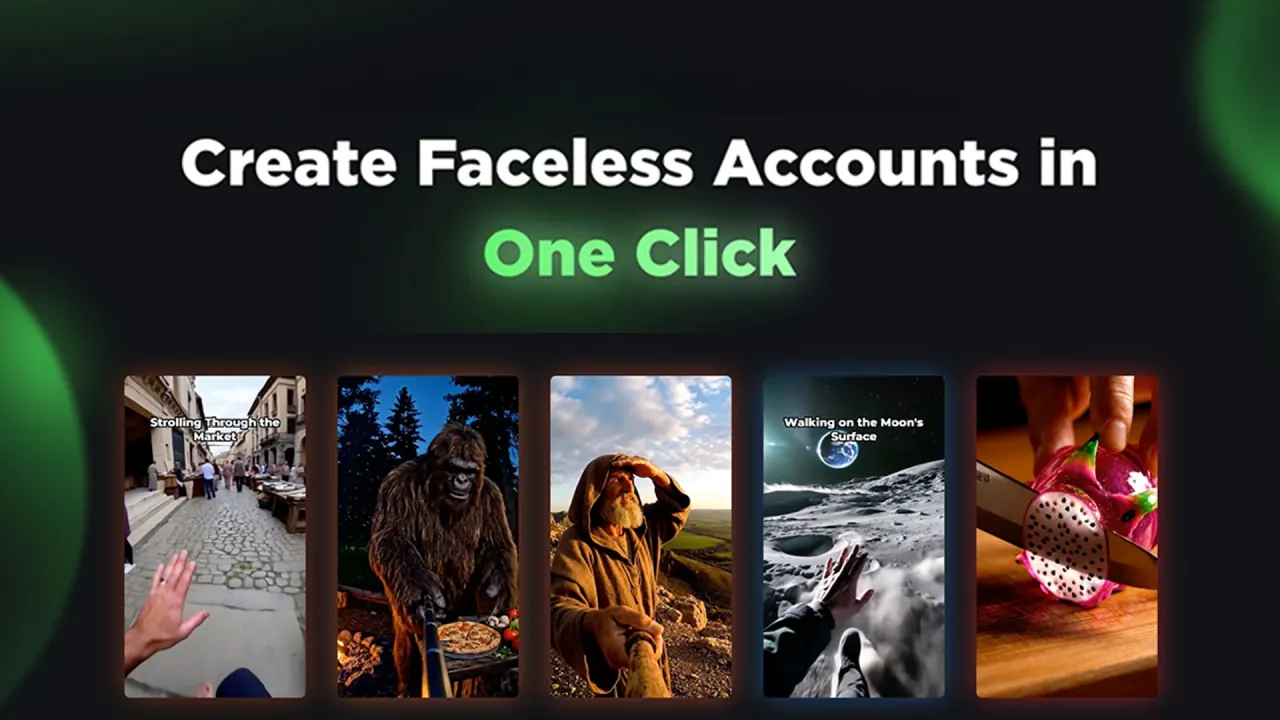

An AI faceless video generator that turns scripts or ideas into vertical videos and auto-posts them on a schedule to TikTok, Instagram Reels, and YouTube Shorts, with credits, series, and assistant integration.
Used this tool? Rate it
Used this tool? Rate it


Multi-model image studio, free to start


Community-Trained Models for Art, Video and Characters


Prompt-Based Images, Edits and Video


One gateway for text and media models


Multi-model AI video and image generation in one browser workspace

Turn images, clips and sound into video


Design original characters and animate them


Chat Your Way to a Finished Video
Faceless.video is a web-based faceless video generator that turns text prompts or finished scripts into short vertical videos and posts them automatically to TikTok, Instagram Reels, or YouTube Shorts. The company describes the product as an automated content team: it creates content and posts it to your account every day, converting text to video in minutes and posting to TikTok, Instagram Reels, or YouTube Shorts. The service is operated by Faceless.video LLC. As captured on November 28, 2026, the homepage displayed a "Trusted by 2.8M+ creators" badge alongside its one-click account setup pitch.
A third-party directory entry anchored to the same domain describes it as an AI-powered tool that automates content creation and posting for TikTok accounts, converting text to video and posting daily.
Independent startup-case reporting dates the public launch to late September or October 2023, after a rough MVP built with roughly $250 of infrastructure and a first promotional push bought for about $250. The same reporting compiles founder-disclosed revenue of about US$1,000,000 in annual recurring revenue within roughly ten months of monetization, and explicitly notes that the figure is founder-reported rather than audited. Architecturally, that reporting says the product relied on third-party APIs early on and later moved high-cost tasks to RunPod, AWS Lambda, and its own code, with Bubble still handling the main app orchestration.
The about page states that Faceless.video "started out as a tool just for us, but became a service for others," and positions it as a content creation team working 24/7 to create and post videos daily. That origin story puts the manual alternative at "upwards of 3 hours per video" once story research, clip hunting, editing, exporting, and uploading are counted.
The homepage workflow starts from proven formats "so you're not starting from scratch." AI agents generate a video draft, which you can fully customize to match your voice and style before publishing. Videos can be generated ahead of their posting time to review them, make changes, or render a new version; users who skip that step leave the platform to automatically write, edit, and post for them. Edits are allowed any time before a video's posting time, from the dashboard's upcoming-video view.
A Series is a recurring content subscription: each active Series can automatically post to one TikTok, YouTube, or Instagram account, and Starter plans are limited to a single connected account. Posting frequency can be adjusted any time from the Series Posting Schedule tab on the dashboard, though the exact time of day a video goes out is not selectable. A video's privacy settings can be edited at any time from Series settings, so a draft can stay off the public profile. The homepage's own framing is publishing "high-quality trending faceless reels on autopilot across TikTok, Instagram, and YouTube."
A dedicated text-to-video tool turns text or a finished script into a faceless video with AI voiceover, matching visuals, captions, and vertical formatting for TikTok, Shorts, and Reels. The narration field on that tool accepts up to 1,500 characters per script. Example starting points include a little daily motivation, an everyday explainer, a mysterious discovery, and a small act of kindness.
The scheduler works in three steps: pick a video type such as stories, reviews, or tips and the tool turns the idea into a script; the system builds the full video with voice, text, clips, and hashtags; then pick TikTok, Instagram, or YouTube and the service posts based on your schedule. Posting pace ranges from three times a week to daily.
Credits are the generation currency, and different video types cost different amounts depending on complexity and compute required. Unused credits stay in the balance, but an active subscription is required to use saved paid credits. When credits run out, active automations pause and the user is notified; purchasing a top-up pack resumes them immediately, or they wait for the next monthly refill. For scene-based AI Video and the VEO/Clone premium types, each scene costs the same credits as the first, and the total is shown before you confirm.
The platform can also be connected to ChatGPT or another MCP-compatible assistant to discover niches, create and revise drafts, generate videos, connect social accounts, and run recurring Series with explicit approval. Every credit-spending action from an assistant runs as a quote first: the assistant must show the exact configuration and cost, then repeat the identical request with the user's confirmation before anything is charged. Assistants other than the documented ChatGPT and Claude walkthroughs need support for remote Streamable HTTP MCP servers and OAuth sign-in.
The scheduler's video-type picker covers stories, reviews, and tips, and the company's own comparison pages extend the range to podcast clips, music fan pages, and trending formats. That makes the product fit several channel shapes: niche story channels that post on a fixed rhythm, promotional accounts built around product or brand content, and format experiments where the credit balance is redirected as ideas evolve.
For business channels, setup starts by choosing an AI Avatar and telling it about the business — the website, images, or videos, and what the business does. Social accounts are connected, draft videos are generated, and the workflow expects users to review, edit, and approve content before anything goes live.
TikTok automation is the flagship scenario: the Series model, the scheduler, and credit metering all assume recurring vertical output rather than one-off long-form production.
An independent editorial listing characterizes the output as vertical content for TikTok, YouTube Shorts, and Instagram Reels, "making it a fit for solo creators and small teams running scheduled story channels." Third-party case reporting likewise describes the main user groups as individual creators and side-project operators who want to run TikTok, YouTube Shorts, or Instagram Reels accounts without showing their face, plus brands and marketing teams that need batch content.
For buyers who need commercial rights, all Business plans allow downloading the generated videos to be used in any way the user would like. Businesses that want a face for the brand can pick from more than 100 AI Avatar options, which the business page says are required for avatar-led videos. The listing's best-for label, "scheduled vertical story videos," marks the boundary: the workflow is built around drafts, approval, and scheduled posting rather than a frame-by-frame timeline editor.
Posting targets are TikTok, Instagram, and YouTube, with YouTube Shorts automation running through the same Series pipeline as TikTok and Reels posting. By opting in to email-only delivery, videos arrive in the inbox instead, while auto-posting to TikTok, YouTube, or Instagram requires connecting those accounts.
On the assistant side, the documented paths are an official ChatGPT plugin and a custom-connector setup for Claude and other MCP-compatible clients; assistants other than those walkthroughs need support for remote Streamable HTTP MCP servers and OAuth sign-in.
Deployment is browser-based. An independent editorial listing records the deployment boundary as web-only, with no listed mobile or desktop app and no API or advanced integrations beyond supported social connections; the same listing confirms there is no free plan.
As captured on November 28, 2026, the pricing page displays four plans: Starter at $20/mo with 30 credits/mo and up to 15 videos/month on 1 social account; Daily at $35/mo with 60 credits and up to 30 videos on unlimited social accounts; Double at $59/mo with 120 credits and up to 60 videos; and Studio at $149/mo with 350 credits and up to 175 videos with dedicated support. All four plans list "All video types" and "Unused credits roll over."
| Plan | Price | Credits | Video output | Social accounts | Extra |
|---|---|---|---|---|---|
| Starter | $20/mo | 30 /mo | Up to 15 videos /month | 1 connected account | — |
| Daily | $35/mo | 60 /mo | Up to 30 videos /month | Unlimited | — |
| Double | $59/mo | 120 /mo | Up to 60 videos /month | Unlimited | — |
| Studio | $149/mo | 350 /mo | Up to 175 videos /month | Unlimited | Dedicated support |
The same page pairs a Monthly and Annual toggle with a "Save 30%" label on the annual option. Top-up packs are reserved for active subscribers and add credits instantly without changing the plan: 10 credits for $8, 50 credits for $35, and 200 credits for $120. An independent editorial listing corroborates the same four-plan structure — Starter $20, Daily $35, Double $59, Studio $149 per month — and notes that every tier is paid; the listing marks its facts as checked on November 17, 2026, and this page was captured on November 28, 2026.
The company operates dedicated comparison pages that frame both AutoShorts.ai and FacelessReels around per-niche subscriptions, while presenting Faceless.video as a single credit plan across niches. On AutoShorts.ai, the company's comparison page states that AutoShorts.ai organizes its plans around Series and posting frequency, while Faceless.video gives you one credit plan across all video niches. On FacelessReels, the same page template states that FacelessReels ties you to a dedicated subscription for each video niche, while Faceless.video gives you one credit plan for all of them. Both statements are vendor comparisons about competing products, so they carry the vendor's own framing rather than an independent measurement.
An independent editorial listing proposes InVideo AI (editor score 9.4/10), VEED (9.2/10), and Kapwing (9.0/10) as alternatives, as captured on November 28, 2026. Those three are broad video workspaces rather than faceless-channel automations — the trade-off the vendor's own pages argue against.
Subscriptions can be canceled at any time: the terms state there is no binding contract, cancellation takes effect at the end of the current billing period with full access retained until then, and no cancellation fees are charged. Cancellation must go through the Dashboard's "Manage Billing" Stripe billing portal or the Contact page's unsubscribe dropdown; emails sent to the support team are explicitly not a valid method of cancellation.
Monthly plans have no refunds for partial months of service, while annual plans are fully refundable only within 7 days of the initial purchase or renewal. After that 7-day window, annual plans are non-refundable. Elsewhere in the same terms, a general payment clause states that all fees are non-refundable except as required by law or as explicitly stated in the payment policy. The two clauses sit on the same page, with the 8.x section spelling out the exceptions in detail. Free trials that are not canceled convert automatically into paid subscriptions; canceling before the trial ends avoids the charge, and users who let it lapse are charged and not entitled to a refund. Refunds may also be issued at the company's discretion for documented technical failures that prevented access to the service, with such requests due within 30 days of the charge.
Two structural boundaries sit outside billing. The terms also reserve the right to terminate access to the services without prior notice, for any reason, at any time. After 3 months of inactivity, the terms reserve the right to delete any inactive, unused, previously used, or pending Series, Videos, Accounts, or related data.
The commercial expectations are contractually bounded too. The terms disclaim responsibility for the performance of your videos, financial expectations, and algorithm administration, and state that the company does not guarantee making money or getting views from the algorithm. Independent case reporting makes the same point from the user side: buying the software does not guarantee traffic or platform payouts.
For EU and UK GDPR purposes, the policy names Faceless.video as the data controller for the personal information it describes, with contact at privacy@faceless.video. The privacy policy states that the company does not authorize its video-generation providers to use customer content to train their models. The same policy notes this is separate from how a connected AI assistant handles conversations and tool results, which is why the assistant-related boundaries are stated separately.
On retention, AI providers may retain inputs, outputs, and processing logs for limited periods to deliver the service or monitor abuse, including human review under their policies; retention varies by provider and feature, and the company states it does not send content to any AI provider for any purpose other than fulfilling the requested generation. The material sent to these providers can contain personal information if you include it in your content.
Assistant access is scoped deliberately: on credentials, the assistant never receives TikTok or YouTube logins — connecting a channel creates a short-lived link that the user opens personally, and the authorization happens on Faceless.video's own site.
Yes. Email-only delivery sends videos to your inbox, and all Business plans allow downloading generated videos for any use.
Not to the minute. The exact posting time is not selectable, but posting frequency is adjustable any time from the Series Posting Schedule tab, and any video can be edited or re-rendered before its posting time.
The terms reserve the right to delete inactive or pending Series, Videos, Accounts, and related data after 3 months of inactivity, and unused paid credits require an active subscription to use.
No. Unused credits stay in the balance and roll over, but an active subscription is required to use saved paid credits, and automations pause when the balance runs out.
Monthly plans have no refunds for partial months. Annual plans are fully refundable within 7 days of purchase or renewal and non-refundable after that. Cancellation is not done by email — it runs through the Stripe billing portal or the contact page.
Each active Series posts to one TikTok, YouTube, or Instagram account. Starter is limited to one connected account; Daily, Double, and Studio list unlimited social accounts.
No. Authorization happens on the site itself through a short-lived link the user opens, and every credit-spending assistant action requires a quoted cost and explicit confirmation first.