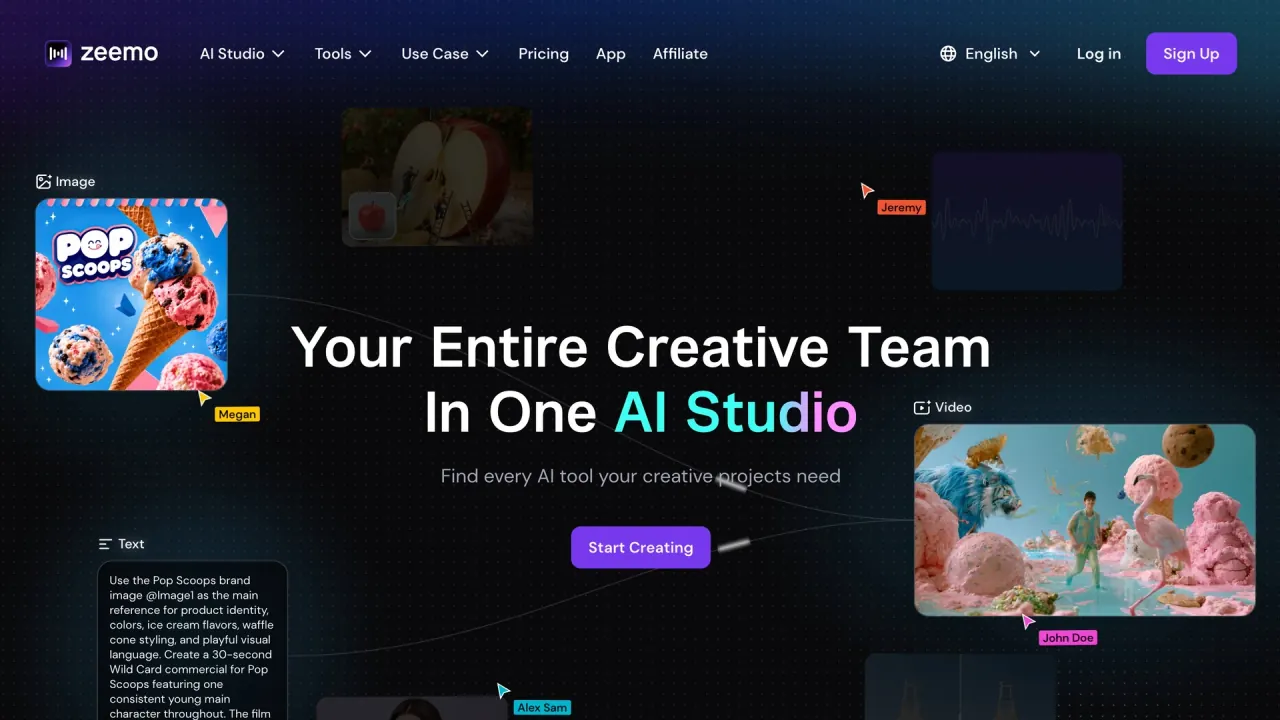

Zeemo is an AI studio for captions, subtitles and video generation. It combines automatic captioning with a node-based canvas for AI video, image and audio work.
Used this tool? Rate it
Used this tool? Rate it
Zeemo is an AI video and caption studio that puts image, video, audio, captions and music into one workspace. The company's own summary describes an AI video studio where assets are generated in one place instead of across separate applications.
Captioning is still the lead capability. The caption page promises automatic speech detection in 95 languages, up to 98% accuracy and a result in seconds, and the caption editor sits on top of the same account as the rest of the studio.
The generation side is where most of the newer work sits. Zeemo markets five AI video models, a set of image models, text to speech and music generation, all reachable from one canvas, and it addresses creative teams rather than lone editors: the homepage headline reads "Your Entire Creative Team In One AI Studio."
Reach is stated as more than 200,000 content creators. The site does not break that figure down by product line, and no page reviewed verifies it independently.
The useful split for a reader is between two workloads. Captioning is the path with a free tier and a four-step flow; generation runs on credits, and explains why the plan table carries five-hour upload ceilings and 4K export on the upper tiers.
Automatic captioning is the anchor capability: 95 caption languages, up to 98% claimed accuracy, and a result in seconds.
The caveat matters more than the headline number. A 98% figure implies roughly one wrong word in fifty on clean speech, and the same page concedes that accents, dialects and background music move the result, so a noisy field recording is a different task from a scripted voice-over.
Caption translation is the part that changes audience reach rather than production time: a single recording becomes an English master plus localized subtitle tracks, without a second transcription pass.
The studio is organised around a node canvas rather than a timeline. Text, image, video and audio nodes live on the same surface, so a project reads as a chain of inputs and generated assets instead of a stack of tracks.
This structure separates the AI video studio from a caption tool with a generate button: changing one shot means re-running one node, and a model swap is a per-node decision rather than a project-wide one. The trade-off is that the canvas assumes the user is willing to think in pipelines.
The fourth step decides where the work goes next. A burned-in file is ready to post as it is; an SRT file is the better hand-off when another editor has to keep working on the cut, because subtitle timing survives the transfer.
For batch work that makes the caption pass something to queue rather than watch.
Generation and export are handled separately from captioning. Rendered video can leave the platform at up to 4K, while the file does not live on Zeemo indefinitely: storage windows are set per plan, from three days on the free tier to thirty days on the top two plans.
YouTube publishing is the first platform use case, with transcription plus subtitles pitched at reach and engagement. The rest of the use-case index repeats that pattern across social platforms and across content types.
The pattern behind these examples is the same: spoken content already exists, and the job is to make it readable, searchable or publishable in more than one language. That is a different job from generating a video from scratch, which is why the split between the caption editor and the canvas matters when you pick a starting point.
Three audiences carry most of the messaging: content creators, educational institutions and media companies.
Two further segments appear on the same page, online media publishers and documentary filmmakers, both framed around the same subtitle workflow.
The fit is weaker where long recordings meet a small budget. The free tier caps uploads at one minute and 200 MB and export at 720P, so documentary-length work belongs on a paid tier or another tool. Human-verified transcripts and multi-approver review workflows do not appear on the pages reviewed.
Zeemo runs in a browser and through one mobile app that the Google Play listing shows at 3.8 stars.
The disagreement sits inside a single capture: the Play header showed 3.8 stars from 36.4K reviews while the ratings block further down displayed a different score and a lower count on the same visit. Neither figure is a stable measurement, so the honest reading is a rating in the high threes on a sample in the tens of thousands.
Every plan is metered in credits, and the yearly-billing view lists Pro at US$8 a month with 3,600 credits.
| Plan | Price on yearly billing | Credits per year | Upload limit | Max export | Storage |
|---|---|---|---|---|---|
| Free | US$0 / mo | 120 | 1 min / 200 MB | 720P | 3 days |
| Pro | US$8 / mo | 3,600 | 3 mins / 500 MB | 1080P | 15 days |
| Expert | US$13.39 / mo | 7,200 | 5 hrs / 5 GB | 4K | 30 days |
| Business | US$16.07 / mo | 7,200 | 5 hrs / 5 GB | 4K | 30 days |
Credits are the unit for everything generative: AI video, AI images, music and automatic captions draw down the same balance, and the account page states that generation and captions are billed by deducting credits. The pricing table converts that balance into expected output for each model, so a plan can be checked against the number of clips or images it actually buys.
Two details are easy to miss. Expert and Business carry the same 7,200 credits and the same upload and export ceilings, so the price gap between them is not explained by capacity. The page also switches between yearly and monthly billing, but only the yearly figures appeared in the captured view.
Billing disputes are handled differently depending on where the subscription started: a website purchase made within 48 hours and with no credits used is refundable through support, while app-store purchases go through the platform that sold them.
Zeemo's own comparison page names nine subtitle tools it is positioned to replace: Happyscribe, Zubtitle, Captions AI, Submagic, Dubverse, Veed, Subtitlebee, Rev and CapCut. Each gets a landing page arguing the same case, that accuracy, templates, translation and styling are available at a lower price.
The positioning is explicit about the trade: Zeemo describes itself as the better fit for users who want a more flexible desktop experience, and it competes on subtitle styling rather than on human review or enterprise workflow.
That framing suggests what to compare before switching:
The vendor's own comparison pages cannot settle which tool is better; they only show which dimensions Zeemo wants to be judged on.
Three ceilings are visible before purchase: a per-tier upload limit, a 720P export cap on the free plan, and a three-day storage window. Together they rule out long-form or high-resolution work without a subscription.
The billing documents contradict each other. The FAQ states that a website subscription is refundable within 48 hours when no credits have been used, while the terms of service state that fees are non-refundable. The two pages were both live in the same capture, and no page reviewed reconciles them.
Language coverage is reported two ways as well. The pricing comparison lists captions in 95 languages and translation in 124+ languages, while the caption page describes translation into 95+ languages. The gap between 95 and 124+ is not explained on either page.
Rights are narrower than the marketing implies. The terms grant a revocable licence to use the Services and company content, and that licence is limited to personal, non-commercial use; nothing on the pricing or caption pages states a separate commercial licence for output.
The vendor also concedes that the subtitle feature set is incomplete. Its comparison page says Zeemo competes on accuracy, templates, translation and styles at an affordable price while more subtitle features are still under development.
Two documents govern the data side: a privacy policy that rules out selling user information, and terms that allow machine learning on content users provide. The policy states that information is shared with service providers, analytics providers and other listed third parties for business purposes, and that it is deleted on request, with retention otherwise tied to contractual, legal and legitimate business needs. It also states that the application is not directed at children under the age of 13. The terms add that the service may run on machine learning systems that generate statistics, calibrate data models and improve algorithms while processing content provided by users and usage data, and that nothing in the terms prevents the company from using those systems to tune and enhance its models. The Play listing's data-safety section says data is encrypted in transit.
Yes. The caption editor detects speech in an uploaded video and generates a timed subtitle track, which can then be edited, styled or translated. The same engine is offered in the browser and in the mobile app.
Zeemo advertises up to 98% accuracy, and narrows that figure to good-quality English and Chinese-speaking video. Accents, dialects, background music and noise can reduce it, so accuracy on a clean voice-over and on a street interview should be treated as two different expectations.
Roughly 5-10 minutes for a one-hour video, depending on length and system workload. The job runs in the cloud, so the browser can be closed while it finishes.
Uploads are capped at 1 minute and 200 MB on Free, 3 minutes and 500 MB on Pro, and 5 hours and 5 GB on Expert and Business. Export tops out at 720P, 1080P and 4K across those tiers, and storage runs 3, 15 or 30 days.
The FAQ says a website subscription bought within 48 hours is refundable if no credits were used, and that app-store purchases are refunded by the platform that sold them. The terms of service state that fees are non-refundable, so the two documents disagree and the FAQ's conditions are the only written process.
Captions cover 95 languages, listed by name in the FAQ. Translation is described as 95+ languages on the caption page and as 124+ languages in the pricing comparison.
