
Toolso.AI
Toolso.AI
All ToolsCategoriesTrendingLatest Tools
AI Models

Image models

  • Nano Banana 2.1
  • GPT Image 2.6 Sunburst
  • Seedream 5.5
View all

Video models

  • MiniMax H3
  • Kling 4.0
  • Seedance 2.5
View all
All AI models
Blog
Toolso.AI
Toolso.AI
Toolso.AI
Toolso.AI

Discover the best AI tools to boost your productivity

GitHubGitHubTwitterX (Twitter)YouTubeYouTubeTikTokEmail

Popular Categories

  • AI Writing
  • AI Image
  • AI Video
  • AI Coding
  • More Categories

Explore

  • Latest Tools
  • Popular Tools
  • More Tools
  • Submit Tool
  • Pricing

About

  • About Us
  • Contact
  • Blog
  • Changelog

Legal

  • Cookie Policy
  • Privacy Policy
  • Terms of Service
  • Refund Policy
© 2026 Toolso.AI All Rights Reserved
Limited timeLimited-time offerFeatured Listing24h priority review · No backlink · 30 days featured$29.90then $59.90Price rises to $59.90 after Dec 31Ends in--:--:--Submit now
  1. Home
  2. All Tools
  3. Image Generation
  4. AI Video
AI Video interface preview
AI Video logo

AI Video

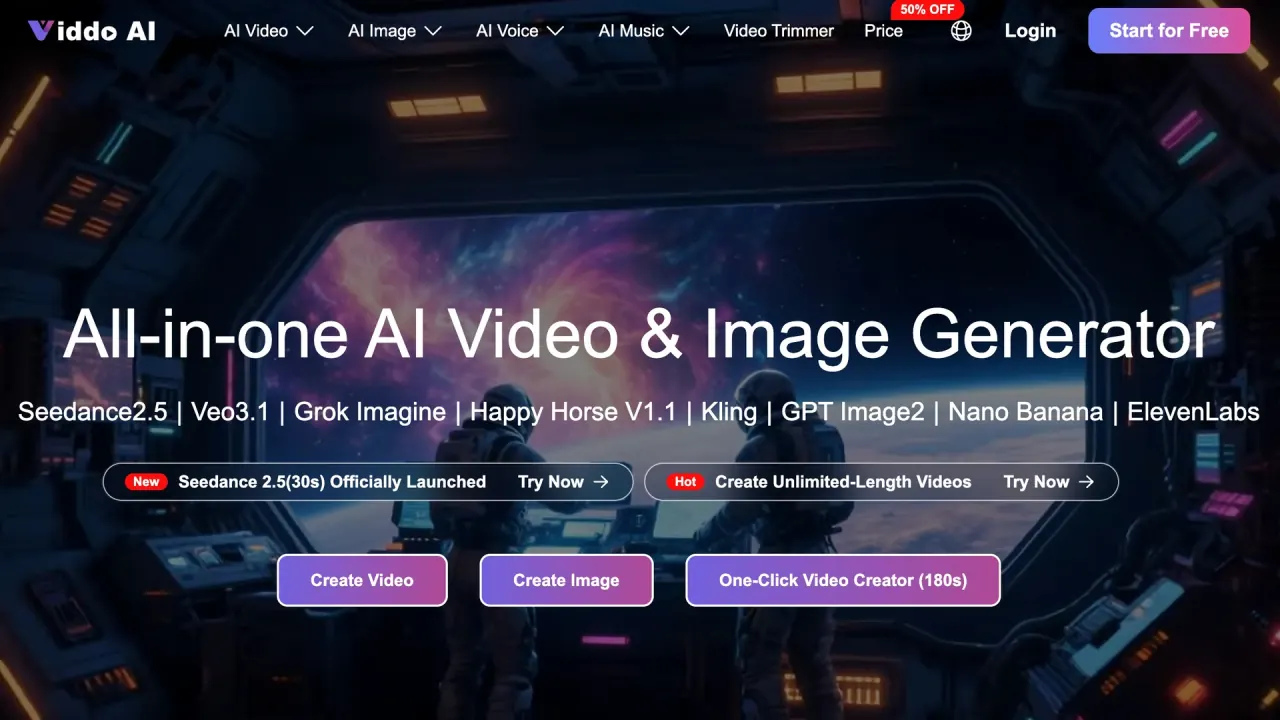
AI Video, branded Viddo AI on its site, generates clips and stills from text, images or existing footage using Seedance, Veo, Kling, Runway and other third-party models, with credits priced per model and per job.

Image GenerationVideo ToolsVideo Generation#Ai Video#Video Creation#Video
Try for Free
Saves
Visits
Views
Pricing
Freemium
Published
Nov 26, 2026
Domain
viddo.ai
Community rating

Used this tool? Rate it

Rate this tool
Try for Free

AI Video Product Information

Try for Free
Tool Information
Saves
Visits
Views
Pricing
Freemium
Published
Nov 26, 2026
Domain
viddo.ai
Community rating

Used this tool? Rate it

Rate this tool

Featured Tools

AI Image To Image interface preview
AI Image To Image logo

AI Image To Image

Free

AI image editing from a reference photo

Raphael AI interface preview
Raphael AI logo

Raphael AI

Free

Multi-model image studio, free to start

Perchance interface preview
Perchance logo

Perchance

Freemium

Build random generators, share them free

PixAI interface preview
PixAI logo

PixAI

Freemium

Anime art, powered by a million community models

Grok interface preview
Grok logo

Grok

Freemium

Real-time answers, images, and code in one chat

SeaArt AI interface preview
SeaArt AI logo

SeaArt AI

Freemium

Community-Trained Models for Art, Video and Characters

PIXLR interface preview
PIXLR logo

PIXLR

Free Trial

Browser-Based AI Photo Editing and Image Generation

Photoroom interface preview
Photoroom logo

Photoroom

Free Trial

Product photo editing for online stores

Fotor interface preview
Fotor logo

Fotor

Paid

AI photo editing and design in one browser tab

Fashion Diffusion interface preview
Fashion Diffusion logo

Fashion Diffusion

Freemium

Fashion concepts, model photos and video in one workspace

HiAPI interface preview
HiAPI logo

HiAPI

Free Trial

One gateway for text and media models

MissYou AI interface preview
MissYou AI logo

MissYou AI

Free Trial

Prompt-Based Images, Edits and Video

Lanta AI interface preview
Lanta AI logo

Lanta AI

Paid

Multi-model AI video and image generation in one browser workspace

Unrestricted AI interface preview
Unrestricted AI logo

Unrestricted AI

Paid

AI chat for dark fiction and research

Try OC Maker interface preview
Try OC Maker logo

Try OC Maker

Paid

Design original characters and animate them

Medeo interface preview
Medeo logo

Medeo

Freemium

Chat Your Way to a Finished Video

Freepik AI Image Generator interface preview
Freepik AI Image Generator logo

Freepik AI Image Generator

Paid

Multi-model AI Image Generator

CapCut interface preview
CapCut logo

CapCut

Freemium

Edit, caption, and generate video in one place

Related Tools

LibTV
LibTV interface preview
LibTV logo

LibTV

Freemium

AI video canvas from script to finished shots

Try Now
Viw AI
Viw AI interface preview
Viw AI logo

Viw AI

Paid

Many models, one credit balance

Try Now
Any Video Converter
Any Video Converter interface preview
Any Video Converter logo

Any Video Converter

Paid

Desktop video converter with AI generation

Try Now
Morph Studio
Morph Studio interface preview
Morph Studio logo

Morph Studio

Paid

Multi-model AI video and image studio with a canvas

Try Now
Magic Hour
Magic Hour interface preview
Magic Hour logo

Magic Hour

Free

100+ AI video, image and audio tools in one studio

Try Now
VideoAny
VideoAny interface preview
VideoAny logo

VideoAny

Freemium

Video-first AI studio with pay-once credits

Try Now
ReelMuse.ai
ReelMuse.ai interface preview
ReelMuse.ai logo

ReelMuse.ai

Paid

Photo-to-video AI effects studio

Try Now
Yolly AI
Yolly AI interface preview
Yolly AI logo

Yolly AI

Free

One prompt, a whole shelf of models

Try Now
HomeTop toolsSimilar

What is AI Video?

AI Video is the catalog name for viddo.ai, a browser-based generation platform that the site brands as Viddo AI. One account covers text-to-video, image-to-video, video-to-video, still-image generation and music generation, so a project can move from a prompt to a downloadable clip without installing software or buying a separate subscription for each model family.

The product works as an integration layer rather than a model developer. Requests are routed to third-party engines, and the site names Seedance, Kling, Grok, Google, Runway, PixVerse, OpenAI, Midjourney, ElevenLabs and Suno among its suppliers. The vendor counts more than twenty models, 2.5M+ users and 70+ countries, and advertises 100+ AI effects.

Breadth is the pitch for a multi-model AI video platform: one credit balance and one download flow across model families that otherwise live in separate products. The trade-off is that the model is a per-job choice, and the credit cost follows that choice, the clip length, the resolution and the number of outputs.

Core features

Generation modes

The AI video generator is the core of the product, and it ships with five documented modes.

  • Text to video. A written scene description becomes a clip. The feature page asks for the scene, the action and the mood, and positions the mode for storytelling rather than restyling.
  • Image to video. A photo, digital painting or product shot is animated. The documented controls include zoom, pan and dolly moves, and the option to build a seamless loop, which makes a still usable as a repeating background.
  • Video to video. Existing footage is restyled rather than replaced. The vendor describes turning a daylight shot into a neon cyberpunk scene or a live-action recording into an anime sequence, so the input clip's motion survives the style change.
  • Video transition. Two clips are analysed and joined with a generated in-between passage.
  • Character consistency. A character's face, clothing and style are defined once and carried across scenes, actions and separate videos.

Several modes carry published operating limits. A block for Seedance 2.5 lists up to 50 references, 30 seconds per video and maintained consistency, while Kling 4.0 lists 10 keyframes, clips from 3 to 30 seconds, up to 15 assets and improved lip sync. Those figures belong to the named model, not to the platform as a whole.

Controls on the generation screen

The studio exposes the parameters that change both the result and the bill:

  • Aspect ratio. 16:9, 9:16, 4:3, 3:4, 1:1 and 21:9, covering landscape, vertical social formats and square posts.
  • Resolution. 480p, 720p and 1080p.
  • References. Up to nine images, three videos and three audio files can be attached to a job. Typing @ in the prompt points the model at a specific uploaded asset.
  • Prompt translation. A translate control converts a prompt into English, which the interface presents as the way to get better results.
  • Prompt drafting. Generate With AI expands a short brief into a full prompt for users who do not want to write camera and lighting language by hand.
  • Web search. An optional toggle lets a generation draw on real-time information rather than the model's training data.
  • Seed lock. A seed is the numeric starting point that stylises an output. Locking it and reusing the same value keeps style and character appearance close across a series; refreshing it produces a fresh interpretation.

The screen also shows the credit price of the configured job before it runs. A configured job displays its required credits before it runs, a reminder that headline plan quotas are not video counts.

Images, music and effects in the same account

The platform is not video-only. Image models such as GPT Image, Nano Banana and Midjourney sit alongside the video engines, and the vendor promotes Nano Banana 2.1 at 60% below the official price. Music and voice models include Suno and ElevenLabs, and an AI music video mode keeps a song at its natural length and adds automatic subtitles. Paid plans also list 300+ video effects.

Guide

The documented workflow assumes no editing experience.

  1. Choose a model. The list spans several generations and price points, from fast, cheap engines to premium cinematic ones. Because every paid plan unlocks the full list, the choice is about output and cost.
  2. Write a prompt or upload a source. Text-to-video starts from a description; image-to-video and video-to-video start from an uploaded file. Generate With AI can turn a few keywords into a fuller prompt, and the translate control converts a non-English prompt before submission.
  3. Set the parameters. Pick the aspect ratio, the resolution and the clip length, attach references if the shot needs a specific face, product or audio track, and decide whether web search or a locked seed is needed.
  4. Generate and download. Images are described as taking seconds and videos a few minutes, and the vendor says short clips typically arrive in under 120 seconds for premium users. Finished results appear in the account for preview and download.

For series work, the seed workflow matters more than any single setting. On the first generation the user locks the seed and lets the system assign a value; on later generations the same lock reproduces the look, and refreshing the value starts a new visual direction. Character consistency is the other half of the same problem, and it is configured through the dedicated mode rather than through the seed alone.

Use cases

The official example gallery is organised around four production types: ad creative, short film, wedding video and social media video.

  • Advertising and product promotion. Marketers test several concepts before committing to a shoot, switching models when one handles product motion better. E-commerce sellers use image-to-video to turn static product photos into animated promos.
  • Short narrative and serialised content. Character consistency and seed locking keep the same face and look across several clips, which is what a short film assembled from generated shots needs.
  • Social media and channel packaging. Vertical ratios, short clips, thumbnails and intro sequences come from the same workspace. Creators use text-to-video for B-roll that would otherwise need a shoot.
  • Weddings and personal commissions. Videographers use generated save-the-date clips and photo collages as extras around filmed material.
  • Real estate and explainer walkthroughs. Image-to-video with pan and zoom turns property photos into a moving tour.

Who is it for

The official audience list names content creators, digital marketers, small business owners, artists and designers, educators and trainers, and social media managers. The pricing structure narrows that group further.

  • Solo creators and small marketing teams are the clearest fit. The entry paid tier includes every model and every feature, so a single creator is not locked out of the expensive engines.
  • Teams that need volume move up the tiers for credits and throughput.
  • Agencies and studios with an existing pipeline should treat the platform as a shot supplier.
  • Commercial use needs a paid plan. Commercial use is allowed for paid subscribers.
  • Watermark-free output needs a paid plan. Free-tier images and videos carry a watermark.
  • Buyers who need a contractual money-back window will not find one; refunds are tied to failed creations.

Platforms

The product runs in a browser and is reached through a website account. The site's interface switcher lists English, Arabic, German, Spanish, French, Hungarian, Indonesian, Italian, Japanese, Korean, Dutch, Polish, Portuguese, Turkish, Vietnamese, Simplified Chinese and Traditional Chinese, so the interface is available well beyond English, although the models are prompted most reliably in English.

Payments are processed by Stripe, and the privacy policy states that card details are not retained. Sign-in with Google is supported; in that flow the Google user ID is collected for the purpose of attributing credits. Support runs through a single published address, contact@viddo.ai, which also handles account deletion requests. The operator named in both the terms and the privacy policy is HONGKONG BEAUTY DANCE COMPANY LIMITED.

No mobile app, desktop client, public API or offline mode is documented on the pages reviewed. Buyers who need programmatic access should confirm availability before committing a production pipeline.

Pricing

The pricing page opens on annual billing with a 50% discount, and separate monthly and one-time toggles exist. The four published tiers are:

PlanAnnual priceMonthly priceCredits per yearEstimated videos per monthEstimated images per month
Basic$16/month$3219,000up to 260up to 520
Pro$23/month$4636,000up to 500up to 1,000
Plus$32/month$6564,800up to 900up to 1,800
Ultra$69/month$139144,000up to 2,000up to 4,000

The estimates matter less than the mechanics. AI video credits are deducted on the model, the clip length, the resolution and the number of variants requested per job, so the video and image counts above are the vendor's own estimates rather than guaranteed output. The annual column shows monthly equivalents of a yearly charge; the monthly column is the undiscounted price.

Paid plans also advertise unlimited simultaneous generation tasks, no queue and private projects. Cancellation is allowed at any time, and the remaining credits stay usable after cancelling. The page states that the displayed price is the price paid, with no additional hidden charges, and that a failed creation can be refunded or its credits restored.

Alternatives to AI Video

Krea is the closest multi-model alternative for stills and video together. Its plans meter compute units instead of credits. The free tier includes 100 units per day. Basic lists 5,000 units per month. Pro lists 20,000 per month. A commercial licence is listed on paid tiers, and Business adds SOC 2 controls, SSO and up to 50 seats. Choose Krea when governance, seats and a shared workspace matter more than a fixed per-video estimate.

Luma is the other credible route: a model-agnostic subscription with its own engine plus third-party video and image models. Plus costs $30 per month, or $300 billed yearly, and includes 10,000 credits with commercial use. Pro raises the allowance to 40,000 credits at $90 per month. Luma publishes a per-model credit table that translates each resolution and clip length into a credit cost, which suits buyers who want to forecast spend before they generate.

The dividing line: AI Video sells a catalogue of models on one credit balance, Krea sells a creative stack with team controls, and Luma sells a subscription that mixes its own engine with outside models and documents the credit maths.

Limitations

  • Refunds cover failures, not disappointment. A failed creation can be refunded or have its credits restored. No general money-back window for a successful generation is stated.
  • Credit consumption is variable by design. Cost depends on model, duration, resolution and number of outputs, so the monthly video estimates are not guaranteed counts.
  • Model availability can change. The terms reserve the right to stop, remove, modify or add services at the vendor's discretion, and the model catalogue is sourced from third parties. The same terms allow the vendor to assign its rights and obligations to a third party without prior notice.
  • Resolution claims conflict. One landing page lists 4K output as a premium feature, while the studio's resolution selector offers no 4K option. The pages disagree, so buyers should confirm the export size before paying.
  • No editor and no documented API. The product generates clips and stills for download; it does not offer a timeline, and programmatic access is not described.
  • Account sharing is prohibited. An account is for one person's use, and the terms make the holder responsible for activity under the password.
  • Age and content rules. Users must be 18 or older, and pornographic, minor-related, illegal, hateful, violent or infringing content is prohibited.
  • Retention is finite. Generated videos, subtitles and project metadata are kept for at least 90 days, and users are advised to download originals within that window. An account inactive for 12 consecutive months is notified at least 30 days before deletion; a verified deletion request is honoured within 30 days in production and 90 days in backups, while billing metadata may be kept for seven years.
  • Data collection is broad. Uploaded images, prompts, preferences and the Google user ID behind a sign-in are all stored to run the service and attribute credits.
  • No public support hours. Support is handled through a single email address, and no service-level commitment or response-time target is published on the pages reviewed.

FAQ

Q1. What is AI Video and how does it differ from a single-model generator?

AI Video is a browser-based platform that routes requests to a large catalogue of third-party models, including Seedance, Kling, Google Veo, Runway and Grok. Instead of subscribing to each vendor, a user picks a model per job inside one account and one credit balance.

Q2. Can I create a video without editing skills?

Yes. The documented flow is to choose a model, enter a prompt or upload an image, adjust ratio, resolution and length, then generate. The vendor states that no technical skills are required, and the interface is built around presets rather than a timeline.

Q3. How much does it cost?

Annual billing costs roughly half the monthly rate for the same tier, and the entry plan already includes every model and every feature. Pro, Plus and Ultra raise the credit allowance and estimated output rather than unlocking more models.

Q4. What happens if a generation fails?

The pricing FAQ says a failed creation can be refunded or the credits returned, and the privacy policy repeats the same policy. This is not a general refund promise for outputs the user simply dislikes.

Q5. Do free outputs carry a watermark?

Yes. Free-plan images and videos include a watermark, and watermark-free downloads require a paid plan. Commercial use is likewise limited to paid subscribers.

Q6. Can I keep a character or style consistent across clips?

Two mechanisms are documented. Character consistency defines a face, clothing and style once and carries them across scenes, while a locked seed reuses the same numeric starting point for a series. Both are aimed at serialised work rather than one-off clips.

Q7. Is there an API or a mobile app?

Neither is documented on the official pages reviewed. The product runs through a website account, payments run through Stripe, and support is handled by email.

Know a Similar Tool?
If you know other great AI tools, feel free to submit them to us