
Toolso.AI
Toolso.AI
All ToolsCategoriesTrendingLatest Tools
AI Models

Image models

  • Nano Banana 2.1
  • GPT Image 2.6 Sunburst
  • Seedream 5.5
View all

Video models

  • MiniMax H3
  • Kling 4.0
  • Seedance 2.5
View all
All AI models
Blog
Toolso.AI
Toolso.AI
Toolso.AI
Toolso.AI

Discover the best AI tools to boost your productivity

GitHubGitHubTwitterX (Twitter)YouTubeYouTubeTikTokEmail

Popular Categories

  • AI Writing
  • AI Image
  • AI Video
  • AI Coding
  • More Categories

Explore

  • Latest Tools
  • Popular Tools
  • More Tools
  • Submit Tool
  • Pricing

About

  • About Us
  • Contact
  • Blog
  • Changelog

Legal

  • Cookie Policy
  • Privacy Policy
  • Terms of Service
  • Refund Policy
© 2026 Toolso.AI All Rights Reserved
Limited timeLimited-time offerFeatured Listing24h priority review · No backlink · 30 days featured$29.90then $59.90Price rises to $59.90 after Dec 31Ends in--:--:--Submit now
  1. Home
  2. All Tools
  3. Image Generation
  4. Try OC Maker
Try OC Maker interface preview
Try OC Maker logo

Try OC Maker

Premium

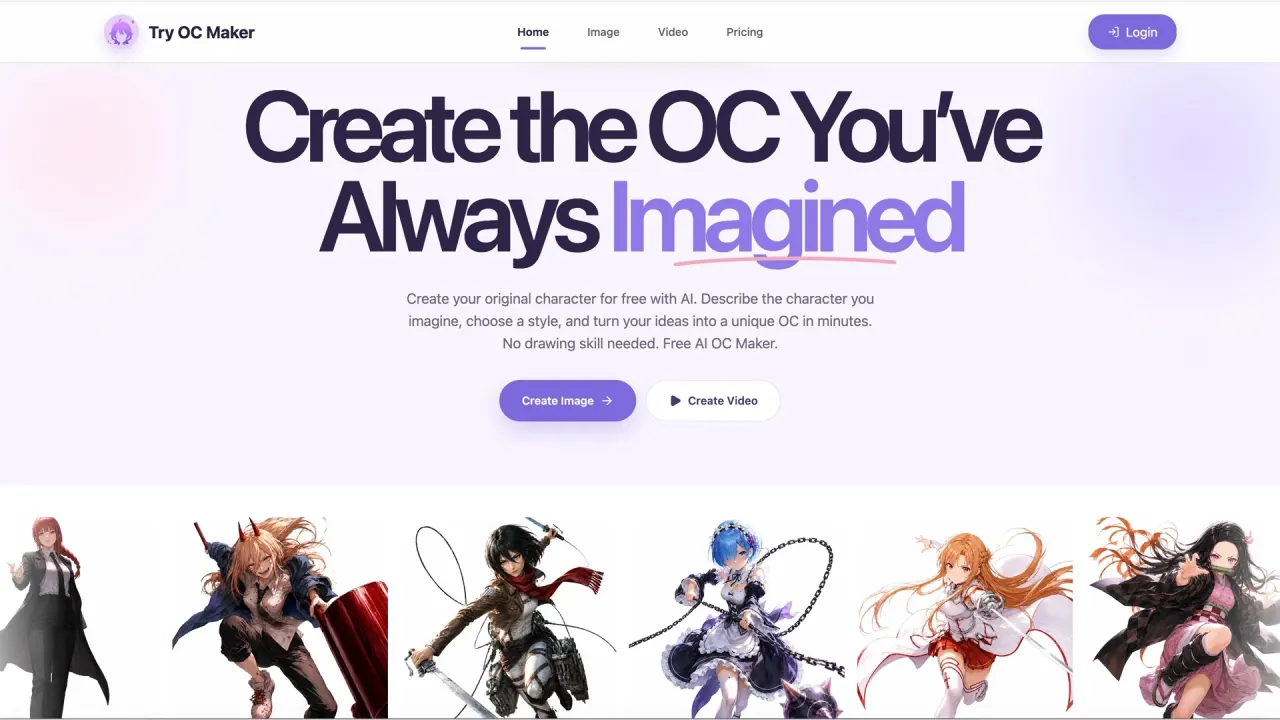
Build a character from a prompt, visual tags or references. Try OC Maker offers separate workspaces for character art, image editing and short animation.

Image GenerationVideo Generation#image-to-video#Character Creation#Text To Image
View Pricing
Featured Tool
Saves
Visits
Views
Pricing
Paid
Published
Nov 26, 2026
Domain
tryocmaker.com
Community rating

Used this tool? Rate it

Rate this tool
View Pricing
Featured Tool

Try OC Maker Product Information

View Pricing
Featured Tool
Tool Information
Saves
Visits
Views
Pricing
Paid
Published
Nov 26, 2026
Domain
tryocmaker.com
Community rating

Used this tool? Rate it

Rate this tool
Featured Tool

Featured Tools

AI Image To Image interface preview
AI Image To Image logo

AI Image To Image

Free

AI image editing from a reference photo

Raphael AI interface preview
Raphael AI logo

Raphael AI

Free

Multi-model image studio, free to start

Perchance interface preview
Perchance logo

Perchance

Freemium

Build random generators, share them free

PixAI interface preview
PixAI logo

PixAI

Freemium

Anime art, powered by a million community models

Grok interface preview
Grok logo

Grok

Freemium

Real-time answers, images, and code in one chat

SeaArt AI interface preview
SeaArt AI logo

SeaArt AI

Freemium

Community-Trained Models for Art, Video and Characters

PIXLR interface preview
PIXLR logo

PIXLR

Free Trial

Browser-Based AI Photo Editing and Image Generation

Photoroom interface preview
Photoroom logo

Photoroom

Free Trial

Product photo editing for online stores

Fotor interface preview
Fotor logo

Fotor

Paid

AI photo editing and design in one browser tab

Fashion Diffusion interface preview
Fashion Diffusion logo

Fashion Diffusion

Freemium

Fashion concepts, model photos and video in one workspace

HiAPI interface preview
HiAPI logo

HiAPI

Free Trial

One gateway for text and media models

MissYou AI interface preview
MissYou AI logo

MissYou AI

Free Trial

Prompt-Based Images, Edits and Video

Lanta AI interface preview
Lanta AI logo

Lanta AI

Paid

Multi-model AI video and image generation in one browser workspace

Unrestricted AI interface preview
Unrestricted AI logo

Unrestricted AI

Paid

AI chat for dark fiction and research

Medeo interface preview
Medeo logo

Medeo

Freemium

Chat Your Way to a Finished Video

Freepik AI Image Generator interface preview
Freepik AI Image Generator logo

Freepik AI Image Generator

Paid

Multi-model AI Image Generator

CapCut interface preview
CapCut logo

CapCut

Freemium

Edit, caption, and generate video in one place

Runway interface preview
Runway logo

Runway

Freemium

Generate new shots and rework existing footage

Related Tools

SeaArt AI
SeaArt AI interface preview
SeaArt AI logo

SeaArt AI

Freemium

Community-Trained Models for Art, Video and Characters

Try Now
Comik AI
Comik AI interface preview
Comik AI logo

Comik AI

Freemium

Anime shots that become a story

Try Now
Everygen AI
Everygen AI interface preview
Everygen AI logo

Everygen AI

Freemium

Images, video and music in one browser studio

Try Now
MissYou AI
MissYou AI interface preview
MissYou AI logo

MissYou AI

Free Trial

Prompt-Based Images, Edits and Video

Try Now
Raphael AI
Raphael AI interface preview
Raphael AI logo

Raphael AI

Free

Multi-model image studio, free to start

Try Now
PixAI
PixAI interface preview
PixAI logo

PixAI

Freemium

Anime art, powered by a million community models

Try Now
Image FX
Image FX interface preview
Image FX logo

Image FX

Freemium

Many AI models, one visual workspace

Try Now
Kira
Kira interface preview
Kira logo

Kira

Freemium

Sketch, prompt and animate your photos with AI

Try Now
HomeTop toolsSimilar

What is Try OC Maker?

Try OC Maker is a browser-based tool for creating original characters, illustrations and short videos from descriptions and visual references. Its AI character design workspace creates a new OC, or original character. Separate tools edit an existing picture or set a still in motion. The service's terms identify Lantiva LLC as the operator.

Core features

Character controls

  • Text, tags and images. The character builder combines a description, character tags and optional reference images, with the background also optional. The character prompt counter shows a 1,000-character limit.
  • Appearance and composition. The builder exposes output type, view angle, character type, gender presentation, age group, hair, eyes, outfit, body build and expression. The style picker includes Anime, Realistic and Stylized 3D. Tags sit alongside written details such as markings and accessories.
  • Reference uploads. The character builder accepts up to eight reference images in JPEG, PNG, WebP or GIF, at up to 10 MB each. The source image can guide appearance while the prompt names traits to preserve across versions. Repeated prompts and traits can guide consistency, but the product says results can still vary.
  • Character reference sheets. Try OC Maker describes character reference sheets that put full-body views, angles, expressions, poses and outfit variations into one visual design. A sheet can record shoes and costume details outside a headshot's crop.

Image editing and generation

  • General image workspace. The separate AI Image Generator offers Image Edit and Text to Image modes. The public form captured on November 26, 2026 displayed Seedream 5.0 Pro in Image Edit, a 20,000-character prompt field and a 14-credit estimate. In that captured setup, the form accepts up to ten references, limits each to 10 MB and lists an aspect ratio limit of 2.5. The same form lists 1K and 2K and offers ratios from 1:1 and 3:4 to 16:9 and 21:9.
  • Change or combine existing images. The editor can use separate images for a person, clothing and background, with the prompt telling it what to take from each. It also takes a single image and a prompt to edit an object, outfit or setting. The editor names Nano Banana Pro, Seedream 5.0 Pro, GPT Image 2 and Flux 2 Pro as examples of available models.
  • Canvas and resolution. Outpainting extends a picture beyond its original frame with generated surroundings, using an aspect ratio choice and a description of what belongs outside the crop. The editor advertises up to 16 image references and 4K on supported models, including Nano Banana Pro for 4K.

Character video

  • Motion from an existing frame. Image to video uses the picture as the starting scene and the prompt to describe movement. A brief can specify a gesture, camera move or background change. Text to Video is a separate mode.
  • Starting and ending frames. Models that support first and last frames take separate images for the start and finish and generate the movement between them. The product describes one to eight image references on some models for the character, setting, clothing or props.
  • Dialogue and scenes. Try OC Maker describes Kling 3.0 for dialogue and multiple shots, Seedance 2.0 for image and audio references, and Veo 3.1 for realistic scenes. For Kling 3.0, the service lists English, Chinese, Japanese, Korean and Spanish dialogue with lines assignable to characters. Audio availability varies with the model.
  • Reference media on the captured form. The public image-to-video reference form showed a Wan 3.0 setup with a 5,000-character motion prompt, sound control and an estimate of 50 credits for the displayed five-second, 480p configuration on November 26, 2026. That form lists 10 MB image and audio limits, a 100 MB video limit, and optimization of first frames to 2048 px and 5 MB. Each reference video or audio clip must be 1 to 15 seconds, the aggregate cap for each media type is 15 seconds, and the reference videos plus output may total no more than 30 seconds.

Guide

From a written character to a short scene

  1. Set the character brief. Enter a description covering hair, eyes, clothing, colors, accessories, personality, pose or background, and combine it with character tags if needed. Select the output and view for the intended crop.
  2. Generate and review the image. Preview and download the generated image, or continue editing it in the AI Image Editor.
  3. Animate the still. In the video workspace, upload an image, describe the action, select a model and available settings, check the credit estimate and preview the clip before downloading.

Try OC Maker use cases

  • Comics and story development. Try OC Maker describes comic workflows built around repeatable character details, outfit changes and poses. A reference sheet can keep those variations on one page. Changes of costume and gesture can be compared without dropping identifying features from the brief.
  • Roleplay and avatars. The character workspace is positioned for close-up avatars, full-body OC references and pose or outfit variations for roleplay.
  • Storyboard clips. The animation page describes turning storyboard or scene illustrations into clips that can be edited together as a short sequence. A multi-shot model can take a brief with ordered actions and camera framing.

Who is it for

  • Artists and writers who work from a visual brief. Try OC Maker presents its character workflow for people who draw, write, roleplay, game or want to visualize a character.
  • Creators who need local image edits with room for variation. The editor is designed for prompt-led changes such as a new outfit, a replacement background, a composite or a photo-to-illustration conversion. A job requiring specific pixels to stay fixed needs another editing workflow.

Platforms

  • Web workspaces. Try OC Maker says its image and video tools are designed for phones, tablets and desktop screens. The image editor can be browsed without an account, with sign-in required for generating edited images and downloading results. The video form prompts users to sign in for animation history.
  • Accounts and access. The terms require users to be at least 18 and prohibit letting someone under 18 use the service through their account. The privacy policy describes collecting information from providers such as Google according to the permissions the user approves.
  • Public examples and remixing. The character workspace describes browsing community characters and prompts and remixing their ideas with changed hair, outfits, colors or other details. The prompt library gives a starting point even when the first visual brief is sparse.

Pricing

Credits and subscriptions

The character builder advertises 40 signup credits and displayed a 10-credit estimate in its default form on November 26, 2026. The editor FAQ cites a 1K Flux 2 Pro edit as a five-credit example. Video credit costs depend on the selected model and settings and are displayed before generation. As an illustration, the captured Wan 3.0 estimate exceeds the 40 advertised signup credits on its own.

Prices below are in USD as shown on November 26, 2026. The Yearly toggle shows the monthly equivalent along with the full annual charge.

PlanCredits per monthMonthly billingYearly billingPack bonus
Basic300$9.90$94.80 per year—
Creator800$19.90$178.80 per year10%
Professional2,000$39.90$358.80 per year30%
Enterprise6,000$79.90$718.80 per year50%

Separate one-time credit packs were listed at $9.90 for 300 credits, $19.90 for 700, $49.90 for 2,000 and $89.90 for 4,000. Under the terms, subscription credits may reset or expire at the end of a billing period, and promotional balances can have separate limits. Specific checkout or plan terms may control.

Canceling and refund conditions

  • Cancellation. Dashboard cancellation stops future renewals and keeps access through the end of the paid period. Subscriptions normally renew at the same interval until canceled. Cancellation alone does not request a refund.
  • Monthly and first-month annual refunds. For a monthly subscription, the policy requires a complete request within 14 days of the applicable period starting and use of less than 10% of that period's included credits for a full refund. For the first month of an annual subscription, the same 14-day window runs from annual subscription start and the less-than-10% test uses the first monthly allocation. Bonus, referral, promotional, gifted and compensation credits are excluded from the calculation, as are credits restored after a verified technical failure.
  • Later annual refunds. After the first month, a partial annual refund is discretionary and, if approved, equals the annual fee paid minus the number of completed subscription months multiplied by the current monthly price for the same plan, with a floor of zero. Completed months run from the subscription start timestamp. It caps the refund at what was paid and excludes taxes or fees that are nonrefundable under the provider's rules or applicable law.
  • Separate packs and technical problems. A one-time pack is eligible for a full refund under the standard rule only if a complete request is received within 14 days of the completed purchase and none of that purchase's credits have been used or deducted. If approved, the associated credits are removed. Billing mistakes, verified technical failures and certain other circumstances may be reviewed separately, while dissatisfaction with a result produced as described does not make used pack credits refundable.
  • Review and settlement. The billing policy typically allows 5 to 10 business days for review of a complete request, with payment providers sometimes taking another 5 to 10 business days or more after approval. The policy returns approved refunds to the original method when possible. It asks for the account email, available transaction or subscription identifiers, plan and purchase date, an explanation and relevant supporting material.

Try OC Maker alternatives

  • The OC Maker. The OC Maker combines its full-body character builder with front, side and back reference sheets and text tools for names and headcanons.
  • OCMaker AI. OCMaker AI lists skeleton-based pose control and a storyboard workspace for planning scenes shot by shot.

Limitations

Editing and operating boundaries

  • Prompt-guided edits. Try OC Maker says its image editor currently lacks a selection brush that locks the surrounding area. The editor cannot guarantee exact facial preservation, and a higher resolution cannot restore missing detail.
  • Variation and reuse. The terms warn that outputs may be inaccurate, incomplete, similar to existing material or unsuitable for a particular purpose. The terms do not guarantee a prompt match or acceptance by a publisher or marketplace.
  • What the moderation rules cover. The acceptable-use policy prohibits pornography, explicit nudity, non-consensual intimate content and sexualized depictions of identifiable people. Enforcement can block generations, restrict content or suspend accounts. The child safety rules cover illustrated and real subjects.
  • Likeness and fandom. The terms require legal rights and valid consent for using another person's face, body, voice, identity or personal information and prohibit misleading endorsements or unauthorized edits. The site offers a Dragon Ball OC maker among its themed generators. Its acceptable-use policy puts responsibility for permitted fan art and other transformative work on the user and requires the necessary rights to sell work using protected characters, brands or art. The themed page does not disclose licensing for its examples.

Ownership, private material and sharing

Lantiva LLC says it does not claim ownership of the generated content and permits lawful personal or commercial use subject to law, third-party rights and disclosed plan restrictions. The terms distinguish that permission from legal protection. The operating license covers processing for generation, hosting, support, safety and compliance.

The privacy policy states that prompts, private uploads and generated outputs are not used to train Try OC Maker's own or third-party general-purpose or generative AI models. The policy separately describes use of aggregated or de-identified operating data. Processing for generation, history, troubleshooting and safety is still described, including automated checks and authorized human or provider review in certain cases. The policy lists inference, storage and payment providers among possible recipients.

The privacy policy says media users intentionally publish through public sharing features may be seen and copied by others. The terms allow the service to display material intentionally shared through a public feature until removal or account closure, subject to backup and legal retention. Deleting the original public post may leave copies previously saved by other people.

Retention depends on operational purpose, account status, data type and legal requirements, and users can delete some outputs where available or request account or personal-data deletion. The policy says deletion may leave data temporarily in encrypted backups, security logs, transaction records or legal holds.

FAQ

Q1. Can I use both a prompt and reference images in the OC maker?

Yes. The builder accepts a description, visual tags and optional reference images together. Tags set selected appearance or composition traits, while the prompt can describe details those choices do not cover.

Q2. Can I animate an existing character image?

Yes. The video workspace takes a still image and a motion description. Available frame, resolution and sound controls depend on the model, and the credit estimate appears before generation.

Q3. Does generating a character give me rights to use a franchise character?

The service terms describe how its own output can be used, subject to third-party rights. The acceptable-use policy requires the rights needed for protected characters, brands or artwork and distinguishes lawful fan works from uses that infringe rights.

Q4. Is the AI girlfriend tool a chat service?

It is an image and short-video workflow for fictional adult characters, with the guided age group fixed to Adult and youth-oriented outfit choices removed. The vendor describes it as a visual design tool without interactive chat.

Know a Similar Tool?
If you know other great AI tools, feel free to submit them to us