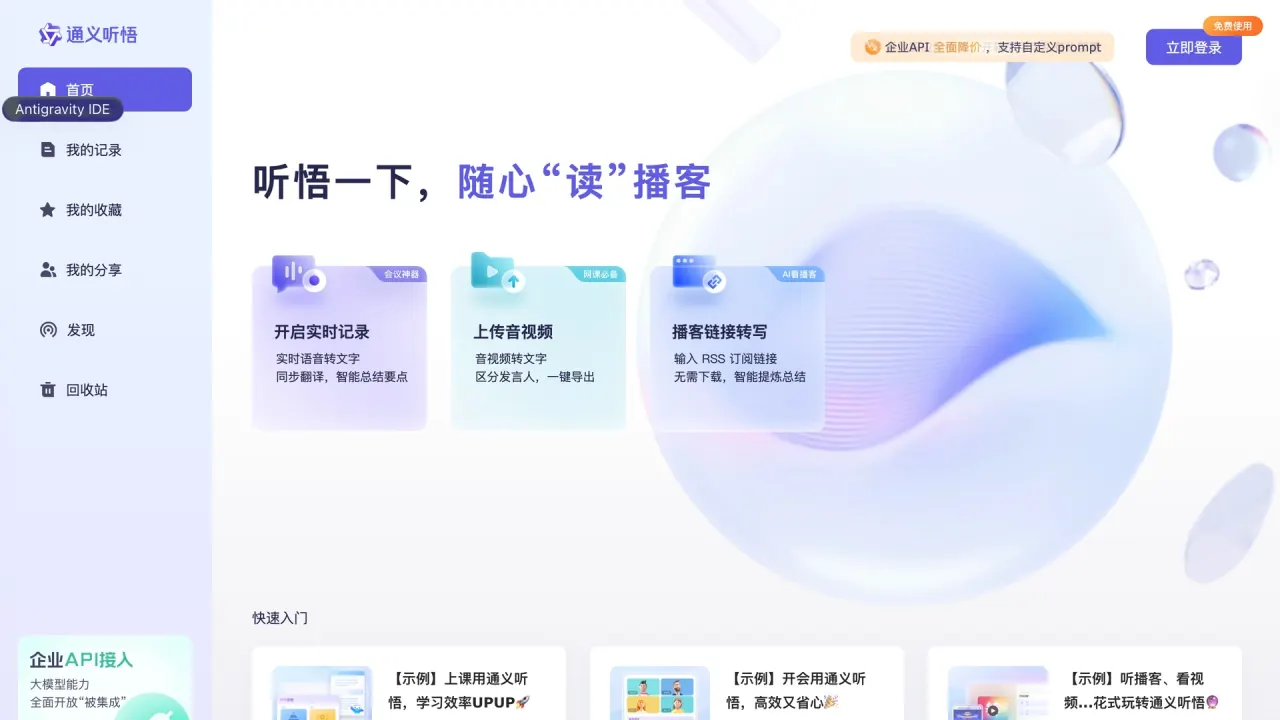

Tongyi Tingwu is Alibaba Cloud's AI assistant for audio and video. It transcribes live or uploaded recordings, separates speakers, and turns the transcript into chapter outlines, summaries, action items and translations.
Used this tool? Rate it
Used this tool? Rate it


AI assistant for writing, analysis and tasks


From a prompt to a deck, site or doc


Real-time answers, images, and code in one chat


One workspace for every AI model


One workspace where your team and its AI agents think together


Public Codex reset tracker


AI assistant for structured work


Plan, build, and refine work with an AI agent
Tongyi Tingwu records, transcribes and summarises audio and video, then returns a structured document instead of a wall of text. A live session and an uploaded file both feed the same language-model outputs.
Tongyi Tingwu is Alibaba Cloud's AI meeting assistant and transcription service for audio and video, built on the Qwen language model with speech and vision models. It converts speech into timestamped text, separates speakers, translates, and generates chapter outlines, summaries, action items and Q&A recaps. In Chinese it is called 通义听悟, described by Alibaba Cloud as a work-and-study AI assistant.
Alibaba Cloud positions it for five settings: office work inside OA, IM or CRM systems; online education; network drives and media libraries; finance and media interviews; and sales or customer service calls.
Individuals sign in with a phone number and use the web app, a DingTalk mini program or a browser extension without charge. Companies reach the same capabilities through an API.
The product has two layers: the first turns sound into text with word-level timing, the second reads that text and produces the notes. Every output depends on a completed transcript.
Real-time recording accepts an audio stream over WebSocket at 8 kHz or 16 kHz in PCM, OPUS or WAV, supports up to three streams and caps a stream at 24 hours. Words arrive while a sentence is being spoken and update when it ends, which makes a running caption possible.
File transcription accepts audio at 8 kHz, 16 kHz, 24 kHz or 48 kHz and video at the three higher rates. Audio containers include MP3, WAV, M4A, WMA, AAC, OGG, AMR, FLAC and AIFF, and video containers include MP4, WMV, M4V, FLV, RMVB, MOV, MKV, WEBM, AVI and MPEG. A file is limited to 6 GB and 6 hours and is supplied as an OSS address rather than through the API request body.
Language coverage differs by path. A Chinese-only live stream is the narrow case; the wider setting covers Chinese, English, Cantonese, Japanese and Korean, and a free-speech mode handles those five plus German, French and Russian in one recording. Hotwords are available in Chinese and English, the practical way to keep product names from drifting.
Speaker separation is a setting, not an automatic result: a file can stay undivided or split into two or multiple speakers, while the live path never separates speakers. Transcripts can carry paragraph, sentence and word-level timing, the structure a subtitle track needs. Official SDKs exist for Java, Python and Go.
The model layer sits on the transcript: chapter outlines, full-text summaries, speaker summaries, Q&A recaps, mind maps, action items, keywords, key points, spoken-to-written rewriting, custom prompts, service-quality inspection and content extraction. Chapter outlines split the recording by topic, write a one-line title for each chapter within 32 topics, and summarise each chapter within 1000 characters.
Each output carries its own floor and ceiling. A full-text summary needs 250 characters of transcript, about 70 seconds of audio, works best within four hours and returns at most 1000 characters. A Q&A recap needs 300 characters and yields roughly 30 to 50 pairs per hour. Action items are capped at six items of 5 to 30 characters. Keywords return at most 20 words. A mind map is capped at four levels and 90 minutes.
Scene recognition labels a recording as an interview, a speech or a meeting. A custom prompt carries a team's own instruction in up to 1000 characters, and each prompt in a request is billed separately.
For video that contains slides, the service extracts them and summarises what was said over each one. Extraction takes roughly 2 to 5 minutes per hour of video and returns at most 200 slides, and each slide summary takes about one minute after transcription.
Translation runs in both capture modes: real-time speech translation takes an 8 kHz or 16 kHz stream and translates live, while file translation runs offline at up to 48 kHz. The billing page lists two-way translation among Chinese, English, Japanese, Korean, German, French and Russian, with Chinese-English free speech rendered into Chinese, English or both; the product-advantages page lists only the first four. The official pages disagree, and the wider list appears on the current feature and billing pages.
The API exposes these capabilities as parameters on one integration rather than as separate products, and it supports proactive message push and status queries so the application can react to completion or failure instead of polling.
A live session needs an audio stream over WebSocket at 8 kHz or 16 kHz and can take up to three streams at once. Sentences arrive while people are still speaking, which suits a caption bar or a second-screen transcript. Because the live path does not separate speakers, a meeting that needs attribution should be recorded and processed as a file.
The transcript is the primary artefact; every model output is a view of it. Chapter outlines give the skeleton, summaries the argument, Q&A recaps the questions answered, and action items the follow-up list. Word-level timing lets the same file drive a subtitle track, so a transcript made for reading can be reused for publishing.
Model outputs are billed independently, so the cheapest useful configuration is one structural plus one extractive output: a weekly meeting needs a chapter outline and action items, an interview a speaker summary and Q&A recap, a lecture a chapter outline and keywords. Turning on everything multiplies the hourly rate.
Meeting minutes are the clearest fit: a recorded meeting yields a transcript with speaker labels, a chapter outline matching the agenda, and action items that can be assigned after the call. Timestamps tie each sentence to the audio, so the transcript can be replayed against the recording.
Interview and visit notes benefit from the Q&A recap: an interviewer gets the questions asked and the answers given, while a sales visit produces a chapter outline of what the customer raised and a follow-up list. Scene recognition labels the recording as an interview, which keeps a library organised without manual tagging.
Teaching recordings use topic segmentation and keywords: a course video is split into chapters, each with a one-line title, and the keyword list shows which concepts were covered, so a teacher can compare it against a syllabus and a student can jump to the chapter that answers a question.
Media libraries use file transcription at scale, so a podcast or an archive becomes searchable by phrase rather than filename. Service teams run service-quality inspection and content extraction on call recordings; both work on the transcript and both are Chinese-only, which suits domestic call centres.
It fits teams whose recordings are mostly in Chinese and whose work depends on what was said: operations teams with several meetings a day, HR and research teams running interviews, schools with lectures, media teams with an archive, and sales or service teams reviewing calls.
It also fits companies already on Alibaba Cloud: files arrive through OSS and completion notifications can use RocketMQ, so an existing account removes most integration work.
It is a weaker fit in four situations. A team needing processing inside its own network cannot use it, because files go to OSS and run in the cloud. Dialect-heavy or unlisted languages cost more time correcting than reading. Files longer than six hours must be split. A team wanting a permanent free tier will find only a 90-day trial.
The consumer entry points are the website, a DingTalk mini program and a browser extension, all sharing one account and one library of records, favourites, shared items and deleted files.
The API runs in one region, China North 2 (Beijing), at tingwu.cn-beijing.aliyuncs.com. There is no second region for latency or data residency.
Audio transcription and slide extraction share one integration: live audio over WebSocket, files as OSS addresses, completion through RocketMQ, and official SDKs for Java, Python and Go; other languages call the HTTP API directly.
New accounts get a 90-day free trial, with no fee while the service is in trial status. The trial is metered per day: real-time recording allows 48 hours per day with two concurrent streams, and file transcription allows 2 hours of audio per day with one concurrent stream; when the daily quota is used, the capability returns after 24 hours.
Commercial pricing for the current API is per hour of processed audio or video, in CNY:
| Component | What it covers | Price |
|---|---|---|
| ASR | Real-time transcription with speaker separation, or file transcription with speaker separation and language detection | 0.6 CNY/hour |
| Language model | Each of chapter outline, full-text summary, speaker summary, Q&A recap, mind map, action items, keywords, key points, rewriting and custom prompt | 0.064 CNY/hour per feature |
| Inspection | Service-quality inspection and content extraction | 0.13 CNY/hour |
| Multimodal | Slide extraction from video plus slide summaries | 0.64 CNY/hour |
| Translation | Real-time or offline translation | 4 CNY/hour real-time, 0.5 CNY/hour offline |
Model features stack: keywords plus a chapter outline on one recording costs 0.064 plus 0.064, or 0.128 CNY per hour, and several custom prompts in one request are billed separately. Translation stacks on transcription, so one hour of a single-stream live meeting with translation costs 0.6 plus 4, or 4.6 CNY; with Chinese-English free speech translated into both languages, the translation charge doubles and the total is 8.6 CNY.
Transcription is counted by the second: three files of 1000, 3000 and 500 seconds total 4500 seconds, and the ASR charge is 4500 divided by 3600, multiplied by 0.6, or 0.75 CNY. A silent stream is still billed for its full duration, and with two or three streams the meter runs whenever any stream produces a result, so billed time equals or slightly exceeds the meeting.
The older API still appears at 10.5 CNY per hour for real-time recording, falling to 3.6 at high volume, and the page asks customers to migrate. Settlement is postpaid by default, with a prepaid savings plan available, and charges land the following day.
Otter.ai is the closest comparison for an English-first team. Its free Basic plan includes 300 monthly transcription minutes and three lifetime audio or video imports; Pro costs 16.99 USD per user per month billed monthly, or 8.33 USD billed annually; Business costs 19.99 USD per user per month billed annually and allows four hours per meeting with unlimited imports. The structural difference is language: Otter covers English, Spanish, French, German, Japanese and Chinese, while Tingwu's deepest coverage and inspection outputs are Chinese-first.
Feishu Minutes is closer for a Chinese team already inside Feishu: it transcribes audio and video, generates a summary the vendor describes as covering an hour of meeting in a minute, structures notes into chapters and identifies action items. Its advantage is that minutes sit beside the team's documents and tasks; its limit is the same ecosystem, because value drops for a team that does not run on Feishu.
A team that needs offline processing, dialect coverage beyond Cantonese or a permanent free allowance should look outside this pair: Tingwu offers a 90-day trial, not a free tier, and processing happens in Alibaba Cloud.
The hard limits are set per file and per region. A file cannot exceed 6 GB or 6 hours. A live stream cannot exceed 24 hours. The service runs only in China North 2 (Beijing), so latency and data location are fixed.
Several outputs are Chinese-only: mind maps, service-quality inspection and content extraction. A mind map stops at four levels and 90 minutes. Action items stop at six per recording, each between 5 and 30 characters. Keywords stop at 20 words. A longer recording is truncated at the output limit rather than summarised further.
The translation language list is inconsistent between two official pages: the feature specification and billing page list seven languages, while the product-advantages page lists only Chinese, English, Japanese and Korean. A team needing German, French or Russian should confirm coverage before committing a workflow.
Speaker separation exists on files but not on the live path, and a file can be split only into two or multiple speakers rather than an exact headcount.
Data handling follows the Alibaba Cloud model. Files are placed in OSS and read through a service-linked role, AliyunServiceRoleForTingwuPaaS, which the account must grant; completion notifications can use RocketMQ through the same role. Recordings and outputs sit in a cloud library with records, favourites, shares and a trash folder, so retention and deletion are account-level operations. A team with an air-gapped requirement cannot use the service as shipped.
The free allowance is a trial, not a permanent tier: after 90 days the quotas stop and usage moves to commercial rates.
A 90-day free trial gives 48 hours of real-time recording and 2 hours of file transcription per day. After that, usage is billed hourly: 0.6 CNY for transcription, 0.064 CNY per model feature, 0.13 CNY for inspection and 0.64 CNY for slide extraction, with translation at 4 CNY or 0.5 CNY.
Transcription covers Chinese, English, Cantonese, Japanese and Korean, plus a free-speech mode that adds German, French and Russian. Two-way translation is listed for seven languages on the feature and billing pages but only four on the product-advantages page; hotwords work in Chinese and English.
Yes, for uploaded files: a file can stay undivided or split into two or multiple speakers. The live path does not separate speakers, so a meeting needing attribution should be processed as a file.
A file is limited to 6 GB and 6 hours, and a live stream to 24 hours. Model outputs have their own ceilings: a full-text summary works best within four hours, a mind map within 90 minutes, and a Q&A recap yields roughly 30 to 50 pairs per hour.
Yes. The API runs at tingwu.cn-beijing.aliyuncs.com in Beijing, accepts live audio over WebSocket and files as OSS addresses, and delivers completion events through RocketMQ. SDKs cover Java, Python and Go, and capabilities are switched by parameters.
Files are read from the account's OSS bucket through AliyunServiceRoleForTingwuPaaS, and results stay in the cloud library alongside records, favourites, shares and a trash folder. There is no offline or on-device mode.