
Mobirise is a block-based website builder for Windows, Mac and Linux, with a browser AI assistant that drafts a site from a sentence, sketch or screenshot and exports clean HTML, CSS and JavaScript.
Used this tool? Rate it
Used this tool? Rate it


From a prompt to a deck, site or doc


Browser-Based AI Photo Editing and Image Generation


One-click AI background removal at scale


AI image editing from a reference photo


Multi-model image studio, free to start


Natural AI photo editing for portraits and projects


AI assistant for writing, analysis and tasks


Build random generators, share them free
Mobirise is a free website builder that ships as a desktop application for Windows, Mac and Linux and also runs in the browser as an AI website builder. Pages are assembled from ready-made blocks, text and pictures are edited directly on the page, and the finished site is published to your own hosting, to GitHub Pages, or to a free mobirisesite.com address. The desktop app saves the project as HTML, CSS and JavaScript files on every plan, including the free one.
The free edition has no time limit and needs no credit card. A free account covers unlimited sites on hosting you already pay for, three sites on a mobirisesite.com address with HTTPS, and three AI generations a month in the browser. Sites on free Mobirise hosting carry a small Mobirise credit; sites pushed to your own hosting do not.
Two working styles sit side by side. In the browser, Mobirise AI turns a short brief into a drafted site that can be refined by chat. In the desktop app the editor runs offline: blocks, installed themes and previews keep working without a connection.
Mobirise AI accepts a description written in any language, a photograph of a hand-drawn sketch, or a screenshot of a site whose look you want to borrow. It returns a draft in four different designs, usually in under a minute, with placeholder text and images already placed. Regenerating produces further variants without spending one of the monthly generations, and a chat panel handles requests such as a different colour, an extra section or shorter copy.
A page is treated as a stack of blocks: header, intro, gallery, prices, reviews, map, footer. Blocks are dragged in from a side panel and lined up in order, so no code is involved at any point. When two sections should look alike, Clone Block copies a block with all of its settings in one click instead of rebuilding it.
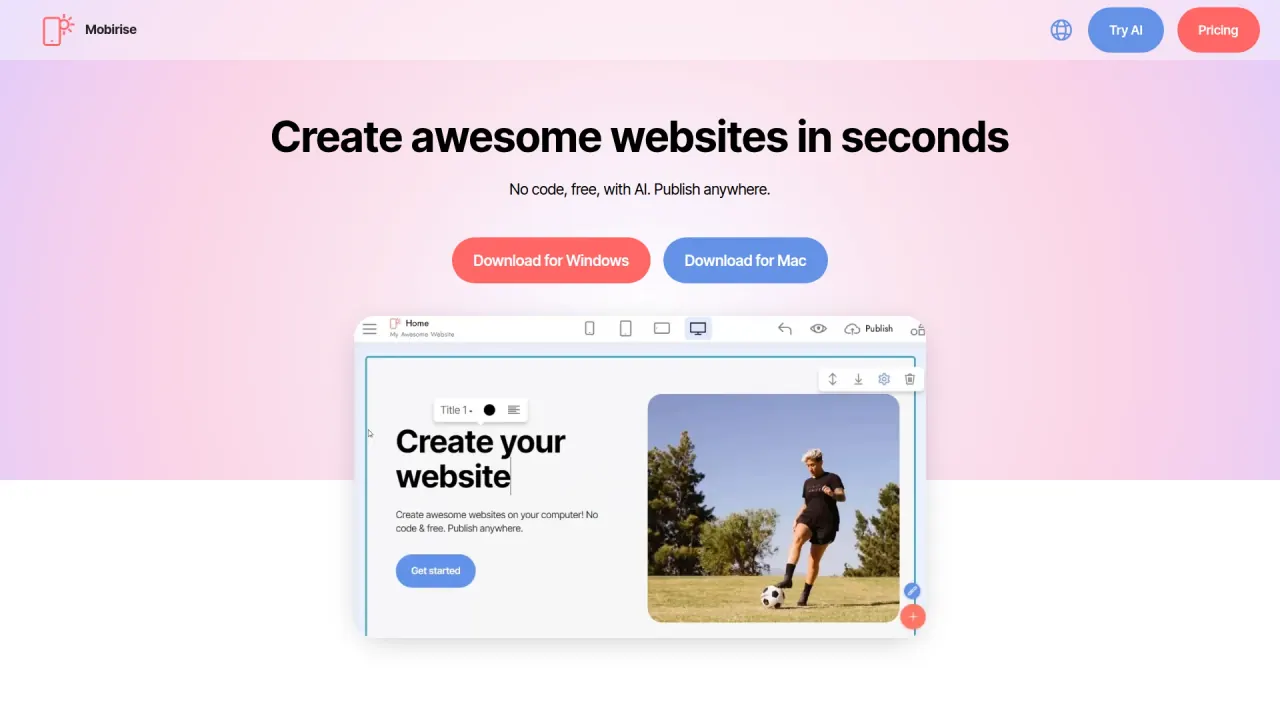
Editing happens on the canvas rather than in a form. Clicking a line of text starts typing in place, clicking a photo swaps it for your own, and the editing view matches what visitors receive. Each block has a settings panel for background, spacing, columns and which elements to show, while fonts and colours for the whole site sit in one Style Editor. Titles expose an H tag selector, which keeps heading levels consistent for search engines.
The free app ships with a basic theme of more than 200 blocks and contact forms, enough for a small business site, a portfolio or an event page. A different look comes from the premium library: 220+ themes, each with its own designs and blocks. Extensions are the second layer and add larger features. They arrive with the paid plans, together with all premium themes, and work inside any theme. The published list includes Smart Cart, Chat Button, Form Builder, Popup Builder, social feeds, a Code Editor for the HTML and CSS of individual blocks, plus Simple Shop, PWA Builder, Password Protect, Lazy Load and WOW Slider.
Smart Cart turns a page into a small store: products are added with photos and prices, and payment runs through PayPal or Stripe. A simpler route sends each order as a WhatsApp message instead of taking payment on the site. A chat button covers WhatsApp, Telegram, Viber, Messenger, Discord and Signal, so visitors can reach the owner on whichever service is already in use.
Every Mobirise block rearranges itself for small screens, so a single build serves phones, tablets and desktops. The editor flips the preview between those three widths while you work, which makes it possible to check a layout without publishing.
Building a site follows a short sequence that works the same way in the browser and in the app.
The vendor's own demo set points at the kinds of sites the block library was built for: a shop, a clinic, a studio, a portfolio, a local service, or a single landing page. Each demo is a premium theme with the text and photos replaced, which is also the intended workflow for a new site: pick the closest design, overwrite the copy, and adjust the blocks that do not fit.
A second pattern is agency and freelance work. Themes and extensions from the paid Kit can be used on an unlimited number of websites, your own and your clients', and one account activates the Kit on up to two computers. That makes the desktop app a plausible tool for someone who builds several small sites a year and hands the files to a client at the end.
A third pattern is offline work: the editor is installed locally, so a site can be drafted on a train or in a place with poor Wi-Fi and published when a connection returns.
Mobirise fits people who want the site as files they own and can host anywhere, who work on Windows, Mac or Linux and sometimes offline, who build commercial sites without wanting to pay for the builder itself, and who prefer starting from a ready design and editing blocks visually. The free edition is unusual in that it puts no limit on how many sites you publish to your own hosting.
It is a poor fit in three situations. Anyone who needs to import an existing website or a bought HTML template will find that Mobirise opens only its own projects. Anyone who wants a separate phone layout with elements hidden on mobile will not find that control, because there is one layout for all screens. Anyone who edits on an iPhone or iPad is limited to the browser, since there is no iOS app.
The free plan also leaves the premium library locked, so a site that needs a store or a premium theme lands on a paid tier quickly.
Mobirise runs on Windows 7 or newer, macOS 10.13 High Sierra or newer, and Debian-based Linux such as Ubuntu. Mac users choose between a build for Apple Silicon and a build for Intel. The desktop app is the product's offline website builder and the only way to work fully offline.
Mobile access is uneven. On Android there is an app, AI Website Builder: Mobirise, which creates sites with Mobirise AI, can restyle a whole site in one step and can translate a site. On iPhone and iPad there is no app, and the browser is the only route.
Publishing destinations are chosen per project. The desktop app uploads over FTP or FTPES on any plan, publishes straight to a GitHub Pages repository, or writes a folder of HTML, CSS and JavaScript files to disk. A free mobirisesite.com address with HTTPS covers up to three sites. A custom domain on Mobirise hosting requires the BASE or GROW plan. In the browser builder, HTML export belongs to those same two plans, while the desktop app exports on every tier.
Offline editing has a defined boundary. Editing, previewing and using installed themes and blocks work without a connection, but signing in, publishing, using AI, buying a plan and downloading updates or new themes all need one.
The app itself is free. Paid plans bundle the premium library with AI capacity and online hosting. A promotional Black FridAI banner sat above the plan cards at capture, and the card figures differed from the FAQ text, so the numbers below are the ones written in the FAQ.
| Plan | Price in the page FAQ | Online sites | AI generations per month | Premium library |
|---|---|---|---|---|
| KIT | $149 | none | none | all 220+ themes and extensions |
| BASE | $199 | 3 | 100 | all 220+ themes and extensions |
| GROW | $249 | 10 | 1,000 | all 220+ themes and extensions |
KIT is aimed at people who work only in the desktop app and do not need AI or online sites: it unlocks every theme and extension, and the page describes the bundle as covering one year of releases, with new themes and extensions added monthly at no extra charge. BASE adds premium AI, three online sites and 100 generations a month; GROW raises the online sites to ten and the generations to 1,000.
Generation accounting is monthly and shared across the account. One generation is spent each time the AI builds a page or a whole site draft, the counter resets every month, and running out does not affect sites that are already published.
The commercial terms are worth reading before checkout. A single account activates the Kit on up to 2 computers, with an Enterprise licence extending that to 10. Only the first order is covered by the 14-day money-back guarantee. Upgrades, additional purchases and renewals are not refundable. Paid services renew automatically until cancelled, and auto-renewal can be switched off in the payment provider's account area.
The vendor itself draws the line in its own comparison: if you want an online-only service where the editor, hosting and business apps live in one account, Wix and Squarespace are built that way, which is the opposite of Mobirise's split between a local editor and a hosting destination you choose. That distinction matters more than any feature list, because it decides whether you keep a portable set of files or rent a platform.
Editorial reviews add a second angle. A long-running review of the builder praises the offline editor and the block system, then points readers who want greater design flexibility toward Wix. For beginners who want to get online in a few hours, it suggests Site123. Both suggestions come from the reviewer's assessment of editing depth, not from the vendor.
Staying with the product is the third route: KIT covers the premium library for desktop work, while a custom domain on Mobirise hosting requires BASE or GROW, and cancelling returns the account to the free tier without taking published sites offline.
Mobirise opens only its own projects, so an existing website or a bought HTML template cannot be imported; the practical alternative is to rebuild the pages with blocks or to describe the site to the AI and start from a new design. There is also one layout for all screens, which means no separate mobile version and no way to hide an element on phones only. Because there is no iOS app, an iPad user works in the browser rather than in the installed editor.
Design control stops short of pixel-level work. An editorial review of the builder notes that it does not offer pixel-perfect editing or native code access, and that its blogging and ecommerce tools are limited; the Code Editor extension allows HTML and CSS changes inside individual blocks, which is narrower than editing a theme's source. The same review describes customer service as limited to email help.
If a paid plan is not renewed, published sites stay online and nothing is deleted. The builder drops back to the free version: basic editing keeps working, while premium blocks, premium extensions, new releases, updates and support switch off, and a few third-party widgets such as ElectricBlaze feeds stop working on published pages. Exported files are standard HTML, CSS and JavaScript that keep working independently, but editing them with premium themes or features requires an active subscription.
AI Design is trained on Mobirise themes and templates. It can be used for non-profit and commercial projects, including client sites, but the output may not be sold or distributed in a reusable form such as a theme or template. Users remain responsible for the accuracy and legality of AI-generated content, and the terms state that Mobirise does not guarantee that generated sites meet legal, regulatory or business requirements. Where a project pulls images or other material from third-party libraries, Mobirise does not review or verify the rights or licensing status of individual items, and the licence of the relevant provider governs their use.
The services are not intended for children under 16. Payments are processed by Verifone Payments B.V., operating as 2Checkout, and Mobirise states that it does not collect card numbers. The privacy policy says Google Analytics is used to understand how visitors interact with the site. It also states that personal information is not sold or shared for cross-context behavioural advertising as defined by the California Consumer Privacy Act. Hosted websites are removed at the customer's request, when the account or subscription ends, where the law requires it, or where content violates the terms.
Yes, with limits. The app and its basic theme are free for personal and commercial sites, the free version has no time limit and needs no credit card, and you can publish as many sites as you like to your own hosting. A free account adds three sites on a mobirisesite.com address with HTTPS and three AI generations a month. Those hosted sites show a small Mobirise credit, and the store, premium themes and custom domains on Mobirise hosting require a paid plan.
The desktop app saves HTML, CSS and JavaScript files on every plan, including the free one. In the browser builder, export is part of the BASE and GROW plans. The exported files are standard web files and continue to work on any host, although editing them with premium themes or features needs an active subscription.
The desktop app does: editing, previewing and using installed themes and blocks all work without internet. A connection is needed to sign in, publish, use the AI, buy a plan, and download updates or new themes.
Published sites stay online. The account returns to the free version, basic editing keeps working, and premium blocks, extensions, new releases, updates and support stop. Some third-party widgets on published pages may stop working.
Windows 7 or newer, macOS 10.13 High Sierra or newer, and Debian-based Linux such as Ubuntu, with separate Mac builds for Apple Silicon and Intel. Android has its own app; iPhone and iPad do not, and the browser is the alternative there.
Yes. Themes and extensions from the Kit can be used on unlimited websites, your own and your clients', and one account activates the Kit on up to two computers, with an Enterprise licence covering ten.
No. Mobirise opens only its own projects, so an existing website or a purchased HTML template cannot be brought in. Rebuilding with blocks or starting a new AI draft are the available routes.