
Swishy is a browser-based AI motion designer: describe the animation in a prompt, pick one of four model tiers, and get an editable scene with colour, font, duration and text controls, built from templates or from scratch and exported as MP4, GIF or MOV.
Used this tool? Rate it
Used this tool? Rate it


Multi-model image studio, free to start


Community-Trained Models for Art, Video and Characters


Browser-Based AI Photo Editing and Image Generation


One gateway for text and media models


Prompt-Based Images, Edits and Video


Multi-model AI video and image generation in one browser workspace


Design original characters and animate them


Chat Your Way to a Finished Video
Swishy is a browser-based AI motion designer that turns a written brief into an animated scene you can keep editing, rather than a rendered clip you have to regenerate. You type the brief into the AI prompt, pick a model tier, and the app writes and renders a scene in its own editor. Text to animation usually ends in a video file; here the first output is a scene.
A video generator hands back pixels; Swishy hands back a scene with hex fields for background and accent colours, a font dropdown, a duration slider and a text field for every element.
The prompt bar is a builder, not a search box: whatever you type becomes material for the canvas, so "cool intro animation" becomes those four words animating on screen instead of a brief. Specificity is what it rewards — name the typeface, the hex colour, the runtime and the frame and you get all four.
Under the editor sit four model tiers, Mini through Pro. Mini draws no credits, which is why a free account can iterate; the higher tiers cost credits per run and route to different vendors, so quality and price move together.
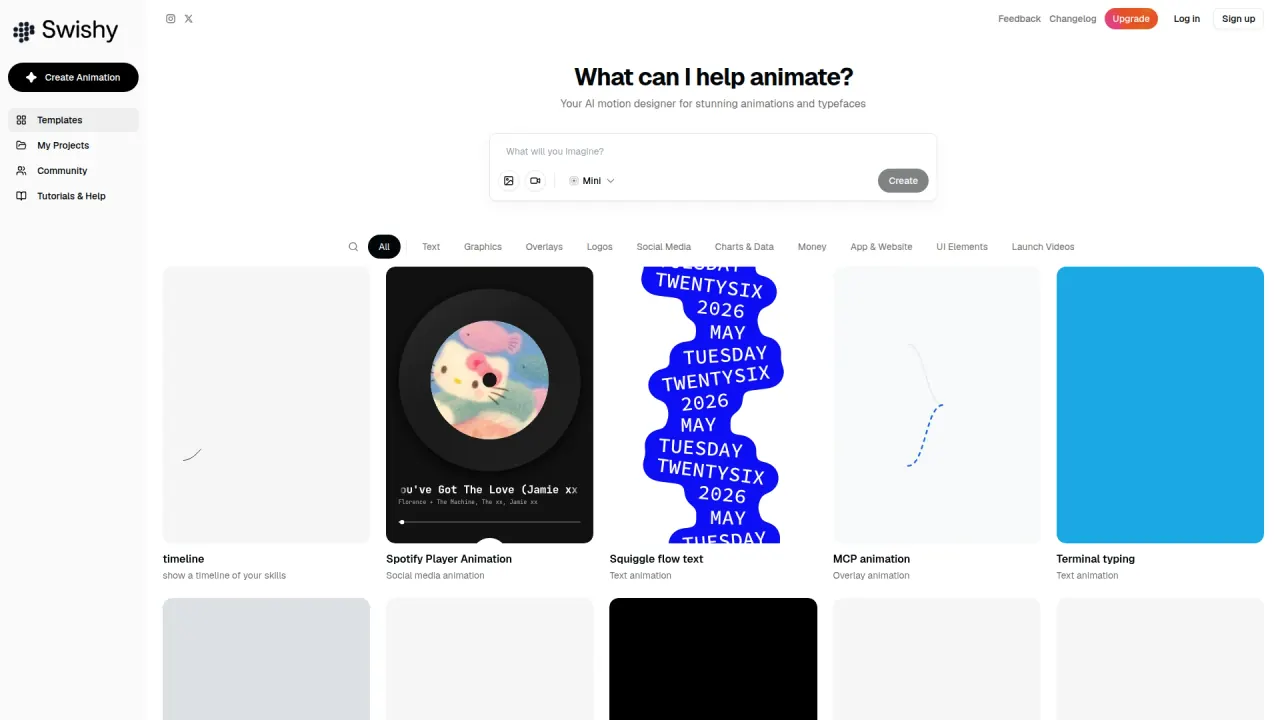
The homepage shows a collection of ready-made AI-generated templates, sorted into tabs for text, graphics, overlays, logos, social media, charts and data, money, app and website, UI elements and launch videos. Public templates duplicate into editable scenes, and community submissions have been part of the gallery since February 2026.
The product is young and its changelog says so: a private release at the end of January 2026, a public beta on 2 February, then community templates, an aspect-ratio picker, a larger open view and a multi-scene mode. The documentation was last updated months ago, and there is no public pricing page at all, so the plan figures below come from the in-app upgrade modal recorded in an independent review.
The output of a generation is motion graphics scene code that renders in the editor, and every colour, font, duration and line of text stays adjustable afterwards. In the independent test that shaped this page, a brief naming a serif face, a gold hex, a three-second runtime and a 9:16 frame produced all four on the first pass, and a word-by-word request came back split into separate editable word slots instead of one text block.
The model fills gaps with its own taste: in the same test an unrequested particle burst arrived in the default blue accent rather than the gold the brief asked for — one hex field away from fixed, but a reminder that the first pass is a draft.
Mini, Starter, Best and Pro are separate models, not speed settings. The app's own configuration routes Starter to Gemini 3 Flash and Best to Claude Sonnet 4.6, with the top tier on Gemini 3.1 Pro Preview, so a run's quality depends on which vendor the tier points at.
Costs are visible before you run: Starter costs one credit per generation, Best five and the top tier eight, while Mini draws none. The counter resets each Monday, and the free plan grants two credits a week for the paid models.
The ledger prints the reset day under the balance. Failure is the weak point: no refund path for a broken run is documented anywhere in the app.
Every scene carries manual controls on the right and an AI chat on the left. The chat edits any part of the animation from short instructions; the panel handles what you would rather not describe in prose, such as a specific hex or a duration in seconds.
Work saves as you go, and a toggle switches back to earlier versions.
Frames come in portrait, landscape and square, so the same scene can be re-framed for a phone, a monitor or a feed without rebuilding it. Transparency is a toggle in the top bar, and the checkerboard you see is a preview that does not appear in the export.
The gallery is broad and category-driven, and duplicating a template is faster than a blank prompt for common formats.
Template search is the weak joint: it matches keywords rather than intent, so a natural-language phrase the generator handles happily returns nothing, and browsing the tabs is the reliable route.
Multi-scene mode turns the tool into a small storytelling machine: four parts, a hook, a problem or challenge, a solution and a call to action, each as its own scene with its own chat and settings. It takes longer to generate than a single scene.
Exports come in MP4, GIF or MOV, each with three quality options, and higher quality takes longer to process. MP4 does not support transparency, so transparent backgrounds are available in GIF and MOV only.
The gates are the practical part of the plan table. On the free plan MP4 runs to 1080p; MOV and transparent export sit on the entry paid tier; 4K, custom fonts, team collaboration and priority support sit on Pro. In the free plan's favour, exported MP4s carried no watermark in the independent test.
The fastest first session is a template, not a prompt. Any public template can be duplicated into a fully editable scene, so open one close to the format you need, change the text and the accent colour, and export.
A text-led vertical clip can cost zero credits: Mini for structure, the panel for polish, MP4 at 1080p for delivery. If you need transparency or 4K, budget for the tier first, because the export dialog stops you at the last step.
The core case is the short vertical clip where the words are the design — kinetic typography for a title card, a quote, a launch line. Text and social template tabs are built around it, and the honest limit is that the model arranges type better than it invents a visual concept from three vague words.
Logo and brand animation is the second: a public logo template duplicates into an editable scene, so a shape-morphing reveal or a spinning mark becomes a colour-and-timing job rather than a build.
UI and product mockups are the third: notification pop-ups, toggle switches, app lists, website reveals. These are the scenes where editable text and a duration slider matter most, because a mockup is usually revised by the product team after the first render.
Data and charts are the fourth. Animated bar charts with staggered entrances, counters and timeline displays are in the gallery, and the panel's per-element controls are what let a real number replace the placeholder without a regeneration.
Launch videos are the fifth and the one multi-scene mode was built for: hook, problem, solution, call to action, each scene with its own chat. It is also where the ceiling shows, because a launch video usually needs a voice, music and a real edit around the animation.
Swishy fits people who write before they design: a founder drafting a launch clip, a marketer producing ten variants of a title card, a course creator who needs an animated lower third without opening a timeline. The product is explicitly pitched as the After Effects alternative for people who never learned After Effects.
It fits teams more narrowly: workspaces exist and the terms describe owners and admins controlling membership, but team collaboration sits on the Pro tier, so a small studio should price the seats before standardising on it.
It fits less well in four situations. If you need a scrubbable timeline and Figma import, a timeline tool is the closer fit. If the job is a full edit with captions and stock footage, a broader editor covers more ground. If you need frame-level compositing or effects, that remains a compositor's territory. And if you need to find a template by describing it, the keyword-only search will fight you.
Swishy runs entirely in the browser, with no download and no hardware requirement beyond an up-to-date Chrome or Safari. The site recommends a desktop for the best experience, and mobile visitors are told to email themselves a link rather than being offered a phone-first editor.
The deliverable is a file: MP4, GIF or MOV, at three quality levels, in portrait, landscape or square. Projects live in the account with autosave and version history, and public templates can be submitted back to the gallery for admin review.
There is no mobile app and no public API. The terms mention third-party services for payment, hosting, analytics and AI infrastructure, but nothing in the documentation describes programmatic access, so Swishy stays a design tool rather than a pipeline component.
Account requirements are light but real: an email sign-up, five onboarding questions and no card. The terms set the minimum age at 13, and free accounts can be suspended after extended inactivity.
Data handling is documented rather than implied. Account details, prompts and outputs are processed to run the service, private project content is not used to train models offered to other customers without explicit consent, and deletion requests are honoured within a commercially reasonable period. Processing happens in the United States and other countries where the vendor or its providers operate.
There is no public pricing page: the /pricing route returns a 404 and the sitemap lists no plans page, so the figures here come from the in-app upgrade modal recorded in an independent review, and the vendor's terms say features, limits and pricing may change over time.
The free tier is genuine: no card, Mini generations that draw no credits, and two credits a week for the paid models. MP4 exports run to 1080p without a watermark, and transparency is reachable through GIF rather than MOV.
Beginner is the entry paid tier at $12 a month billed yearly, or $19 month to month, with 150 AI credits a month and the Starter and Best models. It removes the MOV and transparent-export locks.
Pro is $25 a month billed yearly, or $49 month to month, with 400 credits a month and all four models. It unlocks 4K, custom fonts, team collaboration and priority support, and makes the top model affordable at eight credits a run.
The modal opens with the yearly toggle already selected, so the first numbers you see are annual rates paid up front: $144 for Beginner and $300 for Pro. Listings quoting $19 and $49 are not out of date; they are reading the monthly toggle.
Credits are the second axis. Beginner's 150 a month buys 150 Starter runs or 30 runs of the Best model; Pro's 400 stretches to 50 runs at the top tier. Top-up packs start at 150 credits for $25, the same figure as a month of Pro on yearly billing.
Two billing details matter more. Subscription payments are generally non-refundable once the billing period begins or credits are issued, and the refund policy explicitly excludes unused credits, partially used periods and AI generations that have already run. A failed generation is still a charge, because the credit leaves the account when the model runs, not when it succeeds.
The most useful independent comparison sets Swishy against Jitter, Canva and After Effects, and its verdict is specific: Swishy wins when the brief is a sentence and the deliverable a short text-led clip, because the prompt does the layout and the panel does the polish.
Jitter is the pick when you already design in Figma and want a timeline you can scrub, at the same monthly rate. Canva makes sense when the animation is one asset inside a content workflow you already run there. After Effects remains the answer for compositing and frame-level control, at close to twice Swishy's entry price and with the learning curve Swishy exists to avoid.
A broader editor is the fourth option: if the job includes captions, stock footage and a full edit around the animation, a video editor covers more ground than a motion tool that exports a file and stops.
If you can name font, colour, timing and frame, the editable scene beats a timeline. If you cannot, a template or another tool reaches a usable clip sooner, because a vague brief here becomes on-screen copy rather than a design.
The product works, the free tier is real, and the edges are specific.
Type "cool intro animation" and the app animates those four words. That is defensible for a builder rather than a search box, but a newcomer who types the way they would into a search engine gets a clip of their own prompt, with no warning and no suggestion to add detail.
Generation writes scene code and then renders it, so a syntax slip means no preview at all: a Starter run in the independent test returned raw scene code and a syntax error instead of an animation, and the credit was still deducted. A Fix Errors button appeared, and nothing explained that the run was billable. On a plan that grants two credits a week, one failure spends half of them.
The same failure put raw scene code in front of a user who came to avoid code — rare in a small sample, and the least forgiving way for a no-code tool to break.
Search matches words, not intent, so a phrase the generator handles fine returns nothing in the gallery. Browsing category tabs is the reliable route.
MOV, transparency, 4K, custom fonts, team collaboration and priority support are locked by tier, and the locks appear in the export dialog rather than at project creation: a free user can finish a scene and only then find that the transparent overlay needs GIF or a paid plan.
The independent review found no Trustpilot or G2 listing and no user threads on the usual communities, so the only structured test on record is a single reviewer's session. The terms also warn that outputs may be non-unique, that Swishy does not guarantee originality, and that the user is responsible for reviewing outputs before commercial use.
There is no public price page. According to the in-app upgrade modal recorded in an independent review, Beginner is $12 a month billed yearly or $19 monthly, and Pro is $25 a month billed yearly or $49 monthly. The free tier needs no card.
Generate with the Mini model, which draws no credits, export MP4 up to 1080p without a watermark, and use two weekly credits on the paid models. MOV, transparent export, 4K and custom fonts are locked behind paid tiers.
For text-led clips built from a sentence it replaces the timeline workflow: the output is an editable scene, not a locked render. For frame-level compositing, effects and a scrubbable timeline it is not a replacement, and the vendor frames it as the alternative for people who never learned After Effects.
You retain ownership of your content, including prompts, projects and outputs, while Swishy keeps ownership of its templates and tooling. The terms let you use outputs commercially but warn that they may be non-unique and that you are responsible for checking them before publishing.