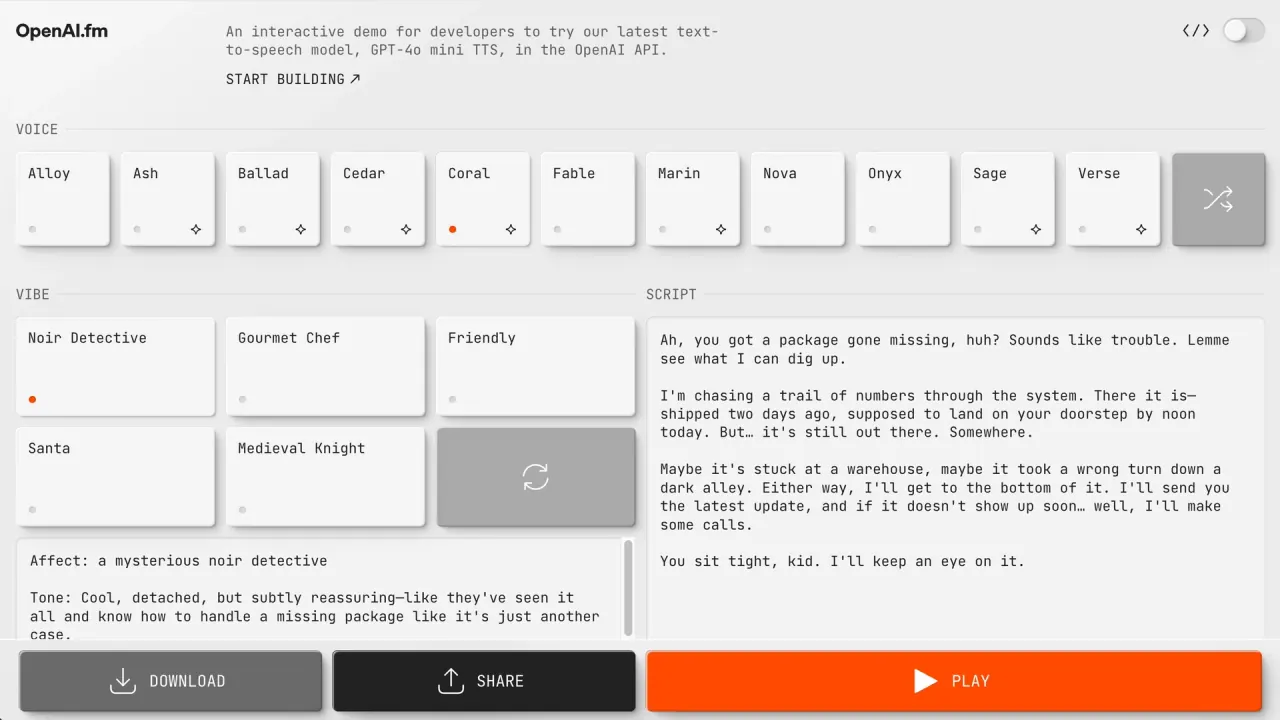

OpenAI.fm is OpenAI's browser demo for its text-to-speech model. Pick a voice, describe the delivery in plain language, paste a script and listen, then move the same request into your own code.
Used this tool? Rate it
Used this tool? Rate it


DeepSeek AI models for chat and API


One Gateway, Every Model, Compensated Failures


Public Codex reset tracker


Personal stories, made into song gifts


One gateway for text and media models


From prompt to production with Gemini


Track public AI usage-limit reset signals


AI image editing from a reference photo
OpenAI.fm is a browser text to speech demo that lets developers hear the GPT-4o mini TTS model before wiring it into a product. The page opens with a voice, a block of delivery instructions and a script already filled in, so the first playback costs one click and no sign-in. It renders speech from text you paste, using voices OpenAI trained rather than voices you upload.
The screen reduces to three decisions: who speaks, chosen from a row of named voice cards; how the voice speaks, set by an editable block of instructions the page calls a vibe; and what it says, typed into a script box with a live character count. Play, Download and Share act on those three choices and nothing else.
The demo has no API of its own: OpenAI's text-to-speech guide sends developers here to audition the voices it lists. The same model reaches your code as gpt-4o-mini-tts, a text-to-speech model built on GPT-4o mini.
One date should shape how much you invest. The model page marks gpt-4o-mini-tts as deprecated, and the speech guide gives a shutdown date of January 6, 2027 for the tts-1, tts-1-hd and gpt-4o-mini-tts models. The migration note points to gpt-realtime-2.1-mini through the Realtime API, which is not a supported model for the speech endpoint: a workflow learned here has a known expiry and a different successor API.
A fresh page shows eleven cards: Alloy, Ash, Ballad, Cedar, Coral, Fable, Marin, Nova, Onyx, Sage and Verse. The endpoint behind the demo counts thirteen built-in voices, so two of them are reachable from code without appearing on this row. OpenAI recommends marin or cedar when quality matters most, and states that the voices are currently optimized for English. The practical consequence: the demo is a good place to compare timbre, and a poor place to judge how the same voice behaves in another language.
Each preset loads a labelled block rather than a single adjective. One preset spells out its intent line by line: "Voice Affect: Calm, composed, and reassuring; project quiet authority and confidence." Other lines cover tone, pacing, emotion, pronunciation and pauses, and every line can be rewritten or deleted.
That structure mirrors what the model accepts: OpenAI's guide lists accent, emotional range, intonation, impressions, speed of speech, tone and whispering as prompt-controlled aspects. You are not picking an emotion from a menu but writing instructions the model interprets, and the preset shows how specific they can be. Trade coverage at launch called the model more steerable than OpenAI's previous speech models, which is the claim this whole page rests on.
The pasted text is the third input, with a counter beside it. The counter is a courtesy, not the limit: the endpoint accepts up to 2,000 input tokens, so short paragraphs fit and a chapter does not.
Audio plays in the browser and saves as a file, enough for a slide deck or a client review. The share control passes a setup rather than a saved library, so the demo is a scratchpad, not a workspace.
The speech endpoint takes three key inputs: the model, the text and the voice. Requests return MP3 by default; the format can switch to opus, AAC, FLAC, WAV or PCM, and OpenAI recommends WAV or PCM for the fastest responses.
Streaming is supported through chunked transfer encoding, so playback can begin before the whole file exists. The guide ships runnable examples across the official SDKs, plus cURL and the CLI, which is why the jump from demo to working prototype is short for a developer and long for everyone else.
The model page lists two dated versions, gpt-4o-mini-tts-2025-12-15 and gpt-4o-mini-tts-2025-03-20, and both carry the deprecated label. When OpenAI shipped the newer snapshot, it reported roughly 35% lower word error rates on Common Voice and FLEURS, more natural output and better custom-voice behaviour, at the same price as before. Pinning a dated snapshot is the only way to keep the behaviour you tested, because the undated name follows whatever OpenAI currently recommends.
Cost tracks both directions: text in and audio out are both billed per million tokens, so a long script and a long render each raise the bill, and the 2,000-token ceiling caps any single request.
The rate-limit table adds one practical check: the free usage tier is not supported for this model, so an API test needs a paid tier. The entry tier allows 2,000 requests and 150,000 tokens per minute; the next tiers rise to 2,000,000 and 8,000,000 tokens per minute.
If a preset that used to sound angry suddenly reads flat, the model rather than your instructions is the likely cause. Developers on OpenAI's community forum reported that the speech API stopped following the instructions parameter after an update, that the output turned monotone, and that switching back to the gpt-4o-mini-tts-2025-03-20 snapshot restored the delivery they had built around. OpenAI's own note on the newer snapshot claims more natural and stable output, so the two accounts describe the same change from different seats: improved stability for some voices, weaker instruction following for others. Pinning a snapshot is the defensive move; treating the vibe block as a stable contract is not.
A support team can paste a real apology script, attach the calm preset, and hear whether the wording survives being spoken. The demo's own sample reads like a contact-centre apology, which makes it a fair test of whether an apologetic register lands or sounds performed.
Creators can keep a short script fixed, walk the voice row and export the take that fits. Because voices are optimized for English, this is the demo's strongest use and the weakest place to judge a bilingual campaign.
The model follows Whisper's language coverage, and the guide lists dozens of supported languages from Arabic and Chinese to Vietnamese and Welsh, while noting that voices remain English-first. A localization lead can hear whether a translated line is pronounceable before commissioning a native session, as long as the expectation is a draft.
The cheapest way to settle a voice argument inside a product team is a shared link to a take. The demo's share control turns a subjective debate into a comparison of two audio files, which is usually faster than another requirements meeting, and that is the whole case for an AI voice generator with a share button.
The demo is a poor fit for anyone who needs a production pipeline with a service-level agreement, for teams that want to clone a specific person's voice, since OpenAI limits custom voices to eligible customers, and for long-form projects, because the input ceiling rules out chapter-length input.
The demo runs in a desktop or mobile browser and needs no account, so it works as a first look on a borrowed laptop; its only output is a file you download or a link you share. Everything beyond the demo is an HTTP request to the text to speech API, with official SDKs and a CLI documented alongside it. Streaming uses chunked transfer, so a client can play before the file completes. There is no offline mode and no local model: audio is generated on OpenAI's side.
The demo itself carries no price and no account requirement, and third-party directories describe it as free to use without signing up. What costs money is the model behind it, and that bill starts the moment you call the endpoint instead of the page.
| Item | Rate | What it covers |
|---|---|---|
| Text input | 0.60 US dollars per 1 million tokens | The script you send |
| Audio output | 12.00 US dollars per 1 million tokens | The speech that comes back |
| Demo page | No listed charge | Browser playback, download, share |
Input is billed at 0.60 US dollars per million text tokens and generated audio at 12.00 US dollars per million audio tokens.
Rate limits decide whether a pilot is possible before price does. The free usage tier is not supported for this model; the first paid tier allows 2,000 requests and 150,000 tokens per minute, and the two tiers above it raise the token allowance to 2,000,000 and then 8,000,000 per minute. For short clips the allowance is generous; for hours of rendered audio, model the token allowance and the per-token price together.
The deprecation changes the cost picture rather than the price sheet: a budget built on this pricing has a fixed horizon and an integration change attached to it.
| Tool | Free allowance | Voice cloning | Billing model | Where it differs |
|---|---|---|---|---|
| OpenAI.fm | Demo free in browser, API free tier not supported | Custom voices limited to eligible customers | Token-billed API | Instruction-driven delivery on a model that retires in 2027 |
| ElevenLabs | Monthly credits on the free plan | Instant cloning from Starter | Subscription with shared credits | Cloning and studio tools on the lowest paid tier |
| Amazon Polly | Standard characters for the first year | Cloned voice free to create | Pay per character | Cloud account and SSML rather than a browser demo |
| Google Cloud TTS | WaveNet characters each month | Instant custom voice at a premium | Pay per character | Wide voice catalogue, heavier setup |
ElevenLabs charges 6 US dollars per month for Starter and includes instant voice cloning from that plan. Polly's neural voices cost 16.00 US dollars per 1 million characters. Google prices Chirp 3 HD voices at 30.00 per 1 million characters; its instant custom voice costs 60.00 per 1 million characters. The free allowances differ as much as the rates: Polly's free tier covers 5 million standard characters per month for the first 12 months. Google's free allowance covers 4 million WaveNet characters per month. ElevenLabs' free plan includes 10,000 credits per month. None ships an instruction-driven demo, which is the reason to start here.
The speech models are deprecated and scheduled to shut down on January 6, 2027. The suggested successor, gpt-realtime-2.1-mini, is not a supported model for the speech endpoint, so migration changes the API workflow, not just the model name. Planning a launch here without a migration line item is the expensive mistake.
The model accepts at most 2,000 input tokens per request. That covers a few paragraphs and excludes a chapter, a long article or a transcript. Splitting a long document into chunks is possible in code, but the demo gives no stitching view, so a producer who needs continuous narration has to build the seams.
OpenAI states that the voices are currently optimized for English, even though the model follows Whisper's broad language coverage. The mismatch is where quality complaints concentrate: a language can be supported and still sound like an accented reading of the text rather than a native performance.
The steerability that the demo is built to show has not been constant. Community reports describe the instructions parameter being ignored after an update and the delivery collapsing into a monotone read, with the older dated snapshot restoring the behaviour. OpenAI's release note for the newer snapshot claims more natural and stable output, so both statements stand: the company improved stability, and some users lost the expressive control they had tuned.
G2 lists OpenAI.fm without a single review, so the only public evidence is the demo's own output rather than a score.
There is no account, no project history and no library of takes. A session ends when the tab closes, and the share control passes a setup rather than a saved recording. Teams that need versioned samples have to keep their own files.
OpenAI's usage policies require a clear disclosure to end users that the voice they hear is AI-generated and not a human voice. The demo will read your script without asking how it will be labelled, so the obligation lands on whoever ships the audio.
OpenAI states that data sent to the API is not used to train or improve models unless the customer opts in, and that abuse monitoring logs are kept for up to 30 days by default; eligible customers can exclude content through Zero Data Retention or Modified Abuse Monitoring, both subject to approval. The demo adds no privacy notice of its own, so API terms govern a pasted script.
The demo page is free and needs no account. The model behind it is not: API calls are billed per token, and the free usage tier is not supported for this model.
No. The demo runs in the browser without a key. You need a key and a paid tier only when you move the same request into your own code.
Not through the demo, which offers OpenAI's built-in voices only. Custom voices exist in the API but are limited to eligible customers and require a consent recording and a matching sample.
Up to 2,000 input tokens, which is several paragraphs of narration, not a chapter; the counter is a rough guide rather than the enforced limit.
The demo grants no rights of its own; use of generated audio follows OpenAI's terms for API output, and published audio must disclose that the voice is AI-generated.
gpt-4o-mini-tts stops working on January 6, 2027. The suggested replacement runs through the Realtime API, not the speech endpoint, so plan for a workflow change rather than a one-line model swap.
English, because the voices are optimized for it. The model covers dozens of languages, but a supported language is not a native-sounding read.