
Toolso.AI
Toolso.AI
All ToolsCategoriesTrendingLatest ToolsPricingBlog
Toolso.AI
Toolso.AI
Toolso.AI
Toolso.AI

Discover the best AI tools to boost your productivity

GitHubGitHubTwitterX (Twitter)YouTubeYouTubeTikTokEmail

Popular Categories

  • AI Writing
  • AI Image
  • AI Video
  • AI Coding
  • More Categories

Explore

  • Latest Tools
  • Popular Tools
  • More Tools
  • Submit Tool
  • Pricing

About

  • About Us
  • Contact
  • Blog
  • Changelog

Legal

  • Cookie Policy
  • Privacy Policy
  • Terms of Service
  • Refund Policy
© 2026 Toolso.AI All Rights Reserved
Limited timeLimited-time offerFeatured Listing24h priority review · No backlink · 30 days featured$29.90then $59.90Price rises to $59.90 after Oct 31Ends in--:--:--Submit now
  1. Home
  2. All Tools
  3. Voice Speech
  4. TTSMaker
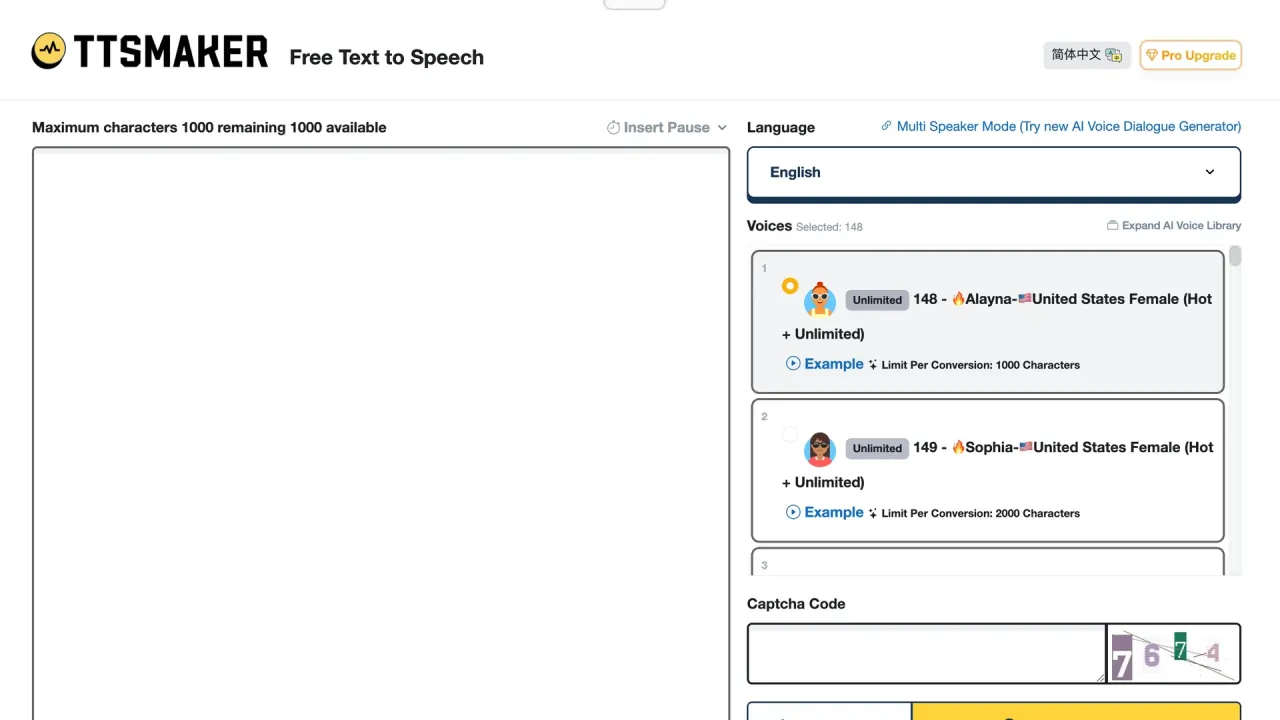
TTSMaker interface preview
TTSMaker logo

TTSMaker

TTSMaker turns pasted text into downloadable MP3 or WAV narration across 100+ languages, with a permanent free tier, SRT subtitle export and commercial rights granted by its published licence.

Voice SpeechVoice GenerationAudio Generation#Text To Speech#Multilingual#Subtitles
Try for Free
Saves
Visits
Views
Pricing
Freemium
Published
Sep 18, 2026
Domain
ttsmaker.com

TTSMaker Product Information

Try for Free
Tool Information
Saves
Visits
Views
Pricing
Freemium
Published
Sep 18, 2026
Domain
ttsmaker.com

Featured Tools

Related Tools

Try for Free

What is TTSMaker?

TTSMaker is a browser-based free text to speech service that turns pasted text into an audio file you can play or download. It runs on two surfaces: the open converter at ttsmaker.com and TTSMaker Pro at pro.ttsmaker.com, which adds paid character quotas, a multi-speaker dialogue editor and API access.

It is a converter, not a studio: text in, MP3 or WAV out, with no editing timeline and no voice cloning entry point in any page checked for this review. The vendor's own summary calls it a free text-to-speech tool that provides speech synthesis services and supports multiple languages, and the site FAQ describes the same thing as an AI voice generator.

Two things separate it from most free tiers here. The free plan is not a trial: TTSMaker will offer a permanent free version for users, reserving the right to make adjustments to relevant policies in the future. And commercial rights ship with free output rather than with an upgrade — the licence grants a non-exclusive, irrevocable, worldwide, and perpetual license to use audio files generated via its services.

The cost sits on the other side: files are deleted within minutes, and the free tier carries captchas and ads.

Core features

Voice library and per-voice conversion limits

The catalogue is advertised at over 600 AI voices across 100+ languages. The detail most listings omit: the ceiling on a single conversion is set per voice, not per account. The voice list shows entries marked Limit Per Conversion: 20000 characters next to others marked Limit Per Conversion: 300 characters, so picking a voice also picks how much text fits in one pass.

A second tier is the group flagged as unlimited: every plan including the free one lists 20+ unlimited voices, whose output does not draw down the weekly character allowance. That pool is a policy, not a guarantee: the vendor reserves the right to adjust the number of voices, availability (adding or removing voices), synthesis speed.

Voice controls

  • Emotion presets, on a subset. Voices tagged with an emotion label expose styles such as newscast, cheerful, angry and whispering. The vendor counts around 20 AI voices that support this feature; free accounts get an upgrade prompt instead.
  • Speed, volume, pitch. Rate runs 0.5x to 2.0x, volume 10% to 200%, pitch -50% to +100%; free-form custom values are paid-only.
  • Pauses. A pause marker can be dropped anywhere, up to ten seconds each, but the count is tiered: the free version supports up to 50 insertions and the Pro version up to 300.

Output formats, subtitles and background music

Audio exports as MP3, OGG, AAC, OPUS or WAV, and MP3 has standard and high-quality settings; pick high quality and the size of the converted audio file will usually be twice as large. Two extras are unusual at this price: the converter generates a timed subtitle file for the audio just produced, and background music can sit underneath, where the free version can upload up to 3 BGMs, which expire after 6 hours, against 20 uploads on paid plans. A listen-only mode previews a voice while only converting the first 50 characters.

Multi-speaker dialogue generation

A separate dialogue editor builds conversations from blocks, each with its own language and voice, then converts the text in each block into speech and merges all blocks into a single audio file. The free ceiling is tight: up to 5 dialogue blocks, 200 characters per block, generate up to 5 dialogues per week. Paid accounts open this to 300 dialogue projects, each supporting up to 100 dialogue blocks, and the free version does not include a save feature for them.

Guide

Converting a first block of text

  1. Paste the text into the converter box. The published tutorial sets the baseline: the free limit is 20000 characters per week, some voices support unlimited free use.
  2. Pick the language group, then the voice, checking its per-conversion ceiling against your script length.
  3. Open More Settings for speed, volume, pitch or paragraph pauses.
  4. Convert, download immediately, and export the subtitle file in the same session — the link expires with the audio.

Inline pause markers beat editing silence afterwards; they take a duration in milliseconds, and the API exposes the same mechanism with a range of 0-10000 ms, default 0.

Calling the API

The v2 API has two main calls: one returns the voice list with IDs and per-voice ceilings, the other creates a conversion order and returns a URL to a temporary file deleted after 2 hours rather than the audio itself, so build the download into the same job.

Use cases and workflow examples

The vendor's scenario list centres on three jobs, each meeting a concrete product constraint:

  • Short-form video narration. YouTube and TikTok voiceover is the flagship case, and attribution is the commercially relevant part: audio may be used on platforms such as YouTube, TikTok, Podcasts, and crediting the source is not mandatory, and you are not required to attribute the source.
  • Audiobook and long-form reading. Practical only with a long-text voice; a 300-character voice would split a chapter into dozens of renders.
  • Language-learning material. The dialogue editor fits, because each block switches language and voice — enough for two-speaker listening drills in one file.

Developers add a fourth pattern: third-party Python wrappers on a public code-hosting platform, one describing itself as a Python library that allows you to interact with the TTSMaker API to convert text to speech.

Who is it for

A good fit if you are:

  • A creator who needs clean commercial rights without paying. The licence lets users freely use, modify, reproduce, distribute, and display the audio content for both personal and commercial purposes, without paying additional fees or obtaining further permissions.
  • An occasional user whose volume fits inside 20,000 characters a week, or who works within the unlimited-marked voices.
  • A teacher or student building listening material across many languages, or a developer wanting a cheap text to speech API for low-frequency batch jobs.

A poor fit if you are:

  • Producing audio where voice realism is the product. The independent review that recommended it still described output that can sound a bit artificial from time to time while remaining clear and intelligible.
  • Dependent on stored assets, or running high-volume automation on premium voices, because the unlimited pool is excluded from API traffic.
  • Bound by procurement rules requiring a current privacy policy and a support SLA, since neither is firmly established in the published pages.

Platforms

  • Web only, two surfaces. Everything runs in the browser; no desktop client, mobile app or extension appeared in the pages checked for this review, so every conversion needs a connection.
  • Interface languages. The converter ships localized entry points on dedicated paths for dozens of interface languages, which is a separate thing from the languages the voices cover.
  • REST API, paid tiers only. Access is gated: subscribe to either a PRO or Studio level subscription as Lite level does not support this feature.
  • One key, one request per second. Each account is permitted to create one API key, which can be deleted and re-created if necessary, and the QPS limit per key is set to 1 request per second.
  • Request ceiling. A single call accepts text up to a maximum length of 20,000 characters.

One inconsistency matters: the same documentation page says the temporary URL will be valid for 24 hours and, further down, that the file is deleted after two hours. Plan against the shorter figure.

Pricing

Billing counts characters, not minutes, because audio duration depends on language, voice, and speed settings. The spread that decides which plan you need: 300,000 characters may produce about 6.9 hours of English audio, 4.3 hours in Spanish, or over 14 hours in Chinese due to language differences. The plan sheet was captured in its annual-billing state; the monthly-billing tab did not render in this pass, so only the annual figures below are confirmed.

PlanAnnual billingCharacter allowanceMax per conversion
FreeFree20,000 per week500
Lite$119.88 per year, save $36300,000 per month10,000
Pro Mini$227.88 per year, save $60600,000 per month20,000
Pro Max$299.88 per year, save $961,200,000 per month20,000
Studio$1296 per year, save $3846,000,000 per month30,000

Tiers also differ on ads and captchas, pause-insertion limits, hosting and background-music slots, invoicing, and email response targets that tighten from 72h on Lite to 24h on Studio. API access starts at Pro Mini, and add-on character packs are sold separately to subscribers.

  • Nothing rolls over. The character quota for users cannot be accumulated, and the monthly character quota for users will reset at the beginning of each billing cycle.
  • Cancellation keeps access to term end. After cancellation you will continue to have access to all premium features until the end of your current billing cycle.
  • Refunds are narrow and single-use. An untouched subscription can be refunded within 30 days after deduction of fees; past 500 characters of use the window closes, partial refunds are not available, and TTSMaker allows one refund for a single account before purchases are restricted.
  • Payments run through a merchant of record. Credit card information is never stored by TTSMaker Pro, prices are quoted in US dollars, and EU businesses must enter a VAT-ID during checkout because it cannot be applied afterwards.

TTSMaker alternatives: when to look elsewhere

The most useful comparison comes from outside the vendor. An independent editorial roundup of AI voice generators named TTSMaker its free pick, citing commercial use allowed even for free voices and more than 600 voices across 100 languages, with 20 available for free without limits — while judging that the interface feels basic compared to ElevenLabs or Speechify. It wins on rights and price, loses on polish.

Three situations argue for a different tool: when the voice is the deliverable and judged as performance; when voice cloning is required, which no page checked here offers; and when a pipeline needs durable hosted assets rather than an expiring link.

One warning: third-party AI tool directories carry stale numbers here, with one listing still showing over 200 AI voices, contradicted by the current official plan sheet.

Limitations

Free-tier and quota ceilings

  • Weekly allowance and per-conversion ceiling are separate limits, and the plan sheet sets the free ones at a 20,000 characters per week limit and a maximum 500 characters per conversion. The two official pages disagree, and this review does not resolve which one is enforced.
  • Free sessions include captcha and ads, with low priority email support.
  • Exceeding a paid allowance slows work rather than stopping it: the user will automatically be switched to slow synthesis and queued processing until the start of the next billing cycle. Even the top high-speed allowance is capped, at a maximum of 10 million characters per cycle.
  • Automation is excluded from the unlimited pool: unlimited voice options are not available for API calls, and API usage will be counted towards the normal synthesis order character quota.

How long files and text are kept

The most important operational constraint, and three official pages give three different numbers:

  • The commercial licence says the service temporarily stores audio files and associated download links for up to 30 minutes, and does not retain input text or generated content beyond that window.
  • The terms of service say input records and converted output audio content are stored for no more than 24 hours, solely to facilitate downloads by users.
  • The Pro privacy policy describes submitted text as automatically erased after 60 minutes based on user settings.

The plan rows fit a plan-dependent difference — 30 minutes of history free, 24h paid — but the licence and privacy texts are not scoped that way, so it stays unresolved. Either way, download the audio and the subtitle file the moment a conversion finishes.

What the policies collect, and what they do not say

  • Automatic collection is broad, covering IP addresses, geolocation data, unique device identifiers, browsing and search history. Sharing with service providers has one explicit boundary — we do not sell your information — and users can request access, review, update, rectify, or delete it.
  • Whether submitted text trains speech models is not addressed on any page checked here, and the terms carry a tension worth noticing: one paragraph says under no circumstances will we disseminate any user input or output audio content to third parties, while another grants rights to make your information and content available to third party providers.
  • Age rules differ: the terms define minimum age as 16 years, raised where local law requires an older age, while the Pro privacy policy says services are not directed at children under 13 and that users under 16 need parental consent.
  • The free site's privacy policy carries an effective date of August 15, 2022, says it is based on a commercial policy template, and still contains an unfilled placeholder where a link belongs.

Legal terms worth reading before committing

  • Ownership is split: TTSMaker does not claim ownership of the specific audio content generated by users but retains all rights to its underlying technology, voice models, and systems, so users get usage rights, not copyright ownership. Input stays yours, because the content and information you submit to TTSMaker remains owned by you.
  • The service carries no warranty, is provided on an as is and as available basis, and sends disputes to arbitration under the laws of the State of Wyoming with a class-action waiver.
  • Downstream platform rules sit outside the vendor's responsibility. The liability clause treats third-party platform policies as a user-borne risk, and the vendor's own example of that risk is YouTube refusing to allow monetization of synthesized videos — a vendor characterisation, not a verified platform rule, because that platform's current policy was not checked here. Either way, commercial rights granted here do not override a distribution platform's synthetic-voice policy.
  • Support expectations differ between pages: one gives free support an average response time of 7 working days, another says subscribed users are prioritized with responses in 24–72 hours, while others may expect replies within 7–15 business days.

FAQ

Q1. How long do I have to download my audio?

Minutes, not days. The figures disagree — 30 minutes in the licence, 60 minutes in the Pro privacy policy, 24 hours in the terms — and all are short enough that downloading immediately is the only safe habit. An independent review made the same point, warning that TTSMaker only stores your files for 30 minutes before deleting them.

Q2. Can I get an API key on the free or Lite plan?

No. API access requires a Pro or Studio subscription, one key per account, one request per second. Free and Lite accounts have no API support.

Q3. Can I cancel and get my money back?

Cancellation is available at any time, with access to the end of the billing cycle. Refunds are narrower: within 30 days if no characters were used, within 7 days of deducting the fee if fewer than 500 were used, no partial refunds, and one refund per account before purchasing is blocked.

Know a Similar Tool?
If you know other great AI tools, feel free to submit them to us