
Nim puts video, image and voice models into a single credit-based workspace, with 500+ templates, lip sync, upscaling and an MCP plugin that lets chat agents drive it.
Used this tool? Rate it
Used this tool? Rate it


AI image editing from a reference photo


Multi-model image studio, free to start


Build random generators, share them free


Anime art, powered by a million community models


Real-time answers, images, and code in one chat


Community-Trained Models for Art, Video and Characters


Browser-Based AI Photo Editing and Image Generation


Product photo editing for online stores
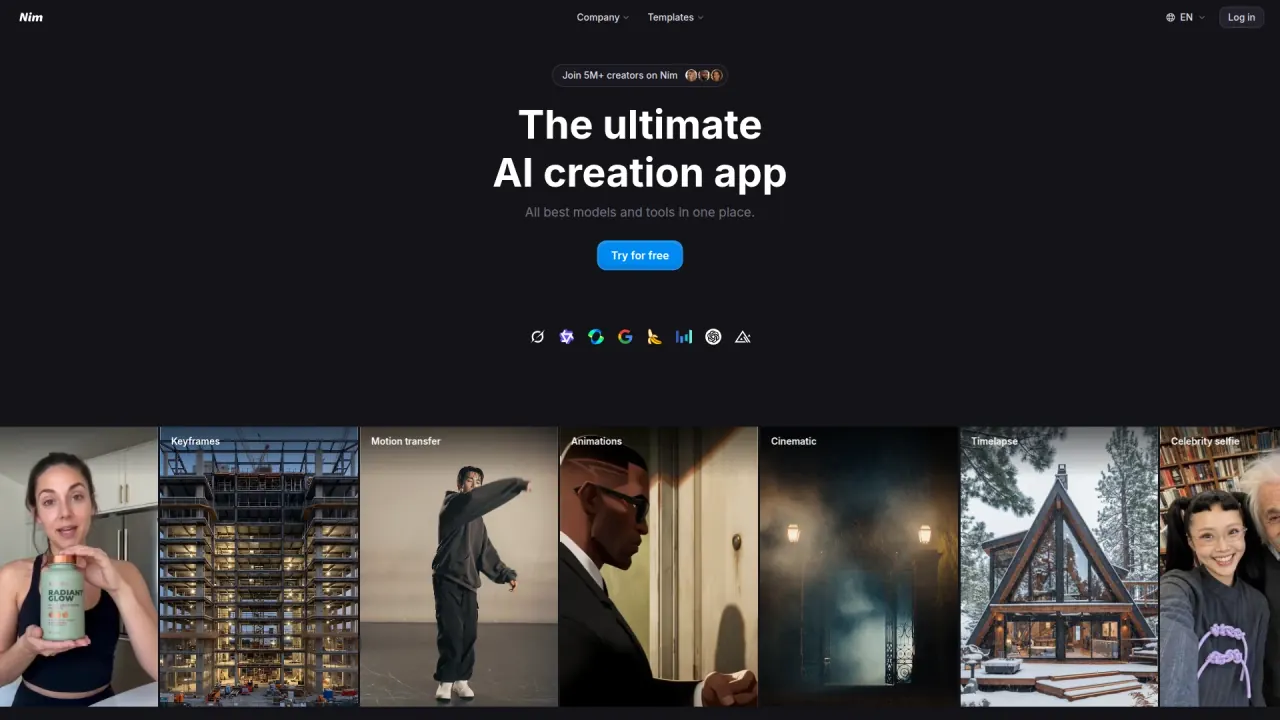
Nim is an AI video creation app that puts many third-party generation models into one workspace behind a single credit balance. The company describes it as "an all-in-one AI video creation app with world's best models in one place" and says it launched in January 2025 and has since grown to 5M+ users.
It ships in three forms: a self-service web app, an MCP plugin for Claude and ChatGPT/Codex for creating inside those assistants, and an ad production service for large brands where Nim acts as an agency. Its landing page states 500+ templates, 50+ models and tools, and a "$0.02/s Starting price".
The model roster is the product: because you choose the engine per generation, output depends on the model you pick — which is why every tool name carries its own credit price, and why story pricing is calculated from the image and/or video models chosen during creation or animation.
Nim's own tool list covers the whole path from still image to finished cut:
Several tools name the model they run on. The Keyframes tool runs on Kling O1 at 115 credits per generation, Add sound offers a Mirelo SFX option, and Upscale is offered as a Standard model with 1x, 2x and 4x multipliers. For lip sync, the tool page exposes a Model field alongside speech source and speech text inputs but names no underlying model, so the engine behind that step is not stated on the pages checked.
The 500+ AI video templates form the largest catalogue, grouped into categories such as Tools, Premium, Business, Photoshoots and Viral.
The MCP plugin adds creative skills to your assistant: product creatives, long videos, hooks, characters, locations, UGC, voices and multi-angle. Long videos are described as "Videos up to 5 minutes long with consistent characters and settings", and the worked example shows a Seedance 2.5 generation at 1:1 and 10s with audio enabled.
Nim publishes a worked procedure for lip sync:
Input quality decides the outcome. The guide asks for a frontal or near frontal face with an unobstructed mouth and even lighting, plus a single clean, intelligible speech take with no clipping and minimal competing sound; profile angles, hands over the mouth and heavy motion blur are the failures it warns about. Logos, packaging text and fine detail should stay out of the speaking region, because generated mouth movement can alter anything inside that area.
The create workspace exposes a model selector, aspect ratio and duration for text to video and image to video runs, with a default view showing Seedance 2.0 Mini at 16:9 and 5s, and export encoding is checked in an external editor.
Nim's catalogue and blog organise work into named, repeatable jobs.
Nim fits creators and marketers who want to compare several engines from one account rather than hold separate subscriptions. One editorial review describes it as a broad AI video workspace for creators wanting multi-model video experimentation, and its fact sheet places the product with solo makers, small businesses and mid-market teams.
It also fits teams already working inside an assistant: the MCP plugin suits people who would rather describe a job to an agent than open a new dashboard. Large brands that buy hundreds of ads a month are served by a separate agency-style production line rather than the self-service plans.
It suits high-volume output best on the top tier plus purchased credits — the pricing page says that if you generate a lot of videos, Max plus credit packs give the best price per generation.
Nim runs as a web app, an MCP plugin for chat assistants, and an agency-style service for brand campaigns.
Accounts are tied to Google or Apple. Logging in with a second provider on the same email address links both login methods to one account, so projects, history and subscription stay in one place; a mismatch in email address, including Apple's "Hide my email" relay address, creates a separate account instead.
Nim meters work in credits rather than minutes. Every model and tool carries its own credit cost, shown next to the tool name, and credits are deducted when you click "Generate"; in rare failures credits are refunded, and a Usage history page records what was spent.
Representative video generation costs:
| Model | Credits | Model | Credits |
|---|---|---|---|
| Seedance 2.5 | 250 | Kling 4.0 | 240 |
| Seedance 2 Fast | 150 | Kling 4.0 Flash | 100 |
| Veo 3.1 | 150 | Runway | 110 |
| Veo 3.1 + Sound | 300 | Hailuo 2.3 | 50 |
| Wan 3.0 Prime | 280 | Grok Imagine | 50 |
| MiniMax H3 | 25 | LTX-2.3 Fast | 30 |
Representative image generation costs:
| Model | Credits | Model | Credits |
|---|---|---|---|
| Nano Banana Pro | 25 | Seedream 5 Pro | 20 |
| GPT Image 2 · Low | 8 | Recraft V4.1 Pro | 40 |
| GPT Image 2 · High | 40 | Ideogram 4.5 · High | 40 |
| Flux 2 | 3 | Higgsfield Soul · High quality | 40 |
| Nano Banana 2.1 | 8 | Gen-4 Image · High quality | 20 |
A new user can take a limited-time "3 Days for $5" offer that includes 2,000 credits for three days with full Pro features; after the trial the subscription automatically renews to the Pro plan at $30 per month, and cancelling before renewal lets the credits expire at the end of the three-day period. The subscription terms describe free and paid plans with details under the user menu, so the tier prices are not displayed in the pages checked.
Payments run through Stripe and accept credit cards, bank transfers, Google Pay and Apple Pay in most countries, with taxes applied by location. Cancellations take effect at the end of the current billing period; contacting support within 7 days of an accidental annual purchase can switch the account to a monthly plan. Credit pack purchases are non-refundable, refund requests are reviewed individually and are generally not eligible once a subscription has been activated or used, and annual subscriptions are generally not eligible for partial refunds on early cancellation.
One editorial comparison, checked in September 2026, reports monthly allowances of 1,700 credits on Starter, 4,500 on Pro and 12,000 on Max, with 4K output and commercial use from Pro up, and shared credits plus a collaborative workspace on Team. The same review reports no free plan at all, describing access as trial or paid only — which does not match the vendor's own description of free and paid plans in the subscription terms. Both accounts are set out here rather than reconciled.
If you need a single dedicated engine, a different video family, or a fixed price for avatar-led or camera-controlled work, credible options sit outside a multi-model aggregator.
An editorial ranking of AI video generators, updated in November 2026, places Nim 175th of 241 with an editor score of 3.0 out of 10. The same page says its rankings can carry paid placements, so treat the ordering as one editorial opinion rather than a measurement.
Its alternatives list names, with its own characterisations: Google Veo for advanced video generation, Runway for professional generative workflows, TikTok Symphony Creative Studio for TikTok-compliant social video, Kling AI for 4K and storyboarding, InVideo AI for marketing video creation, HeyGen for avatar-led business videos, Synthesia for enterprise avatar and training video, Pika for creative effects and image animation, Higgsfield for camera-controlled creation, Hailuo AI for short multimodal clips, and Vidu for reference-driven short video.
A separate AI tool directory independently lists Higgsfield, Artlist, Media.io and Digen AI among the five free alternatives to Nim, alongside HeyGen, Runwayml, Pollo AI, Unlucid AI, Agent Opus, PixVerse, Vidu and Deevid.ai, marking which offer a free tier or trial and which are paid only. On those two listings, dedicated single-family tools are chosen when one consistent output matters more than choice, while Nim's own position is the multi-model aggregator with a shared credit balance.
Nim's boundary conditions, from its own pricing and terms pages:
Two product limits sit outside the contractual ones. Creations are auto-deleted after 60 minutes in the create workspace unless you turn that off, and the exact in-app export-resolution controls are not confirmed, so export geometry and encoding are checked outside the tool.
User feedback is thin and mostly negative. A small product-level review sample of 10 reviews, rated 2.1 out of 5 and labelled Poor as captured on November 27, 2026, contains repeated complaints about customer support not responding and about billing after cancellation requests, plus one report that a model advertised as available showed "coming soon" inside the product. At this sample size it is a directional signal rather than a verdict.
Yes. The Explore feed shows public creations, but a sign-in prompt with Google and Apple options appears where more creations are unlocked, and the MCP plugin requires you to sign in to your Nim account after installing it.
The pricing page lists Nano Banana, Seedream, Veo, Kling, Seedance, Sora, Grok, Wan, LTX, Hailuo, Flux, Z-Image, Ideogram, HeyGen and ElevenLabs, and the landing page shows a strip of Seedance, MiniMax, Wan, Veo, Kling, Grok, Nano Banana, GPT Image, Flux and Runway.
Only on a plan that explicitly permits commercial use; on all other plans the outputs are limited to personal and research purposes. Pro and Max downloads are watermark-free, Free and Starter downloads carry a Nim watermark.
Neither. Unused subscription credits expire at the end of each billing cycle, credit pack credits expire 6 months after purchase, and Nim currently doesn't offer an unlimited plan.
Yes, through the MCP plugin, which installs from the desktop device and authorises through a local OAuth callback on 127.0.0.1. After that you can generate from the mobile app as well as the desktop device.
Opting out is offered only if your plan includes that option; if you do not select it, or your plan does not include it, the company may use your content to train, enhance and improve its AI models. The privacy policy lists training its AI models among the purposes for which de-identified, aggregated or anonymised data is used.