
Flyne AI brings image and video models such as Nano Banana, Seedream, VEO 3, Kling and Hailuo into one credit-based workspace, with a free tier, monthly plans and one-time credit packs.
Used this tool? Rate it
Used this tool? Rate it


AI image editing from a reference photo


Multi-model image studio, free to start


Build random generators, share them free


Anime art, powered by a million community models


Real-time answers, images, and code in one chat


Community-Trained Models for Art, Video and Characters


Browser-Based AI Photo Editing and Image Generation


One workspace for every AI model
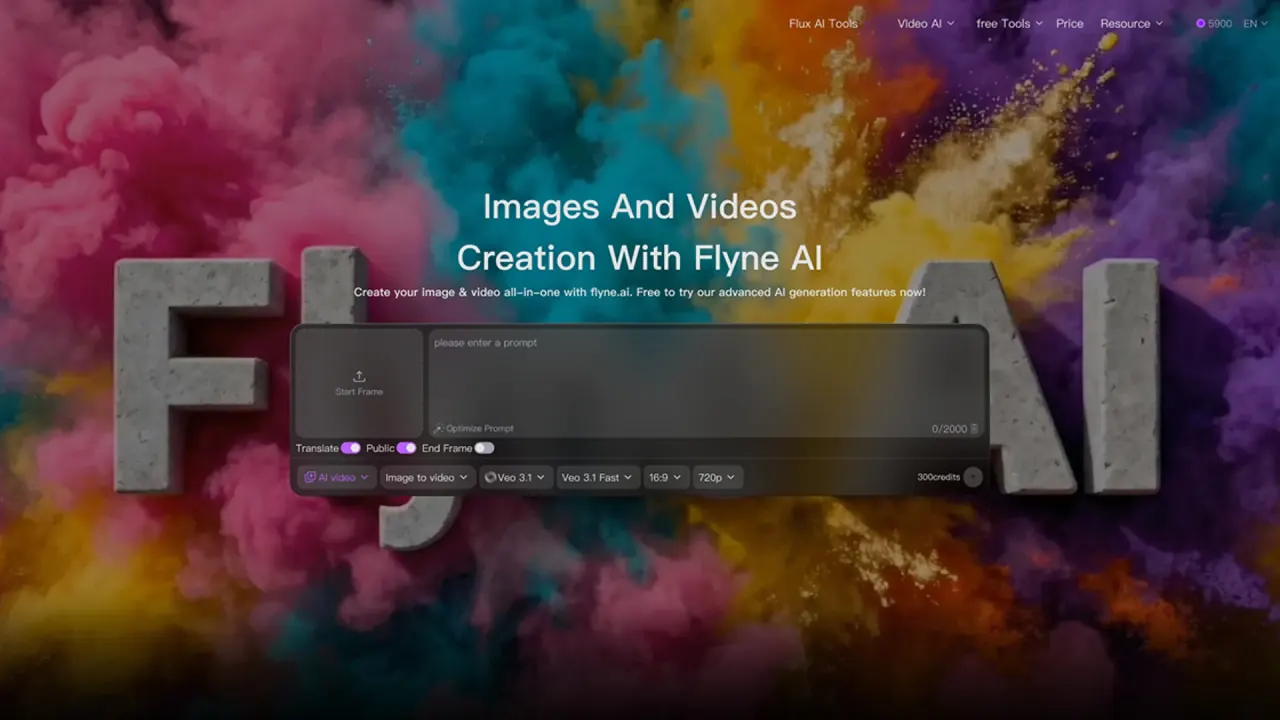
Flyne AI is a browser-based image and video generation platform that places a large roster of third-party models behind one account and one credit balance. The company introduces the service as "an AI-powered image and video generation platform," and its homepage presents Flyne AI as an images and videos creation agent.
No proprietary model is named in the pages reviewed. Image work is routed to models such as Nano Banana, Seedream, GPT Image and Qwen Image, while video work is routed to Google VEO 3, Kling, Hailuo and a longer list of providers. A user chooses a model, writes a prompt or uploads a reference image, adjusts the controls that model exposes, and submits the job; the result arrives in a shared creation workspace rather than in a separate application per model.
Two structural facts shape how the product is bought. Credits are not a fixed number of outputs: the price list quotes a credit cost for each image model, and video generation is priced per clip, so the same balance buys very different amounts depending on the model and the media type. And the value of the platform lies in breadth, in testing several model families without opening several subscriptions, rather than in fine-grained control over one model.
A free tier exists and runs on starter and check-in credits. Paid access is sold as three monthly plans and four one-time credit packs.
The image generator accepts text prompts and reference images and exposes a model selector above the prompt box. The interface documents uploads in jpeg, png, webp, heic and heif, a 3,000-character prompt limit, a default 1:1 frame at 2K output, and a public visibility toggle.
Model coverage is the product's main differentiator. Models named on the image page include Nano Banana, Seedream, GPT Image and Qwen Image, and the pricing table lists a per-image credit price for each one. Style controls are described in terms of photorealism, illustration and concept art, with lighting direction and intensity as separate adjustments.
The video generator turns text or a still image into a clip and supports an optional start frame. The upload control accepts png, jpeg and webp, the prompt box allows 2,000 characters, and the default settings shown in the interface are 720p and 16:9.
The page describes the model line-up as an "advanced AI video creator with high-quality video models including Google VEO 3, Kling, Hailuo, etc." VEO 3.1 is the model shown by default in the generator panel and is presented with native audio and prompt adherence as its selling points. The product page also advertises clips generated from text or images with audio.
A separate product video generator starts from a product photograph instead of a blank prompt. The page states that users can "explore twenty templates, including Product Spin, Push-in Close-up, and presenter-led styles," and each template card carries a preview so the framing can be judged before credits are spent.
Compatible templates accept a second reference image of a presenter. The prompt is pre-filled from the chosen template and remains editable, so the setting, camera movement and product action can be rewritten for each item.
AI Canvas is a node-based workspace in beta in which prompts, reference media and generation steps stay on one infinite canvas. The product describes it as a place to "connect prompts, images, and videos in one workspace," then generate, compare variations side by side and continue from the strongest result without leaving the canvas.
Text, images, videos and audio can all be placed on the canvas as inputs. Connections between prompts and generation nodes keep the direction of the workflow visible, which matters when a project mixes several models and several iterations of the same shot.
A prompt assistant suggests rewritten or expanded prompts. The homepage describes it as an intelligent prompt suggestion tool that offers tailored recommendations and guidance for richer outputs, and the generator panels include an Optimize Prompt control next to the input.
Prompt entry is multilingual. The video page states that prompts are supported in Chinese, English and multiple other languages, which widens the usable prompt vocabulary for creators who do not write in English.
The workflow differs between free-form generation and template-based video, and the interface exposes the same three decisions in both cases: which model to use, what reference media to attach, and how much resolution or duration the credits should buy.
For product video the order changes: pick a template first, then upload the product photo and an optional presenter reference, then edit the pre-filled prompt. The template defines the motion, and the prompt defines the setting and the product action. A third-party walkthrough of the product video generator notes that clips are short by default, at five seconds and 480p in the settings it saw, and that higher quality likely costs more credits.
The published use cases cluster around short-form and commercial visual content rather than long-form production.
Flyne AI fits people whose work requires several visual formats and more than one model family, and who prefer one bill to several.
Commercial use is part of the paid proposition. The terms grant a licence to use the service for personal and commercial purposes, and paid plans list commercial rights and private generations among their inclusions. The free tier is positioned for evaluation rather than production.
The product is a weaker fit in three situations. Teams that need a predictable number of outputs per dollar will struggle, because credit consumption varies by model and media type. Buyers who already know which single model they want may find a direct subscription simpler to forecast. And the service is closed to people under 18: the terms set the minimum age at 18 or the age of majority.
Flyne AI is delivered through the browser. Generation, the model selector, the canvas and the history all run inside the website, and no desktop installer appears in the pages reviewed.
Whether a native mobile app exists is not settled by the pages reviewed. One third-party directory describes the service as online only and states that offline functionality is not supported and an internet connection is required. The official pages reviewed do not document a native app, an API or an integration list, so a buyer who needs programmatic access should treat that as unconfirmed.
Submitted jobs are followed in the Create workspace and finished clips are reviewed in Video History, so the browser tab is also where results are kept and revisited.
Flyne AI sells credits through three monthly subscriptions and four one-time packs. Every price below is the list price displayed at capture time, with the discount badge shown next to it; a banner on the site reads "Limited Time: 20% OFF."
| Plan | List price | Credits |
|---|---|---|
| Free | $0 | 40 on sign-up plus 20 per daily check-in |
| Standard | $9.99 / month (20% off $12.49) | 5,000 per month |
| Popular | $19.99 / month (40% off $33.31) | 13,000 per month |
| Professional | $29.99 / month (45% off $54.53) | 21,000 per month |
All three monthly plans include a fast queue, 365-day history, private generations and commercial rights.
The free tier is explicitly limited: low-quality generations, five uses of the free tools per day, a shared generation queue and 15-day history. Premium is valid for one calendar month from the payment date, and the pricing page states that credits are valid for 100 days.
One-time packs remove the subscription commitment. The four packs are $19.99 for 10,000 credits, $49.99 for 26,000, $99.99 for 56,000 and $199.99 for 112,000, and each carries the same premium feature list as a monthly plan.
What a credit buys depends on the model. The published image price list runs from 5 credits for image colorisation to 100 credits for a 4K Nano Banana Pro image, with Seedream 4.0 at 30 credits and virtual try-on at 90 credits per image. Video is priced per clip, so the same balance produces a different number of clips depending on the model.
Payments are processed by third-party payment providers, with Stripe named on the pricing page. Subscriptions can be cancelled at any time. Refund requests must be made within three days of purchase. Accounts that have consumed significant computational resources are excluded from refunds regardless of timing.
An affiliate programme pays 20% on a referred user's first valid paid order and 10% on later valid orders placed within 60 days of registration.
Because the platform resells access to models rather than owning them, the realistic alternatives fall into two groups: going directly to the provider of the model you actually need, or buying capacity on Flyne without a subscription.
The video generator lists Google VEO 3, Kling and Hailuo side by side in one account. A buyer who has already settled on one of those families can compare that provider's own subscription against Flyne's credit price for the same model, and the per-image and per-clip credit table makes that comparison possible without a trial. The site also advertises Seedance 2.0 series output at 720p from $0.57 per video.
The second alternative is commercial rather than technical. The one-time packs at $19.99 to $199.99 provide credits without a recurring charge, which suits occasional projects where a monthly plan would expire unused.
The restrictions that matter most are in the terms and the credit rules, not in the feature pages.
No statement about watermarks or output attribution appears in the pages reviewed.
Yes. The free tier costs $0 and includes 40 credits for new users plus 20 credits for each daily check-in. It is limited to low-quality generations, five uses of the free tools per day, a shared generation queue and 15-day history.
It depends on the model. Image generation is priced per image, from 5 credits for colorisation up to 100 credits for a 4K Nano Banana Pro image, with Seedream 4.0 at 30 credits. Video is priced per clip; Seedance 2.0 series output at 720p is advertised from $0.57 per video.
The terms grant a licence to use the service for personal and commercial purposes, and paid plans list commercial rights among their inclusions. Commercial use is therefore tied to the licence and to the plan tier rather than to the free tier alone.
Pornography, sexually explicit material, sexual deepfakes, non-consensual intimate imagery, content that sexualises anyone under 18, and content that infringes intellectual property are all prohibited, and the rules apply to prompts, uploads and generated outputs across every mode.
Refund requests must be submitted within three days of purchase. After that period refunds are not supported, and accounts that have used significant computational resources are not eligible regardless of timing.