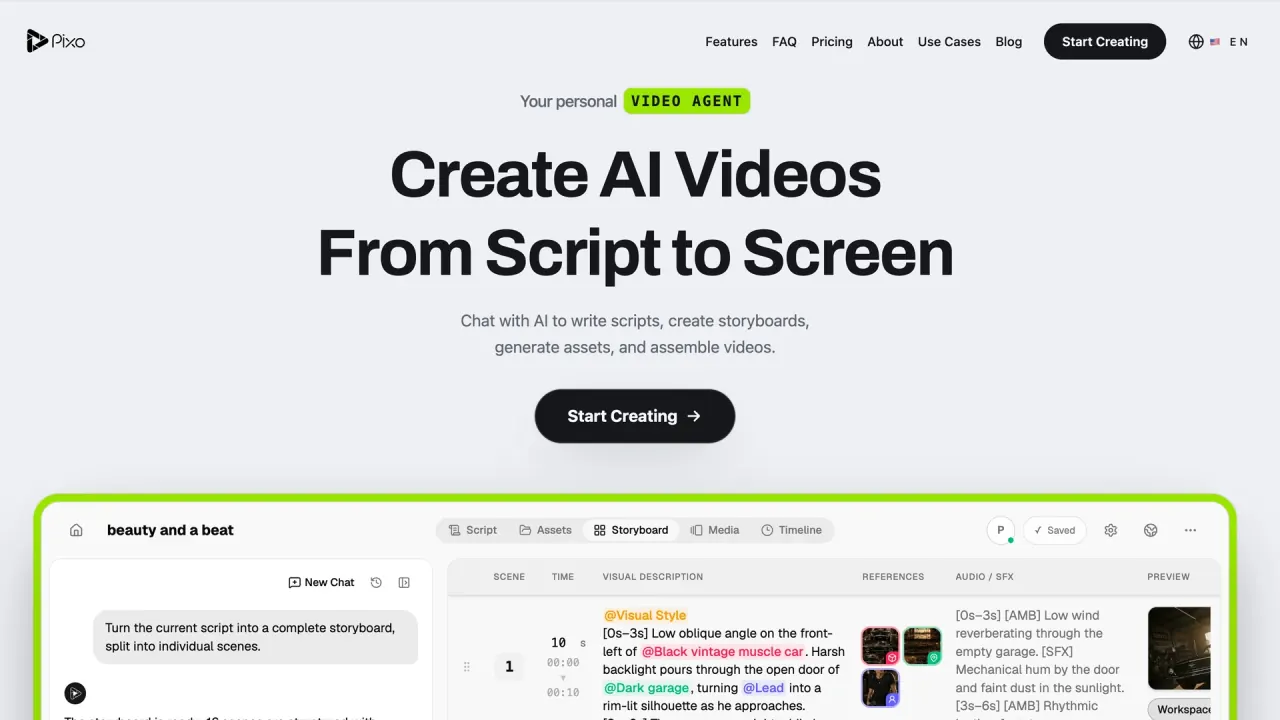

Create multi-scene videos with an AI director, reusable character assets, per-shot model choices, and a shared storyboard and timeline. Pixo combines generation and editing for stories, music videos, and marketing content.
Used this tool? Rate it
Used this tool? Rate it
Pixo is a web-based AI video creation platform combining scripts, image and video generation, audio, editing, and export. Its AI Director turns a conversation into a script and storyboard, generates media for individual shots, and assembles a finished cut. The project structure connects multiple scenes, assets, and a timeline.
A brief can specify the idea, audience, style, and length. Pixo says its agent develops a script and production plan, while users can revise individual scenes, references, and sound cues without rebuilding the whole video.
Pixo combines an AI video generator with a storyboard editor and reusable assets. The agent can operate the project while the creator directs individual shots. These are documented capabilities; generated results still require review.
Pixo says the agent operates the same editor, assets, and timeline as the user. Creators can provide a manual storyboard for it to complete, or modify a shot during automated work.
The asset library has character, scene, and general types, including props and logos. Character assets hold front-facing, side-profile, and expression or outfit references for reuse across shots.
A saved character can be invoked with @character-name; Pixo says its reference images are then used in generation. Users can upload references, and the Director can create and maintain the library.
Updating references affects new generations; previously rendered shots remain unchanged. Pixo also describes automatic checks for issues such as face or wardrobe drift, with the user deciding whether to regenerate, accept, or adjust.
Pixo describes mixing video models within a storyboard and choosing a model per shot, with the same approach for images, voices, and music. Model-specific duration, resolution, and reference-input limits still apply.
The timeline combines clips, voiceover, music, and sound. Pixo describes selective regeneration, full-video preview, clip rearrangement, and independent video-track and audio-track volume controls. The finished cut assembles these parts.
Each panel can carry its own video, reference image, voiceover, and sound effects. Pixo describes independent panel revision: regenerate a clip, change its prompt, or swap its model before assembly.
A reference image, animated shot, voice track, and music track are separate generation tasks. The selected models and settings determine their credit costs; storyboard length alone does not define the production cost.
An AI music video starts with a finished track and creative direction. Pixo accepts WAV, MP3, OGG, or M4A files up to 20 MB, then uses a storyboard and editable timeline to develop the visual sequence.
Music-video projects can enable singing lip sync. Pixo describes clear vocals and visible, front-facing performance footage as the strongest inputs. Performer, location, and style references can be reused across the storyboard, and an individual shot replaced.
Pixo markets the creation of multiple ad variations for A/B testing. The agent can develop scripts and visuals and apply changes across scenes. The reviewed descriptions do not demonstrate a measured conversion increase.
The AI Twin workflow is positioned for the user or a consenting subject. It includes audio-driven character animation, multimodal video, speech, voice design, and consent-based cloning, using an authorized portrait, approved script, authorized voice, and optional permitted motion reference.
Examples include explainers, internal messages, fictional scenes, and recurring characters. Pixo's workflow calls for documented permitted use and a disclosure plan for synthetic media.
Public project links can have optional passwords, and projects can be shared as community templates. A distribution link and shared editing are separate capabilities. The reviewed public help and Director descriptions do not define individual permission roles or demonstrate their enforcement in a signed-in session.
The product fits creators who want to direct a sequence through its script, assets, panels, models, audio, and timeline. Automation operates within that structure; review remains part of the documented workflow.
The reviewed export description does not establish that an external editor receives the whole editable project, asset library, or collaboration state.
Pixo advertises 200 signup credits with no credit card required. The Free card lists about 50 images, three projects, one team member, and one concurrent generation. Public video routes require a paid plan and sufficient credits; free credits do not establish free video access.
The following USD prices were captured on October 16, 2026. Annual monthly equivalents are charged as the stated yearly total; Monthly is a separate billing choice.
| Plan | Monthly billing | Annual monthly equivalent | Annual charge | Credits shown | Projects | Team members |
|---|---|---|---|---|---|---|
| Free | $0 | Not applicable | Not applicable | 200 | 3 | 1 |
| Basic | $12.90/month | $9.90/month | $118.80/year | 1,000 | 10 | 1 |
| Pro | $49.90/month | $39.90/month | $478.80/year | 4,200 | Unlimited | 5 |
| Max | $239.90/month | $199.90/month | $2,398.80/year | 22,000 | Unlimited | Unlimited |
Basic lists a 1080p ceiling and two concurrent generations; Pro lists 4K and five, and Max 4K and ten. A model can have lower limits. The paid cards estimate “up to ~” 11, 50, and 261 videos respectively, rather than guaranteeing that many finished multi-scene projects.
Captured promotional badges advertise up to 55% off, alongside struck-through reference amounts. These establish the displayed offer, without proving historical sale prices or a permanent discount. Static USD offers corroborate the Monthly amounts; static cards also reproduce annual prices and charges.
One-time packs list 1,000 credits for $15, 2,000 for $25, and 3,000 for $40, with “no subscription” and “credits never expire.” The refund policy conditions non-expiry on an account in good standing. Video routes separately require a paid plan; buying a pack alone is not documented as unlocking video.
Costs depend on model, resolution, and duration. The FAQ illustrates roughly 50–250 credits for a five-second HD video and 1–6 for an image, rather than fixed rates for every model. The terms say costs are displayed before generation and may change with pricing or new models.
Plan credits reset at renewal and normally do not roll over unless otherwise stated; purchased credits have a different expiry rule. The FAQ describes buying packs or waiting for the next monthly refresh when credits run out. Requested upgrades and downgrades take effect at the next billing cycle.
Subscriptions are prepaid and renew automatically. Cancellation in billing settings or the Stripe portal stops future renewals, while the plan and included credits last through the current period. Ordinary prorated refunds and credit-pack refunds are excluded, with legally required exceptions applying to both.
Pixo may refund duplicate charges or demonstrable billing errors at its discretion, or where law requires. Requests must be submitted within 14 days; the response target is five business days, and approved refunds use the original payment method. The request window is not an unconditional money-back period.
Enterprise lists custom pricing, SSO, dedicated support, and an SLA, without a standard public price or the service-level commitments themselves.
Pixo combines those production concerns with conversational project operations, approval modes, and per-shot model choice. The reviewed evidence does not support a universal ranking of output quality, speed, credit efficiency, or finished-video reliability.
A long-form project assembles multiple shots; it does not extend a model’s individual generation limit. Pixo also says third-party model availability, quality, and capabilities may change without notice.
Users retain ownership of created content under Pixo’s terms, while granting it a limited processing license to provide the service. Its FAQ permits commercial use on paid plans, subject to each underlying model provider’s terms. Users remain responsible for laws and third-party rights; ownership wording does not guarantee an output is free of others’ rights.
Pixo prohibits harmful deceptive manipulated media, CSAM, rights infringement, and impersonation without explicit consent. Digital-person and voice-cloning guidance calls for authorized portraits and voices, documented permission, and disclosure where synthetic media could mislead viewers.
A public community showcase, “UNASHAMED (Full Play),” was described by its creator as “Rated NC-17” and “Adults only” as captured on October 16, 2026. This establishes the published description and accessibility, not the explicitness of its imagery. The reviewed acceptable-use text does not expressly prohibit all adult content.
The privacy policy says the service is not intended for under-13 users, or under-16 users in the EEA. These intended-user limits do not establish age checks on community pages or suitability of all hosted content for every permitted age.
The Free card estimates image output from 200 credits; public video routes require a paid plan and sufficient credits.
Existing shots stay as rendered. Updated references apply to new generations, without automatically rerendering existing clips.
No. The policy describes discretionary refunds for duplicate charges or billing errors and preserves applicable legal rights. Ordinary prorated refunds and credit-purchase refunds are excluded except where law requires.
