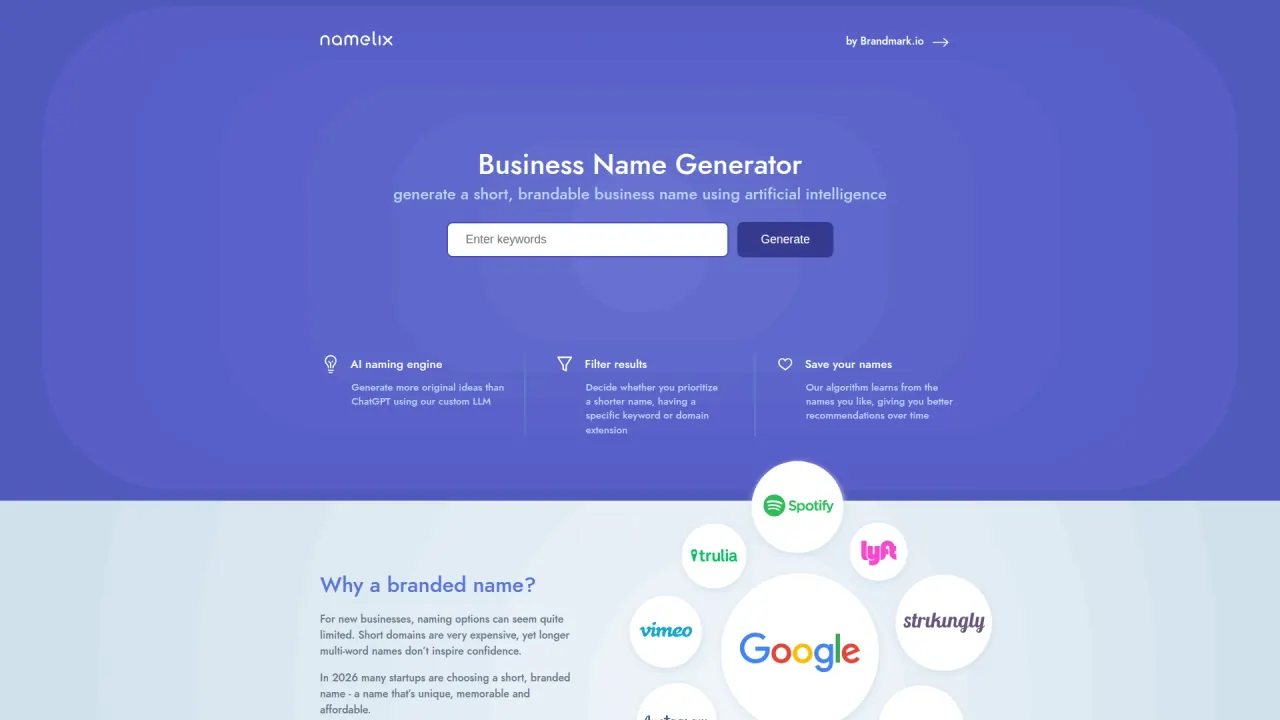

Namelix turns a one-line business brief into lists of short, brandable names, checks the domain extensions you select, and screens candidates against trademark registers. Name generation is free; logo files come from Brandmark's one-time packages.
Used this tool? Rate it
Used this tool? Rate it

Track AI budgets, cash returns and portfolio decisions


AI image editing from a reference photo


Multi-model image studio, free to start


Natural AI photo editing for portraits and projects


AI assistant for writing, analysis and tasks


From a prompt to a deck, site or doc


Build random generators, share them free


Anime art, powered by a million community models
Namelix is a browser-based business name generator that uses generative AI to turn keywords and a one-sentence business description into short, brandable name ideas. The homepage describes it as a tool to generate a short, brandable business name using artificial intelligence. The page presents the product as "by Brandmark.io".
Work happens in three places: a generator at namelix.com/app/ that takes a name style, a randomness level and brand inputs; a domain availability panel attached to each candidate; and a trademark screen attached to a candidate. Names can be saved while browsing, and later suggestions lean toward the ones you keep.
Logos are a separate step. The Namelix page invites you to "Create a unique, professional logo for your business" and links to Brandmark.io instead of rendering a finished logo inside the namer. Domain registration is likewise handled outside the generator, through a register action rather than a checkout on Namelix.
The tool is built for comparison rather than for a single answer: you generate a batch, keep the plausible names, discard the rest, and run another pass with a different style or randomness level. That loop, not one perfect suggestion, is the product's working model.
The feature set splits into three jobs: producing names, narrowing them, and checking what stands behind a candidate.
The company describes its engine as a custom LLM that will "Generate more original ideas than ChatGPT". That is a vendor comparison, not an independent benchmark, and it says nothing about how good any individual name is. Namelix also draws a line between itself and tools that "combine dictionary words to make longer names". Its stated output is short, branded names that are relevant to the business idea, which reads as coined or lightly modified words rather than two-word descriptions.
The style selector is the first decision in the flow. Seven named styles are offered, each with an example: brandable names such as Google and Rolex, evocative names such as RedBull and Forever21, short phrases such as Dollar shave club, compound words such as FedEx and Microsoft, alternate spellings such as Lyft and Fiverr, non-English words such as Toyota and Audi, and real words such as Apple and Amazon. Auto and All styles sit alongside them.
The examples are the company's own, and they show the range the menu is meant to cover: invented words, two-word phrases and dictionary words all appear in the same list. A style is therefore a shape constraint, not a quality setting; it decides whether the batch reads as coined, descriptive or borrowed from another language.
Three levels control how far results drift from the brief. Low is described as "Less random. The most direct name ideas", Medium as "Balanced. More creative results", and High as "Random ideas. More varied results". The page presents these as three positions on one dial and leaves the trade-off to the user: direct names are easier to justify, varied names are easier to make distinctive.
Two optional settings narrow output before generation starts. One field takes "Words, prefixes or suffixes that should not be generated (separate with commas)", useful for blocking a competitor's stem or a syllable you dislike. The other sets a maximum length preference. Length is a real constraint for brandable names because the domain has to fit beside the name, and capping letters is faster than sorting long results afterwards.
Domain availability can be restricted to the extensions you care about. The generator lists thirteen: .com, .co, .io, .ai, .app, .org, .net, .ca, .co.uk, .fr, .nl, .ch and .eu. Fewer boxes means a faster list but a narrower view of what is free; checking all thirteen gives the widest picture and the most noise.
Each name carries a Domain availability panel. The panel is where a naming session turns into a shortlist: names whose chosen extensions are already taken can be dropped before you build a brand around them.
A separate panel screens a name against trademark registers. It checks live marks on the selected register. The domain page runs the same check under a "USPTO trademark search" label. This is a register lookup attached to a candidate name, not a clearance opinion, and the panel says so in its own words.
Candidates can also be reviewed by an in-app AI feedback panel. Its warning is explicit: "AI generated feedback may not be accurate!" The comments are a second opinion on positioning and memorability, and they sit in the same panel area as the factual checks, which makes the distinction worth keeping in mind.
Logo work is delegated to Brandmark.io: the Namelix page links out with "Try Brandmark.io", and the preview sits beside the name you picked. The preview is the free part; downloadable files are sold as packages.
A session follows a fixed order, and that order explains why results change so much between runs.
Results live in three views: Create New Names, Browse Names and Saved. Browsing is for scanning the wider set and for going back to an earlier batch; Saved is the shortlist that survives the session. One is exploration, the other is memory.
The menu separates seven ways of building a name. Brandable names are coined words in the pattern of Google or Rolex; evocative names point at a feeling or benefit, as RedBull and Forever21 do; short phrases put common words together, like Dollar shave club; compound words join two words into one, as FedEx and Microsoft do; alternate spellings twist a familiar word, the pattern behind Lyft and Fiverr; non-English words borrow from another language, as Toyota and Audi do; and real words use an existing dictionary word, like Apple and Amazon. Running the same brief through two styles is more useful than rerunning one style twice.
Namelix is aimed at the moment before a brand exists. The company's framing is that "many startups are choosing a short, branded name - a name that's unique, memorable and affordable". The tool is built for that case: an app, a product line, a studio or a newsletter that needs a name it can own rather than a phrase that describes its category. The work is to describe the business in one sentence, try two or three styles, compare saved names, and check the extensions that fit the launch; the output is a batch of brandable business names rather than one answer.
The Domain Search Engine starts from the other end. It is described as the place to "Find your perfect domain name. Fresh domains daily". Each result carries a Register domain action, so a name found here leads to a registration step rather than to a saved shortlist. That order suits a founder who has decided the .com matters more than the exact name, or who is browsing among names added to the list each day.
Saved names are the working file. Because recommendations shift toward saved names, a session becomes a preference loop rather than a single query: a second pass with High randomness after ten saves looks different from the first, and the shortlist becomes a record of what you rejected as much as what you kept.
The trade-off the company names is explicit: "Short domains are very expensive, yet longer multi-word names don't inspire confidence." Namelix sits between those two costs, which is why its output skews short and coined. That positioning also explains the fit: it is strongest when the name has to be ownable and domain-friendly, and weakest when the name has to explain the business at a glance.
Namelix runs as a web application at namelix.com/app/. The generator, the saved list and the trademark screen are views inside that page.
The domain tools live on a separate page, namelix.com/domain-search/, with its own search field and filters. Coverage is set per name rather than globally: the extension list in the generator and the register choice in the trademark panel are both set per candidate.
The two surfaces are separate pages with their own controls, so a session moves between the generator and the domain search rather than living in a single dashboard.
The page title describes Namelix as a free AI-powered naming tool, and no Namelix-branded subscription, credit pack or per-name price appeared in the pages reviewed. The paid step is the logo: Brandmark, the logo maker linked from Namelix, sells one-time packages.
| Package | Price (one-time) | What the page lists |
|---|---|---|
| Basic | $35 | Logo files in PNG and vector format |
| Designer | $95 | Logo source files, unlimited design revisions, brand guidelines, one-page websites, business card designs, social media designs, presentation designs |
| Enterprise | $195 | Everything in the designer package, up to 10 fully original hand-crafted concepts, font download |
Brandmark adds that there are "No monthly charges" and that the purchase includes copyright for commercial and personal projects. Both statements describe the logo files, not the names Namelix generates. Brandmark also advertises that you can "generate unlimited logos for free" before buying, which places the free/paid line at file download rather than at generation.
Domain registration is not priced on Namelix. The Domain Search Engine shows a Register domain action and a saved-domain counter, but the registration price is set at the registrar that opens from that action, and the pages reviewed do not quote it.
Read the logo tiers by what you need to leave with. Basic delivers finished files, enough for a site header or a social profile. Designer moves the deliverable up a level: source files, brand guidelines and a set of templates turn one logo into a small identity kit. Enterprise adds original hand-crafted concepts and a font download, which matters when the mark has to be unique rather than assembled from a template.
The budget question is therefore two-part: naming costs nothing on Namelix's own pages, and the logo is a one-time purchase whose entry price covers PNG and vector files.
The trademark panel states its own limit: "This is a quick screen, not legal advice — have an attorney clear the name before committing." A clean result therefore means the selected register showed no live mark in that search, not that the name is free to use.
Domain labels are not reservations. Taken names in the Domain Search Engine are marked Unavailable, and the pages reviewed do not describe any hold or reservation step between seeing a name and registering it. A label reflects the check shown for that name at that moment.
Rights language in the reviewed pages is limited to the logo purchase: Brandmark promises "Full copyright included / For use in commercial and personal projects" for its files. No comparable statement about generated names appeared on the Namelix pages reviewed.
The Domain Search Engine describes its listings as fresh daily. That is a statement about new names being added, not an explanation of which data source the availability check uses or how often a particular result is refreshed, and the Namelix pages reviewed do not give one.
Name generation is presented as free: the page title calls Namelix a free AI-powered naming tool, and the pages reviewed list no Namelix-branded subscription. Logo files are not free; they are sold by Brandmark in one-time packages starting at $35 for PNG and vector files.
Yes, through the Domain availability panel attached to each name and through the extension checkboxes in the generator. The panel reports on the extensions you select, and taken names can be marked Unavailable. The pages reviewed do not describe the check's data source or refresh interval.
It runs a register screen, not a clearance search. The panel screens live marks on the selected register, and the domain page labels the check USPTO trademark search. The panel calls itself a quick screen and not legal advice.
The pages reviewed do not say. Copyright language on the Brandmark pricing page covers logo purchases, not names, and Namelix does not present its trademark screen as clearance. Whether a name can be used or registered is a separate legal question the tool does not answer.
Seven named styles plus Auto and All styles: brandable names, evocative names, short phrases, compound words, alternate spellings, non-English words and real words, each shown with an example such as Google and Rolex or Apple and Amazon.
The generator invents names from a brief and then checks the extensions you select. The Domain Search Engine works the other way around: it lists domains, described as fresh daily, with a Register domain action on each row.