
MakeSong turns a written brief or your own lyrics into a complete song with vocals, then lets you extend it, split out stems or build a music video in the same browser tab.
Used this tool? Rate it
Used this tool? Rate it


Multi-model image studio, free to start


Community-Trained Models for Art, Video and Characters


Personal stories, made into song gifts


One gateway for text and media models


Multi-model AI video and image generation in one browser workspace


Prompt-Based Images, Edits and Video


Chat Your Way to a Finished Video


Edit, caption, and generate video in one place
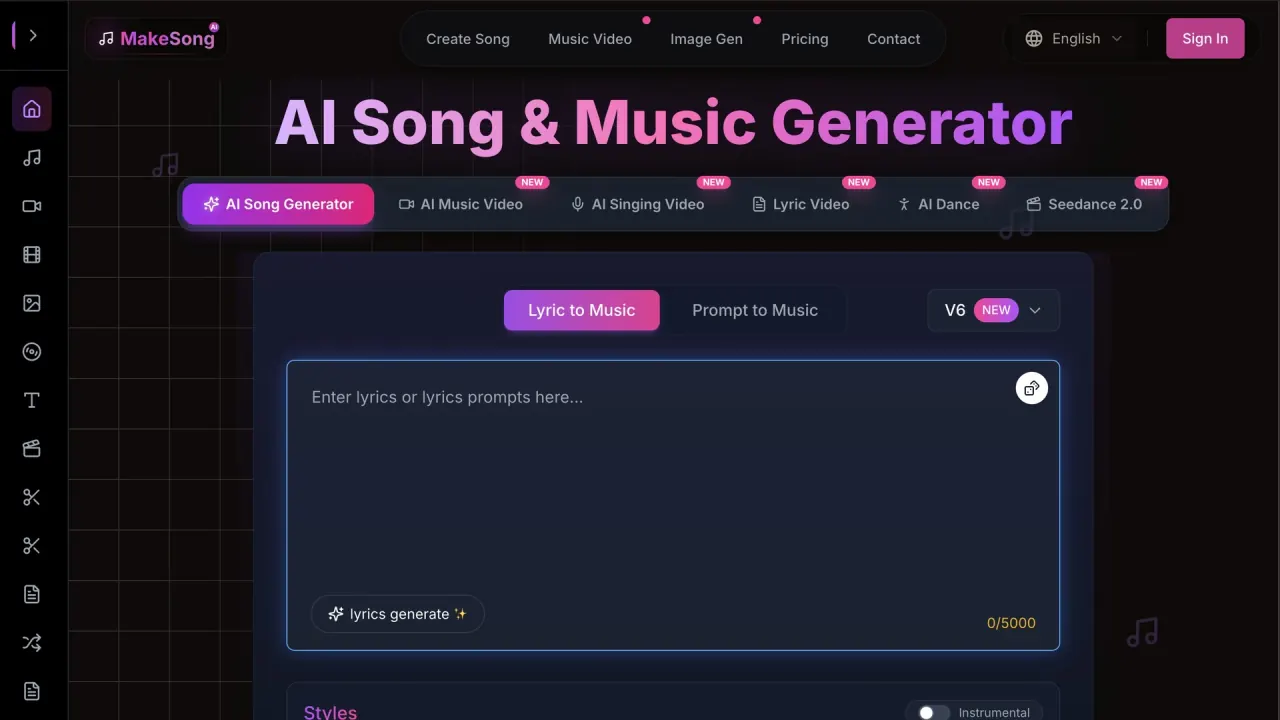
MakeSong is a browser-based AI music service that turns a written description or a set of lyrics into a finished song with vocals. The published terms describe it as taking music themes, lyrics or related musical elements as input and generating a song from them, and the site describes text to song and lyrics to song paths inside one generator screen. MakeSong is provided by Aimake Labs LLC, whose published contact address is in Sheridan, Wyoming, United States.
The generator screen is where most of the product lives. A lyrics box accepts up to 5,000 characters, a separate field takes an instrumental description, and the same panel exposes style, mood, voice and tempo selectors plus a duration and creativity control. Generation is metered: the site states that one generation costs 3 credits, and credits are sold in monthly bundles rather than per song.
Around the generator, MakeSong bundles utilities that usually sit in separate subscriptions: a vocal remover that splits a song into karaoke and acapella tracks, a 12-stem splitter, a lyrics generator, a beat maker, and tools that turn a song into a music video, lyric video or dance video. All run in the browser on one credit balance.
Two input modes share one panel. Description mode takes a plain-language brief, with the site's own example being "A energetic summer dance track", and turns it into a complete single; lyrics mode takes a pasted lyric sheet and asks for style, speed and singer before generating. The lyrics field holds up to 5,000 characters, and the page says the system understands verse and chorus structures automatically.
A separate lyrics generator drafts lyrics from a theme, keyword or emotion before they go into the song generator, and style prompts, a genre list and an artist-style prompt library are published as their own pages.
Songs are described as complete arrangements with intro, verse, chorus and outro rather than loops, and the site says no stitching is needed. Length is where the pages disagree. The lyric-to-song page states that lyrics are supported up to 5,000 characters with "high-quality music up to 8 minutes", and the text-to-song feature block repeats a maximum of 8 minutes. The FAQ further down that same text-to-song page, however, says MakeSong "supports generating full songs up to 4 minutes long". Both figures are published by the vendor and are reported here as they appear.
Extension is separate from generation. The lyric-to-song FAQ states that generated music can be extended, "supporting extensions up to 16 minutes long", so a track built from several extensions can run well past the length of a single generation.
The generator exposes genre, mood, voice and tempo selectors, with male, female and duet AI singers. The site lists pop, rock, hip-hop, jazz, R&B, country and electronic among the styles it can produce, and the text-to-song page also claims multi-language vocals. Instrumental mode drops the vocal entirely, which is the route to background music for video, games or podcasts.
Instead of regenerating a whole track for a small fix, MakeSong offers section replacement: the FAQ states that any 8–16 second segment can be regenerated with new lyrics or new vocals while the rest of the track stays as it is. Extend, cover and section replacement appear in the entitlements of all three paid plans, so they are not premium-only.
The vocal remover accepts MP3, WAV, M4A, AAC, FLAC and OGG files up to 100MB, and the page states that no login or payment is needed. Processing is quoted at about 10 seconds for a standard song, after which the user gets two tracks: a karaoke version with the voice removed and an acapella version with only the voice. The tool reports the key and BPM of the uploaded song, and the page says uploaded files are deleted automatically once processing finishes.
The page also accepts a pasted link instead of a file, and its YouTube FAQ says a copied link is handled the same way. The free claim applies to this separation utility, not to song generation, which is credit-metered.
The stem splitter separates a song into up to 12 stems — vocals, backing vocals, drums, bass, guitar, keyboard, percussion, strings, synth, FX, brass and woodwinds — and outputs 320kbps MP3. Uploads are capped at 50MB, processing is quoted at 1–3 minutes depending on song length, and the page names Hybrid Transformer Demucs as the model behind the separation.
Pricing inside the tool is split by depth: the basic mode returns 4 stems and is free for 3 songs, then costs 2 credits per song, while the 12-stem Pro mode costs 20 credits.
A separate workspace turns a song into visuals: music videos are quoted as up to 5 minutes with beat-matched cuts, and lip-sync singing videos as up to 10 minutes. Users pick a track from the library or upload audio, choose 720p or 1080p, upload up to 7 reference images of at most 10MB each, pick a 16:9, 9:16 or 1:1 ratio, and can add a prompt of up to 3,000 characters. Lyric video, LRC generation, mashup and dance video sit alongside.
Every paid plan includes MP3 and WAV lossless downloads, private generations, commercial use and a downloadable license, plus the V6, V5.5 and V5 models. Premium adds more concurrent work — 4 running jobs at once.
MakeSong's pages position the output for production jobs rather than for listening.
MakeSong fits people who want a finished song and are willing to work inside a template of style, mood and voice choices. The site states that no music theory or DAW knowledge is needed to go from a sentence to a track.
It fits less well in three situations. The first is anyone who needs installed software: the site describes the platform as fully web-based, and its mobile answer points to a phone browser rather than an app. The second is anyone who needs bar-level arrangement control, because the exposed controls are genre, mood, voice and tempo rather than a timeline. The third is anyone who needs uninterrupted availability: the terms warn that the service may be temporarily unavailable for maintenance or updates, and that output quality may vary with technical conditions.
MakeSong runs in the browser on desktop and mobile: the site states that the platform is fully web-based and optimised for all devices, and its mobile answer points to a browser rather than a downloadable client. No desktop or mobile app is described on the pages checked in this round.
Upload limits differ by tool: 100MB for the vocal remover, 50MB for the stem splitter, and 10MB per reference image with a maximum of 7 images for video generation. Supported audio input is MP3, WAV, M4A, AAC, FLAC and OGG for the vocal remover, and MP3, WAV, FLAC and M4A for the stem splitter. Output is MP3 or WAV for songs, 320kbps MP3 for stems, and 720p or 1080p video at 16:9, 9:16 or 1:1.
Account features are tied to the plan rather than to the device, and the checked pages describe no offline mode, plugin or third-party API.
The pricing page shows monthly and yearly billing with a discount badge on each tier; prices below are the displayed monthly rates.
| Plan | Displayed price | Credits | Songs per month | Storage | Concurrent jobs |
|---|---|---|---|---|---|
| Starter | $14.9 → $7.9/month, 50% OFF | 150 credits/month | 200 | 365-day song storage | Not listed |
| Standard | $29.9 → $16.6/month, 50% OFF | 1,000 credits/month | 700 | 365-day cloud storage | 2 running jobs at once |
| Premium | $59.9 → $39.9/month, 40% OFF | 4,000 credits/month | 3,000 | Unlimited cloud storage | 4 running jobs at once |
All three tiers list the same core entitlements: advanced models (V6, V5.5, V5), AI music video, AI singing video and AI image generation, MP3/WAV lossless downloads, private generations, song upload, vocal remover, extend and cover, section replacement, commercial use and a downloadable commercial license. Standard and Premium add a priority generation queue.
Credits are the unit that matters for cost planning: a song generation costs 3 credits, a basic 4-stem separation is free for 3 songs and then 2 credits each, and a 12-stem separation costs 20 credits. Credits reset monthly, so the listed song counts are allowances rather than a lifetime balance.
Two limits sit outside the table. The terms reserve the right to set a maximum number of generations per day or month by tier and to apply fair-usage policies, so the published song counts are not a guarantee against throttling. Refunds are also narrow: the terms state that one-time payments typically do not offer refunds unless the service was not provided or there were significant issues, and that subscriptions renew until cancelled.
Two kinds of tool come up when users compare AI song generators: general song generators with a permanent free allowance, and audio utilities that only separate tracks.
Suno is the closest comparison for text-to-song. Its published pricing lists a free plan at $0 per month, described as free forever, with audio up to 8 minutes per upload; that plan lists no commercial rights and no monthly song downloads. Pro at $10 per month, or $8 per month billed annually, adds commercial use rights and 20 song downloads per month. The structural difference is where the money sits: Suno keeps a standing free plan and gates commercial rights behind payment, while MakeSong's free allowance is described as a starting quota and its paid plans include commercial use and a license download.
Udio appears beside Suno in third-party comparisons, usually described as the fidelity-focused option; this round's checks did not return a working pricing page for it, so no plan details are stated here. For separation-only needs, dedicated stem splitters replace MakeSong's bundled utility but do not generate songs.
The pricing page lists three paid plans and no free plan. Product pages describe a free allowance instead: one says each free account makes 10 royalty-free songs, while the lyrics-to-song FAQ quotes 6 free songs per day.
The feature blocks quote up to 8 minutes, the text-to-song FAQ quotes up to 4 minutes, and extensions are quoted at up to 16 minutes.
Every paid plan lists commercial use and a downloadable license, and the terms say users receive a license for personal or commercial use based on their subscription tier.
The vocal remover takes MP3, WAV, M4A, AAC, FLAC and OGG up to 100MB and returns karaoke and acapella tracks; the stem splitter takes MP3, WAV, FLAC and M4A up to 50MB and returns 4 or 12 stems.
None is described: the site states that the platform is fully web-based and works from a phone browser or a computer.
Yes. Section replacement regenerates any 8–16 second segment while the rest of the track is kept, and extend adds new sections on all paid plans.