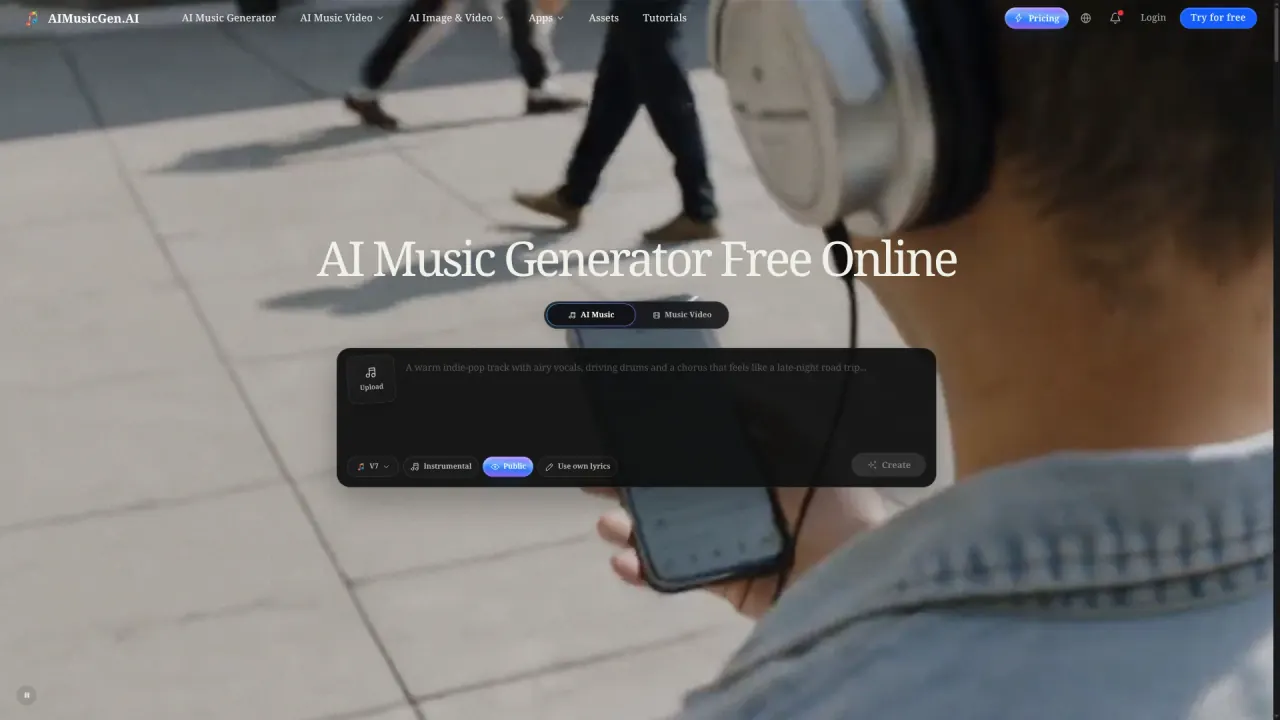

AI Music Gen is a browser-based studio that turns text prompts, your own lyrics or uploaded audio into full songs, then extends them into stems, MIDI and AI music videos.
Used this tool? Rate it
Used this tool? Rate it
AI Music Gen (aimusicgen.ai) is a browser-based AI music generator and music video studio: you describe an idea, paste lyrics or upload audio, and it returns finished songs with vocals or instrumentals, then turns those tracks into performance, lyric, slideshow or vinyl-style videos.
The service is provided by CODEONE AI PTE. LTD., while the terms name Wyoming law as the governing law.
Three choices shape the product. It is model-agnostic, offering its own V2–V7 models beside MiniMax Music 3.0 and ElevenLabs Music V2, each with different inputs, durations and credit prices. It treats the first generation as a draft that can be extended, section-replaced, covered or split into stems. And the video layer ships in the same workspace, so a finished song becomes an MP4 without a separate editor.
The model button beside Easy and Custom changes what you must enter, how long a song can run and what the request costs.
| Model | Best used when | Cost per new song | Results |
|---|---|---|---|
| AIMusicGen V7 | Default general-purpose workflow | 4 credits | 2 songs |
| AIMusicGen V6, V5, V4, V3 | Earlier generation behaviour; source audio up to 8 minutes | 4 credits | 2 songs |
| AIMusicGen V2 | Earlier vocal model; source audio up to 4 minutes | 4 credits | 2 songs |
| MiniMax Music 3.0 | Lyrics ready, one result of a chosen length | 1 credit per second | 1 song |
| ElevenLabs Music V2 | One song of 3–600 seconds from a prompt or timed sections | 10 credits per started minute | 1 song |
MiniMax works in Custom only, requires lyrics, cannot produce instrumentals and ignores references; a MiniMax cover costs 20 credits. ElevenLabs takes one prompt or 1–30 timed sections of 3–120 seconds up to 600 seconds, and does not use references, uploads or existing-song edits. Switching models can add or remove form fields, so the estimate above the Create button is the number that counts.
Text to music and lyrics to song share one prompt field: describe the track, paste your own words, or switch to an instrumental before generating.
Extend adds a section, Edit reworks one, Cover reworks the track in another style, and Add Instruments or Add Vocals builds on a finished song using V5, V6 or V7. Cover accepts a compatible original model or MiniMax, Extend and section editing keep the original model, and the creator switches to V7 when an action needs it.
Separation is sold per action: two-stem separation costs 4 credits, a split into up to 12 stems costs 20, MIDI extraction costs 4, and AI Mastering covers the finishing stage. Exported stems and MIDI are meant for continued work in a DAW and can be trimmed in the built-in audio editor.
The app list adds 19 tools across music, audio editing, voice and sound, and MIDI and sheet music. Finished songs and videos live in workspaces and albums and can be shared through their own links.
The creator checks the input and balance, deducts the cost and lists the song as Generating. A title, cover and Play button can appear while the render continues, and the badge disappears when the song completes; leaving the page does not stop the job.
If a request cannot start, nothing is charged; if a song fails after the charge, credits are returned when the failure is confirmed. A job still unfinished after 30 minutes is marked Failed the next time its list or details are opened, and its recorded cost is returned.
Editing actions cost 4 credits for a cover, extend, added instruments, added vocals or section edit; an upload is free but costs 2 credits when copyrighted audio is switched on.
The most common job is a track that has to fit footage rather than stand alone. The platform positions itself for YouTube videos, podcasts, short films and social posts, and the model length limits let a creator match a cue to a cut: V2 stops at 4 minutes of source audio, V3 to V7 at 8, MiniMax at 300 seconds, ElevenLabs at 600. Because the same workspace renders lyric, slideshow and vinyl videos, one song can supply the soundtrack and the visual for a short-form post.
Jingles, product-launch tracks and campaign soundtracks are explicitly in scope, and the paperwork fits that setting: a company can be named as licensee, so the PDF matches the client rather than the individual who generated the song. The agreement lists advertising, film and television, live streaming, public performance and digital distribution among lawful commercial uses.
Songwriters and producers use it to hear lyrics sung, sketch backing tracks and test arrangements before committing studio time, then export stems or MIDI to continue in their own software. Used as an AI song generator, it returns two versions per request, which suits comparison, and section replacement lets a weak bridge be rebuilt without regenerating the song.
Uploading a song, vocal or instrumental opens a different set of actions: keep the melody and change the style with Cover, or restyle a vocal with the voice changer. Voice references carry a vocal character across tracks, and a separate sharing tool turns a song into a page with a custom message for one person.
AI Music Gen fits creators who want one place to go from a prompt to a licensable, publishable asset. It is positioned both for people who begin without production experience and for teams bringing AI tools into an established creative workflow.
It is a weaker fit in four situations. Access is through a browser, and a third-party review describes the product as web-only, so teams needing a desktop client or programmatic access will not find it here. Vocal-style and genre controls are described in the same review as basic, which matters when directing a performance is the core of the work. Anyone who needs to keep free-tier output long term should weigh the seven-day retention, and a release-grade master still costs credits for mastering and stems.
Everything runs in the browser: song creation, editing, stems, video rendering, workspaces and licence downloads. No desktop or mobile client appears in the site's published page list, and the commercial licence is generated as an A4 PDF in the browser rather than through a print dialog.
| Free | Basic | Pro | |
|---|---|---|---|
| Monthly billing | $0 | $15/month | $29/month |
| Annual billing | $0 | $10/month (save 33%) | $18/month (save 38%) |
| Credits | Free daily credits | 500 credits per month | 1,500 credits per month, with 1.5K / 3.2K / 6K options |
| Cloud storage | 7 days | 30 days monthly, 1 year annual | 3 months monthly, permanent annual |
| Private generations | No, generations are public | Yes | Yes |
| Generation queue | Shared | Not listed | Priority |
One page, two numbers: the plan card advertises 5 free credits with a daily refresh, while the comparison row lists 10 per day. Free credits reset every 24 hours and do not accumulate, so the allowance should be read from the balance shown in the creator.
Paid credits behave differently. Monthly, annual and one-time credits never expire and roll over, and an annual plan grants the whole year of credits up front in a single drop. Credit packs are sold at 3,000 credits for $50, 6,000 for $100 and 12,000 for $200, include one year of storage, and unlock WAV downloads and private generation without a subscription.
Recurring plans renew automatically until cancelled from the Subscription page, and unused paid credits stay in the account after cancellation. Refunds are available within 7 days of purchase when no more than 5 songs have been generated, are reviewed within 3 business days, and songs generated in that window are removed from the account.
A third-party review site ranks AI Music Gen eighth of 29 lyrics-to-song generators with an editor score of 8.3 out of 10. It names Suno as the best alternative. Udio scores 9.1 against that 8.3. The site discloses paid placement and affiliate commissions, so the ranking indicates positioning rather than measured output quality.
| AI Music Gen | Suno | |
|---|---|---|
| Free tier | Daily credits, public output, 7-day storage | 50 credits per day, no downloads, no commercial rights |
| Cheapest paid entry | $10/month annual, $15 monthly | $8/month annual Pro, $10 monthly |
| Commercial rights | Annual subscription, or 100 credits per song | Paid plans |
| Stems and downloads | Stems up to 12 parts, MIDI, WAV | 2 stem types on Pro, 3 on Premier; 20–60 downloads per month |
Suno is the closest substitute on songwriting: its pricing page puts commercial rights, downloads and stem separation behind paid plans, gives Pro 2,500 credits and 20 song downloads a month. Subscription credits do not carry over from month to month, while AI Music Gen lets paid credits accumulate, which matters for anyone who generates in bursts.
The difference shows up in how rights are sold. Suno attaches commercial rights to a plan, while AI Music Gen ties them to a licence document per song, which suits clients who want a PDF per deliverable.
Storage is the first boundary that catches people. Free assets last 7 days, Basic monthly 30 days, Basic annual 1 year, Pro monthly 3 months and Pro annual permanently, while WAV files from song downloads expire after 3 days and stem-split or mastering results after up to 7 days. From 1 November 2026, free-account assets older than 7 days are permanently deleted, and assets cleared after their retention period cannot be recovered.
The privacy policy lists account details, usage data and device data such as IP address and browser. It says personal information is not sold and that providers operating the service may receive it. The terms separately allow anonymised generated content to be used for service improvement, and neither document describes model training on user content.
Yes. The free tier provides credits that refresh daily and do not accumulate, and any action whose cost fits the remaining balance can run without paying. Free output is public, stored for 7 days and limited to a shared queue.
Commercial use depends on a licence. Annual subscribers download general and song-specific licences at no extra cost; other signed-in users pay 100 credits the first time a completed song is licensed, and re-downloading later is free. Once issued, the licence stays valid even after the subscription ends.
Length is set by the model. AIMusicGen V3 to V7 handle source audio up to 8 minutes, V2 up to 4 minutes, MiniMax 1–300 seconds and ElevenLabs 3–600 seconds. The platform's guidance is to start with V7 and Easy and change models only when another clearly matches the result you need.
Free credits reset every 24 hours and do not carry over. Credits from monthly plans, annual plans and one-time packs stay in the account, roll over and survive the end of a subscription.
If the request cannot start, no credits are taken. If it fails after the charge, the cost is returned once the failure is confirmed, and a job left unfinished for more than 30 minutes is marked Failed with its cost returned.
A refund can be requested within 7 days of purchase if no more than 5 songs have been generated, and requests are reviewed within 3 business days. Songs from that period are removed from the account when a refund is approved.
