
Toolso.AI
Toolso.AI
All ToolsCategoriesTrendingLatest Tools
AI Models

Image models

  • Nano Banana 2.1
  • GPT Image 2.6 Sunburst
  • Seedream 5.5
View all

Video models

  • MiniMax H3
  • Kling 4.0
  • Seedance 2.5
View all
All AI models
Blog
Toolso.AI
Toolso.AI
Toolso.AI
Toolso.AI

Discover the best AI tools to boost your productivity

GitHubGitHubTwitterX (Twitter)YouTubeYouTubeTikTokEmail

Popular Categories

  • AI Writing
  • AI Image
  • AI Video
  • AI Coding
  • More Categories

Explore

  • Latest Tools
  • Popular Tools
  • More Tools
  • Submit Tool
  • Pricing

About

  • About Us
  • Contact
  • Blog
  • Changelog

Legal

  • Cookie Policy
  • Privacy Policy
  • Terms of Service
  • Refund Policy
© 2026 Toolso.AI All Rights Reserved
Limited timeLimited-time offerFeatured Listing24h priority review · No backlink · 30 days featured$29.90then $59.90Price rises to $59.90 after Dec 31Ends in--:--:--Submit now
  1. Home
  2. All Tools
  3. Business Tools
  4. Jupid
Jupid interface preview
Jupid logo

Jupid

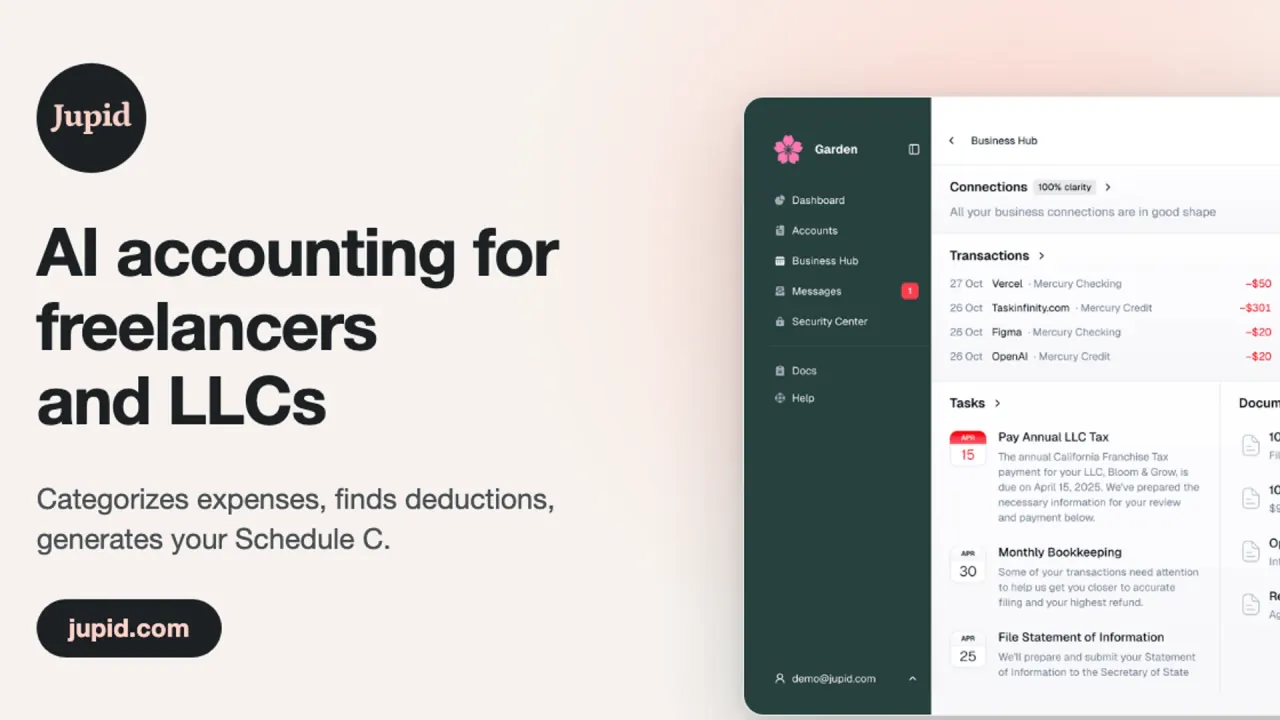
AI accounting for US freelancers and LLCs: a bank feed becomes categorised books, missed deductions are scanned, and a Schedule C plus federal and state filing come with the subscription.

Business ToolsAI AssistantsAutomation Tools#Automation#Compliance#Business
Start Free Trial
Saves
Visits
Views
Pricing
Free Trial
Published
Nov 29, 2026
Domain
jupid.com
Community rating

Used this tool? Rate it

Rate this tool
Start Free Trial

Jupid Product Information

Start Free Trial
Tool Information
Saves
Visits
Views
Pricing
Free Trial
Published
Nov 29, 2026
Domain
jupid.com
Community rating

Used this tool? Rate it

Rate this tool

Featured Tools

ChatGPT interface preview
ChatGPT logo

ChatGPT

Freemium

AI assistant for writing, analysis and tasks

Grok interface preview
Grok logo

Grok

Freemium

Real-time answers, images, and code in one chat

Notion interface preview
Notion logo

Notion

Paid

One workspace where your team and its AI agents think together

Roiva interface preview
Roiva logo

Roiva

Freemium

Track AI budgets, cash returns and portfolio decisions

Hint interface preview
Hint logo

Hint

Freemium

Astrology readings from real astrologers

Jotform interface preview
Jotform logo

Jotform

Freemium

Build forms around real submission workflows

Perplexity interface preview
Perplexity logo

Perplexity

Freemium

AI search for cited research

AI Image To Image interface preview
AI Image To Image logo

AI Image To Image

Free

AI image editing from a reference photo

Raphael AI interface preview
Raphael AI logo

Raphael AI

Free

Multi-model image studio, free to start

Airbrush interface preview
Airbrush logo

Airbrush

Free Trial

Natural AI photo editing for portraits and projects

Gamma interface preview
Gamma logo

Gamma

Paid

From a prompt to a deck, site or doc

Perchance interface preview
Perchance logo

Perchance

Freemium

Build random generators, share them free

PixAI interface preview
PixAI logo

PixAI

Freemium

Anime art, powered by a million community models

DeepSeek interface preview
DeepSeek logo

DeepSeek

Freemium

DeepSeek AI models for chat and API

ZenMux interface preview
ZenMux logo

ZenMux

Free

One Gateway, Every Model, Compensated Failures

SeaArt AI interface preview
SeaArt AI logo

SeaArt AI

Freemium

Community-Trained Models for Art, Video and Characters

PIXLR interface preview
PIXLR logo

PIXLR

Free Trial

Browser-Based AI Photo Editing and Image Generation

i10X interface preview
i10X logo

i10X

Paid

One workspace for every AI model

Related Tools

TaxTim
TaxTim interface preview
TaxTim logo

TaxTim

Freemium

Guided South African tax returns, filed to SARS

Try Now
TrueAccord
TrueAccord interface preview
TrueAccord logo

TrueAccord

Freemium

Digital-first debt collection, run for you

Try Now
Thomson Reuters
Thomson Reuters interface preview
Thomson Reuters logo

Thomson Reuters

Freemium

Fiduciary-Grade AI for legal and tax work

Try Now
Pionex
Pionex interface preview
Pionex logo

Pionex

Paid

Crypto exchange with built-in trading bots

Try Now
Vanta
Vanta interface preview
Vanta logo

Vanta

Freemium

Compliance automation for SOC 2, ISO 27001 and HIPAA

Try Now
Enquiry Genie
Enquiry Genie interface preview
Enquiry Genie logo

Enquiry Genie

Paid

AI replies to guest enquiry emails

Try Now
CREAO AI
CREAO AI interface preview
CREAO AI logo

CREAO AI

Free

AI agents that keep working after the chat ends

Try Now
Roiva
Roiva interface preview
Roiva logo

Roiva

Freemium

Track AI budgets, cash returns and portfolio decisions

Try Now
HomeTop toolsSimilar

What is Jupid?

Jupid is an AI accounting service for US freelancers and single-member LLCs: it connects to a bank feed, sorts transactions into IRS Schedule C lines, keeps the books tax-ready through the year and produces a filled-in Schedule C that can be filed or handed to an accountant. The accountant itself is reached through WhatsApp, iMessage or an MCP server inside Claude Code and Cursor, rather than through a dashboard.

The company behind it is Jupida Co, doing business as Jupid Tax, registered in California at 2450 Colorado Ave, Santa Monica. It was founded in 2025 by Slava Akulov, Anna Khalzova, Sergey Petrov and Ilya Lisin, and closed an $840,000 pre-seed round in April 2026 led by Pre-Seed to Succeed with AltaIR Capital, Yellow Rocks, Smart Partnership Capital, I2BF Global Ventures and the Michigan State University Research Foundation.

Three boundaries matter before signing up. The tax scope is American only — Schedule C, federal filing and the fifty states — so a UK or EU freelancer has nothing to file here. Jupid describes itself as a technology provider that does not give legal, accounting or tax advice and is not a CPA firm, so the review step stays the user's responsibility even though a licensed CPA is offered for complex returns. And the free tier stops at 100 transactions, which is roughly one month of business spending for an active freelancer.

Core features

Everything is built around one loop: transactions arrive from the bank, the model assigns each one a Schedule C line, and anything ambiguous is asked about in plain language so the answer is remembered next month.

  • Transaction learning: new charges are categorised as they land, with 95.9 per cent accuracy out of the box on the features page and 96 per cent in the homepage copy, improving as vendors repeat.
  • Persistent vendor memory: each merchant keeps its category across months and sessions, which is the gap the product positions against chat models that lose context after a few dozen rows.
  • Smart intake: when a charge needs context, Jupid asks a yes-or-no question in WhatsApp or iMessage and one tap files it.
  • Schedule C generation: gross receipts, expense lines and net profit are filled from the categorised transactions, so the form is a download rather than a reconstruction.
  • Missed-deduction scans: home office, mileage, phone and software are checked against the year's transactions, and the average across early users is quoted at $1,249 a year.
  • Quarterly estimates: self-employment and federal income tax are projected from real income as it arrives, with payment reminders before each deadline.
  • Messaging accountant: questions such as what can be written off or what was earned in March are answered from the connected books, not from generic tax rules.
  • MCP server: Claude Code, Cursor and other MCP clients can query the same books and build custom reports from a prompt.
  • LLC formation and filing: the agent files an LLC in any state with no service fee, the state fee is paid separately, and EIN plus operating agreement follow once the state accepts; federal and state returns are prepared in the same subscription.

The parts compound. A categorised year makes the Schedule C a five-minute review, quarterly estimates stop being a spreadsheet exercise, and the chat interface is what makes the review tolerable on a phone. What the product does not do is decide whether a charge is deductible in your specific situation, which is why the supplier keeps repeating that filings and decisions remain the customer's.

Guide

The public pages describe the flow in the order a new account meets it, and the sequence below follows that order.

  1. Connect a bank through Plaid, or upload a CSV export if the bank feed is not wanted yet; both routes end in the same categorised ledger.
  2. Let the first hundred transactions categorise themselves and correct the ones that are wrong. The corrections are what teach the vendor memory, and they are free under the trial allowance.
  3. Answer the questions that arrive by message. A charge that looks personal gets a one-line prompt, and the reply is stored with the vendor rather than the single transaction.
  4. Check the deduction scan once a month. Home office, mileage and subscriptions are the three lines the product flags most often, and the average find across early users is $1,249 a year.
  5. Read the quarterly estimate before each deadline and set the money aside; the figure is projected from income actually received, not from an annual guess.
  6. At filing time, export the Schedule C and either file it or send it to an accountant, adding CPA review first if the return involves a home-office calculation, depreciation or a business that changed shape mid-year.

Nothing in that loop needs the dashboard, which is the point of the messenger interface, but every step does assume a US bank account and a US filing obligation.

Accounting use cases and examples

The product is sold around a handful of concrete situations rather than general bookkeeping, and each one changes what the subscription is worth.

  • A designer with a mixed personal account: business and personal charges sit in the same feed, the model asks about the ambiguous ones in chat, and the year ends with a categorised ledger instead of a shoebox.
  • A consultant who already has an accountant: the accountant receives Schedule C-ready data instead of receipts, which is the use case the vendor frames as cutting billable cleanup hours.
  • An LLC formed this year: formation, EIN and operating agreement come through the same subscription, and the books start from the first bank connection rather than from a spreadsheet opened in April.
  • A developer working in an editor all day: the MCP server answers spending questions from the terminal, so the books are queried where the work already happens.

Who is it for

The target is narrow and stated plainly: US freelancers, contractors, single-member LLC owners and founders whose revenue is too small to justify a full-service accountant but large enough to create a filing obligation. Directory listings put the user base at just over a thousand businesses, which is small next to the incumbents and is itself a selection signal.

  • Solo freelancers filing a Schedule C: categorisation, deduction scanning and the quarterly estimate cover the three tasks that otherwise go to an accountant or a spreadsheet.
  • Single-member LLCs: the same Schedule C logic applies, and formation is bundled for anyone starting the company this year.
  • Founders who want the books in chat: the messaging interface is the differentiator for people who will not open a dashboard.
  • Developers and technical founders: the MCP server is the reason this group can keep books inside an editor.

Three groups should look elsewhere. Freelancers outside the United States have no Schedule C to file, and the product does not cover VAT, MTD or local corporate returns. Businesses with inventory, payroll, multi-entity consolidation or investor reporting need a general ledger, which this is not. And anyone who wants a human to own the books end to end is buying a different service: Jupid keeps the decisions with the customer and routes only complex returns to a CPA.

Evidence on quality is thin. One directory scores it 4.4 across ten reviews, another shows no user reviews at all, and the review platforms that carry weight in accounting software — G2, Capterra and Trustpilot — have no profile to compare. Product Hunt is the strongest external signal: the launch on 31 March 2026 took first place for the day, which says more about attention than about retention.

Platforms

Jupid runs as a web application and is used mainly through surfaces that already exist on the phone and on the desktop.

  • Web app: bank connections, reports, Schedule C export and plan management.
  • WhatsApp and iMessage: questions, expense confirmation and deduction checks without opening the app.
  • MCP clients: Claude Code, Cursor and other MCP-capable tools query the books and generate reports.
  • Bank and payment connections: more than 10,000 US banks and card providers through Plaid, plus Stripe, Deel and QuickBooks sync.
  • CSV import: a bank export can be uploaded instead of connecting an account.

The scope of the connections is the practical limit: Plaid covers US institutions, and the filing engine covers federal and the fifty states. A bank outside the United States, or a company filing anywhere else, is outside the product rather than poorly supported by it.

Pricing

Two published plans and a custom tier, all in US dollars, with annual billing at a stated 35 per cent saving and a free allowance of the first 100 transactions.

PlanMonthlyYearlyWho is coveredEmployee poolTax filingLLC formation
Solo$50$390one personally subscribed usernonefederal and stateincluded
Team$200$1,560owner plus five monthly active employeesone shared pool across owned companiesfederal and stateincluded
Companycustomcustomlarger teams by contractcustomcustomcustom

The definitions decide the bill. An employee uses a place the first time they send an accepted interactive task in a monthly window, so invitations, sign-ins, background work and reading shared results are free; the same person counts once across a company owner's companies. Reading shared results stays free on every plan, and state filing fees are paid separately when a state charges them.

Three commercial terms sit outside the price table. Annual billing saves exactly 35 per cent. Cancellation takes effect at the end of the current paid term, and the subscription renews automatically until it is cancelled. Prices can change, and the marketing pages quote a 30-day money-back guarantee that the terms do not repeat.

Alternatives to consider

The choice is really between an AI-first accountant and a ledger with automation on top, and independent comparisons make that split explicit.

  • QuickBooks Solopreneur: the default for US Schedule C work at $20 a month, with the largest accountant ecosystem; it organises categories but does not file the return.
  • Xero: entry pricing in the mid twenties with an AI assistant on every plan, better suited to double-entry books and accountants who already work in Xero.
  • Zoho Books: free under a revenue threshold and about $20 a month above it, the cheapest route to real double-entry accounting.
  • Wave: free bookkeeping and invoicing for simple single-currency businesses, with payment processing as the real cost.
  • Kick, Digits, Puzzle and Bench: AI-native ledgers from free up to roughly $65 a month for solos with light volume or startups that want accrual books, alongside Bench's done-for-you bookkeeping from about $199, all priced in the vendor's own seven-tool comparison.
  • Tabby: free under a low income threshold and roughly $19 to $39 a month above it, aimed at gig workers.

Jupid is the only one of these that files federal and state returns inside the subscription at the $50 tier, and the only one whose interface is a messenger. The alternatives win on price at low volume, on depth for inventory or payroll, and on the certainty of a human doing the work.

Limitations

  • US tax scope only: Schedule C, federal returns and the fifty states; no VAT, making tax digital or non-US corporate filings.
  • Not an adviser: the supplier states it is a technology provider, gives no legal, accounting or tax advice, is not a CPA firm and leaves every filing decision with the customer.
  • Free tier is small: 100 transactions, which an active freelancer can exhaust in a month.
  • Bank connection is the core: without Plaid or a CSV export the categorisation loop has nothing to work on.
  • The review still belongs to the user: categorisation is quoted at 96 per cent, and the customer still checks whatever lands in the wrong column.
  • Annual commitment is the only discount: $390 or $1,560 is paid up front, and again on renewal.
  • Cancellation is at term end: the subscription renews automatically until cancelled and does not stop mid-period.
  • Fees can change: the terms allow subscription fee changes with notice under applicable law.
  • Thin public track record: a 2025 founding, a pre-seed round and just over a thousand businesses, with no established review corpus.
  • Advisory coverage is conditional: CPA review is offered for complex situations, so a simple return is expected to be filed without one.

Privacy and your data

  • What is collected: account and business details, bank and card transactions through Plaid, messages sent to the assistant and the documents uploaded for filing.
  • AI processors: OpenAI, Anthropic and Google Cloud AI process inputs and outputs, which the privacy notice states explicitly.
  • Security: SOC 2 Type II, independently audited by FinAudit CPA PLLC for the period from 1 January to 30 June 2026 with an unqualified opinion; data encrypted in transit and at rest; bank credentials never seen or stored.
  • Rights: access, correction and deletion requests go through a data subject request form, and the policy states that no sensitive personal information is processed.

One caveat on the privacy claim: the homepage says data is never used to train AI models while the notice says input and output are shared with AI providers, so the training statement should be read as a vendor promise rather than as an audited control.

FAQ

Q1. Does Jupid file my taxes or only prepare them?

It prepares the federal and state return from the categorised books and supports filing; complex situations are routed to a licensed CPA, and the customer remains responsible for what is submitted.

Q2. Is the first 100 transactions really free?

Yes. The trial covers the first 100 transactions with no card, and the subscription starts at $50 a month for one user once that allowance is used.

Q3. Can I use it outside the United States?

No. The product maps transactions to IRS Schedule C and files federal and state returns, so VAT, making tax digital and non-US corporate returns are out of scope.

Q4. What does Team add over Solo?

Five monthly active employees in one shared pool, with invitations, sign-ins and reading shared results outside the count, for $200 a month or $1,560 a year.

Q5. Does it replace my accountant?

It removes the categorisation and assembly work; for a return with a home-office calculation, depreciation or a mid-year change of structure the product routes the filing to a CPA.

Q6. How does it connect to my bank?

Through Plaid, which covers more than 10,000 US banks and card providers, or by uploading a CSV export when a live connection is not wanted.


Know a Similar Tool?
If you know other great AI tools, feel free to submit them to us