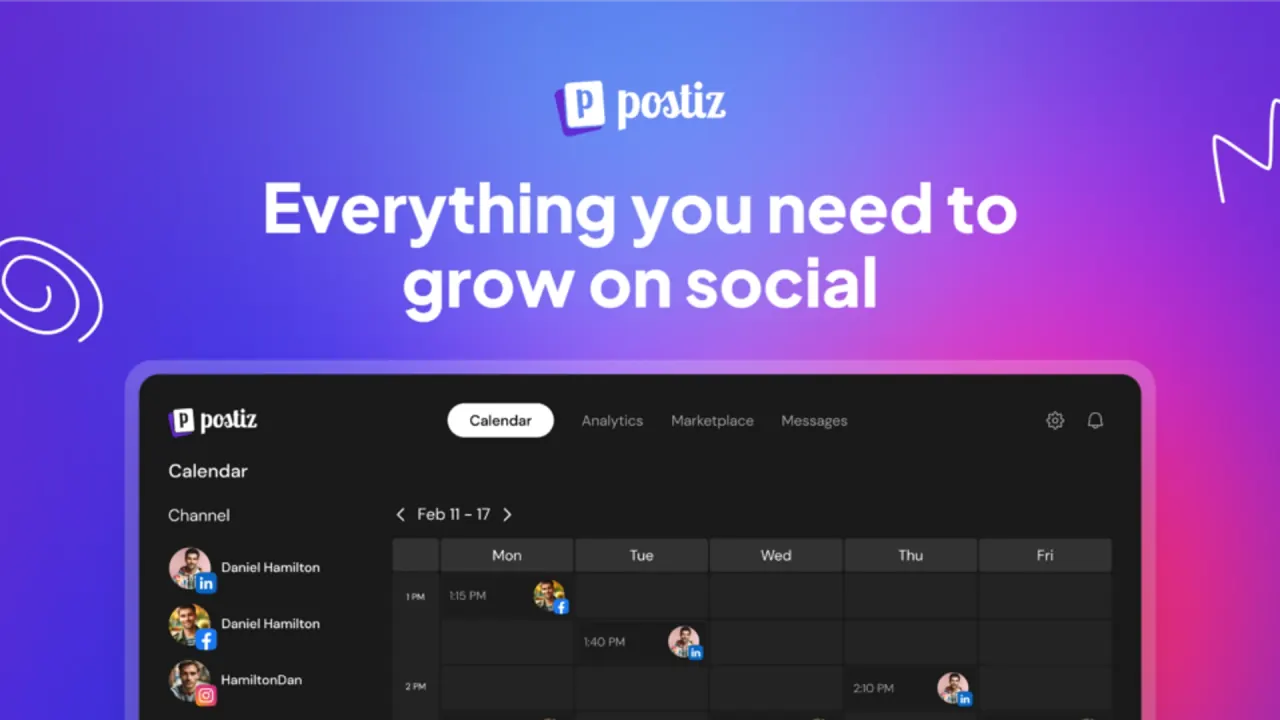

Postiz is a social media scheduling platform where AI agents, a visual calendar and an open-source edition share the same core, so teams can plan, generate and publish across dozens of networks from one queue.
Used this tool? Rate it
Used this tool? Rate it


From a prompt to a deck, site or doc


One workspace for every AI model


One workspace where your team and its AI agents think together


Public Codex reset tracker


AI assistant for structured work


Plan, build, and refine work with an AI agent


Build forms around real submission workflows


AI translation for multilingual workflows
Postiz is a social media scheduling platform built around the idea that an AI agent, not only a person, can plan and publish the calendar. Posts are written once, adapted per network, and queued to more than 30 channels from a single visual calendar.
The product comes in two forms with the same core: a hosted service called Postiz Cloud and an open-source edition released under AGPL-3.0 that runs on the operator's own infrastructure. The vendor states that features are not gated between them, and that the real differences are infrastructure ownership, social platform approvals and deployment effort.
Postiz also ships agent-facing surfaces as part of every plan. A hosted MCP server, a command-line client, a public API and webhooks let Claude, ChatGPT, Codex, Cursor, Gemini, OpenClaw or any agent that speaks MCP connect without a separate agent tier.
Postiz is sold as a social media scheduler for teams, hosted or self-hosted, and it is built to be driven by agents rather than only by hand.
Every plan includes the hosted MCP server, the Postiz CLI, the public API and webhooks. There is no separate agent tier: an agent that can speak MCP or run shell commands can draft and schedule posts, and the same capability sits in the entry plan. That single surface is what makes the product usable by AI social media agents, which need an endpoint they can call rather than a login page.
In practice an agent can take a brief, produce variants, and send them to the queue through the CLI or MCP, while the human reviews the result in the calendar. The calendar remains the source of truth, which is what keeps an autonomous step from becoming an invisible one.
Cross-posting publishes the same content to several channels at once, with the option to customise the message for each platform. Sets save a recurring group of channels with message templates, so a familiar combination such as a personal X account, a company LinkedIn page and a Facebook page can be reused in one click.
Repeated posts republish evergreen content at daily, weekly or custom intervals. The delay feature spaces posts and follow-up comments by minutes or hours instead of releasing everything at the same moment. Signatures append recurring text such as hashtags, links or promotional lines. RSS auto-posting watches feeds and creates posts when new items appear, optionally with AI-generated descriptions and images.
Threads and comments can be scheduled too. On X and Threads a full thread can be composed in advance, and on LinkedIn and Facebook scheduled comments appear as replies to the main post.
The platform includes an AI copilot for generating and refining copy, a picture editor for cropping, resizing and enhancing images, and image generation from a prompt. The editor is described as Canva-like and sits inside the posting flow.
AI video clipping turns a long YouTube video into short vertical clips with burned-in captions. Postiz picks the segments, saves every clip to the media library and can create a draft post for each clip on chosen channels. Minutes are counted against the source video length, not the number of clips produced, and minutes are returned when a clipping run fails without producing a clip.
The Smart Agent is a conversational layer over the same functions: scheduling, content generation, image creation and performance questions can be handled by chatting with it.
Internal Plugs repost or comment through other connected accounts, which the vendor presents as a way to lift early engagement. Global Plugs act on thresholds, such as auto-reposting when a post reaches 100 likes or adding a promotional comment when engagement is high. The vendor frames this as keeping strong content working after publication.
Analytics cover impressions, likes, comments, shares, bookmarks and engagement rates across connected platforms, with performance over time and by channel. Webhooks push publication events into other systems, so a published post can update a spreadsheet, notify a Slack channel or sync with a CRM.
Team plans allow unlimited members, and Customer Groups separate channels by client, brand or owner so an agency can keep accounts apart without separate workspaces. Posts can be assigned, and every channel is organised in one workspace.
The GitHub repository holds the self-hosted edition. Under AGPL-3.0 the software is free to run, fork and modify, and the operator pays only for infrastructure.
The trade is operational. AI copilot, AI images and AI videos work on a self-hosted instance only with the operator's own provider keys, without the monthly quotas of the hosted plans, so the provider bill replaces the subscription quota. The Smart Agent needs the operator's own LLM key. Video clipping needs its own provider keys and extra configuration. Updates mean pulling new images and running migrations. Support moves from priority channels to Discord and GitHub, while data residency can be any region, including an air-gapped environment.
A first setup is short because the calendar, the channel connections and the agent surfaces are the same objects.
For an agent-driven workflow the order changes slightly: connect the MCP server or install the CLI, give the agent the brief and the target channels, then review what it placed on the calendar before publication.
The step that decides whether this works is approval. A hosted account already has pre-approved apps for every channel, so connection is a matter of authorising an account. A self-hosted instance starts from zero on every network: the operator registers a developer app, requests the scopes the posting flow needs and waits for review. The vendor notes that Meta, YouTube and TikTok can take weeks, which is the main reason a first pilot usually starts on the hosted service.
Postiz fits teams that publish to several networks and want one queue, one calendar and one set of analytics. Team, Pro and Ultimate plans allow unlimited members, so seat count does not cap a growing team. It fits less well when a single network is the whole strategy, because the value comes from coordinating channels rather than from one composer.
The agent surfaces make it a stronger fit for teams already using an AI assistant for content work, since the marginal step is connecting the agent rather than learning a new interface. Developers and automation teams get a similar advantage from the API, SDK and webhooks.
Self-hosting suits operators with infrastructure skills and a data-residency requirement. The open-source edition deploys with Docker, Coolify, Railway or any VPS and asks the operator to configure Postgres, Redis, storage and environment variables. The vendor is explicit that this path requires creating developer apps on each platform and going through their approval, and that deployment can be hard at times.
The supported list covers X, LinkedIn, Instagram, Facebook Pages, Threads, TikTok, YouTube, Pinterest, Reddit, Bluesky, Mastodon, Lemmy, Farcaster (Warpcast), Nostr, Telegram, Discord, Slack, VK, Google My Business, Dribbble, Kick, Twitch, Whop, Skool, Medium and Dev.to, among others.
Postiz runs as a web application with a visual calendar. Integrations reach beyond the native interface: a public REST API, an SDK, an MCP server, a CLI, webhooks and connectors for n8n, Make.com and Zapier.
Teams that want an open source social media tool can run the same edition on their own infrastructure. For self-hosting the vendor lists AWS, Azure, GCP, Railway, Hetzner and Coolify as deployment targets, and notes that the hosted platform is where the agent features ship first.
Postiz sells four hosted plans, each with a 7-day free trial.
| Plan | Monthly | Channels | Team |
|---|---|---|---|
| Standard | $29 | 5 | No team support |
| Team | $39 | 10 | Unlimited members |
| Pro | $49 | 30 | Unlimited members |
| Ultimate | $99 | 100 | Unlimited members |
On annual billing the same plans cost $23, $31, $39 and $79 per month, about 20% less. All plans include unlimited posts per month, the MCP server, the CLI, the API, webhooks, the picture editor, the AI copilot, cross-posting, plugs, analytics and RSS auto-posting.
The AI allowances differ by plan. Standard includes 3 AI videos and 60 clipping minutes per month and lists no AI images. Team raises that to 100 AI images, 10 videos and 120 minutes. Pro steps up to 300 images, 30 videos and 300 minutes. Ultimate tops out at 500 images, 60 videos and 600 minutes.
Refunds are limited: the vendor refunds up to one month of fees per account when the last charge was within the past 120 days, annual plans are not refundable, and anything beyond that is discretionary. Plans can be changed or cancelled at any time.
The alternatives question for Postiz is really a question about which layer a team wants to own: the publishing interface, the data, or the agent integration.
Against hosted schedulers, the visible difference is the agent surface. Postiz includes the MCP server, CLI, API and webhooks in every plan, including the $29 entry tier, and does not sell a separate agent add-on. A team that only needs a calendar can compare on channel count and price; a team that wants an agent in the loop is comparing whether that access exists at all.
Against building on platform APIs directly, the difference is the maintenance load. Postiz maintains the connections and the approval process for its hosted apps, which the vendor presents as the work a team avoids.
Against a pure self-hosted stack, the difference is operational. The open-source edition ships the same core product and features with no feature gating or licence limits under AGPL-3.0, but self-hosting requires the operator to create developer apps for each network and wait for approvals that the vendor says can take weeks for Meta, YouTube and TikTok. The hosted plan prices that work into the subscription.
The constraints that change a decision are mostly about billing terms, quotas and the self-hosted path.
There is no free hosted tier. Every plan starts with a 7-day free trial, and paid plans start at $29 per month. The open-source edition is free to self-host under AGPL-3.0, with infrastructure costs paid by the operator.
Standard is $29 per month, Team $39, Pro $49 and Ultimate $99. Annual billing lowers those to $23, $31, $39 and $79 per month, about 20% less.
The list includes X, LinkedIn, Instagram, Facebook Pages, Threads, TikTok, YouTube, Pinterest, Reddit, Discord, Bluesky, Mastodon, Telegram and more than 30 in total, with new networks added over time.
No. The MCP server, CLI, API and webhooks are included in every plan, and any agent that speaks MCP or runs shell commands can connect at no extra charge.
Yes. The open-source edition runs on your own infrastructure under AGPL-3.0, with Docker, Coolify, Railway or a VPS, and requires Postgres, Redis, storage and environment variables. AI features then need your own provider keys, and updates, backups and patches are yours to run.
Up to one month of fees per account can be refunded when the last charge was within the past 120 days. Annual plans are not refundable and further refunds are at the vendor's discretion.




























Social media use cases
The product's own framing names three audiences, and each maps to a different workflow rather than to a different feature set.
AI-first marketing teams
Marketing teams that already work inside Claude, ChatGPT, Codex or Cursor can prompt an agent to draft and schedule a week of posts. The agent uses the CLI and MCP server, and the team reviews the calendar instead of building each post by hand.
Developers building posting products
Teams that need posting inside their own application can use OAuth2, the SDK and the public API, so their users connect an account once and publish to every supported network. The scheduling layer is bought rather than rebuilt.
Automation teams
Teams running n8n, Make.com or Zapier can use Postiz as the publishing endpoint: a workflow drafts, an approver signs off, and the post goes out across the connected channels without manual steps.
A fourth pattern comes from the open-source edition: operators who need the data to stay on their own infrastructure run the same core on their own server, which the vendor describes as a secondary option rather than the primary path.