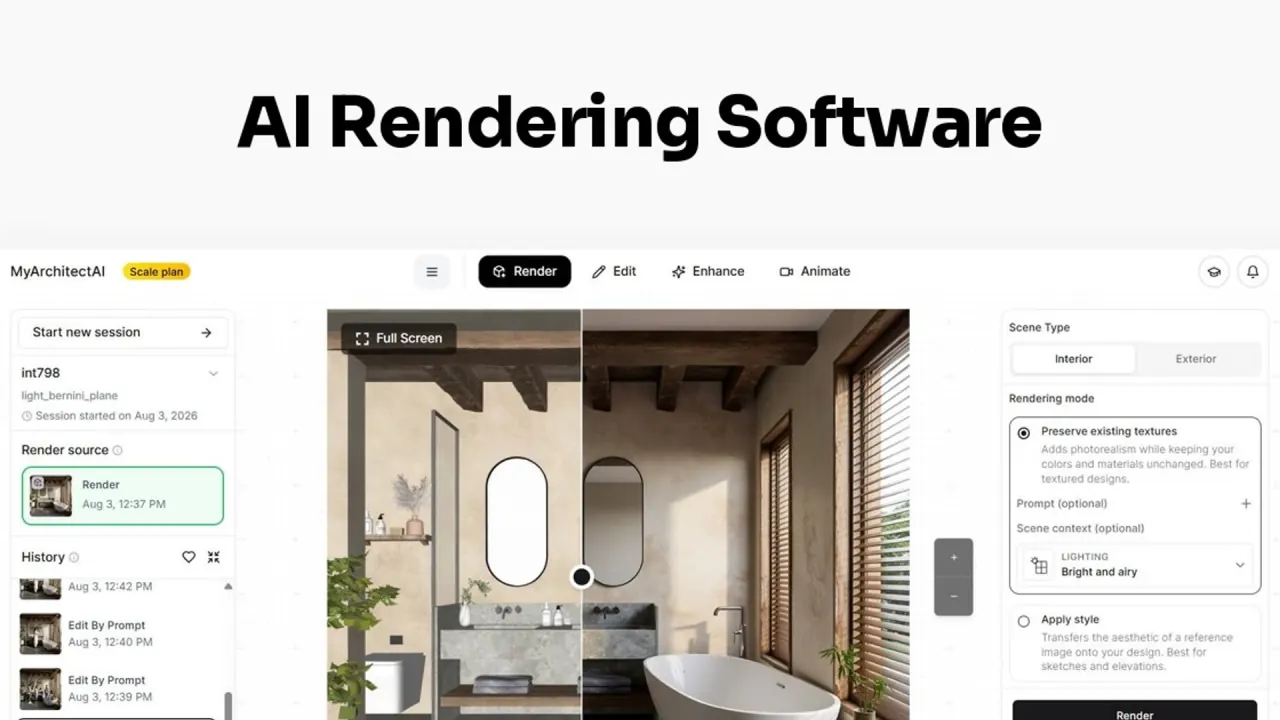

MyArchitectAI renders an uploaded SketchUp, Revit or Archicad view into a photorealistic image in about ten seconds, with style transfer, area-specific editing, enhancement and short animations, all in the browser.
Used this tool? Rate it
Used this tool? Rate it


AI image editing from a reference photo


Multi-model image studio, free to start


Build random generators, share them free


Anime art, powered by a million community models


Real-time answers, images, and code in one chat


Community-Trained Models for Art, Video and Characters


Browser-Based AI Photo Editing and Image Generation


Product photo editing for online stores
MyArchitectAI is browser-based AI rendering software that turns an exported view or a sketch of an architectural or interior design into a photorealistic image. You upload a JPG or PNG, click render, and download the result in 4K. The vendor puts the average render at 9.3 seconds and says 99% of still renders are ready in under 10 seconds. Nothing is installed and no GPU is required: the render runs on the company's servers.
The engine is asked to keep the geometry and textures of the input unchanged while it invents lighting, materials and atmosphere, and the prompt is optional. Around that core sit four more tools: a sketch-to-render mode that blends a reference style onto a rough model, a render-editing mode that regenerates only a selected area, an enhancer for low-resolution images, and an animation tool that turns a still into an MP4.
MyArchitectAI is operated by Luminary Ventures OÜ, an Estonian private limited company with registry code 17194356 and a registered address in Tallinn. The terms are governed by Estonian law. The homepage reports 7,500,000+ renders generated to date and an average rendering time of 9.3 seconds; both are the company's own counters rather than audited figures.
The product is positioned for concept work, not for final visualisation. The FAQ says the main purpose is not to create competition-level visuals but to let you iterate through client feedback faster and win more work, and puts the trade at 5% of the time for 95% of the result.
Upload an interior or architectural design from SketchUp, Revit, Archicad or any other CAD or 3D modelling package. The accepted inputs are exports and screenshots, currently in JPG or PNG, and the pricing FAQ adds WEBP. There is no file import from a modelling application, so the model never reaches the renderer; it sees a picture of the model.
Click render and the engine produces a photorealistic visual while keeping geometry and textures unchanged, according to the vendor. Prompting is optional: the default path is upload, click, download. The result arrives in 4K on every paid plan, and 8K on Studio and Team.
The homepage compares six rows: a $2K+ workstation against a browser, hours of material work against automatic photorealism, 30 minutes to several hours per image against under 10 seconds, a forum post against live chat, a full re-render against a typed instruction, and hours in Photoshop against one click.
Upload a rough conceptual model, a line drawing or a hand sketch, then add a reference image or pick a preset from the style library. The style is blended onto the original image and the geometry of the input is kept unchanged.
Render editing is the feature that keeps a review loop from restarting. Enter the editing mode, choose a material from the library, upload your own or describe the change in words, and select the area of the render where it should apply. Only that area is regenerated; everything else is left untouched.
The vendor's example is a siding change typed in words; the same path covers adding or removing objects, changing lighting and altering the landscape.
The enhancer takes a low-resolution render and post-processes it: noise is reduced, textures and colours are improved, and 3D people are made to look more realistic. A creativity slider sets how much freedom the model has, from subtle refinement that stays close to the original to a more interpretive pass.
It is most useful on older images and on quick internal renders never meant to be final, and it runs in one click without the original scene.
Upload any architectural or interior render in JPG, PNG or WebP, with no 3D model needed, and pick one of 30+ cinematic camera movements such as orbit, dolly, pan or flythrough. A camera motion can also be described in words. Press animate and the MP4 is ready in 90-120 seconds.
Animations are the one metered feature. Starter includes none, Studio includes 50 a month and Team includes 200 a month.
The first pass is cheap: a failed render costs only the wait, which is why the loop works on a live client call.
Consistency is on the roadmap rather than in the product. The homepage lists a feature that will render multiple interior or exterior scenes of the same project with the same aesthetic as planned, alongside a dedicated lighting-direction tool.
A SketchUp plugin and a Revit add-on are also listed as soon.
The common thread is a design that already exists as a view and a conversation that needs a picture of it today.
MyArchitectAI fits practices that treat architectural visualization as a conversation tool rather than a final deliverable:
It fits less well in three situations. A team that needs the renderer inside Revit or SketchUp has to wait for the add-ons, because the current product is upload-only. And a firm that cannot accept the free-tier ownership terms should budget for a paid plan from the first client image.
| Plan | Monthly | Annual | Seats | What the plan includes |
|---|---|---|---|---|
| Free | $0 | $0 | 1 | 10 renders, no card required according to the homepage |
| Starter | $29 | $290 | 1 | Unlimited renders, edits and enhancer, 10GB storage |
| Studio | $49 | $490 | 1 | Everything in Starter, 50 animations a month, 100GB storage, one-on-one video training |
| Team | $99 | $990 | 5 | Everything in Studio, 200 animations a month, 500GB storage, one-on-one video training |
Prices are in US dollars, exclusive of local taxes. Annual billing is described as two months free. Subscriptions renew automatically and can be cancelled at any time; access continues to the end of the paid period, and cancellation does not produce a prorated refund.
Every paid plan carries a commercial usage licence, auto-saved generation history, priority live chat and email support, and encryption described as bank-grade. Volume discounts are available by message, and an educational licence can be requested by students and educators.
The unusual part is the absence of render credits. Rendering and editing still images are unlimited on all paid plans, and the meters sit on animations, resolution and storage instead. The pricing FAQ adds a caveat: unlimited covers the features related to rendering and editing static images, while experimental tools sometimes come with usage limits.
The closest alternatives split into two families: plugins that render inside a BIM or CAD application, and browser tools that take an image.
| Tool | Entry paid price | Free option | Where it differs |
|---|---|---|---|
| MyArchitectAI | $29/month (Starter) | 10 renders | Unlimited stills, image upload only |
| Veras | $59/month, or $29/month billed annually | 15-day trial with 30 renders | Renders inside Revit, SketchUp, Rhino and Archicad |
| Rendershop | Not consistent on the reviewed page ($9 and $19 both appear) | 50 free credits | Also does staging, video and inpainting |
| Midjourney | From $10/month | None | Artistic concepts, no geometry preservation |
Veras is the natural upgrade for a firm that wants the render inside the model. An independent comparison reviewed in November 2026 lists it at $59 a month, or $29 a month on the annual plan at $348 a year, with a 15-day trial that includes 30 renders, and notes that it works as a plugin for Revit, SketchUp, Rhino, Archicad, Vectorworks and Autodesk Forma.
Rendershop and Midjourney pull in opposite directions. Rendershop bundles rendering with staging and video, and the same comparison gives it a free plan with 50 credits, though its paid entry price appears as both $9 per user per month and $19 per month on the page reviewed. Midjourney starts at $10 a month with no free tier and no geometric awareness at all, a mood tool rather than a renderer.
The terms divide ownership by plan. For free accounts, MyArchitectAI owns all rights to the designs generated through the service, and the user grants an irrevocable, nonexclusive, royalty-free and fully paid worldwide licence to reproduce, distribute, publicly display, prepare derivative works and otherwise use the uploads and designs for providing, promoting and improving the service. For paid accounts, the user retains full ownership and no licence is granted.
The security page says every user keeps complete ownership of all renderings, and the privacy policy says uploaded images, prompts and renders are not used to train AI models. Treat the contract as the controlling text and keep client drawings off a free account.
SketchUp and Revit work through an exported image, not a live link. The homepage lists a SketchUp plugin and a Revit add-on as soon. Until those arrive, the model never reaches the renderer, which is the root of most of the accuracy complaints below.
The vendor's promise is that geometry and textures stay unchanged, and independent reviews do not support it as a guarantee. One review collects user reports of angled columns and non-rectangular windows being misread, of detail fading with each successive edit until an image looks less and less realistic, and of added objects arriving at the wrong scale. It also quotes a co-founder on a SketchUcation thread saying the team is not trying to replace physically based renderers because the precision of image models is not there yet.
Every frame needs checking against the model.
The pricing FAQ promises a full refund if the software does not meet expectations and fewer than 20 renders were created. The terms are tighter: a refund of the most recent subscription fee applies within 3 calendar days of the first payment with fewer than 20 images created and no images or animations downloaded, or within 14 calendar days of an automatic renewal with no generation or download since. A service failure of more than 24 consecutive hours can produce a refund or credit at the company's discretion, and statutory rights are preserved.
Refunds are refused for dissatisfaction with style or creative output once outputs exist, for user error such as a wrong prompt, and for accounts suspended under the acceptable use policy. Requests go to the support address or contact form, are answered within 3 business days, and typically appear on the card within 5 to 10 business days.
MyArchitectAI is the data controller described in the privacy policy, and the company is Luminary Ventures OÜ in Tallinn. Uploads and generated content are kept while the account is active and deleted within 24 hours of deletion, backups roll for 7 days, and billing records are kept for 7 years under Estonian accounting law. AI processing is handled by fal, Replicate and Runware in the United States, and none of them trains on the content. Payments are processed by Stripe and full card numbers are not stored.
The terms also carry a binding arbitration clause with a 30-day opt-out, a right to suspend or terminate an account at the company's discretion, and no obligation to store or back up user content; designs may be deleted at any time without prior notice. Beta services are provided as is and may be withdrawn.
There is a free tier with ten renders and no card. Paid plans start at $29 a month for unlimited stills.
Not yet. You export a view as a JPG, PNG or WebP and upload it. A SketchUp plugin and a Revit add-on are listed as coming soon.
On any paid plan, yes: a commercial usage licence is included in Starter, Studio and Team, and the terms give paid accounts full ownership of their designs. The free tier is different, because the terms assign ownership of free-account designs to MyArchitectAI.
Nothing per image on a paid plan. Starter at $29 a month, Studio at $49 and Team at $99 for five seats all include unlimited renders and edits, with animations, resolution and storage as the metered limits. The free tier is capped at ten renders.
The vendor says 99% of still renders finish in under 10 seconds. Animations take 90-120 seconds and produce an MP4. The figures are the company's own measurements, and an independent review notes that it did not run the tool and cannot confirm the timing.