
ForgeGUI is a browser studio that turns prompts and reference screenshots into game UI sets, Roblox thumbnails, icons and textured 3D props, with a free credit tier and a Studio plugin.
Used this tool? Rate it
Used this tool? Rate it


Browser-Based AI Photo Editing and Image Generation


One-click AI background removal at scale


AI image editing from a reference photo


Multi-model image studio, free to start


Natural AI photo editing for portraits and projects


AI assistant for writing, analysis and tasks


From a prompt to a deck, site or doc


Build random generators, share them free
ForgeGUI is a browser-based AI studio for game creators. You describe an asset in a prompt box, optionally attach a screenshot as a style reference, and the site returns game interface art, store thumbnails, icons or a textured 3D prop. The company positions it as an AI game asset generator and an AI design platform for game creators rather than a general-purpose image model, and the page leads with a claim that you can generate any game asset just by chatting.
The product covers four kinds of output that usually come from four different people: a 16:9 thumbnail for the game page, a square icon, a set of interface panels such as an inventory, HUD or shop screen, and a 3D asset exported as a GLB file. Generation happens on the company's servers, results are edited inside the same workspace, and finished files leave as individual PNGs, bulk ZIP archives or GLB models.
Access is metered in credits rather than seats. A free tier exists with a monthly credit allowance and image generation only, and paid tiers raise the balance and unlock advanced models, watermark removal and a commercial licence. The site also runs a public asset catalog built from community generations, which is how the free tier is funded: eligible generations made with free credits can be published there, while paid-plan generations stay private unless the account opts in.
The workspace is one prompt box with a row of controls above it: asset type, platform look, style preset and, on this product, the image model. Everything below is a variation on that row.
The Roblox thumbnail generator is the most developed part of the product and the one the marketing leads with. It produces a widescreen image sized for a game page, and the company says its model was trained on data built specifically for Roblox, so proportions, materials and staging follow the platform's conventions instead of looking like a generic render. A dedicated page lists style presets such as cartoony, anime and realistic, and it accepts a Roblox game link as a starting point so the prompt can be written for that game.
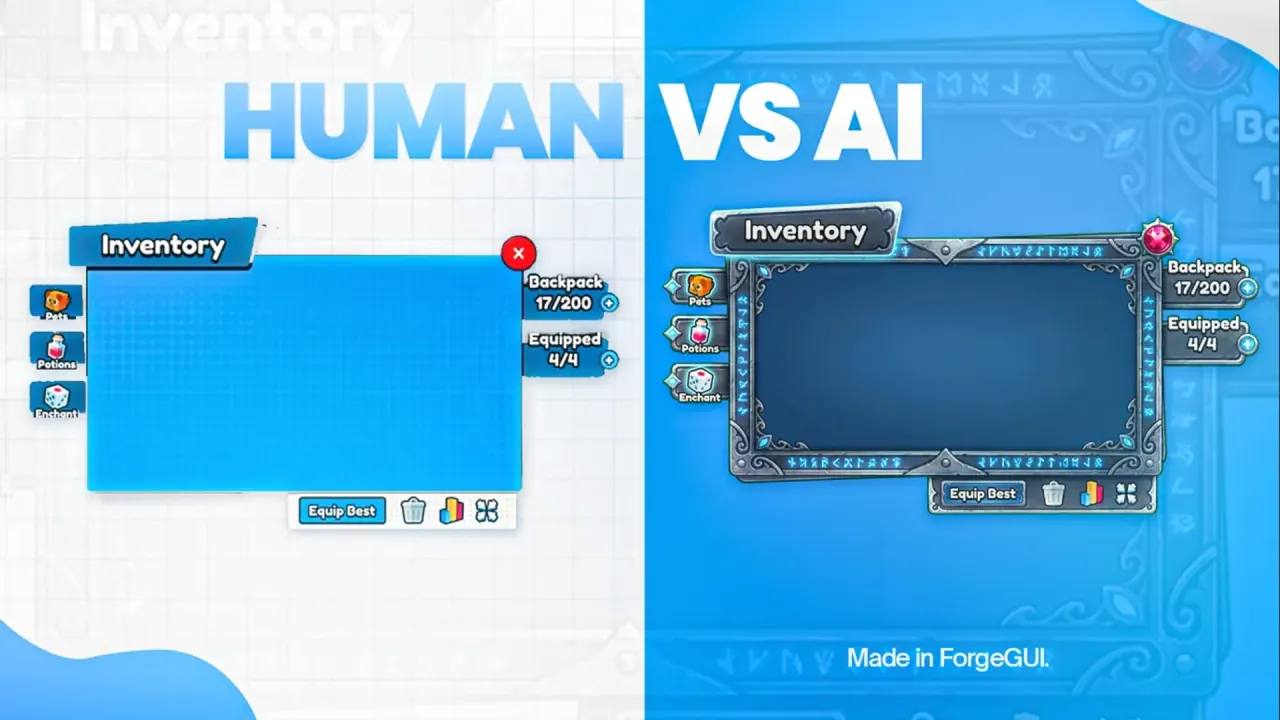
The game UI generator is the capability that distinguishes ForgeGUI from thumbnail shops. Instead of one image at a time it is built to return a coherent set: inventory panels, HUD elements, health bars, skill icons and buttons generated in a single pass and sharing a palette, border treatment and lighting. The site describes the output as consistent in one pass, which addresses the usual failure of generating each panel separately and getting a set that does not match.
Output is artwork with a layout, not a working menu. Parent frames, anchors, scaling rules and the events that make a button respond are still built in the engine, and no export from this tool changes that.
The 3D path produces a textured GLB rather than a finished game model. The site lists 3D game assets among the things you can ask for, exports them alongside PNGs and ZIPs, and a competitor's hands-on review puts a single 3D task at a higher credit cost than a standard image. The practical use is a shape and texture reference: is this prop worth modelling, does this silhouette read at gameplay distance, what palette does this room want.
A screenshot uploaded as a reference is analysed for palette, borders and overall aesthetic, and the result is applied to everything generated in that session. The site frames this as the difference between "an AI interface" and a version of your own interface, and a directory review makes the same point: setting the reference before the first generation is what keeps the tenth icon in the same family as the first panel.
Editing after generation is deliberately shallow. Layout, colours, text overlays, borders and padding can be changed inside the studio without opening Photoshop or Figma. That covers the corrections that would otherwise cost another credit, particularly lettering, which generated interface art almost always gets wrong.
Files leave as individual PNGs, as a bulk ZIP, or as GLB for 3D. A Roblox Studio plugin, referred to on the site as ForgeMCP, pushes assets into Studio and removes the unzip-rename-reimport step for a set of twenty sprites. Imported images are imported as images: the plugin does not turn a generated panel into a ScreenGui with working buttons, and it does not read or edit scripts.
Credits are the unit of access. Different generation types cost different amounts, credits arrive at sign-up, and more can be earned through referrals or by subscribing. Because the price of a task is not fixed, the useful question is not what a plan costs but how many usable assets a balance buys for your particular mix of thumbnails, panels and 3D.
The basic loop is three steps, and the site states them plainly: type or paste the idea and generate, wait a few seconds for the result, then export to the platform you are building for. Multiple assets can be requested in one go. That is enough to test the product; the workflow below is how people who use it daily keep a whole interface consistent.
Write a brief that names the subject, the action, the threat or reward, the camera and the mood, then add the style you want and generate several candidates. Shrink each result to the size of a phone thumbnail before choosing, because a frame that looks dramatic at full size can read as grey mush in a feed. Change one thing per revision so you can tell which instruction helped.
The company's own prompt guide recommends not generating every frame from scratch. Build one strong base frame with the right colours and background, upload references to lock the style, duplicate that frame as many times as you need variations, and ask the AI editor to turn each copy into a different screen: shop frame, quest log, inventory, settings panel. Then screenshot the individual elements, reupload them and isolate the icons, buttons and text layers you actually need.
The guide's argument for this order is credit efficiency: you spend credits generating and editing a base rather than regenerating the same background for every screen. It also produces a set that looks like one game rather than four.
Install the plugin from the Creator Store, open it with the project loaded and Play stopped, click connect and enter the pairing code shown on the plugin page. Approve the pairing in the Studio window, then import from your asset list. A third-party guide that walked through the flow without running the product notes that pairing and publishing are treated as two separate connections, and that pairing codes expire after five minutes.
The core audience is the solo creator or small team that can script and design a game loop but cannot draw a matching set of panels. Roblox and UEFN projects are the clearest fit, because interface polish affects retention there and the alternative, commissioning a matching UI set, costs money and calendar time a prototype cannot spare.
Three narrower fits follow from the product's shape. Developers prototyping before art direction exists get readable placeholders that can be regenerated when the direction changes. Solo creators who also need store art get the thumbnail generator and the interface generator from one prompt box and one credit balance. Designers exploring game conventions can generate HUDs and inventory panels as moodboard material even if nothing ships.
The mismatches are just as specific. Anyone who expects a finished, clickable interface is buying the wrong thing: the export is artwork, and the wiring is the buyer's job. Studios with a settled art direction and an art director do not need it for final assets, though it can compress the concept stage. And a project whose missing asset is a character or a prop rather than a panel is on the wrong shelf, because rigged characters are outside what the tool produces.
ForgeGUI sells credits through monthly or yearly subscriptions, with a free tier underneath. The public plans page shows four tiers by allowance, and the paid ones are billed in advance on a recurring cycle.
| Tier | Monthly credits | What the tier adds |
|---|---|---|
| Free | 10,000 | Image generations only, basic AI models, marketplace access, MCP and API access, commercial use rights |
| Creator | 150K | Advanced models, watermark removal, commercial licence, credit top-ups |
| Pro | 350K | All models, everything in Creator |
| Studio | 1.25M | Everything in Pro |
Prices are not shown to a signed-out visitor on that page. A third-party guide checked the plans page on 26 October 2026 and recorded Creator at $22 a month, or $18 a month billed yearly, and Studio at $200 a month, or $160 billed yearly, and noted that an earlier Basic tier at $6 a month was no longer listed. Confirm the current numbers on the site before subscribing, because a competitor's review from September 2026 lists a different set of tiers and credit volumes entirely.
Two terms matter as much as the price. Paid subscription fees are non-refundable except where the law requires it, and the free tier is not free of obligation: billing information is required to start the trial on the thumbnail page, and generations made with free credits can be published to the public catalog.
The choice is not "which AI art tool" but which layer of the pipeline is missing. A directory review that compares four options draws the lines clearly.
ForgeGUI is the pick when the interface itself is the missing piece and you want a matching set this afternoon. It is the wrong pick when the missing piece is a rigged character, a production-ready model, or a shared style library for a team.
The first limit is scope. The tool returns artwork: parent frames, anchoring, scaling and the wiring that makes a menu respond are still the builder's job in Studio. It does not offer rigged or animation-ready characters, shared team style libraries, review workflows or a public API for your own pipeline, and it does not process anything locally, so every prompt and reference screenshot is a server-side job.
3D carries a second gap. A textured GLB is a reference, not a finished asset: polygon count, topology, scale, pivots, collision, textures and rigging all still need inspection. Studios that need Roblox-ready models without that cleanup are better served elsewhere.
Paid subscription fees are non-refundable except where the law requires it, unused credits alone do not make a past payment refundable, and the service may suspend or terminate access at any time, with or without cause and without notice. The service is provided as is and as available, with warranties disclaimed to the extent the law allows.
Generations made with free credits or during a free trial may be added to the public asset catalog by default after the catalog notice is accepted. The setting stops future publication and cancels pending items, but it does not retract what is already published; existing entries have to be removed from the account's published list. Paid-plan generations stay private unless the account opts in, and publication does not transfer ownership of the asset.
On privacy, the policy says personal data is not sold, payments are processed by Stripe, data is stored with Supabase, and generated images sit in per-user folders served from unguessable URLs, which means anyone given a full URL can view that image without signing in. Personal data is deleted or anonymised within 30 days of an account deletion request, and using the service consents to processing in the United States. The terms require users to be at least 13 years old.
There is a free tier with a monthly credit allowance, image generations only, basic models and commercial use rights. Paid tiers add credits, advanced and premium models, watermark removal and top-ups. The thumbnail page states that billing information is required to start the trial, so read the signup flow before you treat it as card-free.
Game interface sets, store thumbnails, icons, GFX-style art and textured 3D props, with a style reference steering palette and borders across a session. It does not generate working interfaces, rigged characters, animations or code.
Yes, according to the licence the site states: assets created with ForgeGUI are yours, with commercial use rights and permission to modify, distribute or sell them in your games. Paid tiers add a commercial licence explicitly, and publication to the catalog does not transfer ownership.
Free-credit and trial generations are eligible for the public catalog after you accept the catalog notice; paid-plan generations are private by default. Turning publication off affects future generations only, and already-published assets must be removed from the published list.
It produces a textured GLB that works as a shape, silhouette and palette reference, and the vendor's own documentation says it still needs inspection for topology, scale, collision, textures and rigging. Budget cleanup time or use it to decide what is worth modelling.
Each generation spends credits, and different generation types cost different amounts. Credits arrive at sign-up, referrals add more, and subscribers get a monthly allowance; top-ups are a paid-tier feature.
Subscriptions are managed from the account, billing runs in advance on a recurring cycle, and paid fees are non-refundable except where the law requires otherwise. Cancelling stops future billing; it does not refund the current period or restore spent credits.