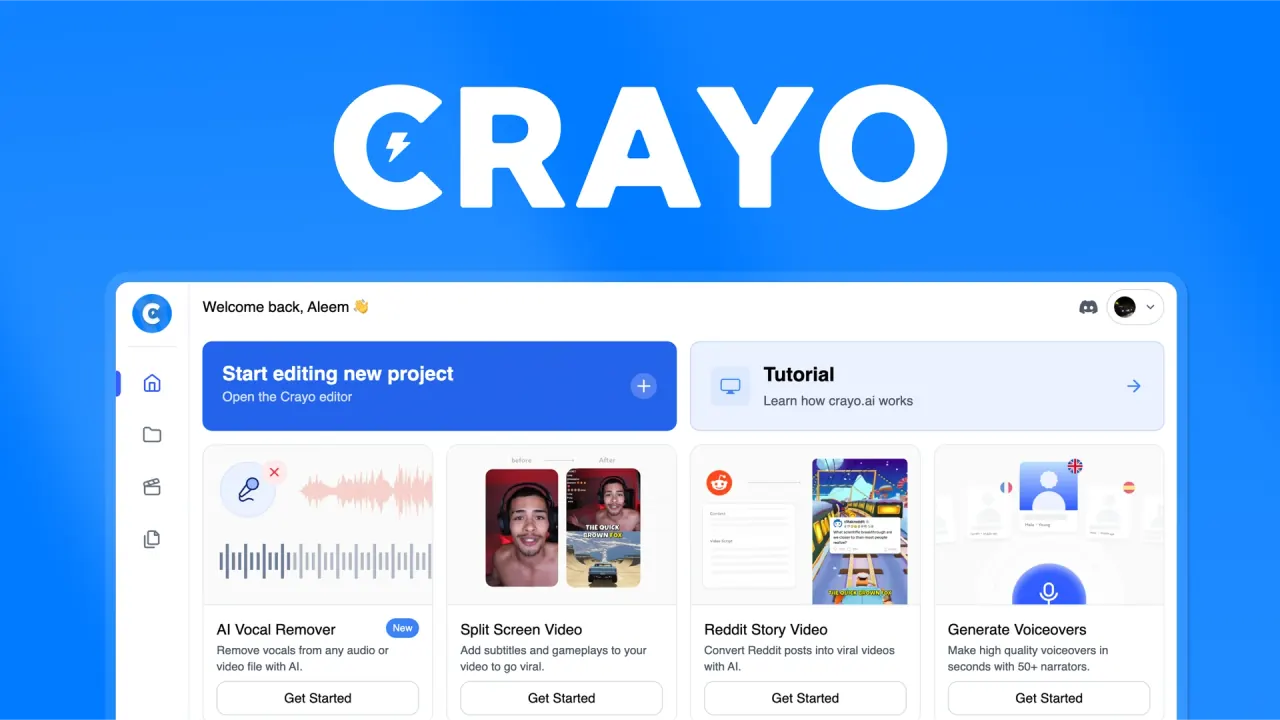

Crayo turns podcasts, streams, interviews and gameplay into vertical clips with AI moment-finding, animated captions and a multi-track editor in the browser.
Used this tool? Rate it
Used this tool? Rate it


Natural AI photo editing for portraits and projects


Chat Your Way to a Finished Video


Edit, caption, and generate video in one place


Generate new shots and rework existing footage


AI image editing from a reference photo


Multi-model image studio, free to start


AI assistant for writing, analysis and tasks


From a prompt to a deck, site or doc
Crayo is a browser-based AI clipping editor that turns long recordings into short vertical clips for TikTok, Instagram Reels and YouTube Shorts. A user uploads a podcast, stream recording, interview or gameplay footage; the software finds the moments worth posting, keeps the speaker in frame, adds captions and a title, and returns clips that reopen in the same editor.
Crayo calls itself the number one clipping tool and says it is trusted by 3.5 million users, figures it reports itself. The difference it claims is narrower and easier to check: most clipping tools stop at the export, while Crayo ships a multi-track editor in the browser with nothing to download, so every automated clip lands there rather than in a download folder.
The work runs through four clipping modes, from fully automatic to hand-cut, and every clip stays editable afterwards.
AutoClip is the one-pass option: one upload in, a batch of captioned vertical clips out. Find Viral Moments scores the moments in a long video and returns a ranked list, so the ranking can be reviewed before anything is cut. The AI Video Editor reviews moment selection first and applies a creator style second. Clip Cutter leaves selection to the user and hands captions, framing and styling to the software. In the fourth mode the user marks the cuts and AI handles captions, framing and style.
Crayo clips a livestream while it runs rather than after the VOD lands. A user adds a Twitch or Kick channel; Crayo follows the stream and its chat, catches moments as they happen and delivers finished clips while the broadcast continues, each framed, captioned and titled in the chosen template. A broadcast that has ended is downloaded and sent to AutoClip instead.
The editor is a multi-track timeline with cut, split and rearrange, plus captions, zooms and transitions, LUTs, speed ramps, cutaways that duck the clip's own audio, and camera keyframes. Captions can be generated or typed and restyled afterwards. Crayo states that exports carry no watermark on any plan.
Crayo splits auto captions, reframing and templates into separate controls. The mobile app lists more than 30 animated caption styles, word-level timing editable by hand, keyword highlights and translation. AI Reframe uses face detection and speaker tracking to keep the person talking centred as the frame goes vertical. Templates apply a saved combination of captions, framing, colour and effects, and up to five can be mixed in one batch so a set of clips does not look identical.
The same account carries tools for the parts of a short video that are not the cut. AI Voiceover reads a pasted script in a chosen voice, for hooks, intros and story videos. A voice changer swaps a recorded voice while keeping timing and delivery, a speech enhancer reduces background noise and echo, and a subtitle remover erases burned-in captions. AI Images generates thumbnails, covers and b-roll stills; an icon generator produces channel icons for chat, wins and announcements; a fake-text tool turns a written or AI-drafted conversation into a vertical video that plays message by message; face swap puts a character's face onto a target image.
A View Tracker follows public Instagram, YouTube or TikTok accounts and posts from a pasted link, no login needed, and charts what changed between snapshots. A REST API exposes auto clipping, AI voiceovers, images and rendered short-form video for teams building their own tooling; the plan comparison also lists MCP support.
Upload a long video or paste a link, choose the mode that matches how much of the edit should be automated, and supply the context the matcher needs: the language, whether it is an interview, whether the footage has no commentary. Review the moments or the finished clips, restyle captions and framing, and export. Clips stay editable in the same tab, so a correction does not mean re-running the job.
Crayo accepts uploads and links, and the YouTube, Twitch and Kick downloaders take a link and a quality setting, saving the video to Crayo's assets, either whole or only the section needed. A Footage library holds long videos from podcasts, shows and creators, searchable by transcript, so a moment can be sent to AutoClip without downloading the source first.
AutoClip handles more than 50 spoken languages, chosen at the start of a job or left on auto. With commentary, a lead-in setting opens each clip just before the play so viewers arrive with context, and the language setting decides which transcript the matcher works from. These are switches on one pipeline, so quality depends on matching the setting to the footage.
A podcast episode or long interview is the shape Crayo is built around: one recording, many moments, and captions that must survive a vertical crop. Told that a video is an interview, AutoClip looks for the moments worth posting while AI Reframe keeps the speaker in frame, which matters when a two-person conversation switches mid-sentence.
Streamers add a live Twitch or Kick channel and receive finished clips while the stream runs, then bring the recording into AutoClip for the rest. Gaming recordings without commentary go through the Action setting, which picks the loudest passages by sound. GTA and GTA RP have their own templates: ten in all, five gameplay and facecam layouts and five based on popular GTA clip formats, and live clipping covers GTA streams on Twitch or Kick.
For a long YouTube upload the route is downloader, AutoClip, then review in the editor before publishing, producing captioned vertical Shorts from an existing video. Faceless channels take another path: a script, an AI voiceover and a background become a split-screen story video with automatic captions in one sitting, with no camera, microphone or editing software. Brainrot-style channels use the same assembly with gameplay footage behind the story.
An agency can clip, edit, caption and track client video from one browser tab, with the View Tracker following performance across managed accounts. Plans meter that work in credits, export hours, voiceover minutes and stored footage rather than seats, which suits a small team producing volume for several clients.
Crayo fits people whose output is a stream of short clips rather than a few carefully finished films. The clearest fit is the clipper working at volume, turning podcasts, streams, interviews and gameplay into posts for TikTok, Reels and Shorts with captions handled automatically; the same account serves faceless YouTube channels assembling stories from scripts and AI voiceover.
Three groups are a poor fit. Anyone wanting a general-purpose editor for long-form projects gets a clipping pipeline with a short-form editor, not a post-production suite. Anyone needing a free tier for the editor has no route in, since a subscription is the only way to use the clipping tools. Anyone whose videos depend on a presenter, avatars or script-generated scenes is in a different category, because Crayo's output starts from supplied footage.
Crayo runs in the browser on Mac, Windows and Chromebook, with nothing to install on desktop. An iPhone and iPad app carries the same account: free to download, signed in with existing crayo.ai credentials, with projects, assets and credits already there. The app is published on the App Store by Crayo, Inc., the company behind crayo.ai. It needs iOS 18 or later. Exports are 1080 by 1920 video saved straight to Photos.
Twitch clipping and Kick clipping are browser features rather than integrations in another app: the channel is added inside Crayo and clips arrive while the stream is live.
Twelve single-purpose browser tools sit outside the subscription: audio balancer, video compressor, MP3 converter, video trimmer, aspect ratio converter, video to GIF, speed changer, volume booster, video merger, MP4 converter, video reverser and mute video. They process files on the device, need no account and add no watermark. Billing follows the place of purchase: app purchases through Apple, web purchases in the web settings.
Crayo sells three tiers, each including every tool: Hobby, Clipper and Pro, priced at $29, $59 and $129 a month for 250, 1,000 and 3,000 workflow credits. Yearly billing is $199, $399 and $799 per year, and quarterly billing is the default at checkout.
| Plan | Monthly | Quarterly | Yearly | Workflow credits | Export | Voiceover | AI images | Storage | View Tracker |
|---|---|---|---|---|---|---|---|---|---|
| Hobby | $29 | $19/month ($57 per 3 months) | $199/year | 250 | 2 hours | 30 minutes | 100 | 25 GB | 100 credits |
| Clipper | $59 | $39/month ($117 per 3 months) | $399/year | 1,000 | 10 hours | 120 minutes | 300 | 100 GB | 500 credits |
| Pro | $129 | $79/month ($237 per 3 months) | $799/year | 3,000 | 30 hours | 180 minutes | 500 | 500 GB | 2,500 credits |
One credit makes one AI clip, whether from AutoClip, the AI Video Editor or Live Clipping, and Find Viral Moments spends one credit per moment it finds; cutting by hand spends none. Export hours meter something different: they cap the total finished length that can leave the editor each month, so two hours covers 120 one-minute clips.
Two rules shape cost over a year. Credits refill every month on every term, monthly, quarterly or yearly, and unused credits do not roll over, so a quiet month is lost; credits from one-time top-ups never expire. Cancellation is available in Settings at any time and the plan stays active until the end of the billing period.
There is no free plan for the editor; the browser utilities are the only free part of the product and they do not clip video. Crayo also states that it does not offer refunds.
Crayo publishes head-to-head comparison pages against tools in adjacent categories, and the list works as a map of who a buyer would weigh it against: AI clippers such as Opus Clip, Vizard and Klap; caption tools such as Submagic and Captions; full editors such as CapCut, VEED and Descript; streamer tools such as Eklipse; and faceless generators such as Revid and AutoShorts.
Those pages disclose their own position: Crayo publishes the comparison and sells one of the products compared, and each competitor fact links to a source carrying the date it was checked. That makes them a vendor's account of where a rival wins, not an independent test.
The refund policy is the bluntest document in the product: all sales are final, no refunds are issued once a transaction has completed, and no exceptions are made for dissatisfaction, accidental purchases or changes in personal circumstances. Cancellation stops future charges at any time but does not reverse a payment already taken.
The allowances are separate meters, and the one that runs out first is the real ceiling: workflow credits cap AI clips, export hours cap the total finished length that can leave the editor, and voiceover minutes, AI images, storage and View Tracker credits each have monthly limits. Because unused subscription credits expire at the end of the cycle, a plan suits steady output rather than occasional bursts.
Crayo's monetisation answer is permissive: the site says a user can post and monetise clips, and that the user owns the rights to every exported video. Both carry one condition, permission to use the source video, for example through a clipping campaign. The terms of service sit at a different angle: they grant a limited right to use the service for personal, non-commercial purposes, and grant Crayo a worldwide, non-exclusive, royalty-free licence to use, reproduce, distribute and display content a user creates or uploads in connection with the service. Marketing pages and terms therefore describe the commercial scope differently, and the terms govern the account.
The terms restrict the service to adults: it is not intended for anyone under 18, and Crayo reserves the right to close an account found to belong to a younger user. The editor is a browser product with an iOS companion rather than a desktop application.
The privacy policy covers account details, the content a user edits or uploads, and automated records such as IP address, browser type, referring pages and clickstream data. It says the data is used to provide and improve the service, support users, analyse usage and detect technical issues and fraud, may be shared with service providers acting for Crayo under data protection terms, and may be disclosed for legal obligations or to protect rights and safety. Data may be transferred outside the user's jurisdiction, and the policy states that no security system is impenetrable and its databases cannot be guaranteed secure. On cancellation data is generally kept for possible reactivation, and the company may delete it.
It turns long videos into short vertical clips: it finds the best moments in a podcast, stream, interview or gameplay recording, keeps the speaker in frame, adds captions and a title, and opens every clip in a browser editor for trimming, restyling and export.
No. AutoClip produces a finished batch in one pass, and a template supplies the caption style, framing, colour and effects; the automated route requires no hand cutting.
No. The cheapest tier is $29 per month, or $19 per month on the quarterly term. The twelve browser utilities are free and need no account, but they do not clip video.
Crayo says clips can be posted and monetised and that the user owns the rights to every exported video, provided the source footage is used with permission. The terms of service separately describe a personal, non-commercial right to use the service, so the two documents differ on commercial scope.
Yes, on Twitch and Kick. Live Clipping follows the channel and its chat, catches moments as they happen and delivers clips while the broadcast continues. A stream that has ended is downloaded and sent to AutoClip instead.
Crayo states that exports carry no watermark on any plan, and the free browser utilities add none either. Every plan includes every tool, so there is no watermark tier.
Plan credits refill each month and do not roll over, whatever the term. Credits from one-time top-ups are kept separately and never expire.
No. The app signs in with the existing account, and the plan, credits and projects carry across. Plans bought in the app are managed through Apple, plans bought on the website in the web settings.