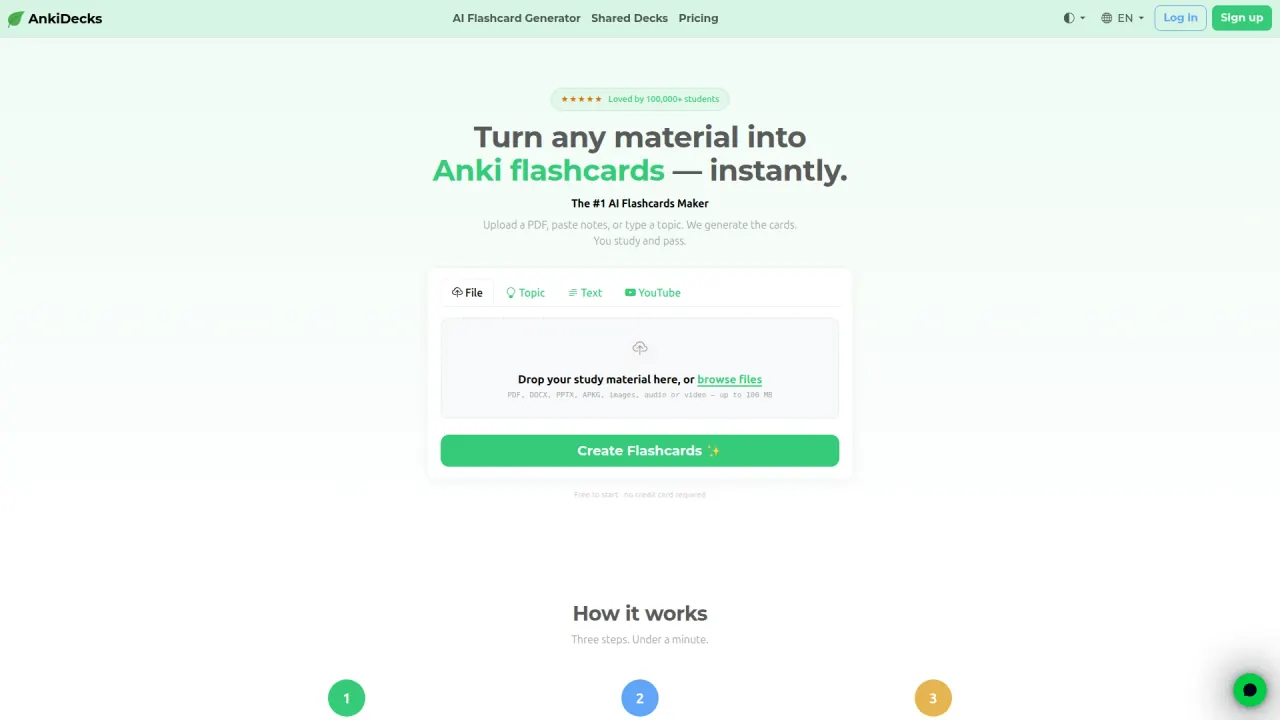

AnkiDecks reads PDFs, slides, notes and YouTube videos and writes the flashcards for you, then exports .apkg decks to Anki or runs spaced repetition in the browser.
Used this tool? Rate it
Used this tool? Rate it


From a prompt to a deck, site or doc


One workspace for every AI model


One workspace where your team and its AI agents think together


Public Codex reset tracker


AI assistant for structured work


Plan, build, and refine work with an AI agent


Astrology readings from real astrologers


AI translation for multilingual workflows
AnkiDecks is a browser-based AI flashcard generator built around the Anki ecosystem. You upload a PDF, a slide deck, a Word or Excel file, an EPUB, an image, an audio or video file, or a YouTube link, and the service returns a deck in one of four formats: question and answer, cloze deletion, multiple choice, or image occlusion. The deck can then be exported as a .apkg file for Anki on desktop, Android or iOS, or studied inside AnkiDecks with its own spaced repetition scheduler.
The site frames the job as three steps it says take under a minute: upload or type the source, let the AI extract the key concepts, then study or export. It does not replace Anki; it feeds it, and the page states plainly that the company is independent of and not affiliated with Anki Software LLC.
Two things sit alongside the generator: a study mode built on FSRS, the scheduler Anki itself adopted, so a deck can be reviewed in the browser; and a shared library the site describes as more than 100,000 decks, browsable by subject and clonable into your account. Generation is metered; the study features are the same on every plan.
The flow accepts more than documents: PDF, PowerPoint, Word, Excel, EPUB, images and handwritten notes are listed on the home page, and the pricing FAQ adds audio, video and YouTube links. Text, tables and diagrams are pulled out and turned into cards, and the PDF section says files of up to 100 MB are supported with tables, images and diagrams included. A YouTube URL is transcribed first, then the key concepts are extracted into cards that carry timestamped source references, so a fact can be traced back to the minute it was said.
AnkiDecks supports question and answer, cloze (fill in the blank), multiple choice and image occlusion cards, and the type is chosen under Options before generation starts. Image occlusion is the feature the site pushes hardest at medical students: upload an anatomy diagram, a map or a chart, and the service detects the labels and covers them so you can reveal one hidden part at a time. Those cards export to Anki as image occlusion notes rather than flat pictures, the part that is genuinely tedious to build by hand. Multiple-choice cards can be generated in a quiz format and exported like any other deck.
The generator works in more than 50 languages, and card language can differ from source language. That single setting covers two audiences: a student reading an English textbook who wants cards in their own language, and a language learner who wants vocabulary cards in the target language built from a list in their native one.
Every plan exports .apkg files that open in Anki desktop, AnkiDroid and Anki for iOS, and the export is a single click from the deck view. The same deck can be studied on anki-decks.com using FSRS scheduling, and no Anki account is needed for that. AI feedback on reviews is metered monthly: 20 on Free, 500 on Pro and 2,000 on Ultimate.
If you stop generating, nothing you have already made disappears. The pricing FAQ says you can keep studying every deck, keep quizzing and keep adding cards by hand after hitting the monthly limit; only new AI generations wait for an upgrade or the monthly reset.
Any deck can be shared with a link, and recipients can clone it, study it or export it to their own Anki. Visibility is set per deck as public, private or link-only, enough for a study group or a class that should all start from the same cards. The community library runs the other direction: the site says it holds more than 100,000 decks across anatomy, pharmacology, law, languages and history, and any can be saved to your account in one click. Searching it first can save a monthly generation.
Start from one lecture, one chapter or one video rather than a whole semester. Limits apply per document and per file, not per deck, so a whole textbook hits the page ceiling on every plan, while chapter-sized files generate cleanly on Pro. If the source is a scan, check that the text or handwriting is legible first: handwritten notes are accepted, but extraction quality depends on the image.
Open Options before generating. Cloze suits definitions and formulas, question and answer suits explanations, multiple choice suits exam practice, and image occlusion suits anything where the answer is a position on a diagram. Set the card language here too if it differs from the source. The choice is per generation, so a mixed course can produce a cloze deck for pharmacology and an occlusion deck for anatomy from two uploads.
Read the generated cards before trusting them. The terms say AI-generated content may contain errors, and the habit is to delete duplicates and rewrite anything ambiguous, because spaced repetition drills a flawed card as faithfully as a correct one. Once the deck reads well, export the .apkg and import it into Anki, or study it in the browser with FSRS. Deck settings, tag management and combining decks sit in the deck menu if you want to merge two uploads.
Anatomy diagrams, maps and charts all depend on knowing where a label belongs. Image occlusion tests that directly, and automating the label detection removes the slowest part of building such a deck. One upload can produce occlusion cards for the diagram and question cards for the surrounding text.
Vocabulary decks are mechanical to build and easy to get wrong, the shape of work a generator handles well. Because card language can differ from the source, a learner can keep a native-language word list and produce target-language cards, or read a textbook in one language and revise in another. Reviewers on the site include language learners who report that translation worked without extra setup.
A recorded lecture, a documentary or a tutorial can become a deck without pausing to take notes. Transcription plus timestamped references means a card can be traced to the exact minute, which matters when a fact is contested. For board exams and finals, that traceability is the difference between a deck you trust and one you abandon.
AnkiDecks fits people who believe in spaced repetition but resent the card-making: medical and law students working from dense slides, language learners building vocabulary at volume, anyone revising from lectures. The tiers map onto that audience. Free is a trial with four deck generations a month. Pro is described as enough for one or two courses a semester, and Ultimate is positioned for three or more subjects at full power.
It also fits learners who do not want to install Anki. The browser study mode with FSRS is a complete loop on its own, and export is there for the moment they want the deck on a phone or want to keep it after the subscription ends.
It fits less well in three situations. If you need fine control over templates, note types and scheduling, Anki gives you that and AnkiDecks deliberately simplifies it. If you plan to sell generated decks, read the ownership clause first, because the terms assign AI-generated content to AnkiDecks. And if you use another spaced repetition system, the .apkg export points at Anki rather than at your tool.
Everything runs in the browser. AnkiDecks is a progressive web app, not a native app, and the site states that it is not in the App Store or on Google Play. On Android it installs from Chrome's "Add to Home screen" or "Install app" menu item; on iPhone it installs through Safari's Share menu. Once installed it runs full screen and can send push notifications, which is close enough to an app for daily review.
On the Anki side, the exported .apkg opens in Anki desktop, AnkiDroid and Anki for iOS, and the file is the same on every plan, including Free. Card order is the one rough edge: exported cards may not appear in the same order as in AnkiDecks by default, and the FAQ explains how to sort by creation date in Anki desktop and AnkiDroid to restore it.
Accounts are email-based. No Anki account is required, and the privacy policy says the only personal data collected is the account email address plus anonymised PostHog analytics. Uploaded files are described in the FAQ as private, never shared with other users, used solely to generate your deck and not used to train AI models. The policy adds that data is processed and stored in the European Union, is not shared with third parties, and is removed when the account is deleted.
Three plans, billed monthly or annually.
Free — no card required. Four deck generations a month, documents up to 10 pages and 25,000 characters, video uploads up to 5 minutes, 50 AI image occlusions and 20 AI review feedbacks a month, and up to 10 images extracted per file.
Pro — $7.99 a month billed monthly, or $5 a month billed annually at $60, which the site presents as saving $35 a year. Fifty deck generations a month, documents up to 100 pages and 200,000 characters, video up to 20 minutes, 250 image occlusions, 500 review feedbacks and 100 images per file.
Ultimate — $20 a month billed monthly, or $12 a month billed annually at $144, presented as saving $96 a year. Two hundred deck generations a month, documents up to 200 pages and 400,000 characters, video up to 60 minutes, 1,000 image occlusions, 2,000 review feedbacks and 200 images per file.
Features are identical on every plan; the difference is throughput. Spaced repetition, quizzes and .apkg export appear on all three, and decks are kept if you downgrade. Upgrades take effect immediately with a prorated charge for the rest of the period; downgrades apply at the next renewal.
Cancellation is self-service: log in, go to Settings, then Manage Subscription. No email is required, access continues to the end of the paid period, and every deck stays in your library on the free plan. Payments run through Stripe and are non-refundable under the terms.
Anki is the free flashcard program that AnkiDecks exports into. Its site says the computer version is free on all major platforms, that AnkiWeb synchronisation is free, that media and scientific markup are supported, and that decks of 100,000+ cards are handled without trouble. What it does not do is write the cards: you create a deck and add the flashcards yourself, which is exactly the work AnkiDecks automates. The official iOS app, AnkiMobile, is a separate purchase whose proceeds the site says fund Anki's development.
Knowt positions itself as a free Quizlet alternative with AI study tools. Its site advertises creating, sharing and studying flashcards for free with unlimited learn mode, a PDF summariser that turns an upload into notes, flashcards and practice tests, and apps for iOS and Android. The overlap is the file-to-cards step and the free tier; the difference is that Knowt keeps everything inside its own platform, whereas AnkiDecks is built to hand a standard .apkg to Anki. Someone who wants one web app for notes and practice tests is better served by Knowt; someone committed to Anki's scheduler and add-ons is better served here.
The terms say AI-generated content may contain errors and recommend reviewing it before relying on it for academic or professional work. An independent editorial review scores it 3.8 out of 5 and calls the tool a genuine time-saver, while warning that AI-made cards can be wrong, oversimplified or miss nuance, and that spaced repetition reinforces whatever flaws survive.
Free is a sample rather than a workflow: four deck generations a month, 10-page documents and 5-minute videos test the output on one lecture and not much more. The page ceiling is the harder constraint for textbook chapters, and the character ceiling (25,000 on Free, 200,000 on Pro, 400,000 on Ultimate) can bind first on dense text. Video length is capped separately at 5, 20 and 60 minutes.
Cards exported to Anki may not appear in the same order as in AnkiDecks; the fix is to sort by creation date in Anki's card browser. Image occlusion exports as occlusion notes rather than plain images, so the deck depends on Anki's image occlusion note type. And the export is .apkg only: there is no bridge to RemNote, Quizlet or other schedulers.
The terms assign ownership of AI-generated content to AnkiDecks and grant the company rights to use, modify, distribute and display it for operational purposes, while stating that user data is not used to improve the AI model. Uploaded content stays yours. For personal study this rarely matters; for anyone planning to sell generated decks, it does. Payments are non-refundable, so the annual discount is worth taking once the monthly plan has proven itself.
Uploaded study files are processed to generate the deck, and the FAQ says they are not used to train AI models and not shared with other users. The privacy policy is thinner: email collection, anonymised PostHog analytics, EU storage, no third-party sharing and instant removal on deletion. An institution with strict data rules should confirm subprocessor and retention details before uploading licensed or patient-related material.
Yes, with limits. The Free plan allows four deck generations a month across flashcards, quizzes or notes, with documents up to 10 pages and 25,000 characters, video up to 5 minutes, 50 image occlusions and 20 review feedbacks. No card is required, and .apkg export works on the free plan.
No. Decks can be created, studied and quizzed entirely on anki-decks.com using FSRS scheduling. Anki is only needed to review in Anki desktop, AnkiDroid or Anki for iOS, in which case you export the deck as a .apkg and import it there.
PDF, PowerPoint, Word, Excel, EPUB, images, handwritten notes, audio and video files, plus public YouTube links. The PDF section states a 100 MB per-file limit, and text, tables and diagrams are extracted. A PDF to flashcards run is bounded by the page and character ceilings of your plan, not by a separate quota.
You can cancel any time from Settings, then Manage Subscription, without emailing anyone. Access lasts until the end of the paid period and your decks remain available on the free plan. Payments are non-refundable under the terms, including annual plans.
You keep the rights to the files you upload. The terms assign ownership of AI-generated content to AnkiDecks and allow the company to use it for operational purposes, so check the clause before selling or republishing a deck.
The FAQ says uploaded files are used solely to generate your deck, are never shared with other users and are not used to train AI models. The privacy policy adds that data is processed and stored in the European Union and removed when the account is deleted.