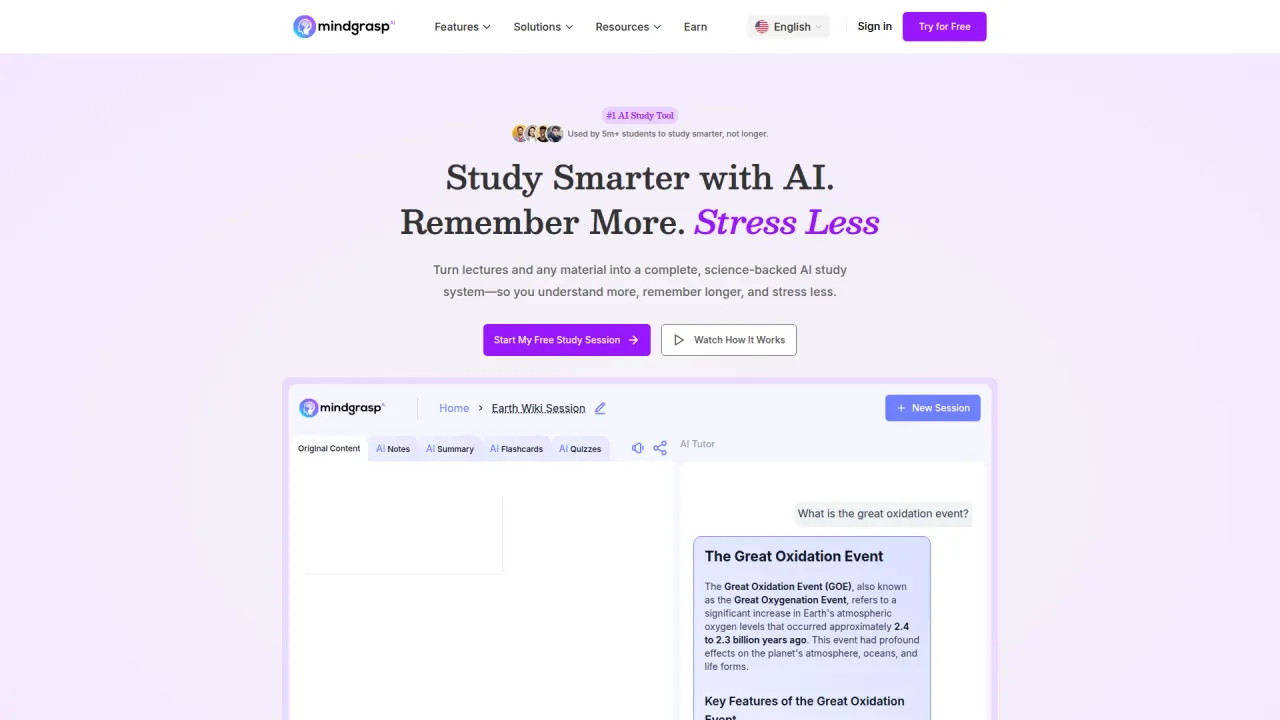

Mindgrasp turns lecture recordings, PDFs and slides into notes, summaries, flashcards, quizzes and a 24/7 AI tutor, organised as one study session per topic.
Used this tool? Rate it
Used this tool? Rate it


Astrology readings from real astrologers


AI image editing from a reference photo


Multi-model image studio, free to start


Natural AI photo editing for portraits and projects


AI assistant for writing, analysis and tasks


From a prompt to a deck, site or doc


Build random generators, share them free


Anime art, powered by a million community models
Mindgrasp is an AI study tool that turns course material into a set of study outputs: notes, a summary, flashcards, quizzes and a chat tutor. The company's values page states that Mindgrasp is not a cheating tool and frames its AI as support for academic integrity, while the homepage leads with students. An AI study tool of this kind does not try to teach a syllabus; it takes the material a student already has and rebuilds it into something reviewable.
The unit of work is the study session. One session stands for a lecture, a chapter or an exam topic, and everything generated from that material stays inside it. A student who records a Tuesday lecture gets one session for that lecture, not a loose pile of files.
Five outputs are generated from the same upload: structured notes, a summary, flashcards, quizzes and an AI tutor that answers questions about the material. The pitch is that the student stops deciding which tool to open for which task, because one upload feeds all five.
Mindgrasp operates the majority of its services in the United States. Its Terms of Use state that all dollar values are in United States Dollars. The same document governs billing, renewal and cancellation, and it is unusually explicit about the last of those. Anyone comparing study tools on features alone will miss the part of Mindgrasp that most affects the cost of trying it.
The homepage reports 5M+ students, 1,500+ schools and universities, 128+ countries and 2M+ study sessions created. These are vendor-reported figures that describe reach and confidence, not how the tool will handle a specific course.
Mindgrasp presents the feature set as built on cognitive science: active recall for flashcards, practice testing for quizzes, spaced repetition for notes and self-explanation for the tutor. The mapping is marketing rather than method, but it explains why the outputs are split instead of folded into one chat window.
Mindgrasp generates structured notes from the uploaded material, with the stated aim of letting a student focus on understanding instead of typing. The summary, flashcards and quizzes are built from the same session, so a student who edits nothing still gets materials that refer to the same source.
The summary compresses long lectures, articles or textbook chapters into a scannable version of the argument. Mindgrasp positions it for the pass immediately before a test or for a quick revision when there is no time to reread the source. It is a compression, not an explanation, which makes it useful for orientation and weak as a substitute for the source.
Flashcards are generated from the material and framed around active recall, the practice of retrieving an answer rather than rereading it. This is where PDF to flashcards becomes a one-step operation: the student supplies the document and the product proposes the cards. The quality ceiling is the source material. A dense chapter with clear definitions produces usable cards; a lecture full of diagrams and verbal shorthand produces cards that need editing.
Quizzes are generated from the same material, with the stated purpose of checking understanding and finding weak spots before an exam does. A quiz is the feature that turns passive review into a diagnostic: a student can see which section of a chapter failed to stick. Mindgrasp does not claim the quizzes mirror a specific exam board, so they work as self-testing rather than prediction.
The AI tutor is available at any hour and is meant to explain concepts, clear confusion and let a student work at their own pace. It sits inside the session, so the questions a student asks are about the material they just uploaded. For an AI tutor for students, availability is the selling point: the alternative at midnight is often no help at all.
Mindgrasp accepts PDFs, DOCX files, MP3 audio, MP4 video, PowerPoint decks, online article links, YouTube links and Vimeo links. A student can also record a live lecture in class and have that recording processed like any other upload. A course that mixes slides, a recorded seminar and a reading list can be handled inside one product instead of three.
Each session tracks its own progress, showing what has been generated and what is left to review, and the session checklist repeats that per output. Mindgrasp states that all plans include unlimited uploads with no daily limits on usage, which removes the quota anxiety that makes students ration a free tier.
| Output | What it gives a student | Best moment to use it |
|---|---|---|
| Notes | Structured record of the source | First pass after a lecture |
| Summary | Compressed version of the argument | The night before a test |
| Flashcards | Recall prompts from the material | Daily drilling |
| Quizzes | Self-test with visible gaps | A week before an exam |
| AI tutor | Answers about the uploaded material | When a concept will not land |
Mindgrasp describes a four-step loop, and the order is the useful part: material first, generation second, practice third.
A student who records lectures can convert them into notes and a summary without transcribing by hand, then drill the same material as flashcards. The value is highest in lecture-heavy courses where the exam follows the lecturer's framing more closely than the textbook's.
PDF to flashcards is the shortest path from a reading list to revision: upload the chapter, generate cards and a quiz, and use the quiz to decide which sections deserve a second read. The workflow suits humanities and social science courses, where the exam asks for argument and definition rather than calculation.
Mindgrasp lists teachers, professors and instructors among its audiences, and the same upload-and-generate flow works for building a quiz from a video module or a reading before class. An educator gains preparation time; the product does not grade, proctor or report on students.
Mindgrasp says its materials are available in 20+ languages, which matters for students studying in a second language or for anyone working through material that is not in their first. The interface language and the language of the generated output are separate questions, and only the latter is claimed on the homepage.
Mindgrasp is aimed at students moving from daily classes to final exams, including high school, college and graduate study. The session model fits a term with several courses, because each lecture or chapter gets its own container. A student with one course and one textbook will find less difference from a general chatbot than a student juggling seven.
The homepage lists self-learners working through online courses, candidates preparing for competitive or certification exams, and working professionals. Mindgrasp's own FAQ says the product was first designed for students but that "lots of professionals enjoy the benefits of Mindgrasp too", which is a candid way of saying the tool is general-purpose study software with a student-first design.
Mindgrasp is available to individuals aged 13 and over. It is not offered to people who reside in, are located in, or access the service from California or New York. A student in either state, or a parent managing a younger child's account, should read the eligibility section before paying.
Mindgrasp runs as a web application, and the site also offers an iOS app for recording lectures on a phone. A Chrome extension pulls content from Canvas, Blackboard or any website, which is how course material moves from a learning management system into a session without downloading files first. The company's summary of this is that Mindgrasp works wherever the student does.
No Android app is described on the pages reviewed, and no desktop client is offered; the browser is the desktop experience. For a student whose course material lives in Canvas or Blackboard, the extension is the practical entry point. The product assumes an internet connection, since processing happens on Mindgrasp's side rather than on the device.
Mindgrasp does not publish a rate card on the pages reviewed for this article: there is no price list on the homepage, and the billing terms in the Terms of Use describe monthly or annual memberships without quoting amounts. The public documents describe the shape of the commitment, which is more decision-relevant than a number that can change.
Payment is due in advance of each membership period, monthly or annually. Memberships renew automatically, and the card on file is charged on the first day of each renewal period. A free trial may require a valid credit card to start. A trial converts into a paid membership at the promoted rate for that level when the trial ends, unless the user cancels first. Only one free trial is allowed per person, and later registrations do not qualify. A price change takes effect no sooner than 24 hours after Mindgrasp notifies the account holder.
| Money question | What the Terms of Use state |
|---|---|
| Billing | Due in advance of each monthly or annual period |
| Renewal | Monthly and annual memberships may renew automatically |
| Free trial | May require a valid credit card; auto-renews at the promoted rate |
| Trial limit | One free trial per person |
| Refunds | No-refund policy, including partial months and renewal payments |
| Cancellation | Email to support@mindgrasp.ai only; effective within 7 business days |
| Price changes | Take effect no sooner than 24 hours after notice |
| iOS purchases | No refunds; manage the subscription through the Apple account |
Mindgrasp states that the sole and exclusive method for cancelling a subscription is an email to support@mindgrasp.ai. No other attempt counts: not the website, not the dashboard, not account settings, not the mobile app, not a chat, phone call, SMS or contact form. Cancellations take effect within 7 business days, and outstanding fees must be paid first. A student who cancels through a settings screen and assumes it worked has, under these terms, not cancelled.
Mindgrasp maintains a no-refund policy. The terms exclude partial months of service, unused accounts and renewal payments. Once a renewal charge has been processed, it is non-refundable. Responsibility for cancelling before the renewal date sits with the account holder. The iOS product is treated separately: no refunds, with subscription changes handled through the Apple account rather than through Mindgrasp.
Mindgrasp says it retains personal information only for as long as necessary. It also says service providers cannot use shared information for their own purposes. It defines a child as anyone under 16, and a child account requires verifiable parental consent. Users can ask to know, access, correct, transfer, restrict the processing of, and delete their personal information.
There is a free trial, and it may require a credit card to begin. The site also offers free AI study tools such as a summariser, transcriber and note taker. Continued use of the main study sessions is sold as a monthly or annual membership, and the public pages reviewed here do not quote a rate.
Send an email to support@mindgrasp.ai. The terms recognise no other route, including the dashboard, account settings or the mobile app, and the cancellation becomes effective within 7 business days.
No. Mindgrasp maintains a no-refund policy that covers partial months, unused accounts and renewal payments, and a renewal charge is non-refundable once processed. The iOS product is also excluded from refunds.
PDFs, DOCX, MP3, MP4, PowerPoint decks, online article links, YouTube links and Vimeo links. Live lectures can be recorded in the app instead of uploaded.
Yes, through the iOS app, which can record a lecture and generate the session from it. There is no Android app described on the pages reviewed. An iOS subscription is managed through the Apple account, and refunds are not offered for it.
It renews at the promoted membership rate for the level chosen, unless the subscription is cancelled before the trial ends. Only one free trial is allowed per person.
Mindgrasp states that all plans include unlimited uploads with no daily limits on usage.
Mindgrasp argues that a general assistant was not designed for learning workflows, while its own tool accepts many kinds of course material and generates notes, summaries, flashcards and quizzes from it.