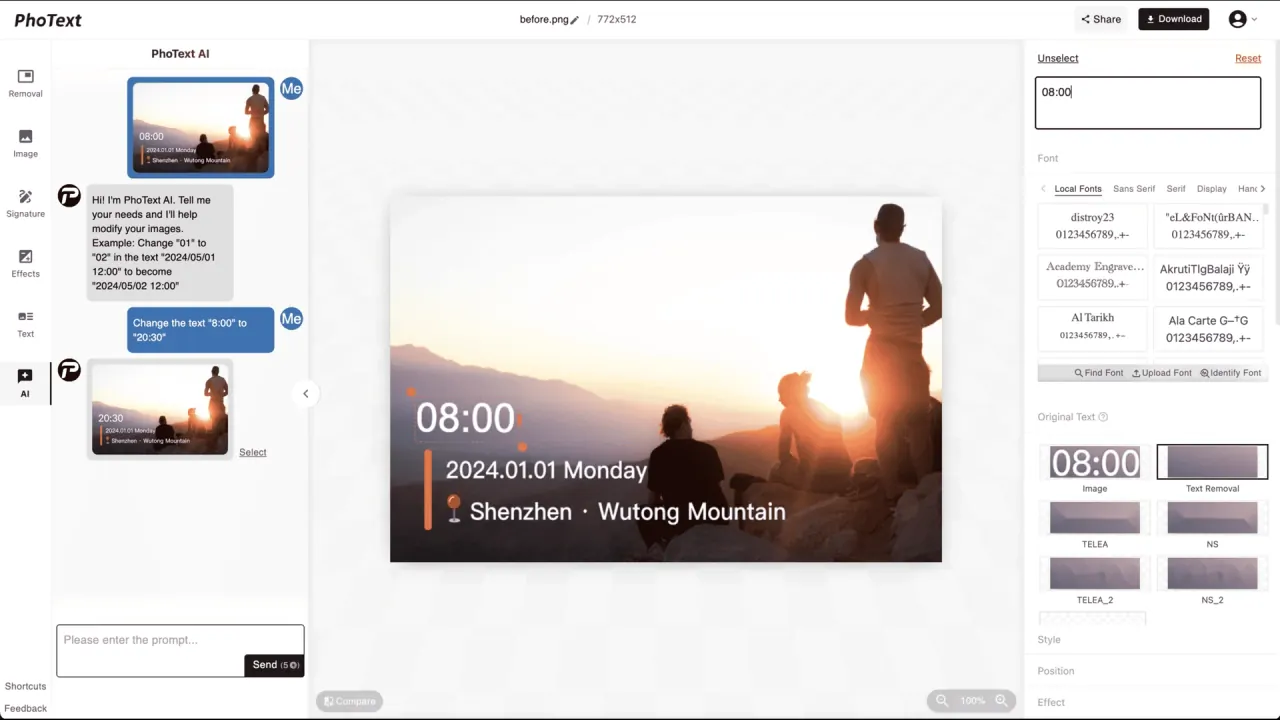

PhoText is a browser editor for text baked into images and screenshots. Click a line, retype it, and the tool rebuilds the background and matches the original font, with an AI conversation mode for harder cases.
Used this tool? Rate it
Used this tool? Rate it


AI image editing from a reference photo


Multi-model image studio, free to start


Natural AI photo editing for portraits and projects


Browser-Based AI Photo Editing and Image Generation


Product photo editing for online stores


AI photo editing and design in one browser tab


Fashion concepts, model photos and video in one workspace

Prompt-Based Images, Edits and Video
PhoText is an online editor for text that is already baked into an image, and it works by clicking the words and typing over them. A screenshot, an exported poster, a product photo with a stale label: the letters are pixels, and the editor treats them as editable blocks. The core action: edit text in image files by clicking a line and typing.
The upload area on the homepage lists JPG, PNG, JPEG, WEBP and PDF. The AI editor page adds BMP to that list.
No account is needed for basic editing; signing in extends how long files stay on the servers and unlocks the AI feature quota.
The privacy policy names the operator of the service as Morling, LLC. The About page also warns that the official domain moved from photext.shop to photext.ai and that lookalike domains on other extensions are impersonators.
The product is a repair tool for finished pictures, not a design suite: a wording change rather than a new layout.
Every text edit runs through the same three-part pipeline the company describes as semantic understanding, smart background repair and style transfer. An image text editor, or AI photo text editor, is judged on the replacement rather than the selection. ### Text recognition and the editable canvas
Recognition is claimed to cover all languages, including slanted, curved and small text on complex or mixed layouts. The recognition pass turns a picture into editable blocks that keep their own position.
Font handling is the part most editors get wrong, and PhoText splits it into recognition and substitution. The editor recognises the font in the image and offers a library to draw the replacement from.
The separate font finder works the same way at larger scale, matching clicked text against more than 10,000 fonts by glyph shape and stroke pattern. What comes back is a ranked set of similar fonts with similarity scores, each one cleared for commercial use rather than the original typeface file.
Recognition is described as working across more than 20 languages, Chinese, Japanese and Korean among them. Which languages the OCR reads is a separate question from which typefaces the library holds.
Background repair is the second half of the trick: the area under the old words is rebuilt rather than covered. The company claims the restoration leaves no ghosts, white edges or color blocks, and that it handles textured surfaces such as wood, fabric and lighting gradients.
Beyond the typeface, the replacement is matched on color, weight, perspective, shadow and gloss. When those five line up, the edit stops looking pasted on; when one is off, the eye catches it immediately.
Filters, stickers and word art sit alongside the text tools, and exports are described as keeping the original resolution. The AI editor widens the scope to retouching, object replacement and removal, style transfer, watermark removal and ID photos.
Reference compositing accepts up to three images at once, enough to blend a product shot, a background and a style reference in one pass.
Image translation covers more than 100 languages and keeps the original layout, font and style, with every line editable afterwards. Because those lines stay editable, a mis-rendered word can be corrected in place instead of re-running the whole translation. The font finder is packaged as its own page and answers a narrower question: what typeface is this, and what free alternative looks like it. Both are separate tools rather than modes inside the editor, which matters when a task is really about identifying a typeface rather than changing words.
The workflow is short, and the shortest version of it is three steps.
The info panel lists every recognized block, so a dense screenshot can be worked through block by block instead of hunting on the canvas. A word inside a longer line is a separate case: the guide suggests selecting just that word, or erasing the target text and adding new text in the same position.
Manual mode is the predictable path. Manual repair offers several removal schemes, and a different result can be tried when a spot survives the first pass — the loop of apply, inspect and switch is what makes textured backgrounds workable.
The AI mode takes an instruction instead of a selection. A conversational edit runs semantic understanding, background repair and style transfer in one pass, and a follow-up instruction refines the result. The vendor's guidance is to name both the current text and the replacement, the way one would brief a designer.
The two modes share one canvas, so a conversational result can still be nudged by hand; flat screenshots with simple replacements are manual work, while stylised headlines, angled text and glossy surfaces suit the AI pass.
Text inside a PDF goes to a separate PDF Text Editor rather than the image canvas — its own tool, not a mode switch inside the image editor.
The recurring situation is a finished image whose words are wrong and whose editable source no longer exists. The site's examples stay close to that case.
Typical fixes are a typo in a chat message before it is shared, a date or version number in product documentation, and numbers in a dashboard screenshot. Two are about accuracy and one about embarrassment; all three are one-word or one-number changes that would otherwise mean rebuilding a graphic.
Removing names and phone numbers before a screenshot leaves the device is another listed case. It sits closer to redaction than to design: a half-erased name is worse than no edit at all.
A borrowed computer or a phone is enough, because nothing has to be installed. The same steps change text in photo captures taken on a phone. The company's comparison with Photoshop lists the same pattern from the other side: the image is flattened and the source file is gone, or the job is a screenshot, poster, label or product image text fix.
The intended spread is short strings of display text, where one wrong character is visible at a glance. The pages do not propose the tool for reflowing paragraphs.
The people the company names are the ones who need a wording change but do not have the layered file or the software to reopen it: a marketer updating a price on a finished banner, a support team cleaning a screenshot before it goes into a ticket, a seller correcting a label on a product image.
The pitch is aimed at people who will not read a manual, which the company summarises as an intuitive interface with no learning required.
Commercial work is covered by the platform's own terms: the fonts it distributes and the content produced with it are described as free for commercial use. That claim covers the platform's fonts, not a typeface a user uploads from elsewhere.
Two groups are a poor fit. Anyone who still has the layered source should edit the real text layer instead of repainting pixels, and anyone doing full compositing, print production or design from scratch needs a general editor.
Everything runs in the browser tab, so the platform list is short: desktop web, mobile web and whatever the company means by app. The AI editor page states the site can be reached from a phone anywhere and anytime, and the screenshot guide describes the whole process as running in the browser.
Nothing has to be installed. The pages checked this round describe an app experience alongside the web one but link no store listing for it, so the safest reading is a mobile-optimised web editor with a companion app described rather than documented.
Input formats differ slightly by page: the homepage lists JPG, PNG, JPEG, WEBP and PDF, while the AI editor page lists BMP as well. PSD is on no list.
PhoText separates free manual editing from metered AI editing: clicking and typing costs nothing, while conversational edits draw on a free trial quota. The homepage puts it as basic features free and a generous trial quota for advanced ones, without naming a number for either.
The tutorial draws the same line in one sentence, with manual editing free and AI conversation metered against a trial quota before paid pricing applies. Translation is tiered the same way: the standard mode is free, and the modes that redraw complex backgrounds are paid-plan features.
What is missing is the price list itself. The sitemap contains no pricing page, the obvious paths return 404, and the pages checked this round give no plan names, monthly amounts or credit sizes.
An account unlocks the AI quota and the longer retention window, so the free tier and the logged-out experience are not the same product. The user agreement adds that fees already paid are not returned if access is restricted or terminated for a violation.
Independent catalogs put PhoText in a crowded field. One directory names PicText.ai, Adobe Photoshop and Fotor as the closest competitors.
The same page puts Photopea, imageTextEditor.org and EditTextImage in a second tier of comparisons. That tier mixes full online editors with single-purpose tools that only replace text, which says more about the choice than a ranked order does.
The company draws a boundary with the most obvious alternative. Its comparison concedes that Photoshop keeps the advantage for artistic compositing, while arguing the AI route is comparable for text replacement on screenshots, posters and labels. For anyone holding a PSD, the same page says to edit the text layer in Photoshop rather than repaint a flattened copy.
The split is by input: a layered source points to a general editor, a flattened image with one wrong word to a tool like this one.
The clearest hard limit is file type: PSD files are out, because the editor only works on flattened images. A layered file has to be exported first, and the layers are gone by then.
Retention is the second limit, and the numbers do not agree. The homepage states 3 days, extended to 30 for logged-in users. The About page repeats the 3-day and 30-day split and calls the deletion permanent. One product page states 30 days for logged-in users and 1 day for everyone else. The translator page states 24 hours for visitors and 30 days for signed-in users. The privacy policy speaks about drafts rather than finished images and gives 30 days as the ceiling.
Uploaded images are declared to be used only for the edit itself, and the retention clocks differ by page and by login state. They may describe different objects — finished images, drafts, uploads — but the logged-out window is given as 1 day, 24 hours and 3 days, and no page reconciles them.
Recognition is not guaranteed. When recognition misses a block, the vendor's own advice is to crop that area and upload the isolated text for a better read. Detection is upstream of everything else: a line that is not recognised cannot be clicked.
Font fidelity has a ceiling the font finder states directly: the output is a similar font with a similarity score, not the original typeface. Kerning, thin strokes and unusual letterforms are where a substitution shows.
On the data side the position is specific but partial. The privacy policy limits the use of uploaded images and the information inside them to providing the editing service. The homepage adds that uploaded images are not used for targeted advertising or data resale, and that device information and geolocation are not collected for those purposes either.
What the checked pages do not say is whether uploaded images are used to train models. The privacy policy, the user agreement, the About page and the editor pages were read for this round, and none addresses model training; the policy's stated purpose is the editing service and stops there. That is an absence of a statement, not a promise.
No page states a maximum file size, a pixel-dimension ceiling or a per-file page limit, and none says whether free exports carry a watermark.
Rights in the output sit with the user: the agreement assigns intellectual property in modified images and generated content to the person who made them. The same agreement puts the rights question on the uploader, who must own the image or hold the right to use it. Editing a photo of a person or a third-party logo does not create permission to use either.
Two smaller rules complete the picture. The user agreement sets the minimum age at 13 for using the service independently. The agreement is governed by the laws of the People's Republic of China.
Yes for basic editing. An account extends the retention window and unlocks the AI feature quota, so the two experiences differ in storage and AI allowance.
No. The editor works on flattened images such as JPEG, PNG and WebP.
It substitutes a close match from a large library, ranked by similarity, and the matches are free for commercial use. A licensed typeface is approximated rather than reproduced.
The vendor states that uploaded images are used only to provide the editing service and are not collected for targeted advertising or data resale. Deletion windows are published but differ between the homepage, the AI editor page, the translator page and the privacy policy.
The company says the fonts it distributes and the content produced with them are free for commercial use. That covers the platform's own fonts; images, logos or typefaces a user brings remain the user's responsibility.
Manual editing is free, and AI features run on a free trial quota with paid pricing beyond it. No plan prices appear on the pages checked this round, so the paid tier has to be read inside the product.