
Toolso.AI
Toolso.AI
All ToolsCategoriesTrendingLatest Tools
AI Models

Image models

  • Nano Banana 2.1
  • GPT Image 2.6 Sunburst
  • Seedream 5.5
View all

Video models

  • MiniMax H3
  • Kling 4.0
  • Seedance 2.5
View all
All AI models
Blog
Toolso.AI
Toolso.AI
Toolso.AI
Toolso.AI

Discover the best AI tools to boost your productivity

GitHubGitHubTwitterX (Twitter)YouTubeYouTubeTikTokEmail

Popular Categories

  • AI Writing
  • AI Image
  • AI Video
  • AI Coding
  • More Categories

Explore

  • Latest Tools
  • Popular Tools
  • More Tools
  • Submit Tool
  • Pricing

About

  • About Us
  • Contact
  • Blog
  • Changelog

Legal

  • Cookie Policy
  • Privacy Policy
  • Terms of Service
  • Refund Policy
© 2026 Toolso.AI All Rights Reserved
Limited timeLimited-time offerFeatured Listing24h priority review · No backlink · 30 days featured$29.90then $59.90Price rises to $59.90 after Dec 31Ends in--:--:--Submit now
  1. Home
  2. All Tools
  3. E-commerce Tools
  4. Mockey
Mockey interface preview
Mockey logo

Mockey

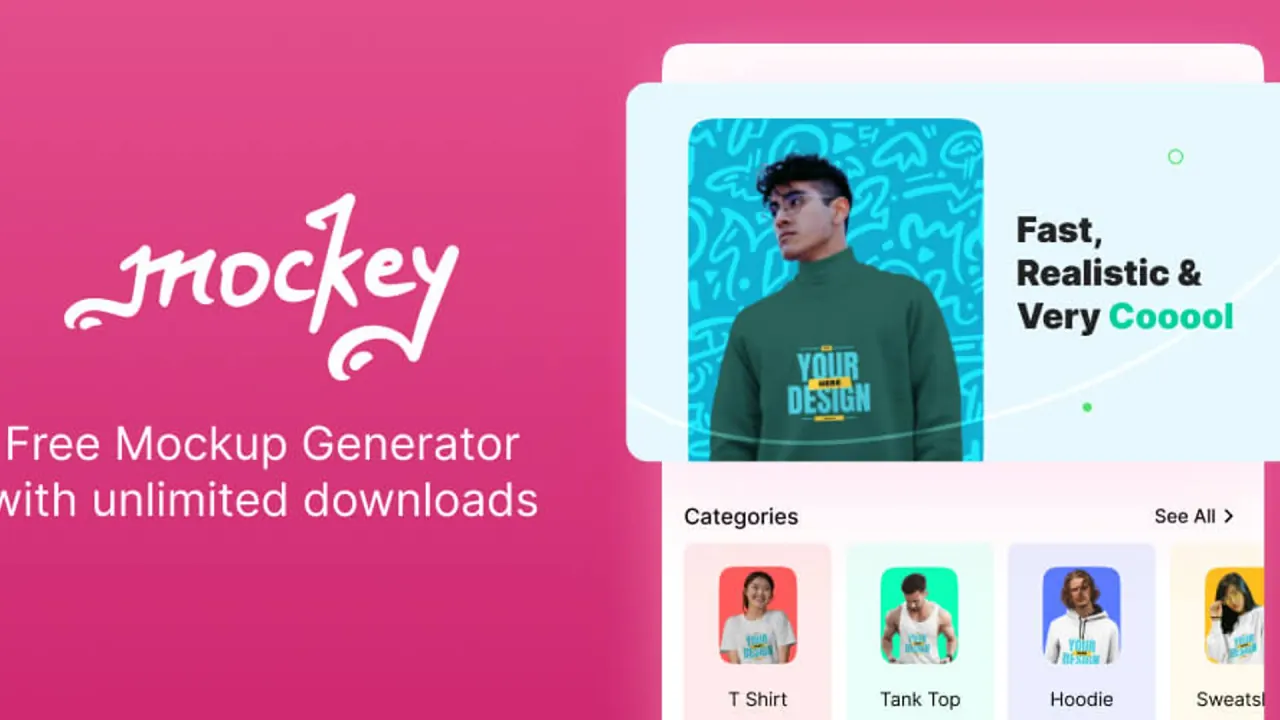
Mockey puts a design onto 30,000+ mockup templates for apparel, packaging, print and devices, and adds AI photoshoot, video mockups and Shopify or Figma publishing from one browser editor.

E-commerce ToolsDesign ToolsImage Editing#Background Removal#Ecommerce#Etsy
Try for Free
Saves
Visits
Views
Pricing
Freemium
Published
Nov 29, 2026
Domain
mockey.ai
Community rating

Used this tool? Rate it

Rate this tool
Try for Free

Mockey Product Information

Try for Free
Tool Information
Saves
Visits
Views
Pricing
Freemium
Published
Nov 29, 2026
Domain
mockey.ai
Community rating

Used this tool? Rate it

Rate this tool

Featured Tools

AI Image To Image interface preview
AI Image To Image logo

AI Image To Image

Free

AI image editing from a reference photo

Raphael AI interface preview
Raphael AI logo

Raphael AI

Free

Multi-model image studio, free to start

Airbrush interface preview
Airbrush logo

Airbrush

Free Trial

Natural AI photo editing for portraits and projects

PIXLR interface preview
PIXLR logo

PIXLR

Free Trial

Browser-Based AI Photo Editing and Image Generation

Photoroom interface preview
Photoroom logo

Photoroom

Free Trial

Product photo editing for online stores

Fotor interface preview
Fotor logo

Fotor

Paid

AI photo editing and design in one browser tab

MissYou AI interface preview
MissYou AI logo

MissYou AI

Free Trial

Prompt-Based Images, Edits and Video

Fashion Diffusion interface preview
Fashion Diffusion logo

Fashion Diffusion

Freemium

Fashion concepts, model photos and video in one workspace

Freepik AI Image Generator interface preview
Freepik AI Image Generator logo

Freepik AI Image Generator

Paid

Multi-model AI Image Generator

remove.bg interface preview
remove.bg logo

remove.bg

Paid

One-click AI background removal at scale

ChatGPT interface preview
ChatGPT logo

ChatGPT

Freemium

AI assistant for writing, analysis and tasks

Gamma interface preview
Gamma logo

Gamma

Paid

From a prompt to a deck, site or doc

Perchance interface preview
Perchance logo

Perchance

Freemium

Build random generators, share them free

PixAI interface preview
PixAI logo

PixAI

Freemium

Anime art, powered by a million community models

DeepSeek interface preview
DeepSeek logo

DeepSeek

Freemium

DeepSeek AI models for chat and API

Grok interface preview
Grok logo

Grok

Freemium

Real-time answers, images, and code in one chat

ZenMux interface preview
ZenMux logo

ZenMux

Free

One Gateway, Every Model, Compensated Failures

SeaArt AI interface preview
SeaArt AI logo

SeaArt AI

Freemium

Community-Trained Models for Art, Video and Characters

Related Tools

remove.bg
remove.bg interface preview
remove.bg logo

remove.bg

Paid

One-click AI background removal at scale

Try Now
Microsoft Designer
Microsoft Designer interface preview
Microsoft Designer logo

Microsoft Designer

Freemium

AI design that starts with a sentence

Try Now
PicWish
PicWish interface preview
PicWish logo

PicWish

Freemium

One-Tap Background Removal and Photo Cleanup

Try Now
ICONS 8
ICONS 8 interface preview
ICONS 8 logo

ICONS 8

Free

Designer-made assets with in-house AI

Try Now
Photoroom
Photoroom interface preview
Photoroom logo

Photoroom

Free Trial

Product photo editing for online stores

Try Now
Kittl
Kittl interface preview
Kittl logo

Kittl

Paid

Browser design studio with AI

Try Now
BeFunky
BeFunky interface preview
BeFunky logo

BeFunky

Freemium

Photo editing, collage and design in one tab

Try Now
Pixelbin
Pixelbin interface preview
Pixelbin logo

Pixelbin

Freemium

URL-based image transformation and AI editing

Try Now
HomeTop toolsSimilar

What is Mockey?

Mockey is a browser-based AI mockup generator that puts a design onto a photographed product. The library is the product's centre: the homepage advertises 30,000+ mockup templates and more than 60 categories, spanning apparel such as t-shirts, hoodies and tank tops, print items such as books, posters and business cards, packaging, jewellery, tech such as iPhone and laptop scenes, and seasonal sets. A design is uploaded, positioned on the template, and exported as an image or a short video.

What separates it from a plain template site is the layer of generative tools built on top: AI Photoshoot turns a product photo into a staged scene, Multi Shot produces several angles from one image, Animate turns a static mockup into a five-second clip, and smaller utilities change backgrounds, apply styles, expand images and generate stickers or text-to-image designs. The same workspace holds mockup templates, brand projects and AI output rather than splitting them across applications.

The company side is worth knowing because it explains the product's centre of gravity. The terms name Mockey LLC, registered in India with an office in Lucknow, Uttar Pradesh, and the Android listing names Blinkstore Pvt. Ltd. at the same Lucknow address. Terms were last updated in September 2025 and the privacy notice in October 2026.

Mockey sells a free tier that is genuinely usable for evaluation — the whole template library with three JPG downloads a day — and a paid tier that removes the limits and grants commercial use. It is aimed at print-on-demand sellers, Etsy and Shopify merchants, small apparel brands and marketers who need listing images faster than a photoshoot allows.

Core features

The feature list splits into three parts: the template library, the editor around it, and the AI operations that cost credits. Each matters differently when deciding whether the free tier is enough.

  • Template library. The homepage claims 30,000+ templates across 60+ categories, added weekly. One internal page elsewhere puts the standard library at 12,000+ templates, so treat the exact figure as unstable and check the category you need before paying.
  • Design upload and placement. Designs upload as PNG, JPG or WebP and are positioned on the product; the editor supports multiple design uploads per project on paid plans.
  • Smart-Texture Mapping. The vendor describes the placement engine as wrapping a design around curves, folds and shadows rather than pasting a flat image on top, which is the difference between a mockup that reads as a product photo and one that reads as a collage.
  • Bulk mode. One design can be pushed across many templates at once, up to 50 mockups in a single batch, then downloaded together.
  • Video mockups. Video templates exist for more than 50 products; a clip is five seconds long, exports as MP4 with no watermark, and is offered in 720p and 1080p.
  • AI Photoshoot, Multi Shot and Animate. Photoshoot edits an image into a scene, Multi Shot derives several perspectives from one mockup, and Animate converts a static mockup into video from a text prompt.
  • Editing utilities. Background removal, background blur, image expansion, style transfer, element modification, sticker maker and text-to-image sit beside the mockup editor.
  • Publishing integrations. A Shopify app creates mockups inside the admin, a Figma plugin works inside a design file, and an Etsy integration attaches chosen mockups to existing listings.
  • Projects. Mockups and assets can be saved into projects rather than exported one at a time.
  • AI credits. Generative operations draw on a credit balance; standard template generation is unlimited and consumes none.

Credit costs are published, which matters because a video habit burns allowance quickly: video mockups and Animate cost 10 credits each, while background changes, style application, element edits, photoshoot, blur, expansion and Multi Shot cost 2 credits each.

Guide

The first mockup takes a few minutes and no software install. The order below follows the workspace.

  1. Create an account, then open Mockups and pick a category such as apparel, print, packaging, tech or jewellery.
  2. Choose a template. Free accounts see the full catalogue, but some templates are marked PRO and belong to paid plans.
  3. Upload the design as PNG, JPG or WebP. A transparent PNG places cleanest on fabric.
  4. Position it: resize, rotate and place, then adjust the product colour or background.
  5. Optionally run an AI operation — a photoshoot scene, a background change, a second angle, or an animation — accepting the credit cost shown for each.
  6. Download. The free plan returns JPG; PNG and high-resolution exports need a paid plan.
  7. For repeat work, save the setup into a project, or use bulk mode to apply one design across many templates and download the set together.

Placement is where most of the perceived quality comes from. A design that ignores the fabric's folds looks pasted on, while one that follows the shoulder seam and the fold shadows reads as a photograph; the vendor's texture mapping handles part of that automatically, but wide logos on gathered fabric still need manual adjustment.

Bulk mode changes the economics of a product launch: one design across forty templates in a single batch is minutes of work and one export step rather than forty separate downloads. Video changes it differently — a five-second loop of a shirt turning is often what a paid social ad needs, and it removes the need for a filmed shoot entirely.

What people use Mockey for

The uses below follow from what the product actually publishes: templates per category, the free plan's terms, and the AI operations that exist.

  • Building a print-on-demand listing set. A seller can mock one design onto t-shirt, hoodie, tote and mug templates in a single batch, which is exactly the multi-product listing that marketplaces reward.
  • Testing a design before printing. The free tier's three daily JPG downloads are enough to see whether a graphic survives being wrapped onto fabric, at the cost of personal-use-only output.
  • Filling an Etsy or Shopify gallery. The Etsy integration attaches chosen mockups to existing listings, and the Shopify app creates them inside the admin, so the image work stays in the store tool.
  • Creating ad creative without a shoot. AI Photoshoot and Animate turn one product photo into scene images and a short clip, which is the cheapest path to paid-social creative when there is no studio budget.
  • Presenting app or web work. Device templates cover iPhone and laptop scenes for portfolios and landing pages, though the library is weighted towards physical products.
  • Handing a template system to a small team. Projects keep a brand's templates and exports together, so a second person can reproduce the same look without rebuilding the setup.

The limit on all of this is licensing rather than capability: on the free plan the outputs are personal use only, so anything customer-facing needs at least the cheapest paid tier.

Who is it for

Mockey fits sellers and small creative teams who need product visuals on a schedule and do not want to book a photographer.

  • Print-on-demand and marketplace sellers who need many product angles quickly and can work inside templates.
  • Etsy and Shopify merchants who want mockups created where the listings live.
  • Small apparel and merch brands that need lifestyle-looking scenes without a studio.
  • Freelance designers producing client mockups as part of a brand package.
  • Marketers who need ad variants and short clips from a single product photo.

It fits less well in three situations. If the deliverable must be a layered PSD file edited downstream, the library is template-based rather than a PSD pack, even though PSD mockups are listed among paid features. If the team works primarily on mobile, the Android app's public rating is markedly lower than the web product's vendor-reported score. And if output has to be commercially usable at zero cost, the free plan's personal-use licence rules it out.

Platforms

Mockey runs in a web browser and needs no local install. The editor, template catalogue, projects and downloads all live in the same account, and paid plans raise exports to PNG and high-resolution files.

Three integrations extend it beyond the browser tab. The Shopify app creates mockups inside the Shopify admin so a merchant does not switch tools. The Figma plugin places mockups inside a design file. The Etsy integration adds chosen mockups to existing listings; the privacy notice is specific about its scope, stating that only the mockup images you pick are sent to Etsy, that Etsy data is not sold or shared, and that it is not used for advertising or to train AI models.

Mobile access exists through an Android app published by Blinkstore Pvt. Ltd., which mirrors the web editor's projects. There is no desktop application and no public API, so automation beyond bulk mode and the integrations is not available.

Pricing

Four plans were published when this page was checked on November 29, 2026, shown here with annual billing, which the pricing page presents as the cheaper default.

PlanPriceTemplates and downloadsAI creditsCommercial useNotes
Free$0Full library, JPG onlyNoneNo, personal use onlyNo billing required
Starter$4.10/month billed $49 yearlyUnlimited downloads, PNG, PRO and bundle templates, bulk download600 per yearYesEverything in Free
Creator$10.80/month billed $129 yearlySame as Starter1,800 per yearYesAdds video mockups and the AI suite
Forever$129 one-timeSame as Starter1,000 one-timeYesLifetime Pro access

Credits are the second currency. Subscription credits reset at the start of each billing cycle and do not roll over, while top-up credits and the Forever plan's one-time credits stay in the account until used. Top-ups are sold in three sizes — 40 credits for $9, 120 for $24 and 350 for $59 — and the page quotes about $0.20 per credit for the middle pack, roughly 12 video mockups or 60 image edits. Top-ups are consumed after plan credits.

Three commercial rules matter more than the price list. Paid plans grant a commercial licence that survives cancellation, so images downloaded while subscribed stay usable in stores and ads. Cancellation is two clicks in account settings with access until the end of the cycle. Refunds are available within seven days of the first payment, conditional on the account not having been used for high-volume downloads.

Alternatives are a pricing-shape question as much as a feature question. Independent comparisons put Placeit's subscription in the same range with a much larger library but no free tier worth using, Dynamic Mockups ahead on bulk automation and API work, and Canva ahead when the output is general design rather than product photography. A comparison site also flags the structural catch on the free plan — watermark-free downloads, but JPG only, with commercial use tied to a subscription.

Limitations

The limits that change a decision are published, but they sit in three different places and two of them only bite after you commit.

  • The free plan is personal use only. Three JPG downloads a day with no commercial licence means it is an evaluation tier, not a production one, however generous the template access looks.
  • PNG and high-resolution exports are paid. Free output is JPG only, which is fine for a web listing and wrong for a print file.
  • Some templates are PRO. The catalogue is browsable on the free plan, but a share of the best scenes belongs to paid tiers, so a specific shot may be locked.
  • Subscription credits expire. They reset each cycle; only top-ups and the Forever deposit persist.
  • Video and animation are credit-hungry. At 10 credits each, Starter's 600 annual credits work out to roughly one clip a week.
  • The template count is stated inconsistently. The homepage advertises 30,000+ templates while the pricing FAQ describes the standard library as 12,000+, and directory listings report 15,000, 20,000 and 27,000 — the pages disagree, so verify the category you need rather than the headline number.
  • Mobile is the weak surface. The Android listing carries a 3.2-star average across 252 ratings, with reviewers describing the editor hanging after two to four edits, images that would not save, and downloads failing on a paid subscription — the web editor is the product to judge.
  • Support responsiveness is uneven in public reports. Several Play reviews describe unanswered emails and messages before a developer reply appears under the review.
  • No API. Bulk mode and the three integrations are the automation ceiling.

Independent evidence is uneven but real. The Play listing provides a product-level sample of 252 ratings and a 3.2 average, which is large enough to treat as a signal about the mobile app rather than the web editor. Review-platform coverage elsewhere is thin: the Product Hunt listing carries a handful of reviews, and directory pages repeat the vendor's own claims while disagreeing on price and template counts.

Privacy is concrete enough to check. Payment data is stored by Stripe, the notice states that no sensitive personal information is processed, retention lasts as long as needed for the stated purposes unless a longer period is required by law, and data is deleted or anonymised when no longer needed. The Etsy integration is scoped in writing: it can replace a listing's main photo, never creates or deletes listings, and never accesses buyer, order, payment or shipping information.

FAQ

Q1. Is Mockey free?

Yes, on a personal-use tier: the full template library with three JPG downloads a day and no billing details required. Commercial use, PNG exports, bulk download and the AI tools need a paid plan starting at $4.10 a month billed yearly.

Q2. Can I use Mockey mockups commercially?

On Starter, Creator or Forever, yes, and the licence survives cancellation. Free-plan downloads are personal use only, so a store listing built on the free tier is outside its terms.

Q3. Do I need to know Photoshop?

No. Designs upload as PNG, JPG or WebP and are placed in the browser editor. The vendor's texture mapping wraps the design around folds and shadows, though a large graphic on gathered fabric still needs manual adjustment.

Q4. What do AI credits cover?

Only generative operations: video mockups and Animate cost 10 credits, while background changes, style transfer, element edits, photoshoot, blur, expansion and Multi Shot cost 2 each. Standard template mockups are unlimited and free of credits.

Q5. Which plan makes sense for a small store?

Starter if the work is images only, because it removes the download cap and grants commercial use. Creator only pays off if video mockups or the AI suite are part of the workflow, since it triples the credit allowance and unlocks the video tools.

Know a Similar Tool?
If you know other great AI tools, feel free to submit them to us