
Toolso.AI
Toolso.AI
All ToolsCategoriesTrendingLatest Tools
AI Models

Image models

  • Nano Banana 2.1
  • GPT Image 2.6 Sunburst
  • Seedream 5.5
View all

Video models

  • MiniMax H3
  • Kling 4.0
  • Seedance 2.5
View all
All AI models
Blog
Toolso.AI
Toolso.AI
Toolso.AI
Toolso.AI

Discover the best AI tools to boost your productivity

GitHubGitHubTwitterX (Twitter)YouTubeYouTubeTikTokEmail

Popular Categories

  • AI Writing
  • AI Image
  • AI Video
  • AI Coding
  • More Categories

Explore

  • Latest Tools
  • Popular Tools
  • More Tools
  • Submit Tool
  • Pricing

About

  • About Us
  • Contact
  • Blog
  • Changelog

Legal

  • Cookie Policy
  • Privacy Policy
  • Terms of Service
  • Refund Policy
© 2026 Toolso.AI All Rights Reserved
Limited timeLimited-time offerFeatured Listing24h priority review · No backlink · 30 days featured$29.90then $59.90Price rises to $59.90 after Dec 31Ends in--:--:--Submit now
  1. Home
  2. All Tools
  3. AI Assistants
  4. LockedIn AI
LockedIn AI interface preview
LockedIn AI logo

LockedIn AI

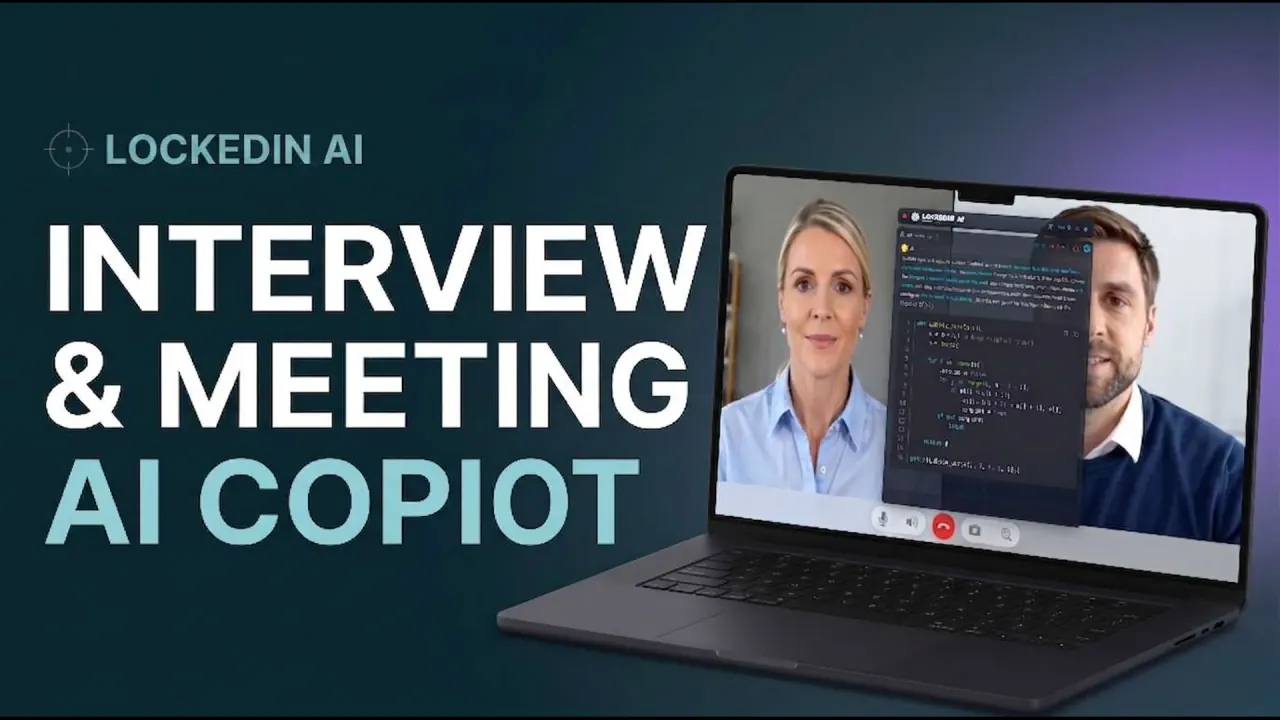
LockedIn AI combines spoken mock interviews, real-time answer suggestions and session reports with AI tools for job seekers.

AI AssistantsRole Play#Coaching#Code Assistant#Real-time Coaching
Try for Free
Saves
Visits
Views
Pricing
Free
Published
Nov 27, 2026
Domain
lockedinai.com
Community rating

Used this tool? Rate it

Rate this tool
Try for Free

LockedIn AI Product Information

Try for Free
Tool Information
Saves
Visits
Views
Pricing
Free
Published
Nov 27, 2026
Domain
lockedinai.com
Community rating

Used this tool? Rate it

Rate this tool

Featured Tools

ChatGPT interface preview
ChatGPT logo

ChatGPT

Freemium

AI assistant for writing, analysis and tasks

Grok interface preview
Grok logo

Grok

Freemium

Real-time answers, images, and code in one chat

Notion interface preview
Notion logo

Notion

Paid

One workspace where your team and its AI agents think together

Hint interface preview
Hint logo

Hint

Freemium

Astrology readings from real astrologers

Perplexity interface preview
Perplexity logo

Perplexity

Freemium

AI search for cited research

AI Image To Image interface preview
AI Image To Image logo

AI Image To Image

Free

AI image editing from a reference photo

Raphael AI interface preview
Raphael AI logo

Raphael AI

Free

Multi-model image studio, free to start

Airbrush interface preview
Airbrush logo

Airbrush

Free Trial

Natural AI photo editing for portraits and projects

Gamma interface preview
Gamma logo

Gamma

Paid

From a prompt to a deck, site or doc

Perchance interface preview
Perchance logo

Perchance

Freemium

Build random generators, share them free

PixAI interface preview
PixAI logo

PixAI

Freemium

Anime art, powered by a million community models

DeepSeek interface preview
DeepSeek logo

DeepSeek

Freemium

DeepSeek AI models for chat and API

SeaArt AI interface preview
SeaArt AI logo

SeaArt AI

Freemium

Community-Trained Models for Art, Video and Characters

ZenMux interface preview
ZenMux logo

ZenMux

Free

One Gateway, Every Model, Compensated Failures

PIXLR interface preview
PIXLR logo

PIXLR

Free Trial

Browser-Based AI Photo Editing and Image Generation

i10X interface preview
i10X logo

i10X

Paid

One workspace for every AI model

Photoroom interface preview
Photoroom logo

Photoroom

Free Trial

Product photo editing for online stores

Fotor interface preview
Fotor logo

Fotor

Paid

AI photo editing and design in one browser tab

Related Tools

ChatGPT
ChatGPT interface preview
ChatGPT logo

ChatGPT

Freemium

AI assistant for writing, analysis and tasks

Try Now
Grok
Grok interface preview
Grok logo

Grok

Freemium

Real-time answers, images, and code in one chat

Try Now
Coach Call AI
Coach Call AI interface preview
Coach Call AI logo

Coach Call AI

Freemium

AI accountability partner that calls and texts you

Try Now
Yuanbao
Yuanbao interface preview
Yuanbao logo

Yuanbao

Freemium

Tencent's AI assistant for chat, search and study

Try Now
ima
ima interface preview
ima logo

ima

Freemium

Knowledge-base-first AI workspace

Try Now
NoteGPT
NoteGPT interface preview
NoteGPT logo

NoteGPT

Free Trial

Summarize videos, PDFs and lectures into notes

Try Now
TRAE
TRAE interface preview
TRAE logo

TRAE

Free

ByteDance's AI coding IDE and work assistant

Try Now
Baidu Comate
Baidu Comate interface preview
Baidu Comate logo

Baidu Comate

Freemium

Baidu's AI coding agent for IDEs and the terminal

Try Now
HomeTop toolsSimilar

What is LockedIn AI?

LockedIn AI is an AI interview copilot and career platform for job seekers. The service identifies its operator as Cyber Gravity LLC, which uses LockedIn AI as a trade name.

In a live interview, the copilot listens to the conversation and generates suggested answers as it happens. In mock interviews, the AI asks the questions, listens to your answers, and gives feedback for a future round.

Core features

  • Live feedback on your delivery. Speech Reflection adds coaching on the structure, clarity, confidence and impact of spoken answers in Live, Coding and Professional Meeting; Mock has its own feedback. This is a separate signal from the copilot's answer text.
  • Context from files you upload. The copilot uses uploaded documents such as résumés, job descriptions and project notes by default, and you can narrow the selection for a particular session. The distinction matters when the account holds applications for several different jobs. The document selection is remembered by device, so a different computer starts with the default selection again.
  • Independent language settings. Transcription language controls what the tool listens for, and AI response language controls the language of its replies. Paid plans add dedicated bilingual packs and more single-language choices alongside the free transcription options.
  • A selectable model for the live copilot. The model picker includes both free and paid choices, while Mock Interview uses a fixed model. The model choice is stored on the device, and the list of available models can change without an app update.
  • Coding and on-screen questions. Coding mode has a required coding-language setting. Online Assessment is a separate session type that combines microphone transcription with vision-model answers to on-screen questions.
  • Assistance from a person. LockedIn Duo lets an invited person follow a live interview remotely and send assistance that appears in the candidate's overlay. This brings a second person into the session's information flow. It is a separate feature from AI-generated answers and from private mock practice.

Guide

Run a mock round around a particular role

  1. Open Interview and select Mock to start a spoken practice round. Fill in Objective, because the mock interviewer uses this field to shape its questions and requires it before the round can start. For a project-manager role, the objective could name the kind of exercise, such as explaining a delayed release or a dispute over scope.
  2. Use Interview Procedures to describe how the practice interview should proceed. Priority Questions is optional and accepts up to 20 entries of up to 512 characters each.
  3. Answer out loud through the microphone or use Submit Answer to finish the current turn explicitly. The explicit submission is useful when a pause is part of thinking through a response. The score next to a mock response compares that answer with a reference answer, so it is a rough measure of coverage.
  4. After the session, Session History offers the transcript, a condensed summary and a generated report. The transcript is the place to reread the exact question.

Use cases

Rehearse a known point of friction. Q&A Prep stores common questions and your preferred answers on your account for reuse across devices and sessions. An example is a career change that comes up repeatedly. A saved answer can contain the candidate's own supporting example, while the mock round exposes whether that example answers a different wording of the same concern.

Prepare context for another position. A session preset saves a setup you can load again, and switching between Live, Mock and Coding clears the loaded preset. Presets and saved answers solve different problems: one preserves the setup for a recurring kind of session and the other holds selected answers. A candidate practising for two roles can keep their evaluation criteria distinct, even when the experience described in both answers is the same.

Bring material to a debrief. A transcript can be exported as plain text or an HTML file, with separate export choices for spoken text and AI replies. That difference is useful when reviewing what a person said versus what the copilot proposed. Screenshots in the HTML export load from LockedIn AI and still need an internet connection to appear.

Who is it for

  • Candidates preparing for a defined role. The Quick Setup scenario library includes software engineering and system design as well as project management, consulting, sales and healthcare roles. For a candidate changing employers within a field, a role-specific round can focus on how they recount familiar work for a new audience.
  • People revisiting recruiter conversations. Professional Meeting covers uses such as recruiter calls and behavioral conversations with live transcription and suggested answers.
  • Job seekers combining preparation and applications. A standalone résumé builder and a separate résumé review service sit outside the copilot's session flow.

The distinction between practice and live use is especially important when the assessment is meant to show what the candidate can do independently. A mock round gives the candidate a way to work through an example or revise an answer before the evaluation. LockedIn AI describes its real-time assistant as intended for use in line with employer and platform policies.

Platforms

  • LockedIn AI provides desktop apps for Windows and macOS, alongside a web app. The Mac app requires macOS 13 or later and supports both Apple Silicon and Intel Macs. The Windows app requires Windows 10 or Windows 11.
  • On macOS, capturing the other speaker's system audio needs the relevant screen or system-audio recording permission, and capturing your voice uses the microphone permission. Phone Interview, Online Assessment and Mock use the microphone without capturing system audio. A working microphone can therefore be sufficient for a mock round even when another speaker's system audio is missing in a meeting session.
  • The named Phone Interview mode is in the web app, outside the desktop app's session list. This is a distinction about the specific mode, separate from the live features marketed for the new mobile apps.
  • The help center describes the iOS app as available and Android as being in development. Google Play has a listing for LockedIn AI: Interview Prep. The mobile product page describes a shared account, credits and session history with the web app. The public pages therefore give different answers about Android availability.
  • The vendor limits the account to one active client session and says opening the app on a phone during a desktop session can end that session without a warning.

Pricing

Copilot minutes and credits are two views of the same balance: one credit is two minutes of Copilot time. The billing docs describe how time limits and plan entitlements work, while the public pricing page is where LockedIn AI directs users for cash prices.

Web accessUsageKey entitlement or boundary
FreeThe billing docs describe 5-minute sessions, up to 60 minutes per day, with a 1-minute pause between sessions.Applies without a credit balance.
CreditsThe monthly credit plan is listed with 400 Copilot minutes. The three-month credit plan is listed with 1,200 Copilot minutes.Credit plans include Duo and Stealth Mode and are described in monthly, quarterly and yearly terms.
Unlimited GeneralGeneral and Pro both include ordinary copilot use without a credit cap.General excludes Duo and Stealth Mode, which Pro includes.
Unlimited ProUnlimited copilot use, subject to the session ceiling.Includes Duo and Stealth Mode.
LifetimeLifetime is described as a one-time purchase with Pro entitlements.It has a separate refund rule tied to time since purchase and whether a session has started.

Credit allowances come from a remote configuration and can change without an app update, with the account sidebar showing the applicable amount. A metered session draws from the balance as it runs and stops when a further deduction fails. Unlocked credits do not expire and remain on an account after a subscription ends. The remaining balance then works with general models while professional models require an active subscription.

Where the public plan descriptions differ

  • The Copilot product page advertises 10 minutes of live interview help on Free. Its presentation differs from the billing docs' description of short sessions with a daily cap for accounts without a balance.
  • The Copilot product page says Mock uses half the credits on the Credits plan. The Mock docs instead state that mock interviews do not draw down a paid user's Copilot minutes. These pages do not establish a single credit charge for a paid mock session.
  • The pricing page displays a money-back guarantee label. The help center describes case-by-case refund requests. The written policy sets plan-specific conditions for purchases made directly from LockedIn AI.

Cancellation and refunds

Paid subscriptions auto-renew at the then-current price unless cancelled in advance. Cancellation through the web app keeps access until the end of the billing period already paid for.

The written policy calls direct monthly and quarterly subscriptions non-refundable once they start. It allows a partial refund on a direct annual plan cancelled within 7 days of purchase. It permits a request for a full lifetime-plan refund within 7 days only if the first session after purchase has not started. The policy separately allows consideration of billing errors, duplicate purchases and failures to deliver access. Apple processes App Store purchases and refund requests under its own policies. The published refund policy preserves mandatory consumer refund or withdrawal rights.

Alternatives for interview practice

Yoodli runs role-based mock interviews with follow-up questions and feedback on delivery, including pacing and filler words. That emphasis is useful when the main task is to communicate an existing answer more clearly. LockedIn AI's mock mode scores the content against a reference answer, while its live copilot is a separate part of the product.

interviewing.io offers anonymous technical mock interviews with engineers, including coding and system design practice. This is a way to get another person's assessment of decisions made during a technical round. For a candidate choosing between rehearsal tools, the distinction is whether the useful feedback is a repeatable AI comparison or a human interviewer's response to their reasoning.

Limitations

What live assistance can and cannot establish

  • LockedIn AI documents Stealth Mode as a desktop screen-capture feature on eligible plans. The vendor says the web app has no Stealth Mode. The vendor also identifies browser-based Teams screen sharing as a case where the desktop overlay can be visible. The vendor's built-in preview uses its own capture rather than the meeting app's capture, so it cannot show what every sharing mode will display. The feature's documented scope concerns visibility in screen capture. It gives no basis for a guarantee about a third party's monitoring or permission to receive live help.
  • For free accounts spending a credit balance, the documented limit is 30 minutes for Mock and 60 minutes for the other session types. The paid-session limits are 60 minutes for Mock and 120 minutes for the other types, including on unlimited plans. The remaining balance can be higher than the amount of uninterrupted time allowed in one session.
  • The vendor says transcription accuracy may drop when multiple people speak nearby. The transcript is an input to the suggested replies, so errors can affect both outputs.
  • The terms provide the service without guarantees of performance, accuracy or compatibility.
  • LockedIn AI's terms require explicit, informed consent from everyone being recorded when using the service's recording features. That is a vendor terms requirement about recording. The assessment organizer separately sets the rules for receiving suggestions and outside assistance.

Audio, transcripts and interview data

For the interview session feature, the help center says live audio capture does not save an audio or video file. The privacy policy says Speechmatics receives session audio for real-time transcription and that AssemblyAI receives it for Multilingual (Auto) on web or desktop. External AI providers can receive transcripts, messages, document text and captured or uploaded images, depending on the feature and model. The policy names Pinecone as storing passages and embeddings from uploaded documents and saved answers for retrieval. A separate vendor safety article says it never shares data with third-party companies. These public statements differ in how they describe disclosure to third parties.

LockedIn AI says it may use interviews, messages and AI replies to improve its models, and that the setting is on by default. Turning off that use in Data & privacy applies across devices going forward and does not undo prior training or erase history. The opt-out does not cover processing that supplies the features or the separate Interview Question Insights program. The policy says aggregated interview insights draw from interviewers' questions rather than the candidate's answers and can remain after account deletion.

The policy describes keeping personal information as long as needed for the service or legal obligations. Account deletion removes personal information and content subject to exceptions such as required payment records and the aggregated question insights. These controls address different outcomes: preventing the stated future use for model improvement, deleting past content and ending the account.

FAQ

Q1. Do mock interviews require a live interviewer?

No. Mock Interviews use the AI as the interviewer, with spoken answers and feedback in the session. Features that produce suggestions in response to another person belong to the live experience.

Q2. Can a new free account use the app without a credit balance?

Yes. The billing documentation describes short free sessions on accounts with no balance, subject to the per-session ceiling, daily cap and interval between sessions. The Copilot product page describes the free allowance differently.

Q3. Does Unlimited remove the limit on a single interview?

No. It removes the credit cap for normal copilot use. Individual sessions are still capped, and the documented Mock ceiling is shorter than the ceiling for other session types.

Q4. Can a transcript export include AI replies and what both people said?

Yes. The export uses the displayed transcript and AI-reply selections. Text and HTML are separate export formats, and screenshots in the HTML depend on loading their images.

Q5. Does turning off training also turn off external processing?

No. The privacy policy distinguishes future training use from processing that provides features, such as speech transcription and generating suggestions. It also treats the question-insight program as a separate use.


Know a Similar Tool?
If you know other great AI tools, feel free to submit them to us