
Paste English text to get a grade-level readability score and color-coded style warnings, with optional AI rewrites and grammar checks. The separate desktop app adds offline editing, file saving, and export.
Used this tool? Rate it
Used this tool? Rate it


From a prompt to a deck, site or doc


One workspace for every AI model


One workspace where your team and its AI agents think together


Public Codex reset tracker


AI assistant for structured work


Plan, build, and refine work with an AI agent


AI translation for multilingual workflows


Ad-free Chinese AI search with cited answers
Hemingway Editor is a writing editor built around a single promise: make prose bold and clear. It analyzes English text for readability, marks sentences and words that create friction, and returns a grade-level score instead of a list of grammar rules.
The company positions Hemingway Editor Plus, its AI editor for clear writing, as fixing wordy sentences and grammar issues. The free browser editor scores readability and flags wordy sentences, passive voice, and words that have simpler alternatives. Hemingway Editor Plus is the paid subscription that adds AI help on top of that free editor: it rewrites highlighted passages, checks grammar, and adjusts tone. Hemingway Editor 3 is a separate Mac and Windows desktop application that works offline, saves files, and exports finished text, but does not include the newer AI features.
The free editor is diagnostic; Plus runs cloud-based AI that rewrites highlighted text instead of only marking it, so the same interface becomes an AI writing editor. The desktop app is a separate writing environment with publishing and export tools rather than a subscription client.
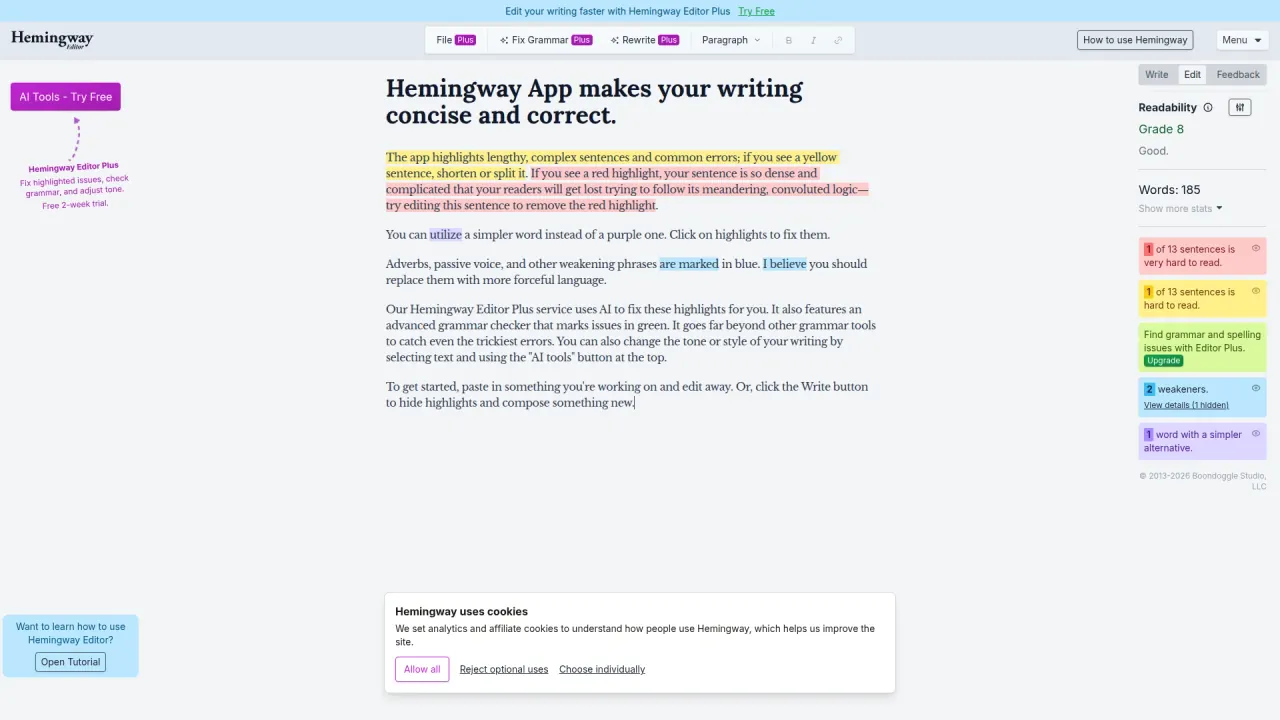
The core loop is paste, read the grade level, then work through color-coded highlights: red and yellow for hard sentences, blue for weakeners, purple for complicated words, and green for grammar when Plus is active.
Release notes run through October 22, 2026, including custom style guides, Enterprise single sign-on, and improved detection of weak language. An independent report described the app as useful for calling out places of friction so writers can decide whether they are necessary or sloppy.
Every document gets an overall readability score, with the default Plus target set at grade 9. The company describes grade 9 as the average reading level for adults in the United States. Three presets — Accessible, Default, and Technical — move that target for young audiences, general audiences, or academic and technical writing.
The color thresholds are specific. Yellow sentences score at least four grade levels above the average US adult reading level, and red sentences at least six.
The free online readability checker accepts an unlimited amount of text at once. A statistics panel reports letters, characters, words, sentences, paragraphs, and reading time beyond the default word count.
Red marks the hardest sentences and yellow marks hard but less severe ones, both measured against the target score. Blue covers adverbs, passive voice, and qualifiers such as “maybe” or “I think.” Purple marks words that have a simpler exact synonym, and the suggested word can be applied with a click.
Green is different: green grammar and punctuation highlights appear only with a Plus subscription. The free tier checks style, not grammar.
Each highlight category can be switched off with an eye icon, so a writer can ignore every adverb warning.
Plus applies one of eight styles, including more confident, more formal, and more friendly versions of a passage. A feedback tool reviews the document and returns detailed insights and suggestions. Custom rewrite requests accept plain-language instructions such as changing tense, inserting detail, or adding a joke.
Style guides let Plus users switch on extra issue types and maintain a custom brand dictionary.
AI rewriting is metered by sentence. A four-sentence selection consumes four AI sentence credits, one for each sentence in the selection. Grammar fixes do not use AI sentence credits and are described as unlimited.
Two cases are free. A rewrite that fails to lower the grade level does not consume a credit, and removing a qualifier or accepting a simpler-word suggestion also costs no AI credit.
The shortest workflow is paste, score, fix, and export. The steps below follow the order the editor presents them and note where Plus changes the job.
The company presents the checker for SEO content and for essay writing, framing readability as a factor in search performance and grades.
The same page argues that high grade levels do not signal better writing and that run-on sentences inflate scores.
The vendor's readability page addresses non-native English speakers and ESL writers. An independent review also names students refining their style, writers who overcomplicate paragraphs, and non-native speakers as suitable users.
Hemingway suits writers who already know what they want to say and need help saying it more directly. It is less useful for writers who want corrections applied across email, social media, and documents, because the product is an editor you visit rather than an extension that follows you.
An account is optional on the free web app but required for Plus. The free browser version cannot save writing the way the desktop app can, which matters for long projects: a writer who closes the tab without exporting has to supply the text again.
Hemingway Plus is offered for the web app only. The free tier can be used without an account, while Plus requires one. Plus members also get a web app that remembers their text; the free browser version still does not save writing the way the desktop app can.
The web app and desktop app do not sync or connect, so a draft started in one is not automatically available in the other. Hemingway does not run a cloud document library; the working document stays in the browser or in the user's Word files.
There is no browser extension or mobile app, and the web app runs on mobile browsers without being optimized for small screens.
The desktop app works offline and can save writing locally. It publishes drafts or live posts directly to WordPress. It exports HTML or Markdown for a blog or CMS. It exports text, PDF, or Word. It imports .docx files. It can also save a PDF with the Hemingway highlights intact.
A Microsoft Word add-in is covered by the same web terms as free use, trials, and subscriptions. The terms describe it as part of the web product rather than as part of the legacy desktop license.
| Capability | Free web | Plus | Desktop 3 |
|---|---|---|---|
| Price | Free | From $8.33 USD/month billed annually | $19.99 per license |
| Account | Optional | Required | Not stated on the product page |
| Readability score and style highlights | Yes | Yes | Yes |
| Green grammar highlights | No | Yes | Not part of the AI feature set |
| AI rewrites, styles, and feedback | No | Yes | No |
| Saves work | No | Remembers text in the web app | Saves files locally |
| Works offline | No | No | Yes |
| Export | Conflicting statements on the site | .docx, Markdown, HTML | HTML, Markdown, text, PDF, Word |
| Direct WordPress publishing | No | No | Yes |
| Mobile use | Mobile browser, not optimized | Mobile browser, not optimized | Mac and Windows app |
| Plan | Annual price | AI sentences | Users |
|---|---|---|---|
| Individual | $8.33 USD/month ($100 billed annually) | 5,000 per month | Single user |
| Individual, larger allowance | $12.50 USD/month ($150 billed annually) | 10,000 per month | Single user |
| Team | $12.50 USD/user/month ($150 per seat billed annually) | 10,000 per month per user | Up to 50 |
| Enterprise | Custom | 20,000 per month per user | Unlimited |
Annual billing is 17% below monthly: $100 per year versus $10 per month for the entry plan. The plan toggle labels annual billing “save $200,” which does not match the annual discount in the help center. Team plans cover up to 50 users on one bill with admin roles.
The Enterprise plan is custom-priced and lists 20,000 AI sentences per user per month, while the page describes single sign-on both as included access and as an optional add-on. The Plus trial runs two weeks, requires no credit card, and cancels automatically.
The desktop editor is Hemingway Editor 3 for Mac and Windows at $19.99 per license. That desktop license does not include the new AI features. The desktop app is licensed separately, and buying it does not include an Editor Plus subscription unless the purchase confirmation says so.
Payments are generally nonrefundable, with refunds when required by law or promised. Paid plans renew automatically, and canceling before the next renewal stops the charge while access continues through the paid period. Hemingway emails at least 30 days before a subscription price increase. When a paid subscription ends, the account keeps the free plan.
Pricing captured November 20, 2026.
An independent review concluded that the editor improves writing on both free and Plus tiers, while calling the paid AI suggestions hit or miss. The closest comparisons depend on whether the need is grammar coverage or manuscript organization.
An independent review describes Hemingway as similar in purpose to Grammarly, with the same need to choose which suggestions to accept. The comparison is about role rather than equivalence: both tools ask the writer to judge suggestions, and neither replaces a human editor.
The same review contrasts it with Final Draft and Scrivener, which store and organize writing rather than try to improve it.
For grammar coverage inside other apps, Grammarly is the closer match because Hemingway has no browser extension or mobile app. For long-form fiction and manuscript organization, Final Draft and Scrivener address a need Hemingway does not attempt.
Hemingway's warnings are heuristics, not corrections. The company itself calls highlights and scores a guide, not a checklist that every yellow or red sentence must be fixed. Long sentences can be deliberate, and the editor cannot tell a necessary passive construction from a weak one.
Wording on the site is not fully consistent. A separate page sells a free online grammar checker that catches commonly confused words, which conflicts with the help center's statement that green grammar highlights require Plus. A free readability page also says users can copy or export finished text as Word, Markdown, or text. An independent review reports that export from the web app requires a Plus account, while the Plus plan lists import and export as features.
The free browser version is the most limited entry point: it cannot save writing the way the desktop app can, it does not sync with the desktop app, and it lacks AI rewrites and green grammar highlights.
Language coverage is English: dialect support covers British, Canadian, Indian, Australian, Irish, South African, and New Zealand English, and the reviewed pages describe no non-English workflow.
Hemingway separates the working document from the AI processing record. The Plus page says documents are not stored on Hemingway's servers, and the privacy policy says the working document normally stays in the browser or in the user's Word files, with no cloud document library. The marketing statement addresses documents; the retention schedule addresses text processed by AI features.
AI features do send text to providers. A published subprocessor list names OpenAI, Google, and Anthropic for covered AI processing. The main application, workers, and database run in Ohio, with an analytics gateway in Oregon. The privacy policy says Hemingway and its AI providers do not use submitted content to train, fine-tune, or improve models. It also says content is not sold, used for advertising, or collected to improve the product.
Retention has a defined window. Eligible live copies of AI-processed text are deleted within 30 days of a valid deletion instruction or the end of processing.
There is a free browser editor with no account required. Plus is a subscription, and the desktop app is a separate purchase. Plus starts at $100 per year ($8.33 USD per month) for 5,000 AI sentences, $150 per year ($12.50 USD per month) for 10,000, or $150 per seat per year for a team.
AI rewriting, advanced grammar, tone and length controls, document feedback, style guides, and target reading levels. Green grammar highlights require Plus.
No. Hemingway Editor 3 is a separate Mac and Windows license for $19.99 and does not include the new AI features.
Only with the desktop app. The web editor needs a connection, and the free tier does not save work the way the desktop app does.
English. Plus adapts to British, Canadian, Indian, Australian, Irish, South African, and New Zealand English; the reviewed pages do not describe a non-English mode.
No. There is no browser extension or mobile app; the web app works on mobile browsers but is not optimized for small screens.
Paid plans renew automatically, so cancellation must happen before the next renewal to stop the charge. Access continues through the paid period, then the account keeps the free plan. Payments are generally nonrefundable.
There is no cloud document library; the working document stays in the browser or Word files, and the Plus page says documents are not stored on its servers. AI features send text to providers, and the privacy policy lists OpenAI, Google, and Anthropic as subprocessors.