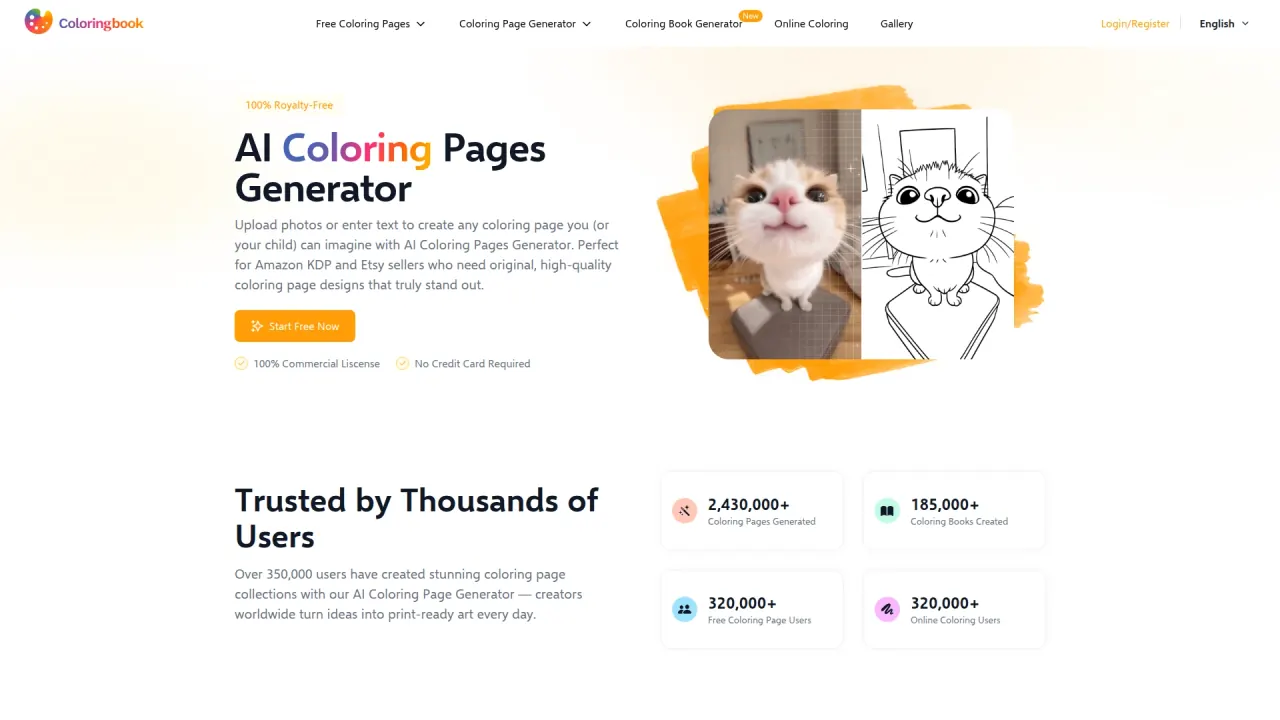

ColoringBook AI turns a text prompt or an uploaded photo into black-and-white line art and exports pages as PNG files or a multi-page PDF. Age presets, batch generation, print upscaling and a KDP-oriented book builder sit on paid plans, while new accounts start with four credits a month.
Used this tool? Rate it
Used this tool? Rate it


AI image editing from a reference photo


Multi-model image studio, free to start


Build random generators, share them free


Anime art, powered by a million community models


Real-time answers, images, and code in one chat


Community-Trained Models for Art, Video and Characters


Browser-Based AI Photo Editing and Image Generation


Product photo editing for online stores
ColoringBook AI is a browser-based tool that turns a written prompt or an uploaded photo into a black-and-white coloring page. The site describes it as an AI coloring page generator that transforms text prompts and uploaded photos into high-quality, print-ready coloring pages in seconds — line art someone can print and fill in.
Two kinds of input feed the generator. A text prompt describes a scene — an animal, a character, a birthday message — and the tool draws the outline; an uploaded image is reduced to clean, colorable lines instead of being restyled. A third mode assembles pages into a book: the user describes a main character and a story outline, chooses the page count, and the generator keeps the character consistent across the sequence.
Output is file-oriented. Individual pages save as PNG images, a complete book exports as a single PDF, and the site states that a standard page is 687 × 1024 px at a 3:2 ratio, with a paid upscaling step raising it to 2748 × 4096 px.
The homepage counters are the vendor's own: over 350,000 users, 2,430,000+ coloring pages generated and 185,000+ coloring books created. They carry no external audit and move over time.
It is not a general-purpose image generator: age presets, page formats, print upscaling and a publishing-oriented export replace the style and aspect-ratio controls of a general text-to-image tool, and the output is printable coloring pages rather than artwork for other uses.
The AI coloring page generator takes three inputs (text, photo, story outline) and gives them one output format, with production tools built around it.
Two constraints cut across these features. The production tools — batch mode, watermark removal, print upscaling and the KDP Builder — appear on paid plans, so the free experience is a generation test rather than a publishing pipeline. And a 687 × 1024 px page is fine on screen but is not a full-bleed A4 or Letter sheet, which is why upscaled output is the version tied to print-on-demand.
Book length is plan-bound too. The two cheaper tiers cap a generated book at 10 pages, while Professional and Business allow up to 200 — the same ceiling the book generator advertises. A long story book therefore needs one of the two upper tiers.
The documented path from an idea to a printed page is short and does not require design software.
For a one-off gift, the photo to coloring page mode is the short path: upload a portrait, let the tool reduce it to outlines, print the result. Files are prepared for standard paper sizes such as A4 or Letter, so a home or school printer handles the page without conversion, and the same page can be colored digitally in the browser instead.
For a classroom or a homeschool unit, the age preset does the work a teacher would otherwise do by hand: the same subject can be generated at a simple level for younger children and at a detailed level for older ones, and batch generation produces a themed set instead of a single sheet.
For a published book, the coloring book generator is the relevant mode: a character description plus a story outline yields a connected sequence with a consistent protagonist, and the page count is chosen up front. That output is what the KDP Builder and the PDF export are designed to receive.
The fit is weakest for anyone who needs a native desktop application or an offline workflow: this is a hosted web tool and its exports are raster images and PDFs. It also fits badly for a buyer who needs commercial rights on the cheapest tier.
ColoringBook AI runs entirely in a browser on desktop, laptop, tablet or smartphone, with no app download required, and the same account works across devices. A desktop browser is recommended when a full multi-page book is being assembled, the difference between previewing one page on a phone and arranging a long sequence.
No separate desktop client or native mobile app appears in the pages checked, so the browser session is the product.
Four paid plans sit above a free tier, and the differences that matter are the monthly page allowance, the maximum book length and whether commercial use is permitted.
| Plan | Price | Monthly pages | Book length | Usage rights |
|---|---|---|---|---|
| Starter | $6.99/mo or $83.92/yr | 100 pages | Up to 10 pages | Personal use |
| Hobby | $13.99/mo or $167.92/yr | 300 pages | Up to 10 pages | Personal use |
| Professional | $27.99/mo or $335.92/yr | 1,000 pages | Up to 200 pages | Commercial use |
| Business | $69.99/mo or $839.92/yr | 5,000 pages | Up to 200 pages | Commercial use |
Pricing is credit-based rather than unlimited: each generation consumes credits according to the quality and format selected, and the page figures above are the allowances the plan cards advertise. New accounts start with four free credits per month, described as enough to create several pages and test the generator before paying; the book generator page instead promises every new user one free trial generation, so the two free-entry descriptions differ.
Credits expire rather than accumulate. Monthly credits do not roll over at the end of a billing cycle, while credits bought as separate add-on packs are exempt from that expiry. Subscriptions renew automatically at the then-current rates unless cancelled.
Cancellation is self-service: a plan can be upgraded, downgraded or cancelled at any time from account settings, and a cancellation takes effect at the start of the next billing cycle while access continues to the end of the paid period. The published Terms of Service add a detail the plan cards omit — to avoid the next charge, a subscription must be cancelled five days before the renewal date.
Refund terms are stated twice and not in the same words. The refund policy accepts requests within three days of purchase, refuses refunds once more than 10 credits have been used, and allows a processing fee of up to six percent of the initial payment. The Terms of Service state that subscription payments are non-refundable except as expressly set out in those Terms. A buyer reading only one document gets a different picture of what is recoverable.
Commercial rights are also stated at two levels. The plan table marks Starter and Hobby as personal use and Professional and Business as commercial use, while a homepage badge advertises a commercial licence next to a no-credit-card promise. A separate statement ties commercial usage rights to paid plans generally and points to the Terms of Service for the licensing detail — broader than the plan table's split.
Failed generations are the one place where credits are returned automatically: a page that fails to generate refunds the credits spent on that attempt.
The category is crowded: a directory entry for this tool lists iColoring.ai, OpenColor.AI and Best Coloring Pages among related tools, so buyers clearly compare several generators. The decision point is rarely text-to-page or photo-to-page conversion, since most of these tools offer both; it is the free monthly allowance, the right to sell the output, and whether print upscaling is bundled or sold as a tier feature. On the first two points this product is explicit — four credits a month, and commercial use only from Professional upward.
The service is not open to young children. Users must be thirteen or older, minors below the age of majority may only use the service when a parent or guardian accepts the terms on their behalf, and children under thirteen are not permitted to use the service at all. The privacy policy reinforces this from the data side: the services are not intended for children, and the company states that it does not knowingly collect personal information from them, promising to delete such data if it becomes aware of it.
That boundary sits awkwardly with the marketing. Coloring pages for kids are the product's main use case, yet an account cannot belong to a child under thirteen, and the privacy policy's "not intended for children" framing is broader than the terms' thirteen-plus threshold.
Uploaded images are treated as personal information, not anonymous input. The privacy policy lists user input — text prompts and uploaded images used to generate output — among the information it collects, and states that information may be used to improve the services, including by training the models that power them. Retention is described only in general terms: as long as reasonably necessary for the purposes in the policy.
Uploading also grants a broad licence: access, use, host, cache, store, reproduce, transmit, display, publish, distribute and modify the uploaded content, with the user required to hold all rights and consents needed to grant it. For a family photo or a classroom picture, that is wider than most users expect from a coloring-page tool.
Visibility is tier-dependent. Pages are described as private only for members with an active subscription who enable privacy mode, which keeps every page visible only to that user and never displayed publicly; the free experience carries no such promise, while another answer on the site says generated pages are never shared without consent. Both statements sit on the site and set different expectations for a free account.
The terms do not claim ownership of user input or output and do not restrict commercial use of output, which is broader than the plan table reserving commercial use for the two upper tiers. The same section disclaims liability for commercial use and warns that users should consider what third-party permissions they may need — the point where branded characters and celebrity likenesses become the user's problem rather than the platform's.
Unused monthly credits disappear at renewal, so a plan's value depends on using the allowance inside the cycle. Refund eligibility is narrow — three days, ten credits — and the Terms of Service describe subscriptions as non-refundable, the stricter of the two published positions.
There is a free tier, but it is a trial allowance: new accounts get four credits per month, enough for a handful of pages, and the production features — batch generation, watermark removal, print upscaling, the KDP Builder and commercial rights — sit on paid plans. The book generator page separately describes one free trial generation for a first book.
Text prompts describing a scene, or an image file the tool converts into line art. The photo mode also offers background removal and an option to keep faces close to the original, and both modes accept a target age group that controls line detail.
Commercial use is attached to Professional and Business in the plan table, while Starter and Hobby are labelled personal use. The Terms of Service separately state that the company does not restrict commercial use of output, and disclaim liability for the third-party permissions a commercial use may require.
A standard page is 687 × 1024 px at 3:2, and the paid upscaling step raises it to 2748 × 4096 px. Individual pages download as PNG, books as PDF, and the book page also mentions a ZIP download; both PNG and PDF downloads are described as available on paid plans.
A plan can be cancelled from account settings and stays active until the end of the paid period, with the Terms of Service asking for cancellation five days before the renewal date to stop the next charge. Monthly credits do not carry over at renewal; credits from add-on packs are the exception.