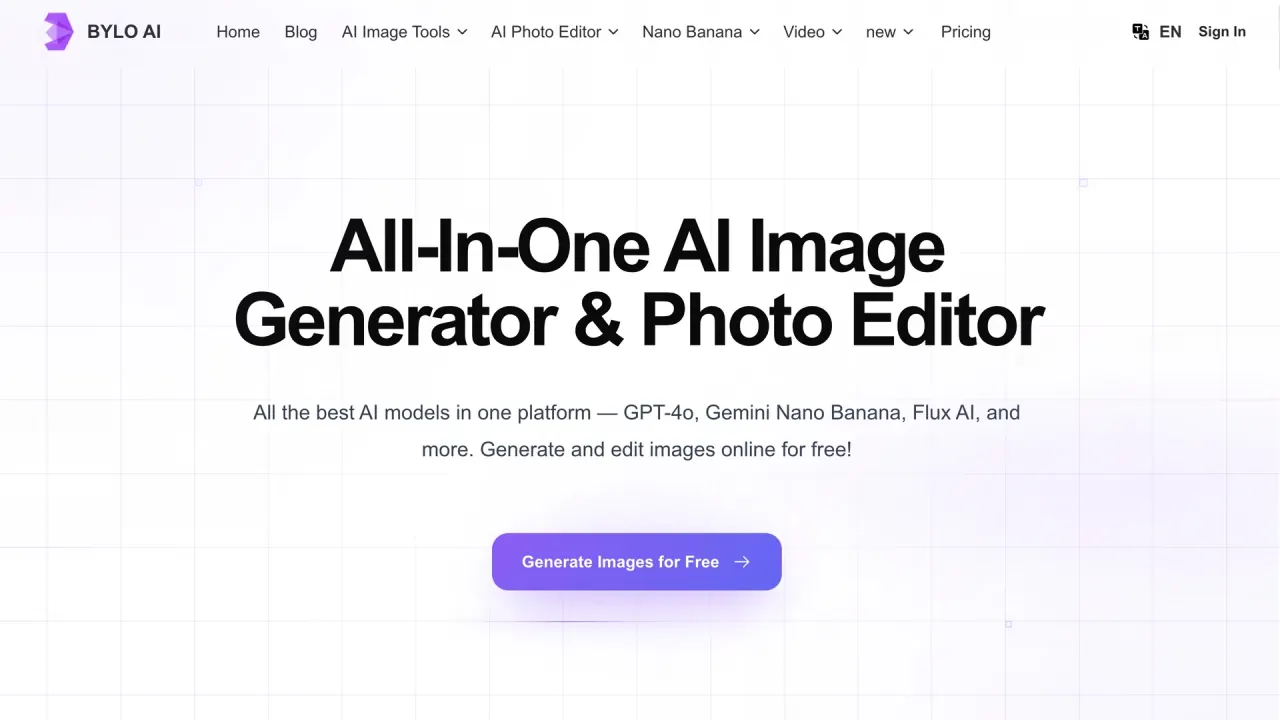

Generate images with GPT-4o Image, Nano Banana and Flux in one browser tab, then clean them up with background removal, restoration and style filters. The free plan resets with 5 credits a day.
Used this tool? Rate it
Used this tool? Rate it


AI image editing from a reference photo


Multi-model image studio, free to start


Natural AI photo editing for portraits and projects


Build random generators, share them free


Anime art, powered by a million community models


Real-time answers, images, and code in one chat


Community-Trained Models for Art, Video and Characters


Browser-Based AI Photo Editing and Image Generation
Bylo AI is a browser-based AI image generator and AI photo editor that gathers several third-party image models in one workspace. Its homepage says the platform puts "all the best AI models in one platform" and names Nano Banana (Gemini 2.5 Flash Image), GPT-4o Image and Flux. You pick a model from a menu, then write a prompt or upload a photo and keep working in the same tab instead of holding separate subscriptions with each model provider.
The models overlap but are pitched for different jobs. GPT-4o Image is presented for new images and for merging several photos into one composition. Nano Banana handles object removal, so unwanted elements can be deleted or added without a separate editor. It also moves styles, colours and textures from one image to another, and keeps a character consistent across edits, changing outfits, poses or lighting while preserving identity. Flux appears in the same picker as a further generation option.
That combination makes the platform a comparison bench rather than a single-model studio. The practical difference shows up when one engine handles a prompt badly: the same idea can be rerun on another model without moving files between services. What does not change is the commercial layer. Credits, storage, watermarks and output rights follow Bylo's own plans and terms, not the model providers' terms, so the model picker and the billing page have to be read together.
The product also carries a long tail of single-purpose pages, from virtual room staging to photo straightening and coloring-page conversion. Those pages reuse the same models and credit system, which is why the tool count matters as much as the model count.
Generation starts with a text prompt and a model choice. The generator page lists model selection, aspect-ratio adjustment and negative prompts as its main controls, so a session can exclude unwanted elements instead of rerunning a prompt from scratch. Output is offered as high-resolution images that can be downloaded to the device.
The homepage's pitch is consolidation: no more switching platforms. In practice that means a comparison session keeps the same prompt, aspect ratio and download step while only the engine changes, so differences in how each model reads a brief are easier to see side by side.
Text prompts work for both original images and edits. The distinction matters in practice: a prompt that describes a scene generates a new picture, while the same box on the image-to-image page describes a change to an uploaded photo.
Bylo works as an AI photo editor as much as a generator: the same upload can be cleaned up without touching a prompt box. It lists 20+ advanced AI editing tools in every plan tier. The homepage groups them by job: removing or replacing backgrounds, retouching portraits, restoring old photos, swapping outfits and merging several images, all through prompts or one-click tools. The same set includes an AI background remover, a background changer and a cut-out tool, alongside watermark and text removal, image extending, face editing, headshot generation and hairstyle changes.
Bylo advertises 40+ AI art effects and filters. The named set runs from Ghibli, Pixar and Chibi looks to Snoopy, pixel art, claymation, Lego, PS2, Minecraft, Family Guy and silhouette treatments, alongside Christmas and Halloween filters. Photo-to-cartoon, photo-to-sketch and photo-to-painting sit in the same group, which makes the filters a fast way to test a direction before committing to a model prompt.
Nano Banana supports multi-image fusion, allowing you to blend up to three images into one. The homepage suggests the usual combinations: a landscape with a portrait, or a real object placed inside a fantasy scene. The same editing path keeps a character recognisable across new outfits, poses, lighting and locations, which is what separates a usable character workflow from a one-off portrait.
GPT-4o Image is the model Bylo positions for typography. The homepage says 4o's text rendering keeps words sharp, readable and perfectly integrated into the design, and the model is also pitched for product mockups and posters where a headline has to survive the render.
Separate tools handle old-photo restoration, background blur, recolouring and text removal. Portrait work covers face editing, clothes changing, headshot generation and hairstyle changes. These are single-purpose entry points rather than settings buried in one editor, so a reader who only needs a clean headshot does not have to learn the full generation flow.
The official guidance is concrete rather than stylistic: name the objects, colours, lighting and context instead of writing "a car", and use the negative prompt to remove recurring artefacts. Because each model responds differently, the same prompt is worth testing on two engines before deciding which one to keep for a campaign.
The image-to-image flow turns a selfie into a Chibi-style avatar, a cartoon portrait or a meme, which is the shortest path from a personal photo to a profile picture. The style filters do most of the work, and the character-consistency feature keeps the same face across a series of posts.
Background removal, background replacement and object addition are the three edits most often needed for a product shot, and all three are listed as one-click tools. The image extender helps when a product has to be reframed for a square listing and a wide banner from the same source photo.
A dedicated virtual staging page lets an agent upload a room photo and redecorate it with a prompt. The same page includes a furniture removal feature, which clears an outdated or cluttered room before a new design is applied. It names real estate agents, interior designers, renters and homeowners as the intended users, which makes this one of the few vertical workflows the site documents end to end.
The coloring-page tool converts a photo into a black-and-white coloring page. The official examples are classroom material, adult doodling and children's art lessons, and the output is a printable image rather than an on-screen effect.
The same fusion and consistency tools support character concept drawings, scene sketches and prop designs. The homepage's examples lean toward stylised figures and game avatars, which is a narrower promise than full concept-art production but enough for early exploration.
Old family photos can be restored, recoloured and turned into 3D-style character figures, dolls or plush-style portraits. The figure workflow keeps the subject's identity while changing the presentation, which is why it is marketed as a gift and avatar idea rather than a retouching service.
Bylo fits people who need a usable image quickly and do not want to manage several model subscriptions. The homepage names designers, marketers, content creators and people experimenting for fun, and the tool set supports e-commerce sellers, social media managers, real estate agents, teachers and indie game developers who need one visual rather than a production pipeline.
The generator page says the tool creates professional-grade visuals without technical skills, which is the beginner-friendly half of the same positioning. It is a weaker fit in three situations. Teams that need every output to match a strict brand system will find the model-driven styles hard to control. Anyone who wants commercial rights on a free account is outside the plan terms. And readers who need an API or a batch workflow will not find one described on the pages checked for this review; the product is presented as a browser interface.
A reasonable split is to treat this multi-model image generator as a comparison bench and quick-edit station: use the free credits to see how GPT-4o Image, Nano Banana and Flux interpret the same brief, then decide whether the paid credit volume is enough for the volume of work.
Bylo runs in a web browser. The generator page states that no downloads or installations are required, and the pages reviewed describe desktop and mobile use through the browser rather than a separate desktop application.
Uploads are limited to common web formats. The image-to-image page accepts JPG, PNG and WEBP files for upload.
Generation, storage and downloads all happen inside the account, so the browser is the only client.
| Plan | Listed price | Monthly credits | Listed storage |
|---|---|---|---|
| Free | $0 per month | 5 credits per day | 7-day storage |
| Pro | $6 per month, billed annually as $72 | 300 credits, listed as 60 generations | Unlimited storage |
| Ultra | $12 per month, billed annually as $144 | 1,500 credits, listed as 300 generations | Unlimited storage |
The Pro and Ultra prices are the annual-billing figures shown by default on the pricing page. Pro is marked as 40% off a $10 reference price. Ultra is marked as 40% off a $20 reference price. The monthly-billing rate is not displayed in the state captured on November 25, 2026.
Credits are consumed per generation. Pro's 300 monthly credits are listed as 60 generations. That ratio puts a generation at five credits, so the free allowance of 5 credits a day covers one image a day. The pricing page's own summary says a subscription is what unlocks faster generations, no watermarks and premium image credits.
Commercial rights are tied to the paid plans. The product's FAQ answers that commercial usage requires a subscription, and the virtual staging page adds that images generated during a paid subscription are fully licensed for commercial use, while images created during the free trial are only for preview and personal experience sharing. Subscriptions renew automatically until cancelled, and the terms offer a 3-day refund window for a new customer's first purchase.
The free plan is a trial rather than a working tier for commercial work. Downloads carry a watermark until a subscription is active. Generated images cannot be used commercially on the free plan. Free storage is listed at seven days. With five credits per generation and five credits a day, the free allowance is one image per day.
Output quality is model-dependent. A third-party review scored the platform 3.8 out of 10. The same review reported that its free credits did not produce a single image in its own test, with the generate action leading to an upgrade screen. That is one reviewer's test rather than a measured failure rate, but it points at the same risk the credit maths implies: the free tier is too small to evaluate the paid output properly.
Billing is the other recurring complaint in third-party coverage. The same review describes a review-platform record dominated by charges continuing after cancellation and unanswered support requests. The platform's terms say subscriptions renew automatically until cancelled and that refund requests are accepted only within three days of a first purchase, which makes the cancellation step the one to understand before subscribing.
Content moderation is automated. The terms state that text prompts and uploaded images are screened with automated moderation tools before any image is generated, that requests identified as violating the terms are refused, and that automated screening may not detect every violation while the user remains responsible for the content created.
Rights over uploads are broad. The terms say you retain ownership of your user content, but by submitting it you grant the operator a worldwide, non-exclusive, royalty-free, perpetual licence to use, copy, modify, distribute and publish it. Uploading a client photo therefore needs a moment's thought even when the generated image itself is licensed for commercial use.
Yes, with limits. The Free plan is listed at $0 per month with 5 credits per day, and a generation costs five credits, so the free allowance covers one image a day. Downloads carry a watermark and commercial use requires a paid plan.
The homepage names Nano Banana (Gemini 2.5 Flash Image), GPT-4o Image and Flux, all selectable from the same picker. GPT-4o Image is positioned for new images and in-image text, Nano Banana for editing and multi-image fusion, and Flux as an additional generation option.
Only on a paid plan. The FAQ says commercial usage requires a subscription, and the virtual staging page states that images made during a paid subscription are licensed for commercial use while free-trial images are for preview and personal sharing only.
No installation is needed; the tool runs in a browser. The image-to-image page says the generator can be used without paying or logging in, although credits, storage and watermark-free downloads are tied to an account and plan.
The terms grant the operator a perpetual, royalty-free licence over submitted content, and prompts and uploads are screened by automated moderation before generation. The privacy policy says the site collects an email address when you provide one. It also collects device information such as IP address, browser type and pages visited.
Free accounts are listed with 7-day storage, while Pro and Ultra list unlimited storage. Downloaded files remain on the user's device, so the storage limit applies to the history kept inside the platform.