
Toolso.AI
Toolso.AI
All ToolsCategoriesTrendingLatest ToolsPricingBlog
Toolso.AI
Toolso.AI
Toolso.AI
Toolso.AI

Discover the best AI tools to boost your productivity

GitHubGitHubTwitterX (Twitter)YouTubeYouTubeTikTokEmail

Popular Categories

  • AI Writing
  • AI Image
  • AI Video
  • AI Coding
  • More Categories

Explore

  • Latest Tools
  • Popular Tools
  • More Tools
  • Submit Tool
  • Pricing

About

  • About Us
  • Contact
  • Blog
  • Changelog

Legal

  • Cookie Policy
  • Privacy Policy
  • Terms of Service
  • Refund Policy
© 2026 Toolso.AI All Rights Reserved
Limited timeLimited-time offerFeatured Listing24h priority review · No backlink · 30 days featured$29.90then $59.90Price rises to $59.90 after Oct 31Ends in--:--:--Submit now
  1. Home
  2. All Tools
  3. Image Editing
  4. Vheer
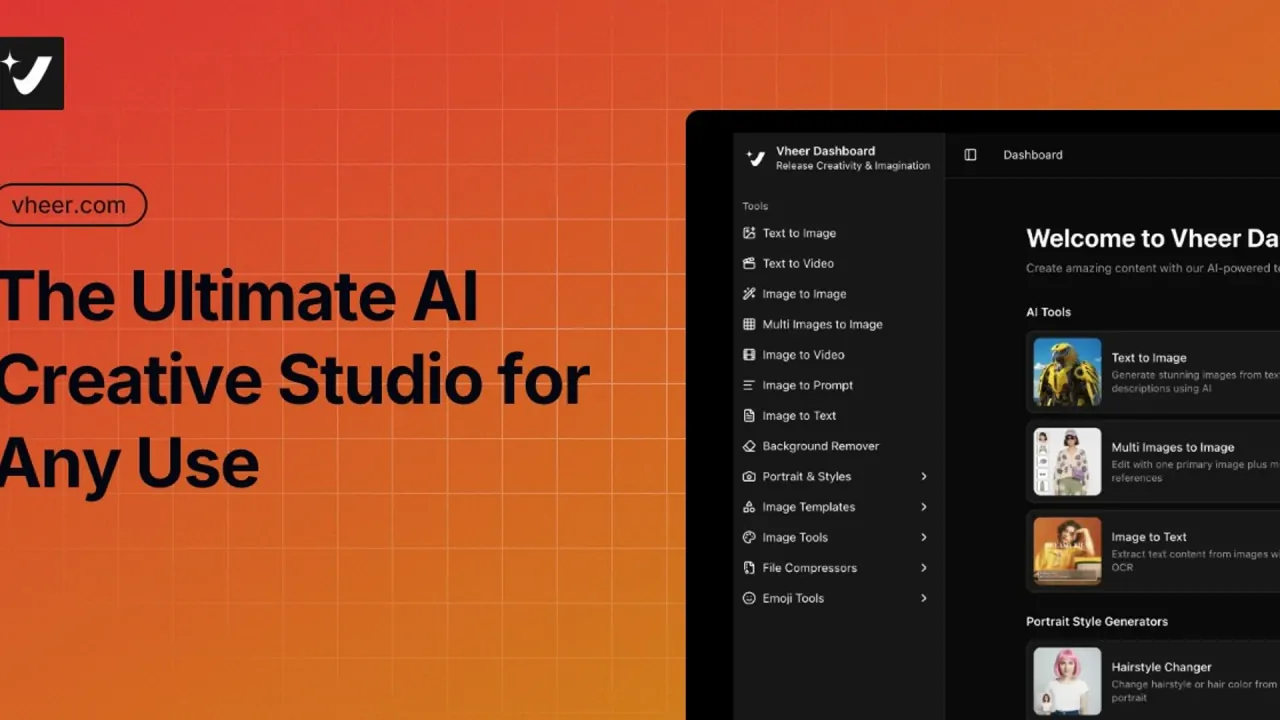
Vheer interface preview
Vheer logo

Vheer

Vheer combines text-to-image, image-to-video, text-to-video and background removal with third-party models such as Sora 2 and Nano Banana Pro. A free plan covers basic image generation, while text-to-video and commercial use of Quality-model images require a paid plan.

Image EditingImage GenerationVideo Generation#Free#Text To Video#image-to-video
Try for Free
Saves
Visits
Views
Pricing
Freemium
Published
Oct 6, 2026
Domain
vheer.com
Community rating

Used this tool? Rate it

Rate this tool

Vheer Product Information

Try for Free
Tool Information
Saves
Visits
Views
Pricing
Freemium
Published
Oct 6, 2026
Domain
vheer.com
Community rating

Used this tool? Rate it

Rate this tool

Featured Tools

Related Tools

Try for Free

What is Vheer?

Vheer (also styled Vheer AI on its own pages) is a browser-based AI image and video generator that puts text-to-image, image-to-image, multi-image editing, image-to-video, text-to-video and background removal in one dashboard, next to non-AI image utilities and file compressors. Rather than relying on one proprietary model, it offers a menu of third-party image and video models alongside its default option, Vheer Quality.

Vheer describes the product as one browser-based studio where you can start free with unlimited generations, no signup, and watermark-free exports. That headline is broader than the plan details: the pricing page gives the Free plan 50 credits per month for basic image generation, and the text-to-video FAQ says that tool needs an active subscription.

The site is operated by Sparklightforce, according to its terms; the official pages checked here do not give a company address or country.

Core features

Model menu

  • Image models: Vheer names Flux Klein, Nano Banana Pro, Nano Banana 2 and Seedream v4 among the image models for multi-image work. A site-wide banner announces that GPT-Image-2 is now on Vheer.
  • Video models: The text-to-video page lists Seedance, VEO, LTX, Sora 2, Nano Banana and Minimax models, each pitched as a different balance of speed, quality and style.
  • Default model: the text-to-image and image-to-video generators open on Vheer Quality.

Image creation and editing

  • Text to image: prompt-based generation with an Enhance button and up to four images per run.
  • Image to image: restyles an uploaded photo while keeping its layout. A reference-strength control sets how closely the result follows the original image.
  • Flux Kontext editor: a separate editor powered by Flux Kontext is aimed at changes such as swapping backgrounds, changing outfits or recoloring objects.
  • Multi images to image: one primary image plus several references, combined through a text prompt.
  • Portrait and template generators: preset-driven generators cover tattoo designs, tarot cards, logos, zodiac cards, pixel art, wallpapers and more, each producing artwork from curated presets.

Video creation

  • Image to video: The image-to-video tool takes a JPG, PNG or WebP image and offers MP4 or WebP output, 5- or 10-second clips and resolutions up to 1080p.
  • Text to video: aspect ratio, duration, resolution and model are adjustable. An optional Think Mode in the text-to-video tool expands a short idea into a more detailed, structured prompt.

Utilities outside the credit system

  • Image tools: invert, grayscale, black-and-white threshold, flip, blur, face blur, batch resizing, HSL adjustment, grid splitting, outlines, background blur, color-palette extraction and side-by-side combining.
  • File compressors: Separate compressors handle video, PDF, Word, GIF and PowerPoint files.
  • Emoji and text tools: emoji copy, kaomoji, symbol lists, text faces and fancy Unicode fonts.

Credits are spent only on AI models; the pricing FAQ says file compressors and image tools are free to use.

Guide

Generate an image from text

  1. Open Text to Image from the dashboard; the free tools do not ask for an account.
  2. Type a prompt into the field, which shows a 5,000-character counter, and use Enhance if you want help with the wording.
  3. Pick a model (the default shown is Vheer Quality), an aspect ratio and the number of images, from one to four.
  4. Click Generate, then download the results you want to keep.

Animate a photo

  1. Open Image to Video, the AI image to video tool, and upload the first frame. If you upload several images, the first two are used as the first and end frames.
  2. Adjust the AI-generated prompt, then set model, aspect ratio, duration and resolution; the captured default was Vheer Quality with a 5-second clip at 768.
  3. Generate, then tweak the prompt or settings and generate again if you are not happy with the result.

Combine several reference images

  1. Open Multi Images to Image and upload the primary image plus the references.
  2. In the prompt, use @ to point to specific images and say which element to take from each. Vheer's own example has a person from one image hold an object from another, take a pose from a third, and appear in a new background.

Use cases and examples

  • Product photos for online stores: The background remover handles JPG, PNG and WebP files, processes up to 20 images at once, and can swap a background for a solid color, all without signing up.
  • Headshots and profile images: The Headshot Generator creates professional business headshots from selfies, next to hairstyle, pet-portrait and anime-portrait tools.
  • Short social clips from photos: Vheer pitches image to video for Instagram stories, TikTok clips and YouTube content, and free users can already render these at 768p.
  • Promo clips and ad concepts: Vheer positions text to video for product videos, promotional clips and ad concepts made directly from text, which puts this use case behind a subscription.

These are the uses Vheer builds the tools for; output quality is not independently measured here, and one third-party review reports poor prompt adherence (see Limitations).

Who is it for

Good fit

  • Hobbyists and social creators looking for a free AI image generator that lets them try several image models from one browser tab before paying, since basic image generation and the non-AI utilities sit on the free tier.
  • Individual creators: Vheer accounts are intended for individual use only.
  • Paying freelancers and small businesses that want commercial rights to text-to-image output. Under the terms, free users may use Quality-model images only for personal, non-commercial purposes, and commercial use of the Quality, Pro or Max models requires a paid membership.

Less suited

  • Teams. The pricing FAQ points multi-user or collaborative use to a Team Plan, but the pricing page lists no plan by that name; the closest card, Ultra, is labeled for power users and teams.
  • Anyone who wants adult or explicit output, which the terms prohibit.
  • Users who need a long-lived cloud archive, given the six-hour file deletion rule described under Limitations.
  • People who want free text-to-video generation.

Platforms

  • Web browser: Vheer's image generator runs directly in the browser, with no downloads or installations.
  • Concurrent sessions: Each account can run tasks simultaneously on up to two desktop web sessions and one mobile web session.
  • Sign-in: Premium and subscription access can use third-party login such as Google Login.
  • Apps: The privacy policy mentions desktop software and lists app distribution platforms (Google Play, Mac App Store) among third-party services, but none of the Vheer pages checked here link to a Vheer app.
  • Same-name app: An Android app called "Vheer : Video Ai Advice" states that it is not affiliated with or endorsed by Vheer AI.

Pricing

Vheer pricing combines monthly credit plans with one-time credit packs; checkout runs through PayPro, and activation is described as instant.

PlanMonthly priceCredits per monthUse rights listedOther listed items
Free$050Personal useBasic image generation, all free tools, email support, no watermark
Premium$9.991,000Commercial useAll premium models, all free tools, priority support, no watermarks, no ads
Business$19.992,000Commercial useAll premium models, bonus on credit packages, priority support, no watermarks, no ads
Ultra$49.995,000Commercial useAll premium models, max bonus on credit packages, priority support, no watermarks, no ads

Prices are from the monthly view as captured on October 6, 2026.

  • The Free card is the only one that lists personal use instead of commercial use, and it does not carry the No Ads item shown on every paid card.
  • Premium at $9.99 a month is the cheapest tier that lists commercial use and all premium models.
  • Business and Ultra add bonus credits on credit packages, and the FAQ says subscribers on those two plans can buy extra credits at the same unit price as included in their plan.
  • A Yearly toggle is labeled "Save 2 months", but yearly totals were not shown in the captured monthly view.
  • One-time credit packs range from 400 credits for $3.99 to 7,000 credits for $69.99, with steps at 950 credits for $9.49, 1,850 for $18.49, 2,700 for $26.99 and 3,500 for $34.99.
  • Credit cost per task depends on the tool, model and complexity, and more advanced models, higher-quality settings and more complex tasks consume more credits; the captured pricing page does not list per-model rates.
  • Plan credits reset each billing cycle without rolling over, annual plans also allocate them month by month, and top-up credits never expire.
  • Subscriptions renew automatically, and a cancellation takes effect immediately, although the FAQ says your reset credits remain available.
  • An upgrade is scheduled to start at the next billing cycle, with the current plan staying active until the period ends.
  • The terms offer a 7-day refund policy for paid services, with used credits or services deducted from the refunded amount.

Vheer alternatives

Software directories list Vheer next to broad creative suites and dedicated AI image platforms. Two of them differ from Vheer on the points where it is weakest, namely usage rights and the size of the free allowance:

  • Adobe Firefly: Adobe says Firefly includes its own commercially safe generative AI models for images, video, audio and vectors, plus partner models from Google, OpenAI, ElevenLabs, Luma AI, Runway and others. That framing suits buyers who weigh licensing clarity above a free tier.
  • Leonardo AI: Leonardo's Free plan lists 150 fast tokens per day with public creations, while its paid plans list private creations. That compares with Vheer's 50 monthly credits on the Free plan and its six-hour file deletion rule.

Vheer's own advantage in this comparison is one browser workspace that mixes third-party models with free non-AI utilities, though its free tier is narrower than the homepage headline suggests.

Limitations

Where "free and unlimited" stops

  • The terms say most features are available without sign-up or registration, while some advanced tools and models require a paid subscription or credits.
  • Text to video is not free: its FAQ says the generator requires an active subscription.
  • Image-to-video output is limited to 768p for free users, with 1080p reserved for premium users.
  • The free claims therefore vary by page: the homepage promises unlimited generations, the Free plan card lists 50 credits per month, and the image-to-video page says all core video-generator features are completely free.

Usage rights

  • You keep ownership of uploads and generated content, and the terms say Vheer claims no intellectual property rights over it.
  • Once subscribed, generated images including Quality-model images can be used commercially, but images from the Kontext Editor Quality model are excluded.
  • Section 11.2 of the terms says outputs from the AI video generator, image-to-image, the background remover and the non-AI tools may be used commercially regardless of subscription status, which is broader than the Free card's "Personal use" label on the pricing page.

Privacy and data handling

  • The terms and privacy policy say Vheer does not use your content to train AI models and deletes uploaded and generated files from its servers every 6 hours.
  • That deletion rule sits beside an app notice saying generation history is saved persistently when you are logged in; the pages checked here do not explain how the two fit together.
  • Trusted third-party providers, such as cloud storage or AI inference APIs, may process your content on Vheer's behalf.
  • Cookies are used for analytics and to serve advertisements through the Ezoic ad network.
  • The privacy policy states that the services are not intended for users under the age of 13.
  • Data in transit is protected with 256-bit SSL encryption, according to the privacy policy.
  • The listed privacy rights include access to or deletion of personal data and opting out of cookies or marketing communications.

Content and account rules

  • Uploading or generating NSFW, explicit, violent or illegal content is prohibited, and the privacy policy warns that violating accounts may be restricted or permanently banned.
  • Vheer reserves the right to remove inactive or abusive accounts after 12 months of inactivity.
  • The terms cap Vheer's total liability for any claim at the amount you paid for paid services during the prior 12 months.

Third-party review signals

  • On a third-party review platform, Vheer held a 4.3 score from 999 reviews as captured on October 6, 2026, but only 6 of those reviews were posted in the previous 12 months, and the platform notes that the company has not invited customers recently.
  • One individual review there says the generator does not follow prompts; it is a single-reviewer account, not a measured failure rate.

FAQ

Q1. Is Vheer really free and unlimited?

Partly. The homepage promises unlimited free generations without signup, but the pricing page gives the Free plan 50 credits per month for basic image generation. Credits are charged only for AI models, so the image tools and file compressors stay free, while text to video requires a subscription.

Q2. Do I need an account to use Vheer?

Not for most tools: the terms say most features work without registration. Sign-in, for example through Google, is used for premium access, and the app says generation history is only saved while you are logged in.

Q3. Can I use Vheer images commercially?

It depends on the tool and plan. Free users may use Quality-model text-to-image output only for personal, non-commercial purposes; paid members can use generated images commercially, except output from the Kontext Editor Quality model. The terms also say the video tools, image-to-image, background remover and non-AI tools allow commercial use regardless of plan, while the Free card on the pricing page says personal use.

Q4. What video resolution and length does Vheer support?

The image-to-video tool offers 5- or 10-second clips in MP4 or WebP. Free users get 768p output, and 1080p is reserved for premium users.

Q5. Does Vheer keep or train on my uploads?

The terms say Vheer does not train AI models on your content and deletes uploaded and generated files every 6 hours, although logged-in users get a saved generation history.

Q6. Which AI models can I use on Vheer?

For images, the site names Vheer Quality, Flux Klein, Nano Banana Pro, Nano Banana 2, Seedream v4 and GPT-Image-2. For video, it lists Seedance, VEO, LTX, Sora 2 and Minimax models.

Q7. Can I get a refund?

The terms offer a 7-day refund window for paid services, and any credits or services already used are deducted from the refund.

Know a Similar Tool?
If you know other great AI tools, feel free to submit them to us