
Toolso.AI
Toolso.AI
All ToolsCategoriesTrendingLatest ToolsPricingBlog
Toolso.AI
Toolso.AI
Toolso.AI
Toolso.AI

Discover the best AI tools to boost your productivity

GitHubGitHubTwitterX (Twitter)YouTubeYouTubeTikTokEmail

Popular Categories

  • AI Writing
  • AI Image
  • AI Video
  • AI Coding
  • More Categories

Explore

  • Latest Tools
  • Popular Tools
  • More Tools
  • Submit Tool
  • Pricing

About

  • About Us
  • Contact
  • Blog
  • Changelog

Legal

  • Cookie Policy
  • Privacy Policy
  • Terms of Service
  • Refund Policy
© 2026 Toolso.AI All Rights Reserved
Limited timeLimited-time offerFeatured Listing24h priority review · No backlink · 30 days featured$29.90then $59.90Price rises to $59.90 after Oct 31Ends in--:--:--Submit now
  1. Home
  2. All Tools
  3. Voice Speech
  4. Voice Changer
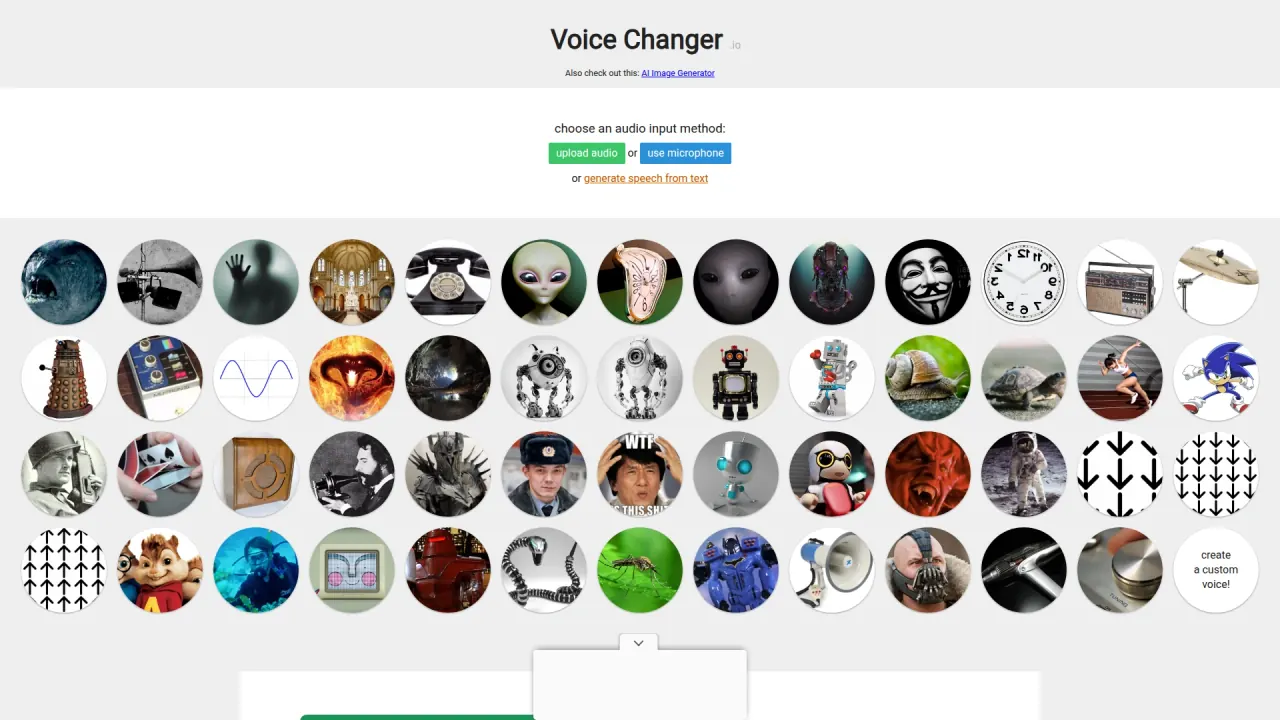
Voice Changer interface preview
Voice Changer logo

Voice Changer

Voice Changer applies preset effects such as robot, monster, telephone and cave echo to a clip you upload or record in the browser, and its Voice Maker page chains named effect modules into a custom voice you can download.

Voice SpeechAudio Tool#Audio#commercial use#audio-processing
Try for Free
Saves
Visits
Views
Pricing
Freemium
Published
Oct 6, 2026
Domain
voicechanger.io
Community rating

Used this tool? Rate it

Rate this tool

Voice Changer Product Information

Try for Free
Tool Information
Saves
Visits
Views
Pricing
Freemium
Published
Oct 6, 2026
Domain
voicechanger.io
Community rating

Used this tool? Rate it

Rate this tool

Featured Tools

Related Tools

Try for Free

What is Voice Changer?

Voice Changer, titled "Voice Changer - Online & Free" on its homepage, is a browser-based online voice changer: you upload an audio clip or record one with your microphone, click a preset, and the page renders a changed version of the same clip to play back or save.

The site has two working areas. The homepage applies one preset per click from a grid of picture cards, while the Voice Maker page, subtitled "Combine audio effects to create your own unique voices!", lets you stack named effect modules into a chain. Every effect is conventional audio processing such as pitch shifting, filtering, distortion, oscillators and echoes built from recorded impulse responses. In the pages checked, nothing describes AI voice models, voice cloning or training on a particular speaker's recordings.

The service does not name a company. Its privacy policy refers to the operator only as "Website Operator", and the notes on both pages are written in the first person by a developer. The only AI-branded item on the homepage is a small "Also check out this: AI Image Generator" link that leads to an image generator hosted on a different site.

Core features

On the homepage, the effects appear as picture cards, and once a clip is loaded the page says you can now play or download a voice by clicking on an icon. The Voice Maker drop-down lists the effect modules by name, and adding a module there shows the developer's own explanation of what it does and which sliders it has.

Character and robot voices

  • Dalek: the Ring Modulator (Dalek Robot) module makes the voice sound like the Dalek robots from Doctor Who.
  • Deep Scary: makes the voice sound like a powerful dark monster, with a slider for strength; the developer suggests lowering the pitch first with a Pitch Shifter if you have a high voice, to make it sound more evil.
  • Giant Robot: works by mixing together a bunch of different pitch shifts.
  • Beep Boop Robot: the classic "beep boop" robot voice with R2D2-style sounds in the background, with adjustable beep length and loudness.
  • Robot Maker: a robot voice effect built for creating a huge variety of different robot voices; setting one of its oscillators to a frequency of zero disables that oscillator.

Rooms, broadcasts and old equipment

  • Church Echo: an echo built from an impulse response recorded in a large church.
  • Long Echo (Cavern): applies a convolution using an impulse response from a cave, as if you were talking in a large underground cavern.
  • Telephone: mimics the way telephone networks filter out high and low frequencies outside normal voice ranges, which gives old telephones their distinctive sound.
  • Megaphone: adds a bit of distortion; adding the module again from the effects list gives more distortion, and the developer suggests combining it with an echo.

Mixing and studio modules

Alongside the character effects, the drop-down holds general audio modules: a biquad frequency filter, gain, overdrive, chorus, delay, a compressor, tremolo, wah-wah, a lo-fi bitcrusher, a Moog filter and a vowel filter, plus a "Make a Random Voice" option.

  • Gain: adjusts output volume, and placed between two effects it helps prevent "clipping", where the volume goes too high and the audio starts clicking.
  • Compressor: lowers the volume of the loudest parts of the signal to help prevent clipping and distortion when several sounds are combined.
  • Speed: speeds the audio up or slows it down; adding a Pitch Shifter after it keeps the original pitch of the voice.

Voice Maker for custom voice effects

The homepage sends anyone who wants more than a single preset to the Voice Maker page, where you can create your own custom voice effects. Effects are added from a drop-down list, and dragging the "↕" icon re-orders them. They are applied to the audio in top-to-bottom order, so the same modules in a different sequence give a different result.

Clicking the value next to a slider lets you type a number outside the slider's range. The default Pitch Shift module shows how far the controls go: a positive value makes the voice high-pitched like a small child or a chipmunk, a negative value makes it deep like a big troll or a demon, and the module can be applied several times in a row to go beyond the slider limits.

While the output is being rendered, the page warns that this could take a while and shows a progress line such as "applying effect 1/1".

Guide

Applying a preset on the homepage

  1. Under "choose an audio input method", pick upload audio for an existing file or use microphone to record, and allow microphone access when the browser asks.
  2. Click a picture card and wait while the page shows its "processing audio" message.
  3. Play the result, or click other cards to hear different effects on the same clip.
  4. To keep a result, right-click the play button, choose "Save audio as..." and save the file.
  5. Use "load a new audio clip" to start again with a different recording.

Building a voice in Voice Maker

  1. Choose the input: the text-to-speech link, record a clip, load a clip, or one of the female and male example clips.
  2. Add effects from the drop-down, adjust their sliders and drag them into the order you want.
  3. Press re-generate to hear the updated output, then download to keep it.
  4. Copy the URL of the page to share your creation with someone else.

Tips from the developer

  • Talk relatively slowly when using any of the echo-heavy voices; otherwise the echoes make the words hard to understand.
  • With Shuffle Chunks on a short clip, use a short chunk time; otherwise the random shuffle may put the pieces back in the same order as the input.

Use cases and examples

The modules suit short recorded clips where an obvious, stylised effect is the goal, and several of the developer's descriptions name the setting they were built for:

  • Announcements: Distopian Public Announcement combines distortion with a significant echo to sound like a big old train station, and the developer notes it could be used for other purposes as well.
  • Supernatural scenes: Ghost (Reverse Reverb) applies a reversed echo, an effect commonly used to make a voice sound supernatural or ghost-like.
  • Hidden messages: Reverse Time plays the clip backwards and can produce audio that sounds like another language while actually carrying a hidden message.
  • Singing: Vibrato (Smooth Wobble) makes a flat sung note sound as if it were sung with vibrato.
  • Radio chatter: Very Distorted Radio emulates a very noisy channel, such as an old military radio almost out of range or a CB hand-held radio in an area with high interference.
  • Space footage: Astronaut emulates the noise and distortion heard in old audio clips of astronauts talking in space.
  • Synthetic narration with character: the text-to-speech option leads to a separate speech generator whose own page suggests downloading the generated audio and then using Voice Changer to make the voice more robotic, like a giant ogre, or like an evil demon.

Who is it for

Voice Changer fits people who want a quick, stylised effect on a recording and are happy to work one clip at a time.

  • Creators who publish the result: the site says the generated audio clips can be used for any purpose, commercial usage included, and that crediting voicechanger.io is optional.
  • Performers willing to act the part: for some voices, such as Bane and Dalek, you need to put on the correct "accent" for the transformation to work, because the engine adds effects on top of a voice that already imitates the target.
  • Casual users rather than live streamers: each homepage effect is rendered after you click it, with a note that processing may take a little while, so the workflow is built around recorded clips. In the pages checked, no live mode, virtual microphone or chat-app integration is described.
  • Not a fit for privacy-critical disguise or for anyone who needs a specific real person's voice; both points are covered under Limitations.

Platforms

  • Web page only: in the pages checked there is no desktop app, mobile app, browser extension or API documentation; everything happens on the homepage and the Voice Maker page.
  • Audio input: the homepage offers two input methods, uploading an audio file or recording with the microphone.
  • Text input: as a third route, the homepage links out to generate speech from text, which then has to be brought back as audio. The linked generator says it uses the browser's built-in voice synthesis, so voices differ between browsers, and that downloaded voices may differ from the ones played because they come from an external text-to-speech server.
  • Output: homepage results are saved through the browser's audio player by right-clicking the play button and choosing "Save audio as...", with "audio.wav" given as the file name.
  • Language: the pages checked are in English only.

Pricing

Voice Changer costs nothing to use, and the Voice Maker page is likewise titled "Voice Maker - Create a Voice - Online & Free". In the pages checked there is no paid plan, credit system or sign-up step. The site is funded by advertising instead: the privacy policy says Google ads and other third parties serve advertisements on it, and the homepage shows a slot labelled "ADVERTISEMENT:" below the preset cards.

For a free voice changer funded by ads, the cost shows up in data handling: ads are served with third-party cookies, and the privacy policy says the operator may sell personal information, including for ad targeting, as detailed under Limitations.

Voice Changer alternatives

Directory listings and a community thread about Voice Changer alternatives repeatedly name Voicemod and Clownfish Voice Changer, two desktop tools that change the voice live. That is the clearest gap in Voice Changer's clip-by-clip workflow.

Voicemod describes itself as a real-time AI voice changer and soundboard, offered as a free download for mobile and desktop. Its site says it works not only in voice apps like Discord but also in in-game voice chats, which suits gamers and streamers who need the effect during a conversation.

Clownfish Voice Changer is a Windows application installed at system level, so every application that uses the microphone or another audio capture device is affected. It lists support for Windows Vista, 7, 8, 8.1, 10 and 11, so it suits Windows users who want one effect applied across all their voice apps.

Voice Changer remains the simpler choice when the job is a finished audio file: there is nothing to install, the presets and Voice Maker chains are free, and the output can be reused commercially without credit.

Limitations

  • Hobby-level maintenance: the developer invites feedback through a link on the homepage but calls Voice Changer "just a hobby project" and says the site won't be updated regularly.
  • Slow response to requests: the Voice Maker notes add that feature requests may not be implemented in a timely manner.
  • Not real anonymity: the Anonymous (Distorter) module makes the voice sound like a "l33t hacker", but the developer notes that it won't actually make your voice anonymous and points to a text-to-speech generator for real anonymity.
  • Narrow modules: the Vowel Filter is described as not all too useful unless the input sound is very "constant".
  • Unlabelled homepage cards: the homepage presets show pictures without visible names, so finding a specific effect by name is easier in the Voice Maker drop-down.
  • No cloning of real people: character effects are sound treatments layered on your own performance; the pages checked offer no way to model a specific person's voice from a sample.
  • No terms of service: apart from the privacy policy, no terms of service, about page or FAQ page was found at the paths checked.

Privacy and data handling

The privacy policy was last updated on June 22, 2020 and reads as a general website policy. It says the servers automatically record information your browser sends, such as IP address, browser and operating system details, referring page and time spent on pages. That information is used only to identify potential cases of abuse and to establish statistical information about website usage. The policy does not mention audio, microphone recordings or uploaded clips, and the pages checked do not say whether clips are sent to a server or processed only in the browser.

  • Retention: personal information is kept for the period necessary to comply with legal obligations, resolve disputes and enforce agreements, unless a longer retention period is required or permitted by law.
  • Advertising cookies: the policy says Google and other third-party vendors use cookies to serve ads based on a user's prior visits to this and other websites.
  • Sale of data: in its California privacy rights section, the policy says the site collects personal information through input forms and through third parties such as web analytics and advertisements, and that the operator may sell personal information to other parties, including to deliver ads tailored to the user's interests. The Do Not Sell page it refers to was not found at the paths checked.
  • Access and removal: users in the European Economic Area who want to know what personal information is held about them, or want it removed, are told to contact the operator.
  • Contact: privacy and data-rights requests go by email to admin@voicechanger.io.

FAQ

Q1. Is Voice Changer really free?

Yes. Both pages are titled "Online & Free", and no paid tier appears in the pages checked; the site carries display advertising instead.

Q2. Can I use the changed audio in a commercial project?

Yes. Generated clips may be used for any purpose, commercial use included, and crediting voicechanger.io is optional. The Voice Maker page repeats the same permission and says a link or mention would be nice but is not necessary.

Q3. Can Voice Changer copy a specific person's voice?

No voice cloning is described. Character effects such as Dalek or Bane work best when you already imitate the character, and the pages checked offer no option to upload someone's voice as a model.

Q4. Does it work live in Discord or in games?

Not according to the pages checked. Each effect is rendered from a recorded or uploaded clip after you click it, and no live microphone mode or app integration is described.

Q5. Who runs Voice Changer?

No company is named. The privacy policy refers to a "Website Operator" reachable at admin@voicechanger.io, and the site's notes describe Voice Changer as a hobby project written in the first person by its developer.

Know a Similar Tool?
If you know other great AI tools, feel free to submit them to us