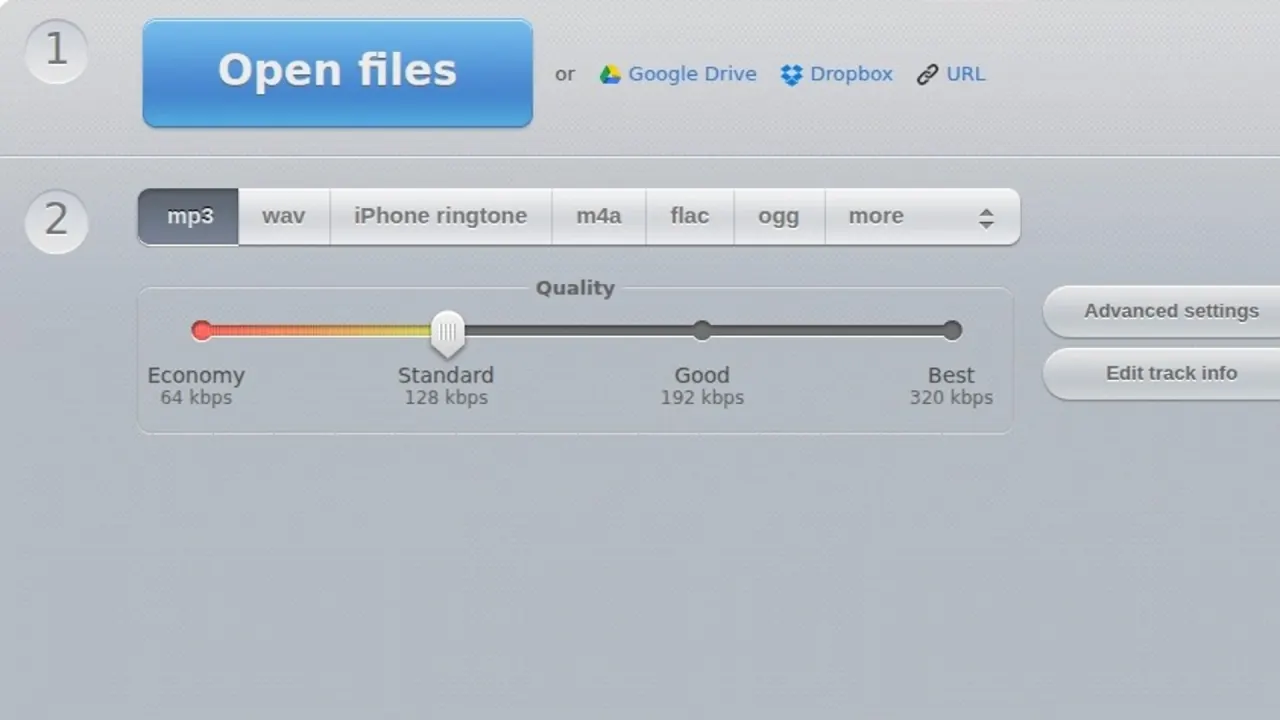

A free browser converter in the 123apps suite that turns audio and video files into MP3, WAV, M4A, FLAC, OGG, AMR, MP2 or M4R, with batch conversion, tag editing and a 4 GB file ceiling on the free plan.
Used this tool? Rate it
Used this tool? Rate it
Audio Converter Online is a free browser app at online-audio-converter.com that converts audio files quickly and needs no installation, taking a very wide range of inputs and writing out to eight formats. (Its own page headings brand it "Online Audio Converter"; this page uses Audio Converter Online throughout.)
One screen handles format changes, soundtrack extraction from video containers, encoder settings and tag editing. Other audio operations live in sibling apps on their own domains, which matters for both workflow and billing.
The footer credits 123apps.com and links to Blog, Privacy, Refund policy, Pricing, Help and Contact us, with the help centre hosted on the operator's own domain rather than the converter site. The refund policy is written for eight sites at once — 123apps.com, online-audio-converter.com, mp3cut.net, audio-joiner.com, online-video-cutter.com, audio-extractor.net, convert.io and video-converter.com — so the commercial terms accepted here are suite-wide terms, not converter-specific ones.
No company name, registered address or jurisdiction appears on any page checked this round; the published contact routes are an on-site form and a support mailbox. A software directory entry cross-checked this round describes the same product as an online tool that converts any audio file into multiple formats including mp3, wav, iPhone ringtone, m4a, flac and ogg, which confirms that this generically named slug points at the 123apps converter.
The converter works with over 300 different file formats including video formats, and writes out to mp3, wav, m4a, flac, ogg, amr, mp2 and m4r for iPhone ringtones. Input breadth is very wide; output is a fixed shortlist of eight targets, and OPUS, AIFF and WMA are not on it.
The app can extract an audio track from a video, framed as saving a particular song from a movie or a music video. Because video containers count as supported input, the same upload box handles an MP4 without a separate mode.
Quality, bitrate, frequency and number of channels are configurable, and the same panel can apply reverse playback, fade in, or remove a voice from the audio track — edit operations that usually need a separate tool.
Bitrate is a constant or variable choice rather than one slider. Variable bitrate achieves higher sound quality while keeping the file size down, coding simple passages lower and complex ones higher.
Track name, artist, album, year and genre can be changed during conversion, and tags are supported for mp3, ogg, flac and wav.
Multiple files can be converted simultaneously in a batch and are returned in a ZIP archive to speed up downloading. On the free plan the ceiling is a daily file counter rather than a per-batch one.
The published procedure is four steps:
Cloud storage works in both directions: files can be pulled in from Google Drive or Dropbox, and results pushed back to either.
Two published rules of thumb decide most settings. For MP3, the recommendation is a bitrate of at least 192 kbps or higher, since disk space is cheap relative to the quality lost below it. For uncompressed material, one minute of WAV formatted sound requires around 10 megabytes of memory.
Format choice follows from purpose. FLAC is a lossless format that does not modify the audio stream, so the encoded sound is identical to the original — the right choice for a master copy. AAC is one of the highest quality lossy encoding algorithms and its files carry the extensions .aac, .mp4, .m4a, .m4b, .m4p and .m4r, so one encoder covers both a phone-friendly M4A and an iPhone ringtone.
To extract audio from video, the app pulls an audio track out of a video file in order to save a particular song from a movie or a music video. Webinar recordings and phone clips follow the same path, and because input handling covers over 300 different file formats including video formats, the source container rarely needs converting first.
M4R output exists specifically for iPhone ringtones, and the encoder behind it is the same AAC family whose extensions include .m4r, which removes the usual step of exporting an M4A and renaming it by hand.
Batch conversion plus tag editing turns mismatched files into one consistent set: files are converted simultaneously in a batch and returned in a ZIP archive, and track name, artist, album, year and genre can be corrected on the way through for mp3, ogg, flac and wav.
When a WAV is too large to send, the ten-megabytes-per-minute rule shows how much there is to save. To convert audio to MP3 without an obviously tinny result, the published recommendation is at least 192 kbps. In the other direction, FLAC keeps the stream unmodified and identical to the original, making it the target when preservation matters more than playback.
The clearest fit is an occasional, self-contained conversion job handled without installing software: the free plan allows 70 files per day at a 4 GB maximum file size, an unusually high single-file ceiling for a browser converter.
It also fits people who need several of the operator's tools: a single Premium subscription covers 51 tools, so anyone who also trims, joins or converts video regularly buys one subscription instead of several.
It fits less well in three situations:
Privacy-sensitive work sits in the middle: uploads are handled by an automated pipeline with no human review, but they are still uploads.
The product runs entirely in a browser, with in-browser conversion described as fast, secure and free. No desktop installer, mobile app or documented API appears on any page checked this round, so the browser is the only published entry point.
Data can be uploaded directly or pulled in through Google Drive or Dropbox, and the completion step offers Download alongside Save to Google Drive and Dropbox, so a file can arrive and leave without touching local disk.
The interface is published in localised versions under language path prefixes. The German edition at /de/ describes a free online app that converts audio tracks, supports all formats, processes files quickly and needs no installation; the Japanese edition at /ja/ carries the equivalent text in Japanese.
All apps are free to use, but there are limits on file size and operations per day. The table below is what the pricing page shows with Audio Converter selected, so these are the converter's own limits, not suite-wide averages.
| Free | Premium | |
|---|---|---|
| Price | $0 | $6 per month, or $48 once a year |
| Tools included | 51 | 51 |
| Files per day | 70 | Unlimited |
| Maximum file size | 4 GB | 10 GB |
| Speed | Fast | Faster |
| Ads | Yes | No |
Two details the table does not spell out. The Premium column lists both $6 per month and $48 once a year, while the yearly toggle is labelled -20%, so the advertised discount and the two prices are worth checking against each other at purchase. And the tool count is identical on both rows: Premium lifts the daily counter, the file ceiling, the queue priority and the ads rather than unlocking extra tools.
Charges are processed by an external payment provider and typically appear on a bank statement as PADDLE.NET* 123APPS or 123Apps; a different descriptor is the operator's own stated signal that the subscription belongs to a look-alike site.
Cancelling stops future charges, keeps premium access until the end of the current billing period, and removes the stored payment details, so resubscribing means entering them again. Pausing stops automatic renewals while keeping payment details saved for one-click resumption.
All payments made for monthly or yearly subscriptions are considered to be non-refundable, and the published list of situations that do not qualify explicitly includes forgetting to cancel before the renewal date. Three exceptions are named — duplicate charges from a billing error, persistent unresolved technical issues support cannot fix, and fraudulent or unauthorised charges — each framed as something the vendor will investigate and refund if confirmed, not an automatic entitlement. An annual plan bought by mistake has a softer route: contact within 12 hours of purchase and the vendor will try to help, which is an offer of effort rather than a promise of money back.
Payment coverage is narrow: UPI is not supported at the moment, and the same answer is given for crypto, both listed as under consideration.
Three browser converters are routinely placed alongside this one, and the single-file ceiling is where the gap is widest.
| Free tier | Maximum file size | Daily allowance |
|---|---|---|
| Audio Converter Online | 4 GB | 70 files |
| CloudConvert | 1 GB | 10 conversion credits |
| Convertio | 1 GB | not published on the page checked |
| FreeConvert | 1GB | not published on the page checked |
CloudConvert publishes both numbers: its free tier lists 10 conversion credits per day against a 1 GB maximum file size, and it caps a single job at 5 minutes of processing time — a limit this converter does not publish at all. Convertio states a 1 GB maximum file size and claims 62+ audio formats, a narrower input range than the 300-plus claimed here but a wider output menu than eight targets.
For one large file the 4 GB free ceiling here is the widest of the four; for many small files a credit system may run out faster or slower than a flat 70-file counter, so the choice depends on batch shape rather than headline price.
Product-level review evidence is thin: the converter's own domain profile on a third-party review platform carries just 2 reviews at 3.8 — far too small a sample to support any conclusion about quality.
The operator's company-level profile there is larger and much worse: 2.7 across 42 reviews, with 65% at one star and 19% at five. That score measures the whole 123apps suite rather than this converter alone, so the two samples cannot be averaged.
Within those company-level reviews, seven different reviewers describe the same sequence: paying for Premium, finding the paid features still do not work or being repeatedly logged out, and receiving no response from support across multiple contact attempts. Seven reports is a recurring theme rather than a statistic.
Retention is stated twice, differently. The privacy policy commits that data is stored only for as long as necessary and deleted automatically no later than twelve (12) hours from the moment you finish using the service, while the homepage describes files as automatically deleted a few hours after you are done.
The vendor states it does not monitor or access the data you provide and that processing is completely automated without any human interaction or supervision. Deletion requests go to the operator's support mailbox, and deleting an account permanently removes all associated data and cancels the Premium subscription, with no undo.
Disclosure is not absolute: the policy reserves the right to comply with court orders and government requests and to provide information to authorised bodies. The stated purposes are delivering the service, analysing use of the site, developing new products, optimising content, providing support and delivering ads based on your preferences; the policy checked this round makes no statement either way about using uploaded audio to train models.
Third-party applications including Dropbox, Google Drive, Google Analytics, Google DoubleClick and Google Adsense set cookies on the site to analyse traffic or determine targeted advertisements based on your preferences.
The policy is effective from 16 May 2022 and states that no registration is necessary and that no personally identifiable information, IP address or other identifying data is collected — while the current site offers optional accounts, third-party sign-in and paid subscriptions. No section of it describes account or billing data.
Yes, with limits. All apps are free to use, but there are limits on file size and operations per day; the free tier allows 70 files per day at a 4 GB maximum file size, with ads shown.
Eight: mp3, wav, m4a, flac, ogg, amr, mp2 and m4r. Input is far wider, covering over 300 different file formats including video formats — so the constraint is almost always the output side.
Yes. Extracting an audio track from a video is a documented feature aimed at saving a particular song from a movie or a music video.
The privacy policy commits to automatic deletion no later than twelve (12) hours after you finish using the service; the homepage phrases the same commitment as a few hours.
Usually not. Subscription payments are treated as non-refundable, with three named exceptions: duplicate charges, persistent unresolved technical faults and unauthorised charges. An accidental annual purchase has its own route — contact within 12 hours and the vendor will try to help.
