
Unblur Image is a browser-based tool that sharpens blurry photos, removes noise, and upscales images up to 4x or 4K. Video unblurring runs on a separate page, and paid work is metered in credits.
Used this tool? Rate it
Used this tool? Rate it


AI image editing from a reference photo


Multi-model image studio, free to start


Natural AI photo editing for portraits and projects


Browser-Based AI Photo Editing and Image Generation


Product photo editing for online stores


AI photo editing and design in one browser tab


Fashion concepts, model photos and video in one workspace


Prompt-Based Images, Edits and Video
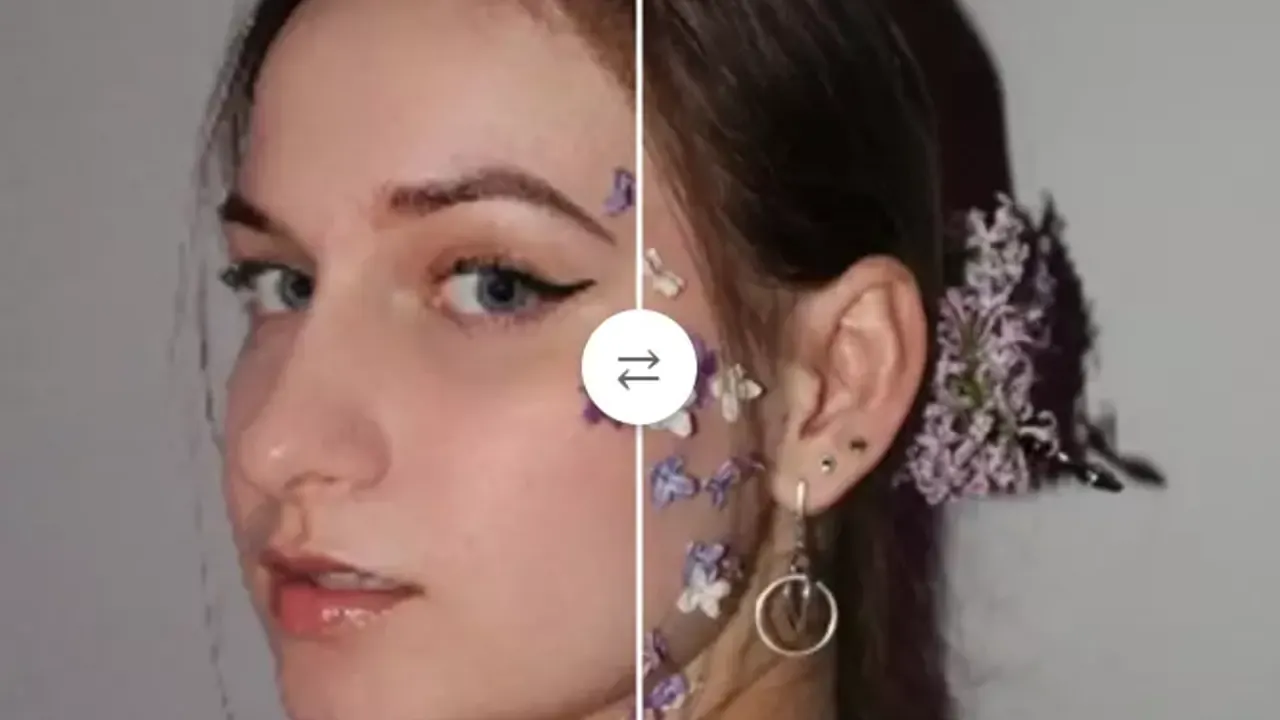
Unblur Image, which appears as UnblurImage AI on its own pages, is a browser-based image tool that takes a soft or blurred photo and returns a sharper version of it. The headline promise is deliberately narrow: it unblurs images and sharpens photos in one click, rather than offering a full editing suite.
The legal description is broader than the marketing one. The Terms of Service describe an online platform that "enables users to enhance, unblur, upscale, and restore digital images," and list image unblurring, upscaling, old photo restoration, quality enhancement, batch processing for eligible plans, and API access among the included services. That gap matters when you compare it with a photo editor: the depth is in restoration and enlargement, not in layers, masking or design layout.
Everything runs in the browser. There is no desktop client to install, and the free flow is built so that a first image can be processed without creating an account. For anyone shopping for an AI photo unblurrer rather than a full editor, the free flow is the trial and credits are what you buy afterwards. Paid capacity is metered in credits, sold either as a monthly subscription or as one-off packs, and the same credit balance is what limits how much work you can push through the tool in a given period.
The two halves of the product behave differently in practice. Unblurring works on a photo that already exists at its final size and tries to recover edge detail; upscaling changes the pixel dimensions, and the upscaler page frames it as the tool for small, compressed or low-resolution images rather than for motion blur. A photo that is both soft and small is therefore two operations, not one, and each operation draws on the credit balance.
For video the sequence is shorter because there is less to configure: upload the clip, run the unblur pass, and download the enhanced file. The video page presents the whole thing as a one-click operation with results returned in seconds, without describing separate controls for individual scenes.
A practical note on ordering comes from the product's own split between tools. Because unblurring and upscaling are separate operations with separate pages, a photo that is both out of focus and too small is normally handled by sharpening first and enlarging second; the enlarged result then reflects the detail that the unblur pass managed to recover. Treating the two as one step tends to produce a large file with the same soft edges, only bigger.
The common thread is a photo you cannot retake. When the original still exists and the camera or the focus was the problem, enhancement is the only remaining lever, and the value is highest where the image will be inspected closely: a listing photo, a print, a portrait used as an avatar.
Unblur Image fits people who need a repaired image and not a workflow: sellers fixing listing photos, designers rescuing a client asset, families restoring an old print, and anyone who wants to try the tool before paying. The free entry point is the reason it can serve that last group at all, since a first image can be processed without an account.
It fits less well in two situations. Teams that need to work on images of people at scale should read the consent restriction in the Terms before building a process around the tool, and users who need to stay above a strict age line should note that the Terms set the minimum at 16 years of age. Both are eligibility boundaries rather than feature limits, and both are covered below.
Anyone whose working style requires a desktop application, offline processing or a plugin inside an existing editor will find the browser-only model a mismatch, regardless of output quality.
The service is delivered as a web interface at unblurimage.ai, with no client application described anywhere in the product pages or the Terms. That makes the browser, rather than an operating system, the compatibility requirement.
Accounts exist but are not the entry ticket. The Terms say that certain features require an account and that registration runs through Google OAuth, so a Google login is the only sign-in path documented in the agreement. The free workflow sits outside that requirement, which is why the homepage can promise that no sign-up is needed for a basic unblur.
Developers have a separate route. API access is listed among the services in the Terms, subject to separate API terms, so an integration is possible in principle, but the public terms do not publish endpoints, quotas or rate limits. Anyone planning to build on the API is relying on a document that is not part of the standard agreement.
| Plan | What you pay | Credits | Notes on the page |
|---|---|---|---|
| Free | $0 | Periodically refreshed free credits | Basic enhancement flow to try the product |
| Subscription | $3.90–$16.90 per month | 50 to 1,000 credits | Steady restoration workloads; 500 credits shown at $0.026 per credit |
| One-time | $4.99–$330 per purchase | 50 to 30,000 credits | Occasional work; 500 credits shown at $0.060 per credit |
| Enterprise | Custom | Custom volume | Priority support for production workloads |
The subscription ladder is priced in four steps: 50 credits at $3.90 per month, 200 at $8.90, 500 at $12.90 and 1,000 at $16.90. The one-time ladder is much wider, running from 50 credits at $4.99 up to 30,000 credits at $330, with the pack size chosen at checkout. The two ladders do not price credits the same way: at the 500-credit point, the page shows $0.026 per credit on subscription and $0.060 per credit on a one-time pack, so a subscription is cheaper per credit and a pack is cheaper in commitment.
Expiry differs by purchase type. The Terms state that credits bought in one-time packages do not expire, while subscription credits remain valid for the duration of the active subscription period. The pricing page is less specific, saying that credit validity depends on the plan or package and that the accurate status is shown in the account or billing area, so the account view is the authoritative place to check a specific balance.
The Enterprise tier is a contact route for custom volume and priority support rather than a published price.
Cancellation runs to the end of the paid period. The Terms say a cancellation takes effect at the end of the current billing period, and access to subscription features and any remaining subscription credits continues until that date. Subscriptions renew automatically unless cancelled before the renewal date.
Refunds are narrow and time-boxed. A subscription can be refunded if the request arrives within 7 days of the initial purchase and fewer than 20 credits have been consumed; renewal charges are generally non-refundable, and every request is reviewed case by case. One-time packs are generally non-refundable once credits have been used, with an exception for a technical failure attributable to the service, reported within 7 days of the incident. The pricing page states the same position more bluntly, that completed purchases are generally non-refundable because AI processing consumes computing resources once a task starts.
Directory roundups in this category do not treat UnblurImage AI as a category of one. One listing groups it with broader photo editors rather than with single-purpose unblurring tools, and the competing pages confirm that wider scope. Fotor's tool list places an unblur entry next to an upscaler that promises to "upscale image to 4x online." PicWish frames its editor as a place where you can "effortlessly unblur and sharpen images online for free."
That grouping is the useful comparison, because the split is not quality but scope. A general editor is the better fit when unblurring is one step inside a larger job such as cutting out a background, laying out a listing image or producing a set of social variants; the enhancement pass is included rather than the whole product. A specialist tool is the better fit when there is one image to rescue and no design work to do afterwards.
Delivery model is the second dividing line. Unblur Image is web-only, so a comparison that includes desktop software used for offline or local processing is comparing different constraints, not just different prices, and the credit model means cost scales with the number of images rather than with seats.
The consent rule is the one that reaches beyond hobby use. Restoring a family portrait and building a face-matching pipeline are the same technical operation to the model but not the same act under the Terms, and the prohibition on using the tool for identification is explicit rather than implied.
The free-cap language is also worth reading literally. Because the cap is discretionary and enforced partly through device fingerprinting, the practical allowance for an unregistered user is not a fixed published number; the pricing page only says that free credits refresh periodically.
Uploaded images are temporary by design. The privacy policy states that processed images are stored on cloud storage only long enough to allow a download and are automatically deleted from the servers within 24 hours of processing unless they were saved to an account.
Saved work and business records follow different clocks. Images saved to an account are kept until manually deleted or until account deletion is requested, transaction records are retained for up to 7 years to comply with financial regulations, and server logs are kept for up to 90 days. The policy also states that uploaded images are not used to train models without explicit consent, and the Terms add that original and enhanced images will not be used for advertising or AI training without consent.
Ownership stays with the user. The Terms say the enhanced output images are owned by the user, subject to compliance with the Terms and applicable law, while the vendor keeps ownership of the models, interface and other product content.
Yes. The pricing page lists a $0 free plan with periodically refreshed credits, intended for light enhancement and for trying the workflow before buying credits. The Terms add that free usage limits are set at the vendor's discretion and can change without notice.
The main workflow names PNG, JPG and HEIC, and the upscaler page lists JPG, PNG, WebP and HEIC. Those two lists differ on WebP, so a WebP file is best treated as supported for upscaling and unconfirmed for the base unblur flow.
One-time pack credits do not expire, according to the Terms. Subscription credits stay valid for as long as the subscription is active, and the pricing page directs users to the account or billing area for the status of a specific balance.
A subscription can be refunded within 7 days of the initial purchase if fewer than 20 credits have been used, and renewals are generally non-refundable. One-time packs are generally non-refundable after use, except when a technical failure attributable to the service is reported within 7 days.
Not for the basic unblur flow, which the site says runs without sign-up. Certain features require an account, and the documented registration path is a Google login through OAuth.
Video has its own page and its own workflow: upload a blurry clip, run the unblur pass, and download the result. The video page describes results in seconds and lists sharpness, detail, colour and brightness as the parts being improved.