
Toolso.AI
Toolso.AI
All ToolsCategoriesTrendingLatest ToolsPricingBlog
Toolso.AI
Toolso.AI
Toolso.AI
Toolso.AI

Discover the best AI tools to boost your productivity

GitHubGitHubTwitterX (Twitter)YouTubeYouTubeTikTokEmail

Popular Categories

  • AI Writing
  • AI Image
  • AI Video
  • AI Coding
  • More Categories

Explore

  • Latest Tools
  • Popular Tools
  • More Tools
  • Submit Tool
  • Pricing

About

  • About Us
  • Contact
  • Blog
  • Changelog

Legal

  • Cookie Policy
  • Privacy Policy
  • Terms of Service
  • Refund Policy
© 2026 Toolso.AI All Rights Reserved
Limited timeLimited-time offerFeatured Listing24h priority review · No backlink · 30 days featured$29.90then $59.90Price rises to $59.90 after Oct 31Ends in--:--:--Submit now
  1. Home
  2. All Tools
  3. Image Editing
  4. Facy
Facy interface preview
Facy logo

Facy

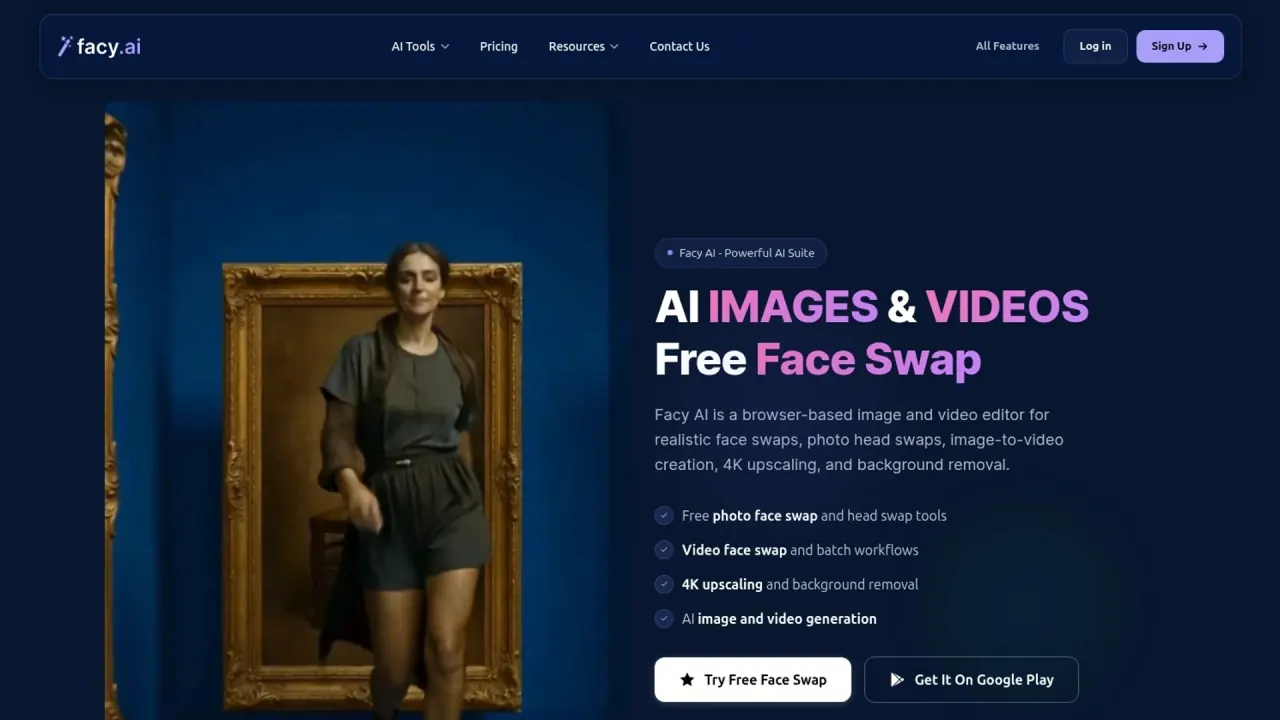
Facy is a browser-based AI editor for swapping faces in photos, videos and GIFs, replacing heads in photos and turning still images into short clips. It adds 4K upscaling and background removal, with free photo tools and one-time paid plans for video work.

Image EditingVideo EditingVideo Generation#image-to-video#image upscaler#ai image generator
Try for Free
Saves
Visits
Views
Pricing
Freemium
Published
Oct 6, 2026
Domain
facy.ai
Community rating

Used this tool? Rate it

Rate this tool

Facy Product Information

Try for Free
Tool Information
Saves
Visits
Views
Pricing
Freemium
Published
Oct 6, 2026
Domain
facy.ai
Community rating

Used this tool? Rate it

Rate this tool

Featured Tools

Related Tools

Try for Free

What is Facy?

Facy (styled Facy AI and Facy.ai on its own pages) is a browser-based image and video editor built around realistic face swaps, photo head swaps, image-to-video creation, 4K upscaling and background removal. Nothing is installed on the desktop: each tool runs on its own web page, and an Android app is offered alongside the site.

The service is run by Facy Spółka z ograniczoną odpowiedzialnością, a limited liability company based in Wrocław, Poland. Its terms are governed by the laws of Poland.

Three facts shape most decisions about Facy AI. Simple photo face swaps, basic upscaling and background removal can be used without paying, while video, GIF and premium models draw on credits. Paid plans are one-time purchases rather than subscriptions. And results are not stored for later: an output can be downloaded once before it is deleted.

Core features

Face swap tools

  • Photo face swap: the free AI face swap tool takes a face image and a target photo and returns the result on the same page, with no sign-up and no credit card required. It accepts JPG, PNG, WEBP, BMP and GIF files up to 20 MB.
  • Multiple face swap: the detector finds up to 20 faces per photo, and you can replace one, some or all of them in a single run. This tool needs a free account but no credit card.
  • Batch face swap: a separate tool applies face swaps across several photos in one workflow.
  • Video face swap: the video face swap tool detects multiple faces in a clip and lets you upload a different replacement for each one, or apply one face to all of them. Supported uploads are MP4, MOV, AVI, MKV and WEBM.
  • GIF face swap: animated GIFs or short clips can have one or several faces replaced, and each GIF swap is listed at 1 credit.

Photo head swap

The photo head swap tool takes one photo containing the head you want and another showing the person or people who should receive it. Facy points to it for swaps that are too complex for photo face swap. An optional custom prompt lets you request details such as "keep eyes open" or a happier expression. The premium HeadUltra model can change only one named person in a group photo, but HeadUltra is limited to paid plans.

Image editing and generation

  • Upscaler: images can be enlarged 2× or 4×; the Basic model is free without an account, while Pro 4K output uses credits that come with a free account. A custom size from 256 to 6000 px per side is also available, and when the aspect ratio differs the result is centre-cropped rather than stretched.
  • Background remover: a one-click tool removes photo backgrounds while preserving edges.
  • Image to Image: one uploaded image can be edited, or two images can be combined so their subjects appear in a single new result.
  • AI image generator: a text-to-image tool creates new pictures from written prompts and offers the result for download.

Video generation

Image to Video animates a still photo from a motion prompt. The model menu lists Vid 3.0 Pro, Vid 2 Fast and Vid 1. Depending on the model chosen, you can pick different durations and resolutions, and some models also add audio. A character can be made to speak by writing the line into the prompt, for example "she says: Hi, how are you?". Text to Video is listed for creating clips from a written idea without source footage.

Reference mode, an Image to Video option, accepts up to 10 images of the people and objects you want to appear. It can also take up to 5 audio clips of 1–15 seconds in MP3 or WAV, and the generated characters are meant to talk like the voice in the uploaded file.

Guide

Swapping faces in a video

  1. Upload a clip that shows at least one visible face, then wait for detection to display each face as a card.
  2. Add a replacement face image for every face you want to change, or switch on one face for all.
  3. Tick the consent declaration, start the swap and download the finished video.

Source quality strongly affects the result. Facy's own guidance warns that the AI might struggle to detect a face filmed from the side, and recommends footage where the person looks at the camera and is well lit.

Animating a still image

  1. Upload one image, which becomes the first frame of the clip.
  2. Describe the motion, for example a camera pull-back or a person standing up, and choose the model, duration and resolution.
  3. Wait for the job to finish; most image-to-video jobs take around 30 seconds to 5 minutes, depending on model, duration, resolution and server load.

Use cases and examples

Facy's tool pages and Android listing describe practical uses ranging from memes and thumbnails to group photo repairs. The examples below come from those pages:

  • Social and marketing visuals: the Android listing describes workflows such as social posts, profile images, thumbnails, product visuals, ads and memes.
  • Group video messages: one clip can carry several swapped faces, which Facy suggests for birthday messages and team videos.
  • Localization and concept tests: creators can try different "actors" while keeping the same footage.
  • Group photo repairs: if someone blinked, HeadUltra can replace just that person's head from a better shot and leave everyone else untouched.
  • Headshots without a shoot: the head swap page suggests placing your head on a figure in professional attire for a polished headshot.
  • Combined scenes: Reference mode is aimed at combining things from several inputs, copying motion from a clip or adding a voice.

Who is it for

Facy suits people who want quick browser-based swaps and short-term video access more than teams that need a stored media library.

Good fit:

  • Casual users who want a quick photo swap or a 2× upscale in the browser without creating an account.
  • Creators and small businesses: Facy says its tools can support personal and commercial creative projects when you own the source material or have the required permissions.
  • Video-heavy users who prefer paying for a single month at a time instead of keeping a recurring subscription.
  • Anyone working on an Android phone, since the same tools are available through the web and an Android app.

Less suitable for:

  • Minors: the terms require users to represent that they are at least the age of majority where they live, or to be an adult consenting to a minor dependent's use.
  • Anyone hoping to edit celebrity or public-figure photos, which the service rejects.
  • Teams that need a cloud library of past outputs, because results are deleted after the first download.
  • Projects involving people who have not agreed to appear in the edit.

Platforms

  • Web: Facy works in an up-to-date browser such as Chrome, Firefox, Edge, Safari or Opera, with JavaScript and cookies enabled.
  • Devices: the homepage says Facy can be opened on a computer or a smartphone, and each tool follows the same upload, process and download steps.
  • Android: the app "Facy - AI Images & Videos" requires an Android version supported by the Google Play Store. As captured on October 6, 2026, its listing showed a 4.3-star rating from 518 ratings and an "Everyone" content rating.
  • How the app behaves: one Android reviewer wrote that the app simply opens the browser version of the site, and that the site gave no place to see how many credits remained. The terms likewise describe the services as available exclusively online through the website.
  • Other platforms: the pages reviewed for this profile link only to the Android app; no iOS app or public API was found on them.

Pricing

Facy sells time-limited plans through a one-time payment, and none of the plans renew automatically, so a new purchase is needed when a term ends. The homepage lists four tiers:

PlanPrice and accessVideo allowanceImage processing
Free$0, no paid termNot listedUnlimited, medium quality, slow processing
Basic$19.99 for 1 month (card also shows $47.99)20 videos / mo, up to 2 minutes eachUnlimited, 4K UHD, fast processing
Plus$89 for 1 month access25 videos / mo, up to 20 minutes eachUnlimited, 4K UHD, fast processing
Pro$399 for 1 month access30 videos / mo, up to 60 minutes eachUnlimited, 4K UHD, fast processing

The free tier is listed at $0 with unlimited image processing at medium quality and slow processing times. Several image tools stay free, and a free account adds starter credits for advanced tools. Credits power the heavier tools, and a video face swap is listed at 1 credit. The required credit amount is shown before each generation. Plans activate once payment is confirmed, or when the funds arrive for a traditional bank transfer, and the plan term is counted from activation. Credits never expire, and any left when a plan ends stay in the account and carry over to the next plan.

Refunds are case by case. You can request one when a demonstrable technical error on Facy's side makes a generation fail, or when the service is unavailable for an extended period. Beyond that, Facy may grant a refund at its sole discretion if you can substantiate your dissatisfaction. Requests are reviewed and decided within 7 business days, with approved funds usually returning in 5–10 business days. A 14-day consumer withdrawal right exists, but it does not apply once the service has been fully performed with your explicit consent.

Alternatives to Facy

Two options in the same category show different trade-offs:

  • Reface: the face-swap and AI avatars app comes from a company that builds AI-native mobile apps and says its products were downloaded more than 300M times. It is a mobile-app route rather than a browser toolkit.
  • Vidnoz Face Swap: its face swap page lists multiple face swaps in a single input, 1080P HD support, a maximum video duration of 50 minutes and daily free usage.

Facy's side of the comparison rests on photo head swap, a 60-minute video limit on its top plan and one-time plans without automatic renewal.

Limitations

Product limits

  • One download only: you may only download each generated or modified result once.
  • No archive: Facy offers no archiving or backup of outputs, so anything not saved within the available window is gone.
  • Content filters: the terms state that filters reject materials featuring minors and celebrities.
  • Consent and content rules: the face swap forms ask you to confirm the legal right and explicit permission of everyone depicted, and state that NSFW content and deceptive impersonation are prohibited.
  • Free-tier friction: heavy use of the free photo swap triggers a captcha before you can continue.
  • Narrow photo swap: in a reply to a reviewer, the developer said Photo Face Swap is designed for straightforward swaps where faces are at similar angles and lighting, pointing harder cases to Photo Head Swap.
  • Reference mode costs: Reference mode is still in beta. When you add a reference video, the maximum output length is reduced and reference seconds are billed.
  • Moderation and reporting: the Android listing says automated moderation helps block unsafe or inappropriate requests and generated content, and users can report offensive or inappropriate results directly in the app.
  • Quality is not guaranteed: Facy does not guarantee that AI-generated results will be free of errors or undesired effects.
  • Review footprint: as captured on October 6, 2026, a consumer review platform showed that the facy.ai profile had been removed for going against the platform's guidelines and was no longer visible there.

Privacy and data handling

  • Uploaded graphics, video and prompts are processed on servers in the European Economic Area and, depending on infrastructure and availability, in the United States.
  • IP addresses or user IDs are shared with Cloudflare for protection against DDoS attacks.
  • Essential cookies keep the site working, while analytics and advertising cookies are used only with your permission.
  • The privacy policy says output data are automatically deleted within 2 days of being generated. The terms add that outputs are deleted after the first successful download if that happens sooner.
  • Pages differ on timing. The homepage says files are deleted as soon as they are processed. The video face swap page instead says files are deleted after 48 hours.
  • Accounts can be deleted from the profile page and recovered for 30 days before the data are irreversibly anonymized.
  • The privacy policy reviewed does not say whether uploads are used for model training; the terms grant Facy a license to process your uploads solely to operate, provide and improve the services.
  • The terms state that user data are not used for profiling for marketing purposes.
  • On its Android listing, the developer declares that no data is shared with third parties, lists personal info, financial info and app activity as data the app may collect, and says data is encrypted in transit.

Rights and acceptable use

  • Facy grants a worldwide, non-exclusive license to use outputs you lawfully generate for any purpose, including commercial use, subject to the terms and full payment.
  • Outputs are not guaranteed to be exclusive or original and may resemble results produced for others.
  • Under the terms, the burden of proving that the people shown consented rests with you, the user, and misuse of someone's image can lead to civil or criminal liability.
  • Opening a chargeback after delivery automatically revokes your license to the related services and outputs until the dispute is resolved in Facy's favor.
  • Complaints are handled by email and reviewed within 14 days of receipt.

FAQ

Q1. Is Facy free to use?

Partly. Photo face swap, basic 2× upscaling and background removal can be used for free, and photo face swap works without an account. Video face swap, GIF swaps, HeadUltra and Pro 4K upscaling rely on credits or a paid plan.

Q2. Can I swap celebrity faces or use photos of children?

No. The terms say filters reject materials featuring minors and celebrities, and the swap forms state that using material depicting people under 18 is prohibited.

Q3. Do Facy plans renew automatically?

No. Each plan is a one-time payment for a fixed term, and none renew automatically. Unused credits carry over if you buy another plan later.

Q4. How long does Facy keep my files?

Outputs can be downloaded once and are deleted after that download or within 2 days of generation. Facy does not offer backups, so a result that was not downloaded in time cannot be recovered.

Q5. Can I use Facy outputs commercially?

Yes, within limits. The terms grant a license that covers commercial use, provided you comply with the terms, pay in full and hold the rights or permissions for the people and material you upload.

Q6. How long can a video face swap be?

The plan cards list a maximum video length of 2 minutes on Basic, 20 minutes on Plus and 60 minutes on Pro.

Know a Similar Tool?
If you know other great AI tools, feel free to submit them to us