
Toolso.AI
Toolso.AI
All ToolsCategoriesTrendingLatest ToolsPricingBlog
Toolso.AI
Toolso.AI
Toolso.AI
Toolso.AI

Discover the best AI tools to boost your productivity

GitHubGitHubTwitterX (Twitter)YouTubeYouTubeTikTokEmail

Popular Categories

  • AI Writing
  • AI Image
  • AI Video
  • AI Coding
  • More Categories

Explore

  • Latest Tools
  • Popular Tools
  • More Tools
  • Submit Tool
  • Pricing

About

  • About Us
  • Contact
  • Blog
  • Changelog

Legal

  • Cookie Policy
  • Privacy Policy
  • Terms of Service
  • Refund Policy
© 2026 Toolso.AI All Rights Reserved
Limited timeLimited-time offerFeatured Listing24h priority review · No backlink · 30 days featured$29.90then $59.90Price rises to $59.90 after Oct 31Ends in--:--:--Submit now
  1. Home
  2. All Tools
  3. Image Editing
  4. YouCam AI
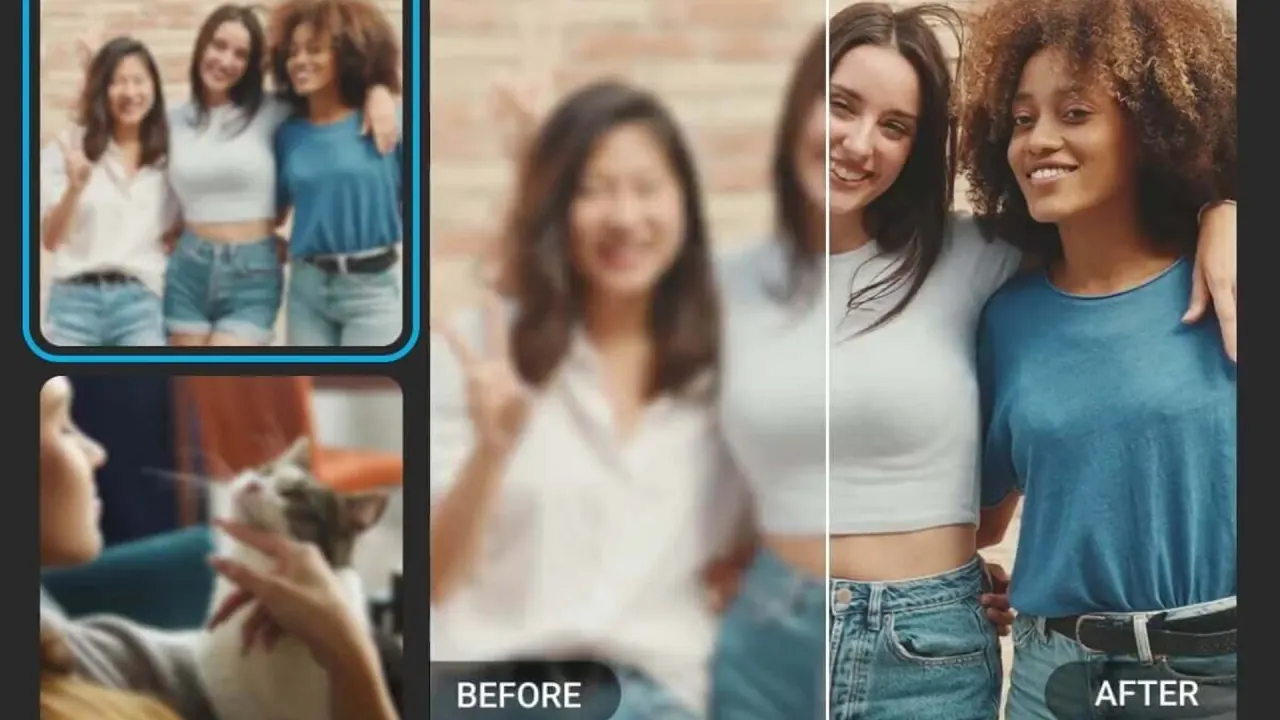
YouCam AI interface preview
YouCam AI logo

YouCam AI

YouCam AI edits, enhances and animates photos in the browser, with credit-based portrait, face swap and video tools. Watermark-free exports need Plus or Pro, and only Pro allows commercial use.

Image EditingVideo GenerationAI Photo Editing & Design#Virtual Try On#Photo Enhancement#image-to-video
Try for Free
Saves
Visits
Views
Pricing
Freemium
Published
Sep 28, 2026
Domain
yce.perfectcorp.com
Community rating

Used this tool? Rate it

Rate this tool

YouCam AI Product Information

Try for Free
Tool Information
Saves
Visits
Views
Pricing
Freemium
Published
Sep 28, 2026
Domain
yce.perfectcorp.com
Community rating

Used this tool? Rate it

Rate this tool

Featured Tools

Related Tools

Try for Free

What is YouCam AI?

YouCam AI (called YouCam Online Editor on its FAQ, pricing and terms pages) is a browser-based AI photo editor that edits, enhances and reimagines photos and short videos without installing software. It is published by Perfect Corp., whose name appears in the site footer and product terms. The basic loop is simple: upload a photo, pick a tool, and let the AI finish the edit in the browser tab.

Beyond unblurring, upscaling and object removal, the site covers portrait and outfit tools, photo and video face swap, AI headshots, image-to-video generation and a chat-driven AI Agent. Many features are free to use, while advanced AI tools run on credits, and free exports carry a watermark.

Three boundaries shape the decision:

  • Only the Pro subscription, or separately sold API units, allows commercial use of results; images made with free or pay-as-you-go credits are personal-use only.
  • The web subscription is a separate service from the YouCam Enhance mobile app, and it cannot be moved between the two.
  • Official pages describe upload retention inconsistently (7 days, 30 days, or never stored), which matters when uploading other people's photos.

Core features

Photo enhancement and restoration

  • Unblur and upscale: The AI photo enhancer is sold as a fix for blurry, grainy or out-of-focus shots, with upscaling to 4K as the headline claim.
  • Batch processing: Up to 50 photos can be enhanced in one run.
  • Two output sizes: The preview usually offers General enhancement at twice the original resolution and Best Quality at four times, and neither can exceed 4096 × 4096 pixels.
  • Repair and colorize: Photo Repair is aimed at old photos, and AI Colorize adds color to black-and-white images.

A photo already wider than 2048 pixels does not get the Best Quality option, because the result would pass that ceiling.

Object, background and scene edits

  • Object removal: Brushing over a photobomber, a power line or a watermark removes it, and the tool fills in the background behind it.
  • Background tools: The AI removal feature strips backgrounds so the subject can be reused as an editable asset; blur and background replacement sit next to it.
  • Frame and light changes: AI Image Extender widens a tight crop, AI Replace swaps selected areas, and AI Lighting and color correction adjust tone.
  • Watermark remover: A dedicated tool erases watermarks and can also remove logos, blemishes, signatures and stamps.

Portrait, hair and outfit tools

  • Hairstyle try-on: The hairstyle generator lists more than 140 haircuts and colors, fitted to the uploaded face.
  • Outfit changes: AI Clothes swaps the current outfit for looks such as professional suits, casual streetwear or wedding dresses.
  • Face and body edits: Face reshape, face retouch, makeup transfer, beard and hair color tools, and body reshape are listed as separate tools.

Photo and video face swap

The AI face swap tool replaces faces in still images and can swap several faces within one photo. A separate video face swap applies a face photo to a video clip, including group scenes in which every face is replaced.

AI video generation

Image to Video and Text to Video turn stills or prompts into short clips. Perfect Corp. describes the generator as an all-in-one aggregator that runs third-party models, including Google Veo, Kling AI, Hailuo, Vidu and Seedance, behind one interface. The vendor quotes render times of about 15–30 seconds and output up to 1080p MP4. The upload box on that page accepts jpg, jpeg and png files up to 10MB with a minimum of 300 × 300 pixels.

AI Agent

The YouCam AI Agent takes plain-language instructions instead of tool menus: users describe the edit or image they want and refine it in follow-up messages.

Guide

Swapping a face in a photo

  1. Upload the target photo where the new face should appear; photos with several faces are supported.
  2. Upload the photos that contain the faces to swap; the tool can detect faces automatically.
  3. Select which faces in the target photo should be replaced.
  4. Start the swap and download the finished image.

For an old or low-resolution face photo, the product page recommends running it through the Photo Enhancer before the swap, because cleaner detail helps face detection.

Changing or cancelling a plan

  1. Log in with the method used at sign-up (email, Google or Apple).
  2. Open Profile > Account > My Plan.
  3. Choose Upgrade Plan, Downgrade Plan or Cancel Plan and confirm.

An upgrade takes effect immediately and charges only the difference. A downgrade waits until the current period ends, and after cancelling, the plan stays usable until its expiration date.

YouCam AI use cases and examples

  • Old and damaged photos: The FAQ names old, blurry or low-resolution portraits, product images and landscapes as the inputs that give the best enhancement results.
  • Pre-salon previews: Trying a haircut or color on your own photo before a salon visit is one of the vendor's own examples.
  • Profile images: The headshot generator is aimed at studio-style portraits and avatars for LinkedIn or other social profiles.
  • Social clips from one photo: A suggested workflow enhances a photo first and then animates it with Image to Video, or sends the same shot to AI Clothes for a new outfit.
  • Small shop visuals: Background removal and replacement help prepare catalog shots, but selling those images requires Pro.

Who is it for

The vendor's own positioning is clear: YouCam AI is built for everyday creators, small business owners and social media managers who want quick results without learning a desktop suite such as Photoshop.

  • Casual editors: Occasional users can test tools with the sign-up credits if watermarked downloads are acceptable.
  • Social media managers: Photo-to-video, face swap and quick background edits fit short-form content.
  • Small businesses: Product photos and headshots are covered, but commercial use requires Pro.
  • Developers: API work is a separate purchase; API units are used only for API calls, and Plus/Pro plans or credits do not include API access.
  • Not for minors: The service is provided to adults above the legal age in their country or jurisdiction.

Platforms

  • Web browser: The editor runs in a browser on Windows, Mac or Linux, on desktops or tablets, with no download.
  • Cloud processing: All heavy AI processing runs on Perfect Corp.'s cloud servers, so the vendor says almost any standard computer, tablet or smartphone can run the tools.
  • Sign-in methods: Accounts created with email, Google, Apple or Facebook are separate accounts that cannot be merged, even when they share one email address.
  • Developer access: Perfect Corp.'s AI API integrates more than 50 AI features through REST APIs with native MCP support, sold as API units.
  • Mobile app: YouCam Enhance is a separate mobile service with its own subscription.

File types differ by page. The troubleshooting FAQ lists JPG, JPEG, PNG, TIFF and GIF. The homepage FAQ mentions JPG and PNG photos plus common video formats and says exact size and duration limits are shown in each tool's upload window.

Pricing

YouCam AI has a free tier, two subscriptions and pay-as-you-go credit packs. The table uses the US-dollar figures in the product terms; the live pricing page shows plan cards through a currency selector.

PlanPrice in the product termsMonthly creditsWatermarkCommercial use
FreeNo charge5 at sign-upYesNo
Plus$9.99 per month or $39.99 per year100NoNo
Pro$69.99 per year300NoYes

The product terms price Plus at $9.99 monthly or $39.99 yearly, each with 100 credits a month. Pro is listed at $69.99 a year with 300 credits a month; no monthly Pro price is stated in the terms or FAQ. The Pro card on the pricing page also lists commercial use and 40% off pay-as-you-go credits.

How credits work

  • Free start: No credit card is needed to sign up, and new accounts receive 5 free credits.
  • Watermark rule: Free use works, but every enhanced image carries a watermark until you subscribe.
  • Subscription features: Plus and Pro users can use subscription features without spending credits and download without a watermark.
  • Rollover: Subscription credits stack for up to 60 days while the subscription stays active.
  • Downgrades: Credits from the current plan expire on the day that plan ends and do not move to the lower plan.
  • Pay-as-you-go packs: These credits are valid for one year from purchase. Purchases are final and non-refundable, and the credits cannot be used commercially unless stated otherwise.

Credit costs vary widely by tool. AI Face Swap costs 1–2 credits and AI Clothes 2 credits per use. The AI Headshot Generator charges 30 credits for 20 images. Video is metered by the second: Video Enhancer uses 1 credit per second, Video Face Swap 1 credit per 2–3 seconds, Video Style Transfer 4 credits per second, and Image to Video starts at 2 credits per second. AI Avatar is sold as a separate pack that cannot be split into smaller packs and must be used all at once.

Billing, renewals and refunds

  • Auto-renewal: Subscriptions renew automatically until cancelled.
  • Payment processors: Checkout runs through Stripe in the U.S. and Canada and through 2Checkout (Verifone) in all other regions, so the payment methods shown depend on location.
  • Refund window: The FAQ says subscriptions are refundable within 7 days of purchase and not afterwards.
  • Refund amount: The terms add that refunds inside that window are processed pro rata, with applicable transaction fees deducted.
  • Annual plans: Cancelling an annual plan midway still completes the full billing cycle.

YouCam AI alternatives

  • YouCam Enhance app: Perfect Corp.'s mobile app covers similar enhancement work, but the web subscription and the app subscription are different services on separate platforms, and a subscription cannot be transferred from one to the other.
  • Remini: Remini is a mobile AI photo enhancer focused on turning old or blurry photos into clear HD images in one tap, a narrower choice for enhancement-only needs.
  • Desktop editors: Perfect Corp. positions YouCam AI against desktop suites such as Photoshop, so users who want manual, layer-level control are choosing a different kind of tool.

Limitations

Output quality and usage limits

  • No quality guarantee: The terms state there is no guarantee that AI output is satisfying, and results may be inaccurate, offensive, harmful or otherwise inappropriate.
  • Enhancement ceiling: The enhancer can sharpen detail, but it cannot recover a subject that was never in focus in the original.
  • Prompt moderation: Certain input prompts are moderated automatically to block requests that might produce inappropriate content.
  • Spent credits: Credits used on a feature cannot be reinstated or restored under any circumstances.
  • Share links: Shared result links expire 7 days after they are created.

Face swap, likeness and consent

The terms make the uploader responsible for rights in every image: users acknowledge that they have obtained consent, license and/or authorization for what they upload to the AI tools. The face swap page adds that users should always obtain explicit consent from the people whose faces they use.

  • Deepfake rule: Malicious or offensive use of deepfake output is strictly prohibited, as is output that infringes portrait rights, defames, or violates privacy.
  • NSFW rule: The AI tools are not intended to generate NSFW content, and attempts to produce it can lead to account suspension.
  • Celebrity swaps: The face swap page promotes swapping your face with a favorite celebrity. Its own FAQ says personal, non-commercial fun is generally lower-risk than using a public figure's likeness commercially, which can raise publicity-rights and endorsement issues.
  • Watermark removal: The watermark remover's own FAQ notes that removing watermarks can be illegal without the copyright owner's consent or for unauthorized purposes.

Privacy, retention and training

Retention is described three ways. The product terms say uploads are permanently deleted from the server within seven days of use, while outputs are kept for up to seven days or for as long as the account stays active, depending on the tool. The FAQ says uploads and results are deleted after 30 days, with a limited number of features keeping files while the account remains active. The video face swap page says uploaded videos and photos are never stored or shared.

  • Training: The homepage FAQ says personal images and uploaded content are not used to train AI models without consent. The terms separately allow Perfect Corp. to use uploads and outputs to improve your experience with the AI tools.
  • Biometric consent: Using the AI tools means expressly consenting to the collection and use of biometric information as defined in the privacy policy.
  • Facial recognition: The privacy policy states that Perfect Corp. does not and will not use facial recognition or identification technology in its services.
  • Generated AI models: If a generative feature builds an AI model from your photos, that model may be stored for up to one year with your consent.
  • Account deletion: Deleting the account permanently deletes all data associated with it.

Ownership and commercial rights

  • Commercial use: Under the terms, only the Pro subscription allows commercial use of outputs. The FAQ also extends commercial use to images generated with API units, and keeps free-credit and pay-as-you-go images personal-use only.
  • Copyright: Perfect Corp. gives no warranty that you can claim copyright in generated content or that it will not infringe third-party intellectual property.

FAQ

Q1. Is YouCam AI free to use?

Partly. Sign-up gives 5 free credits without a credit card, but free enhanced images carry a watermark and advanced tools such as face swap, headshots and video run on credits.

Q2. Can I use YouCam AI images for commercial work?

Only with the Pro subscription or with API units. Free-tier and pay-as-you-go results are personal-use only, and because the terms reserve commercial use for Pro, Plus results are not covered either.

Q3. Does YouCam AI train on my uploaded photos?

Not without consent, according to the homepage FAQ. The terms still allow uploads and outputs to be used to improve your experience with the AI tools.

Q4. Can I face swap a photo of someone else?

The terms require that you have consent, license or authorization for every upload, and the face swap page asks for explicit consent from each person whose face you use. Malicious deepfakes and NSFW output are prohibited.

Q5. How long are uploaded photos kept?

The pages disagree: the terms say uploads are deleted within 7 days, the FAQ says 30 days, and the video face swap page says uploads are never stored.

Q6. Can I get a refund on a YouCam AI subscription?

Subscriptions can be refunded within 7 days of purchase, pro rata with transaction fees deducted under the terms. There are no refunds after 7 days, and pay-as-you-go or free credits are non-refundable.

Know a Similar Tool?
If you know other great AI tools, feel free to submit them to us