
Toolso.AI
Toolso.AI
All ToolsCategoriesTrendingLatest ToolsPricingBlog
Toolso.AI
Toolso.AI
Toolso.AI
Toolso.AI

Discover the best AI tools to boost your productivity

GitHubGitHubTwitterX (Twitter)YouTubeYouTubeTikTokEmail

Popular Categories

  • AI Writing
  • AI Image
  • AI Video
  • AI Coding
  • More Categories

Explore

  • Latest Tools
  • Popular Tools
  • More Tools
  • Submit Tool
  • Pricing

About

  • About Us
  • Contact
  • Blog
  • Changelog

Legal

  • Cookie Policy
  • Privacy Policy
  • Terms of Service
  • Refund Policy
© 2026 Toolso.AI All Rights Reserved
Limited timeLimited-time offerFeatured Listing24h priority review · No backlink · 30 days featured$29.90then $59.90Price rises to $59.90 after Oct 31Ends in--:--:--Submit now
  1. Home
  2. All Tools
  3. Image Editing
  4. Pica AI
Pica AI interface preview
Pica AI logo

Pica AI

Pica AI swaps faces in photos and videos, including several faces at once, and turns 6–12 selfies into AI headshots. A free tier gives a small daily credit allowance, while its photo enhancer and old-photo restoration now redirect to Artguru.

Image EditingVideo EditingAI Photo Editing & Design#headshot editor#linkedin headshot#free daily credits
Try for Free
Saves
Visits
Views
Pricing
Free
Published
Sep 22, 2026
Domain
pica-ai.com
Community rating

Used this tool? Rate it

Rate this tool

Pica AI Product Information

Try for Free
Tool Information
Saves
Visits
Views
Pricing
Free
Published
Sep 22, 2026
Domain
pica-ai.com
Community rating

Used this tool? Rate it

Rate this tool

Featured Tools

Related Tools

Try for Free

What is Pica AI?

Pica AI is an online AI face swap and AI headshot generator that runs in the browser. Its terms describe a product that uses artificial intelligence algorithms to edit, modify and transform your photos and videos. The same terms name Wegital HK Limited as the company that provides and operates both the Pica AI app and the website.

You bring a photo or video, choose which faces should appear in it, and Pica AI blends them in. The terms add that Pica AI's technologies are not used to identify or authenticate people in the images or videos, so it is an editing tool, not a recognition system.

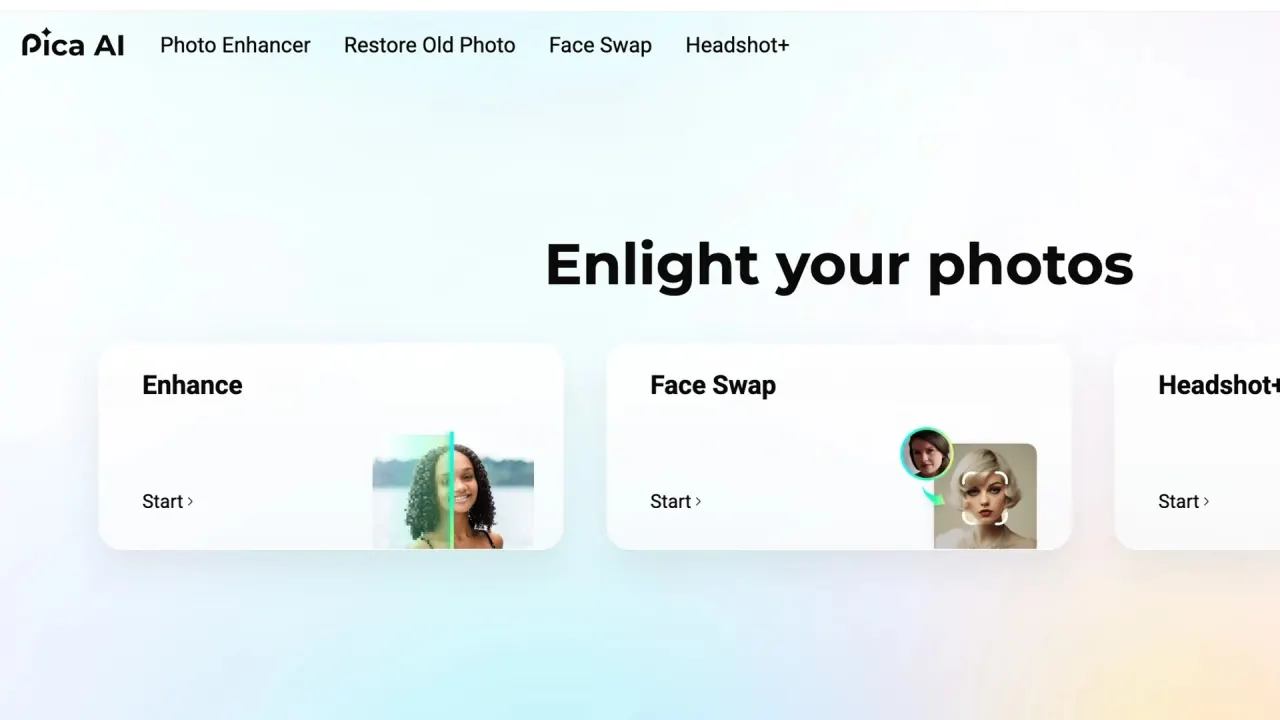
The product has narrowed over time. The top navigation still lists Photo Enhancer, Restore Old Photo, Face Swap and Headshot+, but a homepage notice says the Photo Enhancer was upgraded to Artguru on 2025-10-31. In this check, both the Photo Enhancer and the Restore Old Photo links sent visitors on to a separate Artguru website instead of a Pica AI tool. What remains on Pica AI itself is face swapping for photos and videos, the AI headshot generator, and separate gender swap and face morph pages.

An AI tool directory that has listed Pica AI since Jun 29 2023 still describes it as an AI art generator for avatars and artworks made from text and photos, and as captured on September 21, 2026 it estimated 389.0K monthly visits. That no longer matches the current site, so treat older listings that mention text-to-image features with care.

Core features

Pica AI's tools fall into two groups that are billed differently: face swaps spend credits from the free or subscription balance, while AI headshots are sold as separate packages that credits cannot pay for.

Photo face swap

  • Any image type: photos, cartoons and artworks all work, and photo results arrive in seconds.
  • Templates or your own upload: start from your own image or from ready-made templates on the page.
  • One replacement per face: each uploaded face can replace a different face in the original.

Video face swap

  • Expressions kept: video face swap replaces faces in any video with your chosen face while preserving the original expressions, and the finished clip downloads as a GIF or MP4.
  • Limits: the video guide says the tool detects up to 5 faces and accepts files up to 500MB; if a face is missed, you can upload that character's face manually, and finished clips appear in the My Videos tab.

Multi-face swap

The multi-face mode replaces several faces at once in photos and videos, for example swapping every friend in a group picture or recasting several characters across a whole video clip. The face swap FAQ puts the ceiling at up to 3 faces in a single photo or video, lower than the figure in the video guide.

AI headshot generator (Headshot+)

  • Industry styles: styles cover executives, creatives, financiers and tech leaders, plus specialized looks for roles like HR Manager, News Anchor and Premier Lawyer.
  • Output size: the FAQ lists headshot resolution as HD to 3K+, around 3200 x 2400 pixels.
  • Personal model: your photos are used to train a personal face model for your headshots rather than being edited one by one.

Gender swap and face morph

  • Gender swap: the gender swap page accepts JPG, PNG or MP4 files with 1-5 faces and says results arrive in under 10 seconds, with guest files auto-deleted after 24 hours.
  • Face morph: face morph blends a selfie with another portrait or one of the site's templates, and the page says a morph typically takes a few seconds.

Guide

Swap a face in a photo or video

  1. Open Face Swap and click Upload to select your original image or video, or pick one of the templates instead.
  2. Upload one photo per face you want to insert.
  3. For a video, check that every character was detected, and upload a face manually for any character the AI missed.
  4. Click Swap. Photos finish in seconds; for video you can close the page and return later.
  5. Download the result; videos wait in the My Videos tab as MP4 or GIF.

Generate AI headshots

  1. Open Headshot+ and select the styles you want; styles are grouped by career and industry.
  2. Upload 6-12 clear selfies. The FAQ advises diverse, high-quality close-up photos of yourself, because the more photos you upload, the better the results.
  3. Click Start. Headshots are bought as a separate package, and subscription credits cannot be used for them.
  4. Wait while the model trains, which usually takes 40 minutes to 2 hours.
  5. Open My Library from the avatar in the upper right corner and download the images you want.

Use cases and examples

  • Memes and celebrity scenes: the photo tool is pitched for transforming into celebrities, placing anyone in exciting new scenes, creating funny memes, inserting faces into famous paintings and trying gender swaps.
  • Group photos and movie scenes: in group photos you can swap all your friends' faces with celebrities or mix faces from different photos, and in videos you can put a whole friend group into a movie scene.
  • Social media trends: the gender swap page suggests side-by-side transformations, gender-flipped duets and "what if" story polls for TikTok or Instagram posts.
  • Profile photos for work: the headshot generator targets LinkedIn, resumes and online profiles, and it is the one tool whose FAQ grants full commercial rights to the output.

Where you plan to publish decides which examples fit the license. The terms license the service for personal, non-commercial use, so meme, group and gender-swap content suits personal sharing, while headshots are the only output with an explicit commercial grant on its own page.

Who is it for

Pica AI fits people who want quick, casual face edits or a low-cost set of profile headshots, and who accept a personal-use license for everything except headshots.

Good fit

  • Social media users aged 16 or older who want funny face swaps, gender swaps or group edits within a small daily free allowance or one subscription.
  • Job seekers and freelancers who need a handful of LinkedIn-ready headshots from an entry package of $2.99.

Poor fit

  • Anyone under 16. The terms require users to be at least 16, and users between 16 and 18 need a parent or legal guardian to establish the account.
  • Brands and agencies planning commercial face swap content, which the personal-use license does not cover.
  • Buyers who want a money-back guarantee on headshots: the refund policy says the AI Headshot Generator Service is non-refundable under any circumstances.
  • People looking for a photo enhancer or restorer inside Pica AI itself, since those tools have moved to Artguru.

Platforms

  • Web: the tools run in the browser, and the video face swap guide says it works on both computers and mobile devices.
  • iPhone app: the terms say the Pica AI app is released and distributed globally through the Apple App Store, and the blog links to an App Store listing. In a check on September 21, 2026, Apple's public lookup returned no result for that listing across seven storefronts.
  • Android: the terms mention Google Play for app purchases, but no official Pica AI Android listing turned up in the channels checked this round.
  • Payments: web purchases go through Stripe, PayPal and DukPay, while app purchases are processed by the Apple App Store or Google Play depending on the account you log in with. A purchase stays tied to that account on both the app and the website.

Pricing

The pricing page shows three subscription cards.

PlanListed priceCreditsListed extras
FreeUS$04, labeled "Limited credits/day"Saving images for 24h
Monthly (Most Popular)$9.991,000 credits/monthFast processing, no watermark
Annual (25% OFF badge)$59.998,000 credits/yearFast processing, no watermark

The Annual card carries a "25% OFF" badge without saying what it is measured against, and the cards do not print a billing-period suffix next to the price. The terms allow subscriptions on an annual, monthly, weekly or other basis that renew automatically until you cancel, but only monthly and annual cards appear on the web pricing page.

What credits buy

  • Photo enhancement costs 1 credit per image and restoration of old photos 20 credits per image, although both tools now open on Artguru.
  • Face swap costs 1 credit per face on images and 2 credits per face for each second of video.
  • Credits can only be used within the subscription period.

Headshot packages

PackageListed priceWhat the card lists
Starter$2.99HD to 4K+, 4 unique photos
Premium (Best Value)$9.99HD to 4K+, 20 unique photos

Refunds and cancellation

  • The refund policy covers only exceptional cases: an automatic renewal you failed to cancel but did not use, a payment made by mistake or on the wrong account with no usage, or a purchase that returned no result because of a technical failure. Accidental purchases are not refunded.
  • The same policy says the AI Headshot Generator Service is non-refundable under any circumstances, yet the headshot page FAQ tells unsatisfied users to contact the support team for a refund.
  • App Store and Google Play purchases must be refunded or canceled through Apple or Google; web purchases use the in-service refund request or the Feedback page, and responses usually take 72 hours.

Pica AI alternatives

Directory lists of Pica AI alternatives still reflect its old positioning. One AI tool directory names PixAI, Midjourney, davinci.ai, Yodayo AI, NightCafe Studio, Imagine Ai Art Generator, Domo AI, Artguru AI Art Generator, FLORA AI and SoulGen, which are mostly text-to-image generators rather than face swap or headshot tools. Closer matches for what Pica AI does today:

  • Remaker AI: Remaker AI presents its face swap as a free online face changer with no sign up and no watermark, and offers video and GIF swaps, single-face, multiple-face and batch modes.
  • Aragon: Aragon sells headshot packages at $35 for 40 headshots, $45 for 60 and $75 for 100, each listed next to a higher second figure under a "20% off all packages limited time only" banner. It offers a full refund if you have not downloaded your photos, unlike Pica AI's no-refund rule for headshots.
  • Artguru: the site Pica AI's own Photo Enhancer and Restore Old Photo links now open.

Limitations

Commercial use depends on which page you read

The terms grant a personal, non-exclusive, non-transferable, revocable limited license for your non-commercial, personal use, and users agree to use the services only for personal reasons. The headshot FAQ, in contrast, says you have full commercial rights to your AI-generated headshots. The pages do not say which statement prevails.

Using other people's faces

  • The content rules forbid material that impersonates any person or entity or creates a false identity to mislead others, and material that is sexually explicit or invasive of another's privacy.
  • You are solely responsible for the content you upload and create, and you agree to indemnify the company against claims that include any alleged violation of the rights of a third party.
  • The privacy policy says that when you upload photos or videos of people other than yourself, processing rests on your legitimate interest, Face Data is processed on the basis of consent, and anyone uploading images of minors consents as the holder of parental responsibility.
  • In the terms, privacy policy and face swap page checked this round, no clause explicitly requires you to obtain permission from each person whose face you upload; the impersonation, privacy and third-party-rights rules above are the relevant limits.

Age requirement

You must be at least 16, and anyone using Face Swap explicitly confirms being at least 16.

Specifications that disagree between pages

  • Faces per swap: the face swap FAQ says up to 3 faces, the video guide up to 5, and the gender swap page 1-5.
  • Headshot resolution: package cards say HD to 4K+, while the FAQ says HD to 3K+.
  • Selfies: the headshot page asks for 6-12 selfies, while a LinkedIn headshot page recommends uploading 6-30 photos.

Storage, privacy and training

  • Free-plan images are kept for 24 hours. The face swap FAQ says uploaded photos are used only for face swapping and deleted within 24 hours of upload.
  • The headshot FAQ says uploaded selfies are deleted after 24 hours and generated images can be deleted anytime.
  • The privacy policy says photos and videos you upload are not used to train Pica AI's technologies, but your generated content may be.
  • The terms give the company a license to use your user-generated content to improve machine learning models; that use stops after you delete your account but does not undo training that happened before deletion.
  • Face Data may count as biometric data depending on your jurisdiction; the policy says it is used only to enhance your photos and create the results you request unless you consent to other processing.
  • Data is usually transferred to servers in the USA, and because the company has offices in mainland China and Hong Kong, it may be accessed and processed there too.
  • You can delete your account and personal data yourself on both the website and the app, and the company aims to answer privacy requests within 45 days.

Legal terms and third-party signals

  • The services are provided "as is", total liability is capped at the amount you paid, disputes go to Hong Kong courts under Hong Kong law, claims must be raised within two years, and users waive class actions.
  • The only third-party rating found this round is small: as captured on September 21, 2026, an unclaimed profile on a third-party review platform showed 7 reviews with a 2.4 rating, 86% of them one-star. Individual reviewers describe artificial-looking headshots with unhelpful support, and a dispute over charges and account closure while paid credit remained. A sample this small is a signal to watch, not a quality verdict.
  • The "Reviews from our premium users" quotes on the pricing page are published by Pica AI itself.

FAQ

Q1. Is Pica AI free?

Partly. The Free plan costs US$0 and lists a small daily credit allowance, labeled "Limited credits/day", with images saved for 24 hours. Face swaps spend credits per face, so free use covers only a few short edits, and headshots always need a paid package.

Q2. Can I use Pica AI results commercially?

Only headshots have an explicit commercial grant, in the headshot FAQ. The terms license the whole service for personal, non-commercial use, and the pages do not reconcile the two statements.

Q3. Does Pica AI still have a photo enhancer?

Not on Pica AI itself. The enhancer and old-photo restoration links now redirect to the Artguru website.

Q4. Can I get a refund for Pica AI headshots?

The refund policy says headshots are non-refundable under any circumstances, while the headshot FAQ tells unhappy users to contact support.

Q5. Does Pica AI use my photos to train its AI?

Uploaded photos and videos are not used for training according to the privacy policy, but generated content may be, and the terms allow user content to improve machine learning models until you delete your account.

Know a Similar Tool?
If you know other great AI tools, feel free to submit them to us