Skywork AI Highly Recommended→Domestic open-source large model, performance comparable to GPT-4.
Toolso.AI Logo
Toolso.AI
  • All Tools
  • Categories
  • 🔥 Trending
  • Latest Tools
  • Blog

💌Subscribe to AI Tools Weekly

Weekly curated selection of the latest and hottest AI tools and trends, delivered to your inbox

Toolso.AI Logo
Toolso.AI

Discover the best AI tools to boost your productivity

GitHubGitHubTwitterX (Twitter)FacebookYouTubeYouTubeTikTokEmail

Popular Categories

  • AI Writing
  • AI Image
  • AI Video
  • AI Coding

Explore

  • Latest Tools
  • Popular Tools
  • More Tools
  • Submit Tool

About

  • About Us
  • Contact
  • Blog
  • Changelog

Legal

  • Cookie Policy
  • Privacy Policy
  • Terms of Service
© 2026 Toolso.AI All Rights Reserved
  1. Home
  2. Video Editing
  3. ezswap
ezswap cover image
ezswap

ezswap

Free Unlimited AI Face Swap Online for Video and Photo Use

Video EditingImage Generation#Online Editor#AI Video Editing#ai face swap#video face swap#free face swap#photo face swap#meme generator#social media content#deepfake#face blending

ezswap Product Information

What is ezswap?

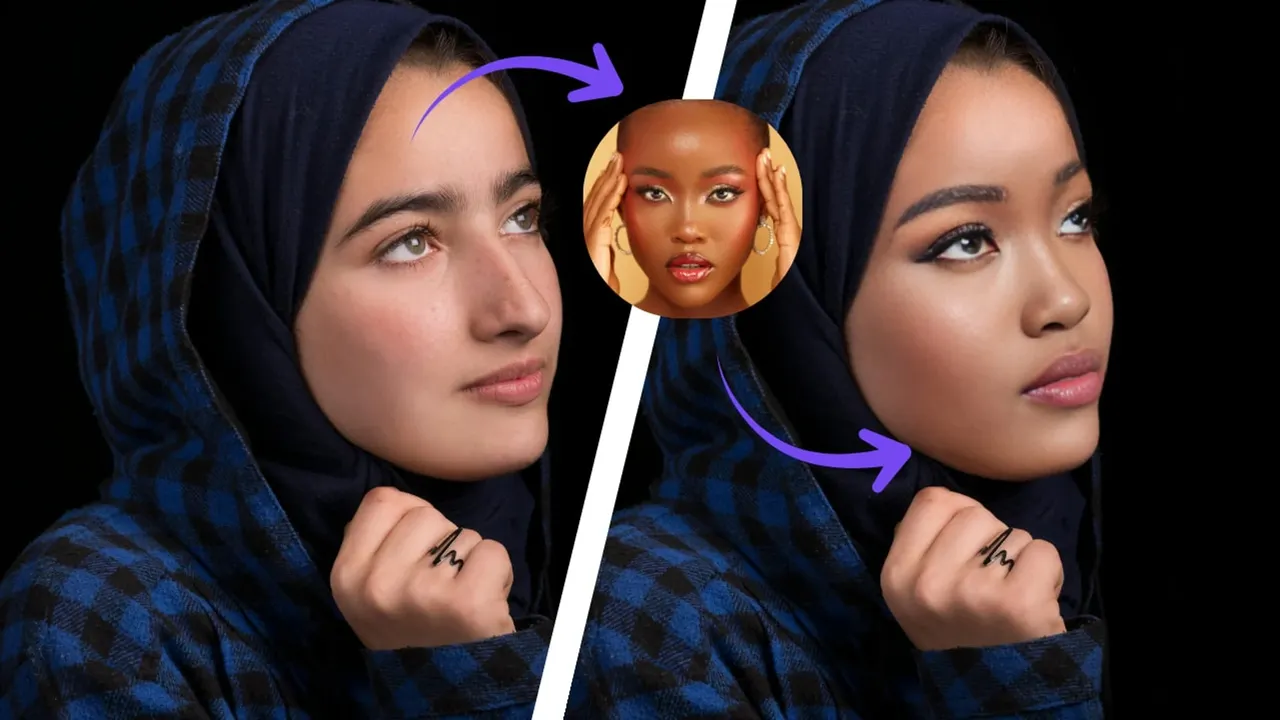
ezswap is a fast and free online AI-powered tool designed for swapping faces in photos and videos. It enables users to seamlessly replace one person's face with another in any image or video clip, creating humorous, creative, or transformative content with ease. Positioned as an accessible and user-friendly alternative to complex video editing software or other AI face-swapping solutions, ezswap emphasizes speed, high-quality natural blending, and a completely free, unlimited usage model. It's particularly useful for creating memes, social media content, parody videos, or simply having fun with friends and family.

Powered by advanced AI algorithms, ezswap analyzes facial features, lighting, and angles to merge the new face into the target media realistically. The process is entirely web-based, requiring no software downloads, and outputs results without any watermarks, making it ready for sharing across various platforms.

Core Features

  • Fast AI-Powered Face Swap: Leverages optimized AI models to process face swaps rapidly, often in just a few seconds, providing a quick turnaround for both photos and videos.
  • Natural Blending & High Quality: Utilizes sophisticated algorithms to match skin tones, lighting, and facial expressions, ensuring the swapped face looks integrated and realistic rather than pasted on.
  • Free & Unlimited Usage: Offers a completely free service with no usage limits, watermarks, or mandatory sign-ups for basic features, making it highly accessible.
  • Support for Photos and Videos: Handles both static images and video files, allowing users to create everything from simple photo memes to full video face-swap clips.
  • Simple Web-Based Interface: Features a clean, intuitive online editor where users can upload files, select faces, and download results with minimal steps and no technical expertise required.
  • No Watermark on Output: All generated images and videos are provided without any ezswap branding or watermarks, giving users full freedom to use the content as they wish.

Use Cases

  1. Meme and Social Media Content Creation: Quickly create hilarious or trending memes by swapping celebrities' faces into iconic scenes or putting friends' faces on popular movie characters to generate engaging content for platforms like TikTok, Instagram, or Twitter.
  2. Entertainment and Pranks: Have fun with family and friends by creating funny videos or photos for personal enjoyment, group chats, or light-hearted pranks, adding a creative twist to gatherings or events.
  3. Creative Storytelling and Parody: Content creators, YouTubers, or filmmakers can use face swaps for parody sketches, historical reenactments with a modern twist, or to visualize "what-if" scenarios in a creative project without needing expensive VFX.
  4. Educational or Presentation Aids: Teachers or presenters could (with clear disclosure) use face swaps in a responsible manner to illustrate historical figures in modern settings or to create engaging, attention-grabbing visuals for educational materials.

How to use ezswap

  1. Visit the official ezswap website (ezswap.ai) using any modern web browser.
  2. On the homepage, you will typically find an upload area. Click to upload your source photo or video file. You may also need to upload a separate image containing the face you want to swap in.
  3. Use the interface tools to select or highlight the faces in both the target media and the source face image. The AI will automatically detect faces, but you may be able to adjust the selection for accuracy.
  4. Initiate the face swap process by clicking the "Swap" or "Generate" button. Wait a few moments for the AI to process and render the new media.
  5. Once processing is complete, preview the result. If satisfied, download the final image or video file directly to your device. The file will be watermark-free and ready to share.

Tips & Best Practices

  • Use High-Quality, Well-Lit Source Images: For the most realistic results, use photos and videos with clear, front-facing faces and good lighting. Blurry or heavily angled faces may reduce swap quality.
  • Match Facial Orientations: Try to use a source face that has a similar angle and expression to the target face in the photo or video frame for a more seamless blend.
  • Start with Photos: If you're new to face swapping, practice with still images before moving on to videos, as videos involve more frames and processing.
  • Respect Privacy and Consent: Only use photos and videos of people who have consented to their image being used in this way. Be mindful of privacy and ethical considerations.
  • Check Platform Guidelines: Before sharing face-swapped content widely, especially on social media, ensure it complies with the platform's community guidelines regarding manipulated media.

Who is ezswap for?

  • Social Media Enthusiasts and Meme Creators: Individuals looking to create viral, funny, or engaging content quickly and for free.
  • Casual Users and Families: People who want to have fun, create entertaining photos/videos for personal chats, or add a creative element to events.
  • Content Creators and Influencers: YouTubers, TikTokers, and other digital creators who need a tool for parody, sketch comedy, or unique visual content.
  • Students and Educators: Those exploring digital media creatively for projects or presentations (with appropriate ethical considerations).
  • Anyone Curious About AI Tools: Individuals interested in experiencing AI-powered media manipulation without a financial commitment or steep learning curve.

Platforms

  • Web Platform: ezswap is primarily accessed through its official website (ezswap.ai) on any modern desktop or mobile web browser like Chrome, Firefox, or Safari. No app installation is required.

Pricing & Plans

  • Free Plan: ezswap operates on a completely free model for its core face-swapping functionality. Users can perform an unlimited number of face swaps on both photos and videos without watermarks and without necessarily requiring an account. (Based on public information).
  • Paid Plans: As of the latest available information, ezswap does not appear to offer tiered subscription plans. The service is presented as free. It's possible that future monetization strategies could involve premium features, higher processing priority, or a professional API, but these are not currently advertised on the main site. (Information to be verified).

Alternatives

  • Reface (formerly Doublicat): A popular mobile app specializing in face-swap GIFs and videos with a vast library of templates, but often includes watermarks and limitations in its free version.
  • DeepFaceLab: A powerful, open-source desktop software for advanced deepfake creation, offering极高 control but requiring significant technical expertise and hardware resources, not suitable for casual users.
  • FaceApp: Primarily known for its age transformation and beauty filters, it also includes a face swap feature but is more focused on selfie enhancement than swapping between different people in existing media.
  • Online Face Swap Tools: Various other websites offer similar basic face-swapping for photos, but may have stricter limits, lower quality, or prominent watermarks compared to ezswap's free unlimited model.

Limitations & Considerations

  • Ethical and Misuse Potential: Face-swapping technology can be used to create misleading or harmful content (deepfakes). It is crucial to use ezswap responsibly, with consent, and never for deception, harassment, or fraud.
  • Quality Dependency on Input: The output quality is heavily dependent on the quality, lighting, and angle of the input photos/videos. Poor source material will yield less realistic results.
  • Processing Limitations for Complex Videos: While it supports videos, very long or high-resolution videos might take longer to process or could be subject to technical limitations of the web-based platform.
  • Privacy of Uploaded Data: Users should be aware that uploading media to an online service involves transferring data to the provider's servers. Review the privacy policy to understand how your data is handled and stored.
  • No Advanced Editing Features: ezswap is focused on the core face-swap task. It does not offer comprehensive video editing tools like trimming, adding effects, or audio editing within the same interface.

FAQ

Q1. Is ezswap really free to use?

Yes, according to its official website, ezswap offers its core face-swapping service completely free of charge, with no usage limits and no watermarks added to the output files.

Q2. Do I need to create an account to use ezswap?

Based on available information, you can likely use the basic face-swap functionality without registering for an account. An account might be required for accessing advanced features or saving your history in the future. (To be verified).

Q3. What file formats are supported?

ezswap typically supports common image formats like JPG, PNG and video formats like MP4, MOV. For the most accurate and up-to-date list, please check the website's upload interface or documentation.

Q4. Can I use the face-swapped content commercially?

You should review ezswap's Terms of Service for specific licensing information. Generally, if you own the rights to the original media and have consent for the faces used, the output created by you might be yours to use. However, always verify the platform's policies regarding commercial use of generated content. (Based on public information).

Q5. How long does it take to process a face swap?

Processing time is usually very fast, often just a few seconds for photos and a bit longer for videos depending on length and resolution. The website promotes itself as "the fastest AI face swap online."

Q6. Is there a limit on video length?

The website does not prominently state a specific limit for free users. There may be practical limitations based on file size or duration to ensure reasonable processing times for all users. For very long videos, consider splitting them into shorter clips.

Q7. Is my data safe? Are uploaded files stored?

You should refer to ezswap's Privacy Policy for details. Many such services process files temporarily and may delete them after a short period. However, it's always good practice to avoid uploading highly sensitive or private content to any online tool.

Q8. What are the system requirements?

Since ezswap is a web-based tool, you only need a stable internet connection and a modern web browser (Chrome, Firefox, Edge, Safari). No powerful computer hardware is required as processing happens on their servers.

Start Free Trial
Tool Information
Saves
Visits
CTR
Views
Pricing
Free Trial
Published
Jan 1, 2026
Domain
ezswap.ai

Featured Tools

Midjourney cover
Midjourney logo

Midjourney

Freemium

AI Image & Video Generation from Prompts

Freepik AI Image Generator cover
Freepik AI Image Generator logo

Freepik AI Image Generator

Paid

Multi-model AI Image Generator

CapCut cover
CapCut logo

CapCut

Freemium

All-in-one video editor & graphic design tool driven by AI

Grok cover
Grok logo

Grok

Freemium

AI Chat Assistant with Real-Time Search & Multimodal

Image FX cover
Image FX logo

Image FX

Freemium

Free One-Click AI Photo Editor & Image Generator

remove.bg cover
remove.bg logo

remove.bg

Paid

AI background remover & background replacement

VirWorld AI cover
VirWorld AI logo

VirWorld AI

Free

Best AI Image to Video Free Promo Maker

Raphael AI cover
Raphael AI logo

Raphael AI

Free

Free Unlimited AI Image Generator

No Beard Filter cover
No Beard Filter logo

No Beard Filter

Free

BeardFilter - No Beard Filter | AI Beard Removal Online

PixAI cover
PixAI logo

PixAI

Freemium

AI Art Generator | Create Stunning Anime AI Art

Claude cover
Claude logo

Claude

Freemium

Claude AI Assistant for Writing, Coding, and Deep Document Analysis

Tripo Studio cover
Tripo Studio logo

Tripo Studio

Freemium

AI 3D model generator & editable workflow

Sora cover
Sora logo

Sora

Freemium

OpenAI AI video generator for text & image to video

DeepSeek cover
DeepSeek logo

DeepSeek

Freemium

Open-Source LLM Chat & Reasoning API for Developers

Gamma cover
Gamma logo

Gamma

Paid

Best AI Presentation Maker & Website Builder

i10X cover
i10X logo

i10X

Paid

All-in-one AI Chat & Agent Marketplace Platform

Know a Similar Tool?
If you know other great AI tools, feel free to submit them to us

Related Tools

Cutout.Pro
Cutout.Pro cover
Cutout.Pro logo

Cutout.Pro

Paid11

AI Photo Editing | Visual Content Generation Platform, best for image and video design

Try Now
VEED.IO
VEED.IO cover
VEED.IO logo

VEED.IO

Free5

Online AI Video Editor with Auto-Subtitles, Avatars & Voice Translation

Try Now
Higgsfield
Higgsfield cover
Higgsfield logo

Higgsfield

Freemium2

AI Video & Image Generation Platform with Cinematic Effects

Try Now
Medeo
Medeo cover
Medeo logo

Medeo

Freemium63

The AI Video Editor for Your Mind

Try Now
SAM 3D
SAM 3D cover
SAM 3D logo

SAM 3D

Freemium13

Single-image to 3D model online generator

Try Now
Free Image Generator
Free Image Generator cover
Free Image Generator logo

Free Image Generator

Free13

AI Image Generator Tool with Free Daily Credits

Try Now