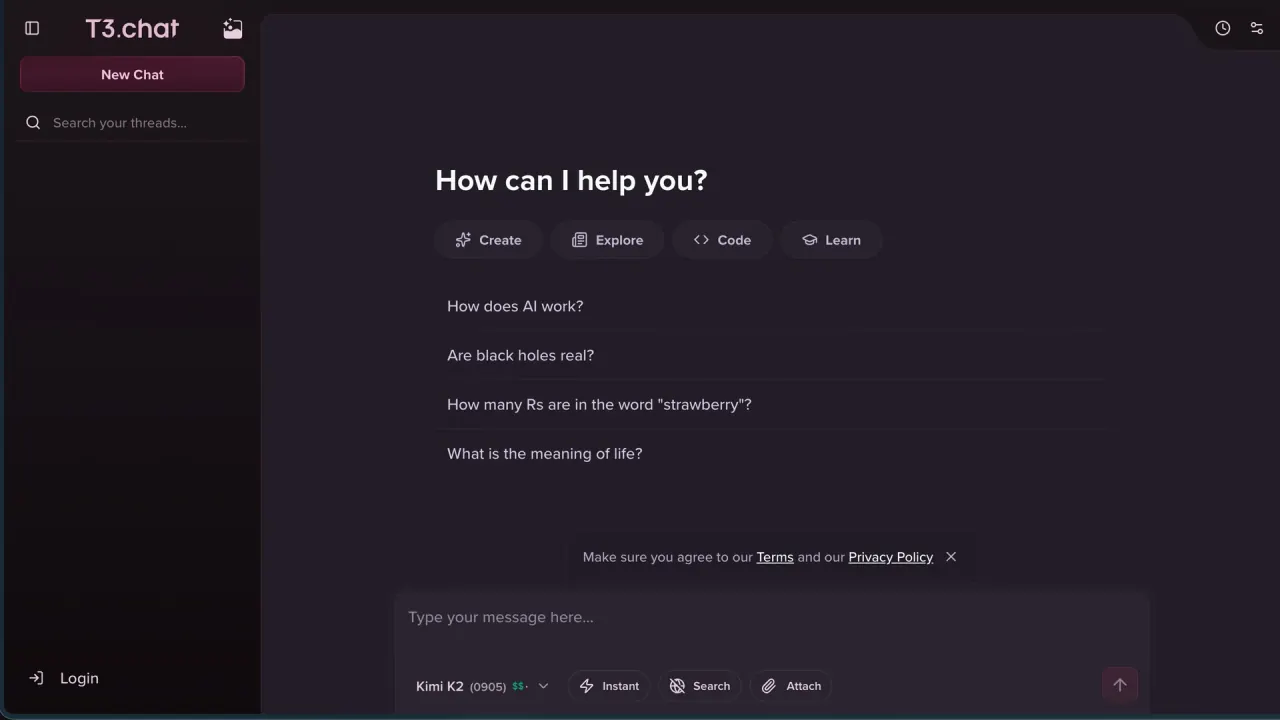

T3 Chat is a browser-based AI chat app that puts models from OpenAI, Google, Anthropic and OpenRouter behind one account, with per-chat model choice, optional web search and a usage meter you can watch in settings.
Used this tool? Rate it
Used this tool? Rate it


AI assistant for writing, analysis and tasks


Build random generators, share them free


Real-time answers, images, and code in one chat


One workspace for every AI model


One workspace where your team and its AI agents think together


AI chat for dark fiction and research


AI assistant for structured work


Astrology readings from real astrologers
T3 Chat is a browser-based AI chat app operated by T3 Tools, Inc., the company its terms of service name as the provider and operator of the service. A session runs at t3.chat: you sign in, choose a model, and write in a single conversation window instead of moving between vendor products. That makes it a multi-model AI chat app rather than a model vendor's own client.
The product is best understood as one front end over several model providers. When a request relies on OpenAI's technology, T3 Chat sends the necessary input data to OpenAI's servers to process it, and the privacy policy describes the same arrangement for Google Gemini, Anthropic Claude and OpenRouter. One account therefore reaches model families that are otherwise sold as separate subscriptions with separate histories.
What the arrangement buys is continuity of interface rather than a model of T3 Chat's own. The FAQ states that the company does not train its own AI models and has opted out of training data collection with its model providers where possible, which is the sentence that matters to anyone deciding whether to paste client material into the composer.
T3 Chat keeps its controls next to the message box, and most of them change a single chat rather than a global preference. That structure is worth knowing before reading feature lists from other tools: a setting you change here applies to the thread you are in.
A first session takes a handful of decisions, and each one is reversible later in the same chat.
A chat can also be created from a URL instead of the interface, which is how a saved link in a notes app or a script opens T3 Chat with the model, the search setting and the first message already filled in. The FAQ documents the /new endpoint and the parameters below.
| Parameter | Type | Required | What it changes |
|---|---|---|---|
| q | string | Yes | Sends this text as the first user message in the new chat. |
| model | string | No | Selects which model the new chat uses. |
| effort | string | No | Sets reasoning effort level for the selected model. |
| search | boolean | No | Enables or disables web search for that new chat. |
| search_limit | integer | No | Sets the max number of search queries or tools for the run. |
| temporary | boolean | No | Creates a temporary chat instead of a persisted thread. |
The q parameter is the only required one, and it carries the opening message. A link with a missing or empty prompt does not open an empty chat: the app redirects to home instead. Search limits are normalised to a whole number and clamped to 1..5, so a link asking for twenty searches runs five.
T3 Chat pricing is not published on the public pages reviewed in this round. The terms describe the commercial shape instead: the services are provided without charge up to certain usage limits, and usage beyond those limits may require buying additional resources and paying fees, with the account settings page holding the current numbers. Because the figures sit behind sign-in, this page describes the metering rules rather than quoting a plan price.
| Bucket | Spent when | Refills |
|---|---|---|
| Base | first, before any Burst overage is touched | every 4 hours |
| Burst overage | after Base is depleted | on your monthly renewal date |
The two buckets behave differently under pressure. Usage always spends from Base first and only then from Burst overage, and if both are depleted you wait for capacity to refill rather than paying per message. A worked example in the FAQ makes the arithmetic concrete: with a fresh Base bucket of 20 points and a full Burst overage bucket of 200, total capacity is 220; after 50 points in four hours, 20 come from Base and 30 from Burst overage; when Base refills, Burst overage stays reduced, so total capacity is 190 rather than 220. That is why capacity can look lower after a reset even though the meter jumped back up.
Charging is a two-stage process. Whenever a message is sent, T3 Chat reserves an expected cost from the available balances, then settles the final cost when the response completes, either crediting back the unused reservation or deducting the additional usage. A meter that rises before it falls is therefore normal rather than a billing error.
Three things raise the cost of a single message: long threads, because more context is sent on each turn; large or numerous attachments; and more expensive models. Search-enabled requests sit in the same list, which is why a research habit changes a bill faster than a long conversation with search off.
Two commercial terms sit outside the meter. Cancelling an account does not produce a refund, and consumers in the European Union have a 14-day right of withdrawal that is lost once performance of the digital service has been fully carried out, because purchasing the service counts as a request to begin immediately.
T3 Chat does not position itself as an answer engine. Large language models have improved sharply but remain imperfect, and the FAQ recommends double-checking answers rather than treating a response as a settled fact. A retry sometimes produces a better answer, which is a hint about how variable the underlying sampling is rather than a fix.
An account is personal: the terms allow no authorising of others to use it. They also rule out renting, leasing or sublicensing the service to third parties. The same rules forbid access intended to avoid fees or exceed usage limits or quotas. T3 Chat also reserves the right to terminate an account at its sole discretion and for any or no reason, which is a real continuity risk for anyone building a workflow on stored threads.
Uploaded content stays yours in the sense that the company claims no ownership of it, but running the service requires a licence to reproduce, adapt and display that content for the purpose of providing the service, and sharing a thread with others is under your control. Deletion is the weak point: the terms warn that deleted user content may be irretrievable, and exporting before termination is the user's responsibility.
The privacy policy is unusually specific for a chat app. It states that personal information is not used to train AI models, that it is not sold, and it names the providers whose settings have been configured to keep inputs out of training: OpenAI training is disabled by default and the company has not opted in, Anthropic is described the same way, Google training is disabled on paid models, and OpenRouter has been explicitly disabled for routing to providers that allow training on user inputs. The carve-out matters as much as the default: some new models can only be used with training enabled, and when that is the case the product says so before you choose the model. Users who bring their own keys fall outside the arrangement and carry the responsibility for their provider settings.
Two smaller points complete the picture. Analytics tools are used to understand how the site is used, and the service does not respond to Do Not Track signals, so browser-level opt-outs are not a control surface here.
T3 Chat is a chat interface over other companies' models, which caps what it can promise: it cannot guarantee that a model will keep a capability, that a provider will not change its terms, or that an answer will be correct. It is also not a document studio or an image generator in the pages reviewed here; the documented inputs are prompts, PDFs, images and text files, and the documented output is conversation.
Features labelled alpha, beta, preview, early access or evaluation are shipped before they are finished, may not be as reliable as the rest of the service, and are provided on an as-is basis with the warning that they may cause failures or loss of data. The legal frame around the service is Californian: disputes are governed by the laws of the State of California and, for most claims, settled by binding individual arbitration rather than in court. Purchases are also explicitly not contingent on future functionality, so a roadmap item is not a contractual promise.
No, and the answer has two layers. The company states that it does not train its own models and has opted out of training collection where the provider allows it; the four named providers have training disabled for inputs sent through T3 Chat. The exception is a model that only works with training enabled, which the interface flags before you select it.
Because spending is reserved first and settled after the answer finishes. A message reserves an expected cost, then the final cost is applied when the response completes, crediting back what was not used or deducting the difference. The Base bucket refilling every four hours while Burst overage waits for the monthly renewal date explains the rest of the movement.
You wait. There is no per-message overage charge documented in that state; capacity has to refill, with Base coming back every four hours and Burst overage on the renewal date.
No. The terms make an account personal, forbid authorising others to use it, and forbid sublicensing the service to third parties. A household or a small team needs separate accounts.
Yes, within limits. The terms describe the service as free up to certain usage limits, with paid resources available beyond them. What those limits are in points depends on the account settings, which is also where the current prices live.
Access and stored threads, without a refund. Cancelling ends the agreement and the terms state that no refund is issued; anyone who needs the transcript should export it first, because deleted content may be irretrievable.