
Toolso.AI
Toolso.AI
All ToolsCategoriesTrendingLatest ToolsPricingBlog
Toolso.AI
Toolso.AI
Toolso.AI
Toolso.AI

Discover the best AI tools to boost your productivity

GitHubGitHubTwitterX (Twitter)YouTubeYouTubeTikTokEmail

Popular Categories

  • AI Writing
  • AI Image
  • AI Video
  • AI Coding
  • More Categories

Explore

  • Latest Tools
  • Popular Tools
  • More Tools
  • Submit Tool
  • Pricing

About

  • About Us
  • Contact
  • Blog
  • Changelog

Legal

  • Cookie Policy
  • Privacy Policy
  • Terms of Service
  • Refund Policy
© 2026 Toolso.AI All Rights Reserved
Limited timeLimited-time offerFeatured Listing24h priority review · No backlink · 30 days featured$29.90then $59.90Price rises to $59.90 after Oct 31Ends in--:--:--Submit now
  1. Home
  2. All Tools
  3. Image Editing
  4. BeArt AI
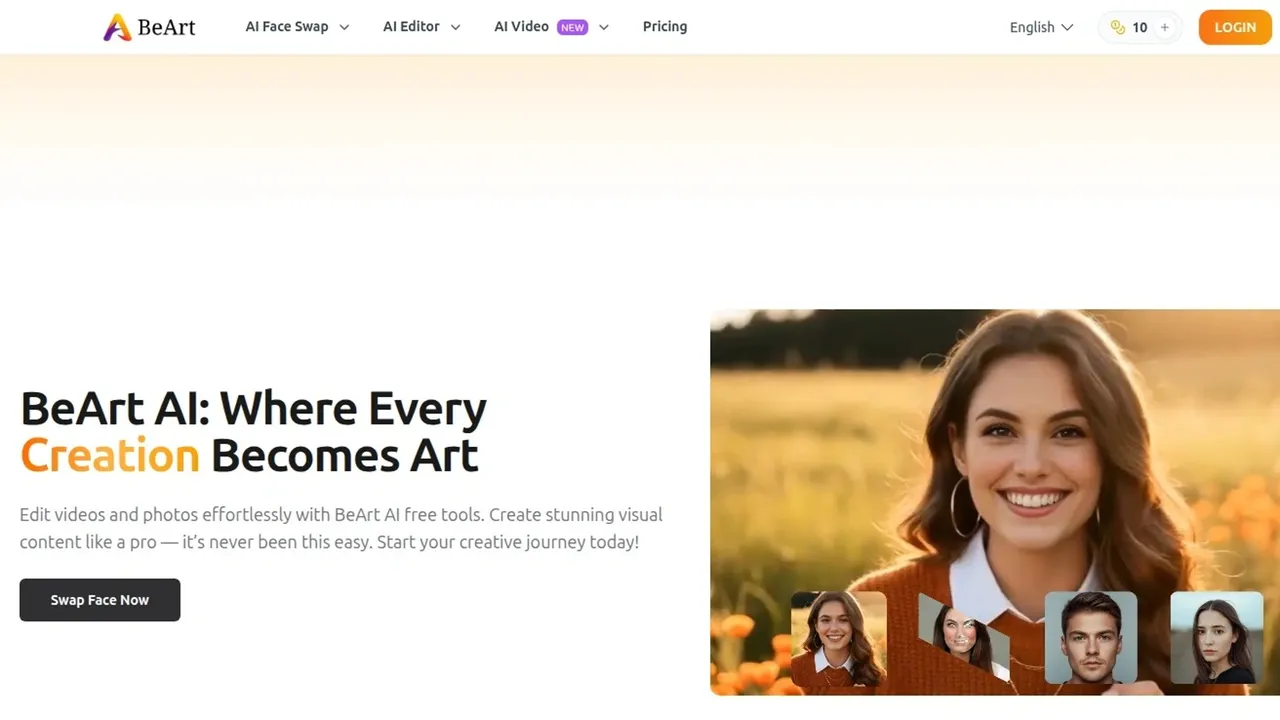
BeArt AI interface preview
BeArt AI logo

BeArt AI

BeArt AI is a browser-based suite of face swap and photo-video editing tools covering single, multi-face and batch swaps, head swaps, unblurring, upscaling and lip sync, running on a weekly free credit allowance with one-time credit packs and no installation.

Image EditingVideo EditingComputer Vision#Lip Sync#Image Enhancement#AI Video Editing
View Pricing
Saves
Visits
Views
Pricing
Paid
Published
Aug 21, 2026
Domain
beart.ai
Community rating

Used this tool? Rate it

Rate this tool

BeArt AI Product Information

View Pricing
Tool Information
Saves
Visits
Views
Pricing
Paid
Published
Aug 21, 2026
Domain
beart.ai
Community rating

Used this tool? Rate it

Rate this tool

Featured Tools

Related Tools

View Pricing

What is BeArt AI?

BeArt AI is a browser-based collection of AI tools for editing photos and video, organised around face swapping. The site groups its offering into three families — face swap, photo editing and video generation — and presents roughly sixteen individual tool entries covering photo and video face swaps, multi-face and batch swaps, head swaps, unblurring, upscaling, lip sync, portrait generation and image-to-video. The positioning is aggressively low-friction: the homepage advertises the platform as offering completely free, cutting-edge AI technology, without the need for registration, and the entire product runs in a browser tab.

That positioning deserves an early qualification, because the pricing page describes a different arrangement. In practice the service runs on credits: the free tier grants a weekly allowance that requires an account, and beyond that there are one-time credit packs. Both statements come from the vendor's own pages, and the gap between them is the single most useful thing to understand before starting — the tool is genuinely usable without paying, but "no registration" and "completely free" are marketing framing rather than a description of the account and credit mechanics.

Transparency about who operates the service is limited. The published terms identify the operator only as "BeArt" and, on inspection, contain no legal entity name, no registered address, no country of operation, and no minimum age requirement. The About group in the site footer links its API entry to vmodel.ai, and third-party directories describe the platform as powered by VModel AI, but the site's own terms and privacy policy never mention that relationship, so the corporate structure remains unconfirmed from primary sources.

Understood on its own terms, BeArt AI is a consumer-grade creative toy and a quick utility belt: fast, free enough for casual use, and unusually broad in the number of things it will attempt. It is not positioned as, and does not document itself as, a tool with the accountability that commercial or professional work usually requires.

Core Features

  • Photo face swap: The flagship function. The site states that its AI face fusion technology seamlessly inserts faces for realistic results and stresses that no editing skills are required, positioning it against manual compositing in traditional image editors.
  • Video face swap: Extends the same operation to moving footage. The vendor says its algorithms track facial features frame by frame, keeping expressions, movements, and angles coherent across the clip, which is the technically harder problem because errors show up as flicker rather than as a single bad frame.
  • Multi-face and batch processing: Beyond single-subject swaps, the platform advertises simultaneously tracking and replacing multiple faces in complex dynamic scenes, along with a batch face swap entry for processing several images in one pass.
  • Head swap: A separate tool from face swap, replacing the whole head rather than blending facial features, which generally handles hairline and profile differences better than a face-only composite.
  • Image unblurring: The site distinguishes this from simple filters, claiming its model performs analysis to restore lost details, fix motion blur, and enhance resolution rather than merely increasing contrast.
  • Video upscaling: A resolution-enhancement path for footage, sitting alongside the photo-side unblur tool in the AI Editor group.
  • AI lip sync and talking photo: Tools that animate a still portrait or align mouth movement to audio. These appear as navigation entries; the homepage provides no functional description of them, so their capability level is not documented.
  • Image to video and AI hug generator: Animation tools that turn still images into short clips, including a preset that animates two subjects into an embrace.
  • AI portrait generator and face morph: Generative and blending tools for creating or transforming portraits rather than swapping an existing face into an existing scene.
  • Sora watermark removal: Listed among the tools in both the homepage FAQ and the free tier's feature list. This one is worth flagging rather than celebrating, since removing a provenance watermark applied by another platform runs against that platform's terms and against the general direction of AI content provenance practice.

Use Cases

  1. Memes and social comedy: The most common and least fraught application. Swapping a friend's face into a film still or a reaction clip is low-stakes, consensual within a group, and matches the tool's speed and quality profile well. This is the use the vendor's own testimonials emphasise.
  2. Quick content for creators: Streamers and short-form video makers use face swap for recurring bits and character gags where production budget is zero and turnaround matters more than fidelity. The batch tool suits creators who need the same treatment across many thumbnails.
  3. Rescuing unusable photos: The unblur and upscale tools address an everyday problem unrelated to face swapping — a photo of a real moment that came out soft or was saved at too low a resolution. This use has none of the consent complications of the swap tools.
  4. Personalised gifts and novelty edits: Placing a family member into a poster, an album cover or a historical scene, where the subject knows about and would enjoy the result.
  5. Concept mockups before a real shoot: Using head swap or portrait generation to visualise how a person might look in a particular style, wardrobe or setting, as a disposable draft rather than a deliverable.
  6. Animating old family photographs: Talking photo and image-to-video applied to a still portrait, a use with genuine sentimental value that nevertheless deserves thought when the subject is deceased and cannot consent to being animated.

How to use BeArt AI

  1. Open the specific tool you need directly rather than starting from the homepage. The platform is a collection of separate single-purpose pages, and navigating to the photo swap, video swap or unblur page gets you to work faster than the general landing page does.
  2. Create an account if you intend to use the service more than trivially. Despite the no-registration framing, the free weekly credit allowance is tied to logging in, so an account is what makes ongoing free use possible.
  3. Upload your source and target images. For face swap the source supplies the face and the target supplies the scene; getting these the right way round is the most common first-attempt mistake.
  4. Check your inputs before spending a credit. Face swap quality is governed almost entirely by input quality — a well-lit, front-facing, unobstructed source face produces dramatically better output than a small, angled or partially covered one.
  5. Run the operation and review the result at full size. Artefacts in face swaps concentrate at the jawline, the hairline and around glasses, and they are easy to miss in a thumbnail.
  6. Iterate by changing the input rather than re-running the same pair. If the result is poor, a different source photograph will usually help more than a second attempt with identical inputs.
  7. Download your output and keep your own copy. The vendor states that work data is not retained, so the platform should not be treated as storage for anything you want to keep.

Tips & Best Practices

  • Settle the consent question before you upload anyone's face. This is the practical constraint that matters most with this category of tool, and it applies regardless of what any platform's terms do or do not say. If the person whose face you are using has not agreed, do not proceed.
  • Choose source images shot in similar lighting to the target. A face lit from the left composited into a scene lit from the right will read as wrong even when the blend itself is technically clean, and no amount of re-running fixes a lighting mismatch.
  • Match head angle roughly between source and target. Extreme differences in pose force the model to invent geometry it cannot see, which is where the most obvious distortions come from.
  • Use head swap when hair matters. If the hairstyles differ substantially between source and target, a face-only swap tends to produce an uncanny result, and the dedicated head swap tool usually handles it better.
  • Budget your weekly credits toward the hard jobs. Video operations consume far more than a single photo swap, so experimenting on stills and only committing credits to video once your inputs are settled makes the free allowance go considerably further.
  • Do not rely on it for anything with a deadline or a client. Given the limited transparency around who operates the service and its long-term availability, a project with commercial consequences should not have this tool as a single point of failure.
  • Treat outputs as unverified for commercial use. The vendor explicitly recommends checking local law before commercial use rather than granting a clear commercial licence, which is a meaningfully weaker position than a straightforward usage grant.

Who is BeArt AI for?

  • Casual users making things for friends: The clearest fit. Memes, jokes and personal edits where everyone involved is in on it, and where a flawed result costs nothing.
  • Creators working at zero budget: People who need a lot of small visual edits quickly and cannot justify a subscription, and for whom the weekly free allowance covers real usage.
  • People with a one-off photo problem: Anyone who simply needs a blurry picture sharpened or a small image enlarged, and who will use the tool once and leave.
  • Users who want to try many tools without committing: The breadth of the tool list and the absence of an upfront subscription make it a reasonable place to experiment with what face swap and animation tools can do.
  • Not suited to professional or commercial pipelines: The absence of a named operating entity, a clear commercial licence and documented data handling makes this a poor foundation for client work — established vendors with accountable business models are the appropriate choice there.
  • Not suited to anyone handling other people's images without permission: The consent requirement is a hard boundary, and the tool's ease of use does not soften it.

Platforms

  • Web browser only: The entire product runs online. The vendor states that no installation or download is required and that the platform works across desktops, tablets and phones.
  • No native applications: Research found no iOS or Android app, no desktop client and no browser extension associated with the service.
  • Mobile through the browser: Phone and tablet use is supported through the same web interface rather than through a dedicated app, so the experience depends on your mobile browser and connection.
  • Interface languages: The site offers thirteen interface languages, including English, Arabic, Indonesian, Hindi, Japanese, Korean, Russian, German, French, Italian, Vietnamese and Chinese.
  • API: The footer lists an API entry, but it points to the external vmodel.ai domain rather than to BeArt documentation, so BeArt itself does not appear to publish a developer interface under its own name.
  • Account requirement: An account is needed to collect the recurring free credits, even though the marketing emphasises registration-free access.

Pricing & Plans

The free tier is real but metered. According to the pricing page, users log in to receive 30 free points every week, and that allowance covers the main tools including photo and video face swap, multi-face swaps, head swap and unblurring. Because the credits recur weekly rather than being a one-time trial grant, a light user may never need to pay — but the allowance is finite, video operations consume more than photo operations, and unused capacity does not accumulate indefinitely in any documented way.

Paid access is structured as one-time credit purchases rather than a subscription, with the page stating there are no recurring fees and no subscription. Four packs are listed: 600 credits for $9.99, 1,400 credits for $19.99, 4,000 credits for $49.99 and 8,500 credits for $99.99, with larger packs offering more credits per dollar. Purchased credits are stated to become usable only after the weekly free credits are exhausted. Two aspects of the payment arrangement are worth noting plainly: the listed payment methods are Card Via Telegram and USDT on the TRC20 network, which is an unusual combination for consumer software, and the terms state that products are non-tangible and irrevocable, so we do not issue refunds once the order is completed, with only narrow exceptions. Anyone considering a purchase should weigh those two facts together.

Alternatives

  • Adobe Photoshop and its generative tools: The professional baseline, offering full manual control and a clear commercial licence, at the cost of a subscription and a real learning curve.
  • Established face swap web tools: A crowded category of browser-based competitors with broadly similar capabilities; they differ mainly in output quality, watermarking policy and how clearly they document consent requirements and data handling.
  • Runway and comparable video AI platforms: Aimed at creators who need video generation and editing with an accountable vendor, versioned models and defined commercial terms, positioned well above this tool in both price and rigour.
  • Dedicated upscaling and restoration tools: If sharpening and enlarging is your actual need rather than face swapping, single-purpose upscalers generally deliver better results than a swap platform's secondary feature.
  • On-device open-source pipelines: Self-hosted options keep images entirely on your own hardware, which resolves the data-handling uncertainty at the cost of setup effort and technical knowledge.

Limitations & Considerations

  • The consent framework is split across documents and incomplete where it matters most. The terms of service do contain a clear rule — likenesses of individuals cannot be utilized without proper consent — alongside a prohibition on unlawful deepfakes. However, the separate Content Policy, which is the document a user is most likely to read, is generic model-usage boilerplate: it has no clause requiring that you obtain permission from the person whose face you upload, and no rule about celebrities or public figures, while its treatment of minors is a general prohibition on harming them rather than any restriction on uploading a minor's face. For a product whose core function is placing one person's face onto another body, that is a notable gap. The absence of a rule is not permission — the legal exposure for non-consensual likeness use sits with the user regardless of what any policy omits.
  • The privacy policy does not cover the product's central activity. The published privacy and cookies policy contains no mention of uploads, photographs, faces, biometric data or any retention period; it is a conventional cookie, analytics and advertising document. The reassuring claim that all data is cleared within 1 day appears only as a homepage FAQ line, with no corresponding commitment in the policy that would actually govern the vendor's conduct. Treat the retention promise as unverified.
  • Operator identity is undisclosed. The terms name no legal entity, no registered address, no country of operation, and no minimum age requirement. Independent reviewers reach the same conclusion, citing a lack of transparency around company ownership, commercial licensing, and long-term viability as a reason to avoid the tool for professional use.
  • The free and no-registration claims do not match the pricing page. The homepage says completely free and without registration; the pricing page describes an account-gated weekly credit allowance and four paid packs. Both are the vendor's own statements.
  • Payment arrangements are unconventional and non-refundable. Card payment routed through Telegram and USDT cryptocurrency, combined with a strict no-refund policy, concentrate the risk on the buyer to an unusual degree for a consumer product.
  • The terms show signs of template reuse. The document refers to reporting LoRAs and character models and to monitoring trigger words associated with character models, neither of which corresponds to anything BeArt actually offers, suggesting the terms were adapted from another service rather than written for this one.
  • A marketed feature works against content provenance. Sora watermark removal is promoted as a benefit, but watermarks of that kind exist to mark synthetic media as synthetic, and stripping them conflicts with the originating platform's terms.
  • No authoritative technology press coverage exists. Searches across major technology publications returned no reporting on this service, so no independent assessment of its claims is available from that direction.
  • Output quality depends heavily on inputs and remains unpredictable. As with all tools of this type, results vary with lighting, angle and resolution, and no output should be assumed usable without inspection at full size.

FAQ

Q1. Is BeArt AI actually free?

Partly. There is a genuine recurring free tier, but it is metered and account-gated: the pricing page states that users log in to receive 30 free points every week. Beyond that allowance you buy credit packs, so the homepage's "completely free, no registration" framing overstates the case.

Q2. Do I need an account?

For any sustained use, yes. The weekly free credit allowance requires logging in, even though the marketing emphasises registration-free access.

Q3. What does BeArt AI actually do?

It is a browser-based suite covering photo and video face swap, multi-face and batch swaps, head swap, unblurring, video upscaling, lip sync, portrait generation, image-to-video animation and related tools, listed across roughly sixteen entries on the site.

Q4. Can I swap a celebrity's or a stranger's face?

You should not. The terms of service state that likenesses of individuals cannot be utilized without proper consent and prohibit unlawful deepfakes. Note that the separate Content Policy does not repeat this rule, but its silence does not create permission — non-consensual likeness use carries legal exposure for you in many jurisdictions regardless of platform policy.

Q5. Are my uploaded photos stored?

The homepage FAQ claims that all data is cleared within 1 day and that staff cannot access user content. However, the published privacy policy makes no reference to uploads, images, faces or retention periods at all, so that claim is not backed by any binding policy language and should be treated as unverified.

Q6. Who owns the output, and can I use it commercially?

The vendor states that BeArt AI does not claim ownership of user-generated content and that what you create is yours to use, while recommending you check local law before commercial use. That is weaker than an explicit commercial licence, so commercially sensitive work warrants a vendor with clearer terms.

Q7. Which company operates BeArt AI?

This could not be established from the site. The terms identify the operator only as "BeArt" with no legal entity name or address. The footer links an API entry to vmodel.ai and third-party directories describe the service as powered by VModel AI, but the official documents never confirm that relationship.

Q8. Is there a mobile app?

No app was found. The service runs in a browser on desktops, tablets and phones, and the vendor states that no installation or download is required.

Q9. How do refunds work?

Effectively they do not. The terms state that products are non-tangible and irrevocable, so we do not issue refunds once the order is completed, with only a narrow set of accepted exceptions. Combined with payment via Telegram card processing and USDT cryptocurrency, this places the risk firmly on the buyer.

Q10. Is there an age requirement?

None is stated. Research found no minimum age requirement, no age verification mechanism and no NSFW or adult content policy anywhere in the published terms, which is a documentation gap rather than an endorsement of unrestricted use.

Know a Similar Tool?
If you know other great AI tools, feel free to submit them to us