
Toolso.AI
Toolso.AI
All ToolsCategoriesTrendingLatest ToolsPricingBlog
Toolso.AI
Toolso.AI
Toolso.AI
Toolso.AI

Discover the best AI tools to boost your productivity

GitHubGitHubTwitterX (Twitter)YouTubeYouTubeTikTokEmail

Popular Categories

  • AI Writing
  • AI Image
  • AI Video
  • AI Coding
  • More Categories

Explore

  • Latest Tools
  • Popular Tools
  • More Tools
  • Submit Tool
  • Pricing

About

  • About Us
  • Contact
  • Blog
  • Changelog

Legal

  • Cookie Policy
  • Privacy Policy
  • Terms of Service
  • Refund Policy
© 2026 Toolso.AI All Rights Reserved
Limited timeLimited-time offerFeatured Listing24h priority review · No backlink · 30 days featured$29.90then $59.90Price rises to $59.90 after Oct 31Ends in--:--:--Submit now
  1. Home
  2. All Tools
  3. Image Editing
  4. Unwatermark AI
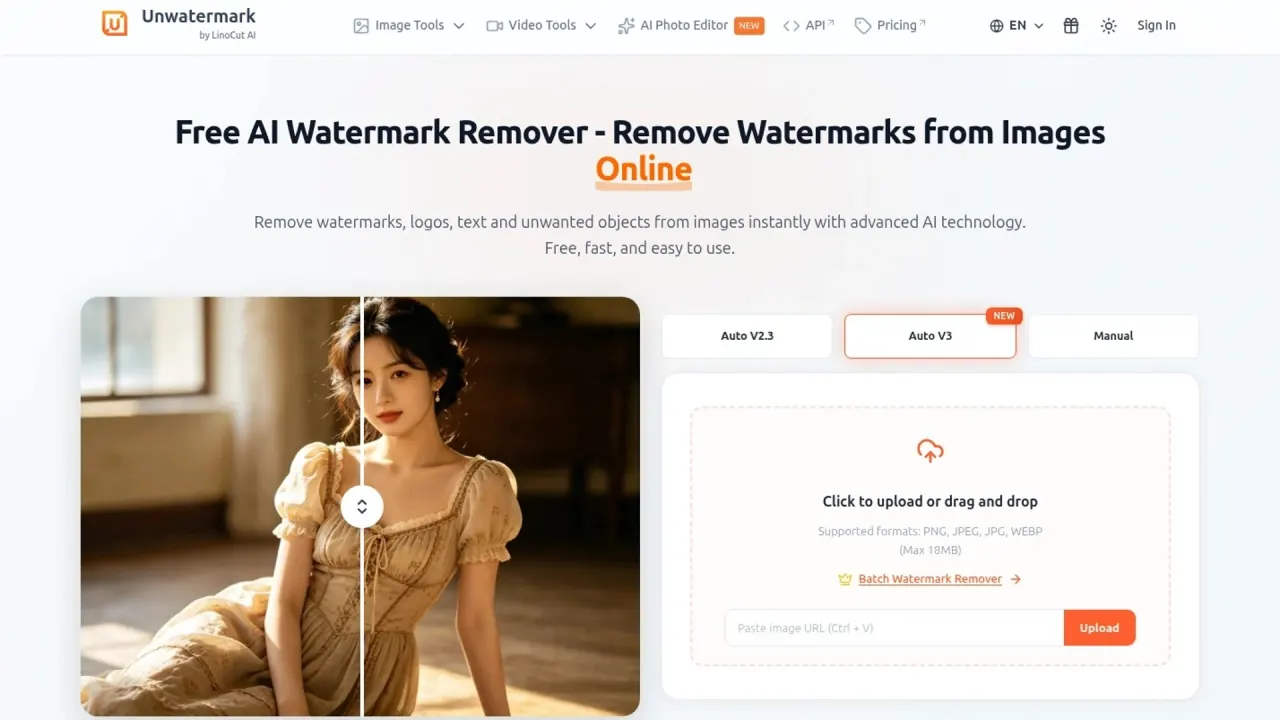
Unwatermark AI interface preview
Unwatermark AI logo

Unwatermark AI

Unwatermark AI erases watermarks, logos, text and unwanted objects from photos and videos in the browser, with capped free use, credit plans and a developer API.

Image EditingVideo Editing#Api Available#Batch Processing#AI Video Editing
View Pricing
Saves
Visits
Views
Pricing
Paid
Published
Oct 5, 2026
Domain
unwatermark.ai
Community rating

Used this tool? Rate it

Rate this tool

Unwatermark AI Product Information

View Pricing
Tool Information
Saves
Visits
Views
Pricing
Paid
Published
Oct 5, 2026
Domain
unwatermark.ai
Community rating

Used this tool? Rate it

Rate this tool

Featured Tools

Related Tools

View Pricing

What is Unwatermark AI?

Unwatermark AI is an online AI watermark remover that erases watermarks, logos, text and unwanted objects from images and also handles watermarks in video content.

The site labels itself as Unwatermark by LinoCut AI, and a header banner points visitors to LinoCut AI as the "new brand home" with more than ten further tools, while the watermark and video tools described here still run on unwatermark.ai.

Two facts shape most decisions. Free use is capped per day or per week, and paid use runs on credits sold either as monthly subscriptions or as one-time packs. The Terms of Service also place responsibility for content rights on the person who uploads a file, so the tool suits material you own or are licensed to edit.

Core features

Unwatermark AI pairs an automatic mode with manual masking tools. The automatic mode targets common logos and stamps; when it misses faint marks or busy backgrounds, the manual brush takes over, and the same mark-and-remove approach carries over to video. The site has also grown beyond watermark removal into prompt-based photo editing and short AI video generation.

Automatic watermark detection

  • Auto-detection: Unwatermark AI is described as automatically detecting logos, stamps and full-screen watermarks and removing them in seconds without user input, and the vendor claims original image quality stays intact with no blur or pixelation.
  • Batch mode: Batch removal handles up to 10 images at a time and works in both automatic and manual modes.

Manual brush and Magic Eraser

  • Manual Brush: Aimed at stubborn or intricate details, the Manual Brush lets users adjust the brush size to repair images and videos where faint watermarks or complex backgrounds defeat automatic detection.
  • Magic Eraser: The magic eraser extends removal to date stamps, brand logos, text overlays and strangers in the background, reconstructing the background texture behind them.

Video watermark remover

  • Platform and AI-video marks: The video cleaner relies on frame-by-frame AI analysis and is pitched at watermarks on TikTok, YouTube and AI-generated videos.
  • Upload limits: The video watermark remover accepts MP4, MOV and M4V files under 500 MB.
  • Length statements: The same page promises quick results for videos up to 90 seconds with no resolution limit, yet also says clips of a few seconds or several minutes can be handled.

Background remover

  • Free and premium limits: Free users can remove backgrounds from up to 10 images per day at up to 3000×3000 pixels, while premium users get support for up to 5000×5000 pixels.

AI photo editor

  • Model choice: The prompt-based AI photo editor lists Flux Kontext, Nano Banana and SeeDream 4.0 (advertised for editing at up to 4K), plus Flux 2 Pro and Nano Banana Pro, which carry a VIP label.
  • Uploads: The photo editor accepts JPG, PNG and WEBP images up to 20MB.
  • Free positioning: The same page promises AI features "without subscriptions, watermarks, or sign-ups", a statement that sits beside the VIP-labelled models.

AI video generation and editing

  • Text and image to video: The video generator creates clips from text or images, and its default Video Generate Fast model offers 3–10 second clips at 480p or 720p.
  • Paid model: Seedance 2.0 Fast requires a signed-in paid account with enough credits for the chosen settings.
  • Video editor: The AI video editor accepts uploads of up to 10 seconds and changes them through a written instruction to add, remove, replace or restyle a visible element.

Guide

Removing a watermark from an image

  1. Upload the image from your computer or device with the upload button.
  2. Choose automatic detection, or switch to the manual brush for precise control.
  3. Let the AI process the file, then preview the result and download the clean version.

Removing a watermark from a video

  1. Upload the clip in MP4, MOV or M4V format.
  2. Highlight the watermark, logo, text, people or other unwanted areas with the brush or the selection frame.
  3. Click Remove: the AI processes only the first 6 seconds so you can preview and download that segment first.
  4. For longer clips, click "Process the Entire Video" to run the full file and download the result.

Because only the first 6 seconds run at first, the result can be checked before the full clip is processed.

Use cases and examples

Unwatermark AI's own pages describe a mix of cleanup and commerce scenarios. All of them assume the uploader has the rights described in the Limitations section.

  • Product photos: For online sellers, Magic Eraser is positioned for removing logos, props, price tags or unwanted objects from product images.
  • Marketplace cutouts: The background remover is pitched for transparent product images on Amazon, eBay, Shopify and other online marketplaces.
  • Personal photos: Removing photobombers and background distractions from portraits and selfies is listed as a common use case.
  • AI-generated media: The vendor says the tool is specially optimized for removing watermarks from AI-generated images and videos.
  • Stock previews: The vendor's blog frames removal on stock-image previews as a way to preview and test images, and encourages buying licenses for images used commercially.

The product-photo and marketplace examples rely on the background remover and Magic Eraser more than on watermark detection, so their free allowances differ: background removal has its own daily cap, while watermark removal follows the plan limits in the Pricing section.

Who is it for

Good fit

  • Photographers, sellers and creators cleaning their own images or clips, such as removing a date stamp, a stray logo or clutter from a product shot.
  • Light users who stay within the free daily and weekly caps and do not need an account for basic removal.
  • Developers who want per-call credit pricing for image and video watermark removal.

Poor fit

  • Anyone hoping to reuse stock or third-party images without a license: the vendor's own guide states that removing a watermark does not bypass copyright and that permission from the copyright holder is still needed.
  • Children, since the service is not intended for children under 13.
  • Teams that need guaranteed API continuity, because the terms let the operator discontinue or suspend the API at any time without notice and expect a reasonable number of concurrent calls.
  • Buyers who want a refund safety net, given the narrow refund terms described under Pricing.

Platforms

  • Web app: Unwatermark AI supports common formats such as JPG, PNG, WEBP, MP4, M4V and MOV, and its watermark removal can be used without logging in.
  • Devices: The video tool page says the service needs no software installation, offers both online access and a mobile app, and can be used on computers and phones.
  • iOS listing check: Product pages link to an App Store listing, but as captured on October 4, 2026, Apple's public lookup service returned no result for that app ID in the US storefront.
  • Developer API: The API charges between 1 and 3 credits per image depending on the endpoint and 1 credit per second for mask-guided video removal.
APIDescriptionCredits
Auto Remover V2Standard automatic removal2 per image
Auto Remover V2.3Latest model, sync and async2 per image
Auto Remover V3Advanced automatic removal3 per image
Manual RemoverMask-guided precise removal1 per image
Background RemoverRemove image backgrounds1 per image
Manual Video RemoverMask-guided video watermark removal1 per second

The API reference also lists a credits-balance query and API key settings.

Pricing

The free plan allows 3 automatic and 20 manual watermark removals per day, plus 6 video watermark removals per week. The homepage FAQ describes a different free allowance of 100 images per day, after which users are prompted to log in and buy credits.

Subscriptions run from $3.90 for 50 credits to $16.90 for 1,000 credits a month and auto-renew monthly.

Monthly subscriptionPrice per monthPrice per credit
50 credits$3.90$0.078
200 credits$8.90$0.045
500 credits$12.90$0.026
1,000 credits$16.90$0.017

One-time packs run from $4.99 for 50 credits to $330 for 30,000 credits, and those credits never expire.

One-time packPricePrice per credit
50 credits$4.99$0.100
200 credits$14.99$0.075
500 credits$30$0.060
2,000 credits$70$0.035
5,000 credits$90$0.018
10,000 credits$120$0.012
30,000 credits$330$0.011

Credit rules

  • Subscription credits refresh every billing cycle, and unused credits expire at the end of each cycle without carrying over.
  • The homepage FAQ, by contrast, says purchased credits never expire, without separating subscription credits from one-time packs.
  • On the website, the homepage FAQ prices usage at 1 credit per image and 1 credit per second of video.
  • Plans cannot be changed while a renewal is already scheduled, so a subscriber who runs out must wait for the renewal or buy one-time credits.
  • The Terms of Service mention subscription fees billed "on a monthly or annual basis", while the pricing page shows monthly subscriptions only.

Cancellation and refunds

  • Cancellation runs through Profile → My Plan → "cancel the subscription" or through customer support before renewal, and takes effect at the end of the current paid period.
  • After cancelling, subscription benefits and remaining subscription credits stay active until the billing period ends, while one-time pack credits remain usable permanently.
  • The pricing FAQ says that, due to the high cost of AI, refunds cannot be provided, and suggests trying the free plan first.
  • The Terms of Service allow refunds to be considered only for verified technical errors that completely prevent use, or for requests within 24 hours of a first-time payment, excluding renewals, upgrades and repeat purchases.

Unwatermark AI alternatives

Two web-based watermark removers with a similar scope publish their own limits, which makes the trade-offs concrete.

  • Dewatermark AI: Free users get 3 images per day without logging in, and batch mode processes up to 50 images at once.
  • Dewatermark AI upload notice: Its upload area tells users to work only with images they own, created themselves or are authorized to edit, and makes them responsible for copyright compliance.
  • WatermarkRemover.io: This alternative limits uploads to images up to 5,000 × 5,000 px, PDFs up to 25 pages and videos up to 2 minutes, and lists HEIC and WEBM among supported formats.

Against these, Unwatermark AI offers smaller batches (10 images) but accepts videos up to 500 MB, adds photo editing and AI video generation on the same site, and sells both monthly subscriptions and non-expiring one-time packs. Readers who mainly process PDFs or need larger image batches may find the alternatives' stated limits closer to their workload.

Limitations

Content rights and acceptable use

  • The Terms of Service require users to guarantee that they hold all necessary rights, such as copyright, ancillary copyright, industrial property rights and trademark rights, for processing uploaded photos and videos.
  • The Magic Eraser page lists copyright notices among the text it can remove, alongside watermarks and timestamps.
  • The content policy bars using output in ways that violate laws, harm minors, spread false information to harm others, or defame and harass, and states that violators will be banned.
  • In the pages checked this round, Unwatermark AI does not say when removing a watermark is lawful; that question sits with the uploader under the rights clause above.

Privacy and data

  • Uploaded images and videos are typically processed and deleted within 24 hours of processing completion, but certain data may be retained longer for purposes such as improving services, preventing fraud or legal compliance.
  • Users keep ownership of their content but grant a non-exclusive, worldwide, royalty-free, sublicensable license to use, reproduce, modify and create derivative works from it solely for operating or improving the services.
  • The terms and privacy policy checked do not state whether uploads are used to train AI models.
  • The operator may store users' IP addresses to verify extensive use of the platform.
  • Collected data is stored on servers in the United States or in other territories.
  • Account deletion is handled by contacting the support email, and data required under applicable laws may be retained.

Service terms and operator

  • Any warranty for results and availability is excluded, and the operator's liability is limited to EUR 100.00 in any case.
  • The terms refer only to "the Operator" and to the laws of the jurisdiction where the Operator is incorporated, without naming a company or country in the version checked.

Inconsistent or thin information

  • A blog guide promotes an Unwatermark.ai PDF Watermark Remover, while the format lists on the main tool pages cover images and video only.
  • As captured on October 4, 2026, a third-party review platform showed a single review for unwatermark.ai and noted that the company had not invited customers to review, so no meaningful independent rating sample exists.
  • IT-media searches run on October 4, 2026 found no independent coverage of the product.

FAQ

Q1. Is Unwatermark AI free?

Partly. Basic removal works without an account, but the pricing page caps free use at 3 automatic and 20 manual watermark removals per day and 6 video removals per week, while the homepage FAQ quotes 100 images per day. Heavier use requires credits.

Q2. Can I get a refund on Unwatermark AI credits?

Generally not. The pricing FAQ rules out refunds, and the terms only consider them for verified technical failures or first-time payments within 24 hours.

Q3. Can I use Unwatermark AI on stock photos or other people's images?

Only with the necessary rights. The terms make the uploader guarantee copyright and trademark rights for every processed file, and the vendor's own blog says removing a watermark does not replace a license from the copyright holder.

Q4. Do Unwatermark AI credits expire?

One-time pack credits do not expire. Subscription credits reset each billing cycle and unused ones lapse, even though the homepage FAQ says purchased credits never expire.

Q5. Does Unwatermark AI have a mobile app?

The site advertises a mobile app and its pages are built to work on phones, but the linked App Store listing returned no result in Apple's US lookup on October 4, 2026.

Q6. How long does Unwatermark AI keep uploaded files?

The privacy policy says uploads are typically deleted within 24 hours after processing, with exceptions that allow longer retention for service improvement, fraud prevention or legal reasons.

Know a Similar Tool?
If you know other great AI tools, feel free to submit them to us