
Toolso.AI
Toolso.AI
All ToolsCategoriesTrendingLatest ToolsPricingBlog
Toolso.AI
Toolso.AI
Toolso.AI
Toolso.AI

Discover the best AI tools to boost your productivity

GitHubGitHubTwitterX (Twitter)YouTubeYouTubeTikTokEmail

Popular Categories

  • AI Writing
  • AI Image
  • AI Video
  • AI Coding
  • More Categories

Explore

  • Latest Tools
  • Popular Tools
  • More Tools
  • Submit Tool
  • Pricing

About

  • About Us
  • Contact
  • Blog
  • Changelog

Legal

  • Cookie Policy
  • Privacy Policy
  • Terms of Service
  • Refund Policy
© 2026 Toolso.AI All Rights Reserved
Limited timeLimited-time offerFeatured Listing24h priority review · No backlink · 30 days featured$29.90then $59.90Price rises to $59.90 after Oct 31Ends in--:--:--Submit now
  1. Home
  2. All Tools
  3. Image Editing
  4. Pokecut
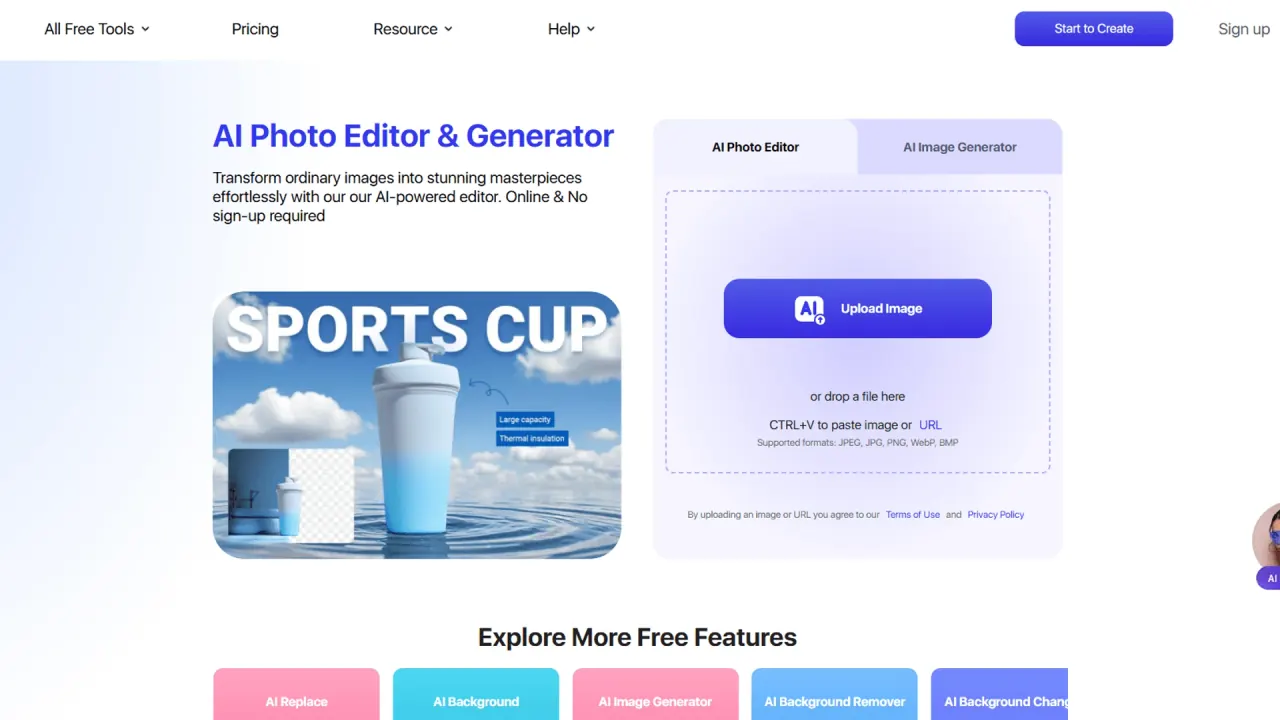
Pokecut interface preview
Pokecut logo

Pokecut

Pokecut is a web-based AI photo editor for background removal, photo enhancement, batch edits of up to 50 images and text-to-image generation with models such as Nano Banana and Seedream. Plans run on monthly credits, and the iOS and Android apps are billed separately.

Image EditingImage GenerationAI Photo Editing & Design#Photo Enhancement#Batch Editing#Magic Eraser
Try for Free
Saves
Visits
Views
Pricing
Freemium
Published
Oct 5, 2026
Domain
pokecut.com
Community rating

Used this tool? Rate it

Rate this tool

Pokecut Product Information

Try for Free
Tool Information
Saves
Visits
Views
Pricing
Freemium
Published
Oct 5, 2026
Domain
pokecut.com
Community rating

Used this tool? Rate it

Rate this tool

Featured Tools

Related Tools

Try for Free

What is Pokecut?

Pokecut is an AI photo editor and image generator that combines background removal, object erasing, quality enhancement, collages and prompt-based image creation in one place. It is aimed at portraits, travel photos, product images and creative content, and most features sit on a shared credit balance rather than separate subscriptions.

Pixl Concerto Technology Limited, incorporated in Hong Kong, provides the Pokecut website and services. The mobile apps are published under a different developer name.

Pokecut officially launched in November 2024, then added AI backgrounds in May 2025, text-to-image and image-to-image generation in July 2025, batch editing in August 2025, portrait, body and hairstyle filters in February 2026, and an infinite canvas in April 2026. The company reports 3M+ users, 200+ AI tools and 500M+ photos processed, as captured on October 4, 2026; these are vendor figures.

The practical decision points are less about whether a given tool exists (the catalog is large) and more about credits: which tools draw on them, which image models require a paid plan, and how refunds and app purchases are handled.

Core features

Background removal and object editing

  • Three cutout models: the background remover lets you choose General for everyday scenes, Head/Face for portraits and avatars, or Text for real text elements such as signatures.
  • Magic Eraser: detects content automatically and erases objects without manual painting.
  • AI Background and AI Replace: generate a new scene behind a subject, or replace a selected object with something described in a prompt.

Batch photo editor

The batch photo editor processes up to 50 images in one batch. It offers four tasks: image enhancement, background removal, background change, and crop and resize, which covers most of the repetitive preparation a catalog needs before individual images get more creative treatment.

Photo and text enhancement

  • Five enhancement modes: Standard, Portrait, Text, Old Photo and Ultra HD, each tuned to a different kind of detail.
  • Resolution split: the photo enhancer targets results up to 4K, and an 8K result goes through a separate HD photo converter.
  • Text enhancement: a dedicated tool is described as sharpening text to 8K, reducing glare and moiré, and making blurry words easier to read.

AI image generator

The AI image generator offers third-party models including ChatGPT Images 2.0, Nano Banana Pro, Seedream 5.0 Lite and Stable Diffusion. Pokecut's own Basic and Pro models are described as its most cost-effective options with over 100 art styles, and the Pro version is said to keep a character consistent when you supply reference photos. Prompts can be written in Spanish, Portuguese, Japanese and other languages, not only English.

Portrait, face and body tools

Portrait tools edit faces, hairstyles and body shapes, with separate pages for retouching, makeup, slimming, height and hair color. The image-to-image catalog also includes face swap tools; one celebrity face swap page invites users to swap their face with celebrities and share the realistic images on social media. These pages are covered by the identifiable-people rules described under Limitations.

Guide

Two workflows have product-specific steps worth knowing before you spend credits.

Remove a background

  1. Upload a product image, portrait or graphic; the background remover works with JPEG, JPG, PNG, WebP and BMP, and you can also paste an image or an image URL.
  2. If the automatic cutout misses edges, switch between the General, Head/Face and Text models.
  3. Export the result as a high-quality PNG with a transparent background, or choose a new background to replace the original.

Prepare a product set

  1. Upload up to 50 images to Batch Edit.
  2. Pick one of the four batch tasks and apply it to the whole set.
  3. Download the finished images as a package in JPG or PNG format, then reopen only the images that need extra work in the editor.

Use cases and examples

  • Marketplace listings: Pokecut is pitched at preparing product images for Amazon, eBay, Etsy, Shopify and similar storefronts before a listing goes live, starting from cleaner backgrounds, sharper detail and channel-ready sizes.
  • Passport and ID photos: the ID Photo Maker converts a portrait into a passport or ID photo; the vendor describes results as meeting official requirements, but the general output disclaimer in the terms still applies.
  • Old photo restoration: the enhancer's Old Photo mode is marketed for faded, yellowed or scratched prints.
  • Outfit previews: the clothes changer applies outfit templates to a photo for style looks, posts or product tests.
  • Print and merchandise graphics: the generator is positioned for custom t-shirts, stickers and packaging designs.

The common thread is image preparation rather than open-ended illustration: most examples start from an existing photo and end in a marketplace, social post or document.

Who is it for

  • Online sellers and small teams: Pokecut says it helps small teams organize repeat image-prep work before files move to Amazon, eBay, Etsy, Shopify, ads, email or social publishing, and the 50-image batch limit fits that kind of catalog work.
  • Creators and everyday users: the company describes its audience as creators, online sellers and everyday users who need good visuals without complicated editing.
  • Occasional users: free credits and no-signup access on many tool pages make one-off cutouts or ID photos possible without paying.

Less suitable:

  • Users who want one subscription across devices: Premium Plans and credits bought on the website cannot be used in the Pokecut app at the moment, so web and mobile purchases are separate.
  • Developers: no public API or SDK appeared on the pages checked for this review, so it does not fit automated pipelines that depend on one.
  • Buyers who want time to evaluate a paid plan: refunds are limited to one day after payment, and dissatisfaction with results is not an accepted reason.

Platforms

  • Web: tool pages such as the image extender run directly in the browser on desktop, mobile or tablet with no installation and without creating an account.
  • iOS and Android: Pokecut is also available on iOS and Android for removing backgrounds and enhancing photos on a phone.
  • iOS listing: the iOS app, titled AI Background - Pokecut Studio, lists Guangzhou Guangzhuiyuan Information Technology Co., Ltd. as developer, with a 4.7 rating from 1.5K ratings and a 4+ age rating, as captured on October 4, 2026. It requires iOS 14.0 or later and also runs on Apple silicon Macs.
  • Android listing: the Google Play listing showed 4.0 stars from 3.34K reviews, 500K+ downloads and a Teen rating citing suggestive themes, as captured on October 4, 2026.

Billing is split by channel. The Payment Terms cover the Pokecut website only and exclude the Pokecut app on Apple or Google Play, where questions about payments go to the respective platform.

Pricing

Pokecut sells web access two ways: Premium Plans (SE, Pro and Ultra) with a monthly credit allowance, and one-time credit packs that give full tool access on a lifetime credit system.

PlanMonthly creditsBackground removal, enhancement, uncrop, watermark removalTrial shown
FreeLimitedCosts credits—
SE300Costs credits3 days
Pro800Unlimited3 days
Ultra1,500UnlimitedNot shown
Credit packs300, 500, 1,000, 2,000 or 5,000 one-timeCosts credits—

The SE trial grants 100 credits immediately and the remaining 200 after the trial. On Pro, you get 200 credits now and unlock the remaining 600 after the trial. On the credit-pack tab, larger packs show discounts of 10% (500), 25% (1,000), 40% (2,000) and 52% (5,000). The yearly billing toggle advertises savings of up to 60%. During capture, an "offer ending soon" banner with a 24-hour countdown ran across the site.

What things cost in credits

Per-feature costs come from the credit table in the Payment Terms. Background removal costs 1–4 credits for free, SE and credit-pack users and has no deduction on Pro or Ultra. Premium models cost the same on every paid tier: Seedream 4.0 and Nano Banana use 10 credits per image for everyone, while Seedream 5.0 Lite and Nano Banana 2 (15 credits) and Nano Banana Pro and ChatGPT Image 2 (30 credits) are listed as requiring a purchase for free users. Credits are only deducted after a feature successfully processes an image, but applying several features to the same image can trigger several deductions.

Unused Premium Plan credits do not carry over and refresh on the 1st of each month, while purchased credits never expire.

Dollar prices

Plan prices did not render on the pricing page when it was loaded on October 4, 2026, so the table above has no prices. Other official pages quote figures that do not agree with each other:

  • The background remover's comparison table lists Pro at $6.99/month or $54.99/year.
  • The AI image generator's comparison table shows $69.99 / year (Avg. $5.83/mo) for Pokecut.
  • The refund examples in the Payment Terms use a Monthly Ultra Plan bought for $18.99 with 1,500 credits.
  • A second refund example uses a 300-credit purchase for $9.99.

Mobile pricing is separate. The App Store listing shows in-app purchases from $3.99 (Pro weekly) and $5.99 (monthly) up to $49.99 (Pro yearly) and $89.99 (Max VIP yearly), as captured on October 4, 2026.

Renewal, cancellation and refunds

  • Auto-renewal: Premium Plans renew monthly or annually until you cancel; after cancelling from My Order, the plan ends on the next billing date and remains usable until then.
  • Refund window: refunds can be requested within 1 day of payment; later requests are generally refused unless the support team agrees to a case-by-case exception.
  • Excluded reasons: dissatisfaction with feature results, simply not wanting the purchase, and forgetting to cancel before a renewal charge are listed as reasons that do not qualify.
  • Refund amount: approved refunds return only the value of unused credits at the original unit price, minus any platform handling fees, which the terms put at typically 5%–8% for PayPal.

Pokecut alternatives

Alternatives matter most for two gaps: API access and batch size.

  • remove.bg: a dedicated background removal service that can be called with one API call. Starting December 1, 2026, its background removal moves to Leonardo.Ai, also part of Canva.
  • Photoroom: markets one image editing API for transforming product images at scale, aimed at commerce teams that need automated pipelines rather than a browser tool.
  • PicWish: an all-in-one AI photo editor whose background remover processes up to 30 files at a time, compared with Pokecut's 50-image batches.

Pokecut's advantage over single-purpose cutout services is breadth (generation, portrait tools and batch prep under one credit balance); its disadvantage, on the pages checked, is the lack of a documented API.

Limitations

Output and product boundaries

  • No accuracy guarantee: the terms say it is difficult to guarantee the truthfulness, accuracy and reliability of AI output. Pokecut filters inappropriate or harmful content but says mistakes cannot be ruled out.
  • No storage obligation: Pokecut is not obliged to store user content and is not liable for deleting it or failing to store it.
  • Clothing tools are restricted: the AI clothes remover page states it is for fully clothed outfit replacement, not undressing, exposed-body edits or sexualized changes.
  • Inconsistent free allowance: one tool page promises 20 free credits. The collage maker instead says 5 free credits are provided every day.
  • Inconsistent resolution claims: the background remover's FAQ says it delivers 1080×1080px cutouts. The comparison table on the same page lists its output quality as up to 4K.
  • Stock-photo watermark removers: the catalog includes tools such as a Getty Images watermark remover that clears watermarks from stock photos. Pokecut says commercial copyright in design resources it does not provide is not managed by Pokecut.

Privacy and data handling

Uploaded images are deleted from Pokecut's servers after 24 hours. The retention period for generated images is stated inconsistently: one clause of the Privacy Policy gives 15 days, while the retention section gives 30 days for images generated from your uploads. Project files saved with the Cloud Storage function are kept until the storage period expires or you delete them.

The Privacy Policy says deep-learning features are trained on public or purchased datasets and that uploaded pictures are not used for purposes beyond the requested function. It also allows third-party advertising networks to collect information about website use over time.

App store disclosures add detail. The Google Play data-safety section says the app may share location and device IDs with third parties and that data can't be deleted. The App Store privacy label lists identifiers as data that may be used to track you across other companies' apps and websites.

Rights and legal terms

  • Commercial use: exported images are royalty free for personal and commercial projects.
  • Identifiable people: you must not imply endorsement by people or brands in an image, and identifiable people may not be shown in a bad light, such as in criminal, medical or pornographic contexts.
  • License to Pokecut: uploading grants Pokecut a worldwide, royalty-free license to your content to the extent necessary to operate the app and apply its features.
  • Open-source model terms: some AI features are based on Stable Diffusion V1.5 derivatives, and users must also follow the CreativeML Open RAIL-M license.
  • Conflicting governing law: the Terms of Use send disputes to arbitration at the Hong Kong International Arbitration Centre. The Payment Terms, by contrast, are governed by the laws of the People's Republic of China.

FAQ

Q1. Do I need an account to use Pokecut?

Not for many tools: the homepage says Pokecut can be used directly without signing up or logging in. The Terms of Use, however, say users must register a Pokecut account to use the full service.

Q2. Does Pokecut add watermarks?

The pages disagree. The homepage FAQ promises no ads and no watermarks. The pricing page, however, lists No Watermark and HD Download among the benefits of paid plans.

Q3. Does Pokecut have an API?

No public API, SDK or developer documentation appeared on the Pokecut pages checked for this review, which included the homepage, pricing, legal and individual tool pages.

Q4. What happens when I upgrade a plan?

The new plan starts immediately and the old one is cancelled without further charges. Remaining credits from a monthly plan are added to your account; from a yearly plan, all credits for the remaining months are added at once and stay valid until the end of the current billing cycle.

Know a Similar Tool?
If you know other great AI tools, feel free to submit them to us