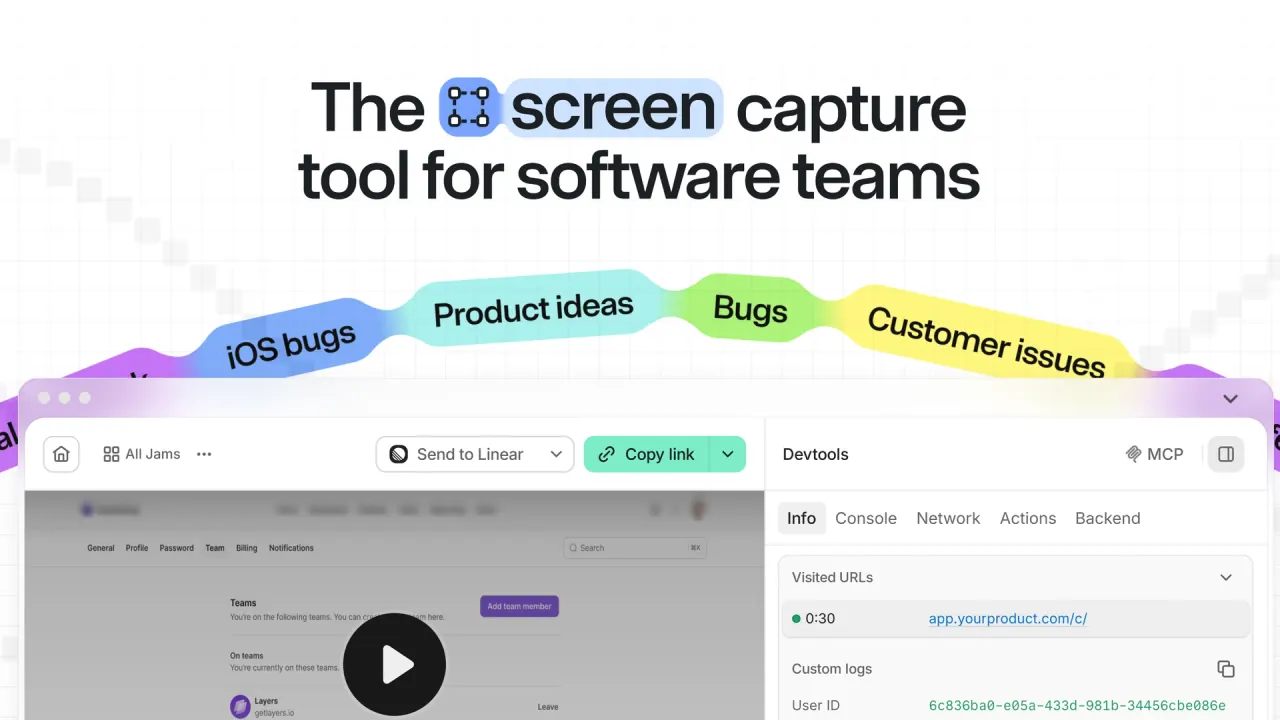

Jam records screens and screenshots from a Chromium browser, a Mac, or an iPhone and attaches console logs, network requests, user events, and device details, so engineers and coding agents can reproduce a bug from one link.
Used this tool? Rate it
Used this tool? Rate it
Jam is a capture tool for software teams that records bugs, issues, and ideas together with the technical context that teammates and AI coding agents need. The Jam screen recorder runs as a Chromium browser extension, a Mac menu-bar app, and an iOS app, and each capture becomes a shareable link (a "Jam") that keeps the video or screenshot next to logs, network activity, and device details.
The company says Jam was founded in 2020 to make bug reporting faster for people and AI agents, and it names Ramp, Drata, Perplexity, ElevenLabs, and Autodesk among the companies whose software teams use it. Independent tech press coverage from February 2024 adds that co-founders Dani Grant and Mohd Irtefa previously worked in product management at Cloudflare before launching the company in 2020.
On the Chrome Web Store, the Jam extension showed a 4.5 rating from 293 ratings and 300,000 users as captured on October 6, 2026.
In short, Jam suits teams that build web apps, test them in Chromium browsers, and want every bug report to arrive with developer logs attached. Its main boundaries are browser coverage, short recordings on the Free plan, and retention rules under which deleting a Jam archives it rather than erasing it.
The Chrome extension can record the screen or capture a screenshot, so a report is ready to share while the details are still fresh. Recording modes cover a single browser tab or a whole window or monitor, with optional voiceover, and the finished capture is packaged into a link.
Each Jam carries developer logs (console logs, network requests, errors, and warnings) plus user events such as clicks, navigation events, and typed input. Engineers inspect this data in a DevTools-style panel inside the Jam, next to the recording. On your own site, a jam.metadata() call can add live debug data such as user IDs, app state, and feature flags to every Jam submitted from that website.
Jam AI suggests a title, a summary, and repro steps for a capture, giving developers and agents a starting point instead of a blank ticket. Allowances differ by plan and are covered under Pricing.
Instant Replay is opt-in: once enabled, Jam keeps a rolling 2-minute local buffer of DOM activity so a bug can be shared without reproducing it. It is a DOM session replay rather than a screen video, built by snapshotting HTML changes and rendering them inside an iframe.
Recording Links are shareable URLs that let anyone record their screen and send a Jam with no browser extension, no account, and no download. On sites that install Jam's snippet, auto-blur hides sensitive content in real time during Recording Link sessions, and Jam says blurred content never reaches its servers.
Jams can be sent to issue trackers such as Linear, Jira, GitHub, GitLab, and Azure DevOps, to Slack for triage, and to Notion, Asana, and ClickUp for docs and tasks. Jam can also show Sentry backend errors and FullStory sessions alongside a capture, so frontend evidence and backend errors sit in one place. Webhooks send Jam events to your own HTTPS endpoint, a Zapier workflow, or an n8n automation whenever a new Jam is created.
Jam MCP loads a Jam's video, user events, console logs, errors, and network requests into Claude Code, Cursor, VS Code, and Windsurf, so an agent can investigate from the link without copy-pasting.
Choose desktop recording instead when a bug spans several tabs, involves a login pop-up, or needs the browser URL bar to be visible, because desktop recording captures an entire window or the full monitor.
In Jam for Mac, press Cmd + Shift + J or choose Record a Jam from the menu bar to start; the toolbar then offers screen, window, or area capture. The camera appears as a floating bubble, and the draft editor opens for trimming when you stop.
The documented uses center on getting a reproducible report from whoever saw the bug, whether that is a customer, a tester, or a coding agent.
Jam describes its video recorder as purpose-built for product, engineering, support, and QA teams. As a bug reporting tool, it fits groups where the person who sees a bug is not the person who fixes it.
It is a weaker fit for testers who work mainly in Firefox or Safari and for organizations that require recordings to live in their own storage. The Terms of Service also limit use of the Service to your own internal purposes or those of the organization you represent.
Jam runs in the browser, on macOS and iOS, and from a terminal, but capture through the extension is limited to Chromium browsers.
Jam pricing is set per creator seat, and the pricing page lists three plans.
| Plan | Listed price | Main allowances | Added features |
|---|---|---|---|
| Free | $0 | 30 Jams, 5 Recording Links, recordings up to 5 minutes | Issue-tracker integrations, MCP, webhooks |
| Team | $14 per creator / month | Unlimited Jams, 150 Recording Links, recordings up to 15 minutes, 200 AI summaries | Access controls, backend logging |
| Enterprise | Custom | Unlimited Recording Links | SAML/SSO, audit logs, workspace analytics, automatic data deletion, priority support |
Team is listed at $14 per creator per month but billed yearly, with a 14-day free trial; the pricing page does not display a month-to-month price. Enterprise is yearly billing only.
Creator seats are capped at 5 on Free and 50 on Team, while viewer seats are unlimited on every plan. Viewer seats are free, but a viewer automatically becomes a paid Creator seat after actions such as creating a Jam, creating a recording link, or sending a Jam to an integration.
The AI allowance is described differently on two official pages. The pricing table lists AI summaries at 30 per month on Free, 200 per month on Team, and unlimited on Enterprise. The Jam AI help page instead describes the Free allowance as 30 trial uses and the Team allowance as 200 uses per person per month.
Open-source teams can apply to use Jam for free.
The closest alternatives are website feedback tools that also collect bug reports, while error trackers and session replay tools tend to sit alongside Jam rather than replace it.
The Security page lists access controls among Enterprise-plan features, while the pricing page and the Access Controls help page say the feature is available to Team and Enterprise workspaces.
The Terms of Service grant Jam a worldwide, non-exclusive, perpetual, royalty-free, sublicensable, and transferable license to your submissions to operate, provide, secure, support, and improve the Service. Jam may also aggregate or de-identify information from submissions for research, analytics, product development, and service improvement. If a recording includes another person's image or voice, the Terms make you responsible for having the consent that applicable law requires.
Not as an extension. Capture from the browser requires a Chromium browser such as Chrome, Edge, Arc, Brave, or Opera. People you send a Recording Link to can use desktop Firefox or Safari.
No. A Recording Link opens in the recipient's browser without an account, extension, or download. Developer logs are only attached when your domain is connected to Jam.
Jam says Jam AI runs on Google Gemini and is opted out of model training, and the privacy policy says camera and microphone content is not used to train machine learning models. The Terms still let Jam aggregate or de-identify submission data for product development.
Free costs $0 and includes 30 Jams, 5 Recording Links, and recordings up to 5 minutes, along with issue-tracker integrations, MCP, and webhooks. Unlimited Jams and 15-minute recordings start on Team.
