
Toolso.AI
Toolso.AI
All ToolsCategoriesTrendingLatest ToolsPricingBlog
Toolso.AI
Toolso.AI
Toolso.AI
Toolso.AI

Discover the best AI tools to boost your productivity

GitHubGitHubTwitterX (Twitter)YouTubeYouTubeTikTokEmail

Popular Categories

  • AI Writing
  • AI Image
  • AI Video
  • AI Coding
  • More Categories

Explore

  • Latest Tools
  • Popular Tools
  • More Tools
  • Submit Tool
  • Pricing

About

  • About Us
  • Contact
  • Blog
  • Changelog

Legal

  • Cookie Policy
  • Privacy Policy
  • Terms of Service
  • Refund Policy
© 2026 Toolso.AI All Rights Reserved
Limited timeLimited-time offerFeatured Listing24h priority review · No backlink · 30 days featured$29.90then $59.90Price rises to $59.90 after Oct 31Ends in--:--:--Submit now
  1. Home
  2. All Tools
  3. Video
  4. Mango Animate
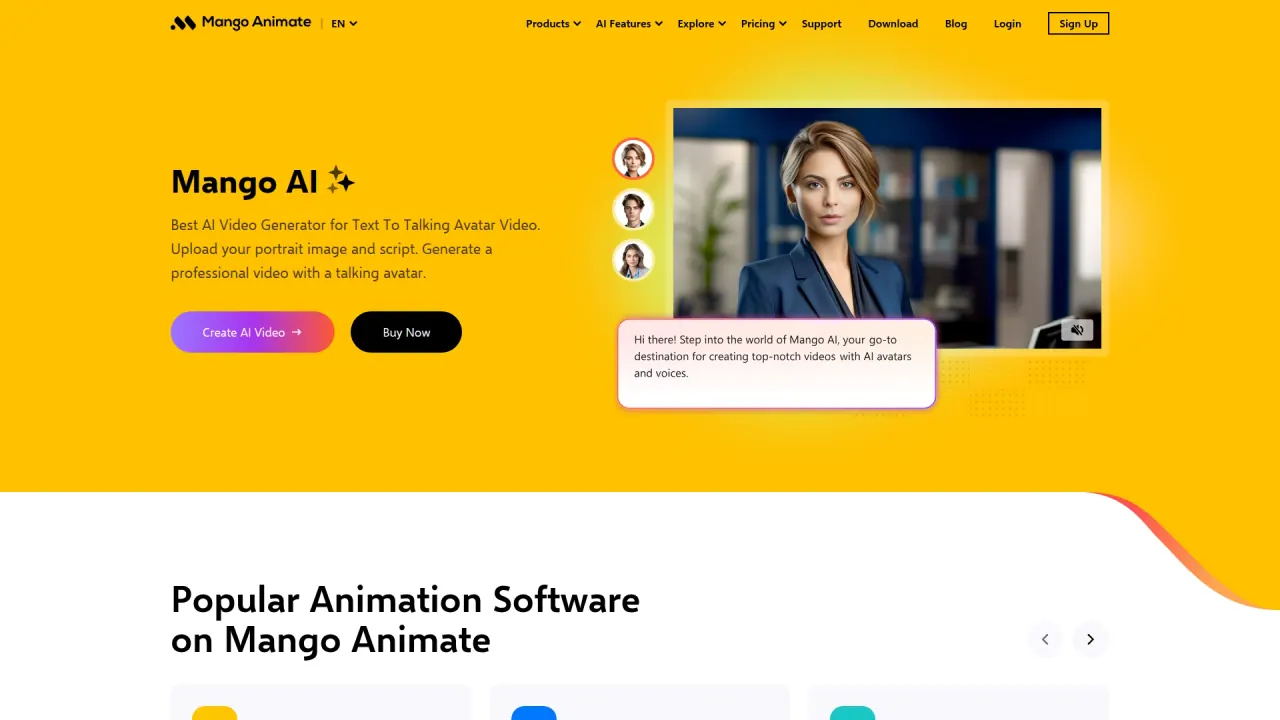
Mango Animate interface preview
Mango Animate logo

Mango Animate

Mango Animate pairs Mango AI, a credit-based online generator for talking photos, face swaps, voice cloning and text-to-video, with one-time-purchase desktop apps for explainer, whiteboard, character and presentation animation.

VideoVideo Generation#Text To Speech#Voice Cloning#Animation
Try for Free
Saves
Visits
Views
Pricing
Freemium
Published
Oct 6, 2026
Domain
mangoanimate.com
Community rating

Used this tool? Rate it

Rate this tool

Mango Animate Product Information

Try for Free
Tool Information
Saves
Visits
Views
Pricing
Freemium
Published
Oct 6, 2026
Domain
mangoanimate.com
Community rating

Used this tool? Rate it

Rate this tool

Featured Tools

Related Tools

Try for Free

What is Mango Animate?

Mango Animate is a video-creation brand with two product lines: Mango AI, a browser-based AI video generator that turns portraits, scripts and audio into talking-avatar clips, and a family of downloadable animation programs for explainer, whiteboard, character and presentation videos. The homepage presents the Mango AI video generator as a tool for text-to-talking-avatar video: you upload a portrait image and a script, and it generates a video with a talking avatar.

Mango Animate says its R&D team has served the creative industry since 2003, and it describes its products as a series of animation video software for animation, whiteboard, character and business videos. Both product lines are published under the copyright of WONDER IDEA TECHNOLOGY LIMITED, the company named in the site's copyright line.

The two halves are bought differently. Mango AI runs on monthly credit allowances with a Free tier and three paid subscriptions, while the desktop apps have free editions and one-time "perpetual" licences. Mango AI also includes face swap, voice cloning and photo effect templates that animate pictures of real people, so its content rules and data terms (see Limitations) matter as much as its features.

Core features

Mango AI talking-avatar tools

  • Talking Photo: an AI talking photo tool that animates a still portrait from typed text, uploaded audio or a recording. The generator offers two Mango AI models: Mango AI 1.0, described as the fastest with standard video quality, and Mango AI 2.0, described as the highest video quality with body movements.
  • AI avatars and templates: Mango AI says its avatars mimic human expressions with precise lip-syncing, and you can either pick a stock avatar or import your own portrait photo. Prebuilt video templates are also offered in vertical format.
  • AI voiceover: a built-in text-to-speech voice generator offers men's, women's and children's voices for narration.
  • Other avatar tools: the menu also lists Lip Sync Video, Talking Animals, Talking Cartoon, Singing Photos and Avatar Dialogue.

Generative video and image models

Beyond its own avatar models, Mango AI offers third-party generation models. The text-to-video page lets you pick among Seedance 1.0 Pro, Seedance 1.0 Pro Fast, Seedance 1.5 Pro, Seedance 2.0, Seedance 2.0 Fast and Vidu Q2, several of them labeled as producing audio. The site footer separately lists Seedance 2.0 as a video model and Nano Banana 2 and Seedream 5.0 Lite as image models.

Face swap, voice cloning and effects

  • Video Face Swap: you upload a source video and a target face photo. The upload box accepts a video of up to 15 seconds and 30MB, and the video should show only one face.
  • Voice Cloning: you upload or record a voice sample in mp3, wav or m4a format, with about 10 seconds recommended, then type a script for the cloned voice to read.
  • Effect templates: one-photo effects include AI Hug, AI Kissing, AI Twerk, AI Gender Swap and AI Bikini. The AI Bikini page asks for a clear single-person photo and markets "realistic AI bikini videos with full curves and breathtaking details".

Desktop animation apps

  • Mango AM (Animation Maker): built for explainer and motion-graphics videos, with more than 40 character types and a multi-track timeline that controls camera, background, foreground and animation layers.
  • Mango WM (Whiteboard Animation Maker): whiteboard animation software for doodle videos and hand-drawn animation.
  • Mango CM (Character Maker): turns static images into animated cartoon characters, using skeletal animation to rig 2D figures.
  • Mango PM (Presentation Maker): an animated presentation maker for interactive slide decks with 3D backgrounds.

Mango VM (a drag-and-drop video maker) and Mango TM (a text video maker) appear in the product menu as well.

Guide

Mango AI's walkthrough has three steps, and the Talking Photo page adds input rules:

  1. Select a video template, or open a tool such as Talking Photo and upload a portrait in jpg, jpeg, png or webp format with a clear front face and good lighting.
  2. Type or paste your text and choose an AI voice. Talking Photo also accepts an uploaded audio file, and its recorder allows up to 30 seconds of audio.
  3. Generate the video, then share it on social media or download it for offline use.

The desktop Mango AM follows a four-step flow instead: start a blank project or an online template, drag in images, shapes, SVG and SWF files, apply entrance, emphasis and exit effects, then publish the animation video to YouTube, as an offline video or as a GIF.

Use cases and examples

  • Business video: Mango Animate pitches Mango AI for explainer videos, training videos, promo videos and other business videos, and its sample gallery shows templates for annual reports, healthcare, training and product presentations.
  • Education: Mango Animate suggests AI avatars for onboarding videos, science videos and other educational videos.
  • YouTube channels: a help-center answer on monetization says legal and original videos made with Mango Animate can be uploaded to YouTube; it points to the paid Mango AM plans for HD output without the watermark.
  • Personal clips: for personal use, Mango AI suggests telling your own story with digital avatars, and its tool menu includes talking pets, singing photos and dance effects.

Who is it for

Mango Animate fits people who want presenter-style or novelty videos without filming, and buyers who prefer owning desktop animation software outright. A few conditions narrow that fit:

  • Commercial rights depend on the plan. The plan cards list a Personal License on Free and a Commercial License on Starter, Pro and Enterprise. The comparison table lists Personal Use for Free and Starter and Commercial Use only for Pro and Enterprise.
  • Teenagers need a guardian. The service requires everyone to be at least 13 before creating an account, and users between 13 and the local age of majority need a legal guardian to review and accept the terms.
  • Third-party review data is limited. As captured on October 6, 2026, a third-party review platform showed a company-level score of 4.7 from 107 reviews, with 11 reviews in the last 12 months and a note that the company had not invited reviews recently, so they may not be representative.

Platforms

ProductWhere it runsNotes
Mango AIWeb browserOnline tools; no installation
Mango AM, Mango PMWindows and MacDesktop downloads
Mango WM, Mango VM, Mango CMWindows onlyDesktop downloads
Mango Talking PhotoAndroid and iOSMobile app
Mango Face Swap VideoiOSMobile app

Mango AI runs in the browser; the Software Pricing page sums it up as "No download required." The Download Center lists Animation Maker and Presentation Maker for Windows / Mac. Whiteboard Animation Maker, Video Maker and Character Maker are listed for Windows only. Mango AM is not locked to a single PC: you can reinstall it on any Windows computer and log in to your account to use it.

On mobile, as captured on October 6, 2026, the Mango Talking Photo listing on Google Play showed WONDER IDEA as developer, 50K+ downloads, a 3.0 rating from 136 reviews and a Teen rating. The Apple App Store lookup data for the same app lists WONDER IDEA TECHNOLOGY LIMITED as seller, a Free price, a 17+ content rating and iOS 15.1 as the minimum version. A second iOS app, Mango Face Swap Video, also has a Free price and a 17+ rating in the lookup data; lookup ratings can differ from what the store page shows.

Pricing

Mango AI subscriptions

PlanMonthly billingYearly billingCredits
Free$0$0180
Starter$12.9 per month$89 billed yearly ($7.9/month)600 per month
Pro$19.9 per month$129 billed yearly ($10.9/month)1200 per month
Enterprise$99.9 per month$599 billed yearly ($49.9/month)6000 per month

Higher tiers also raise per-video limits. Text input runs from up to 300 words per video on Free to up to 1000 words per video on Enterprise, with Avatar Dialogue excepted. The avatar library grows from 10 avatars at 720P on Free to 150+ avatars at 1080P on Enterprise. Free uses standard voices, while the paid plans list premium voices.

Credits are not a flat per-video count: each video consumes a different number of credits, shown as "Credits Required" on each generation page. The Free plan's 180 credits do not apply everywhere, because it gives 0 credits for effects, text-to-video, image-to-video, reference-to-video and the AI Ad Generator. Paid plans can buy additional credits, while Free users cannot. To cancel, go to Billing > Subscription > Cancel Subscription, or contact customer service.

Desktop software (one-time purchase)

The Software Pricing page groups the desktop apps under "One-Time Payment" and shows Mango WM at $59, Mango VM at $59, Mango AM at $67, Mango CM at $139 and Mango PM at $49. The individual plan pages show higher figures for the same apps, so the pages are not consistent. The Mango WM plan page lists Professional at $99 and Enterprise at $299 as perpetual licences, with no watermark and video quality of 720P and 1080P / 2K / 4K respectively. Its Free edition costs $0 but adds a Mango Animate watermark and caps video quality at 576P.

The Mango AM plan page, priced in U.S. dollars, lists Professional at $99 per perpetual licence and Enterprise at $299, each beside a struck-through yearly figure whose meaning the page does not explain. The Mango AM product page instead shows "Only $67" next to $99 for a one-time payment. Bundles are also offered: four Enterprise editions (AM, WM, PM and CM) are listed at $449 against a $1096 total, with a "Buy for Windows" button.

Mango Animate alternatives

  • HeyGen covers the same talking-avatar ground. Its Free plan allows 3 videos per month with videos up to 1 minute, and its paid Creator plan lists credit rollovers, whereas unused Mango AI credits reset every month.
  • VideoScribe competes with Mango WM for whiteboard animation but is sold differently: its plans are recurring subscriptions charged monthly or annually, and videos made during its 7-day free trial carry a VideoScribe watermark. Mango WM instead pairs a free edition with perpetual licences.

Limitations

Plan and credit limits

  • Credits expire monthly. Unused credits are not carried over to the next month, and they reset every month from your subscription date.
  • Free-tier face swap is capped. Video Face Swap on Free is limited to 3 times per day with clips up to 15s and 30MB, while paid plans allow up to 90s and 50MB per video.
  • Audio uploads are limited. The Free plan allows 2 audio files in total, each up to 1 minute, while Enterprise allows up to 15 minutes per audio file.
  • Desktop free editions are restricted. Free Mango AM users get an embedded watermark in published videos, plus limited video assets and lower video resolution.
  • Free exports are watermarked. The Free Mango AI plan exports with a Mango AI watermark.

Refunds and billing disputes

Mango Animate offers a free version so that you can test the product before paying, and its terms say this is why it does not generally offer refunds. Cancelling does not refund fees for a subscription period that has already begun. Any charge dispute must be submitted in writing within 30 days of the charge, and any refund that results is at the company's discretion.

Content rules

The terms prohibit storing or posting adult content, defined to include all pornographic material. They also prohibit uploading unauthorized personally identifiable information, including unauthorized personal images. Face swap, voice cloning and the photo effect templates all take real people's photos or voices as input.

Privacy and content rights

  • Ownership: you retain full ownership of what you upload and what you generate, which the terms call User Submissions and User Created Art, while granting Mango Animate a worldwide, royalty-free licence over content you display or publish through the service.
  • Model training: the privacy policy says User Submissions are transferred to in-house servers for content generation and model fine-tuning. It also says you may opt out of processing for AI model research and development by contacting the company.
  • Face data: Mango Animate says it does not collect biometric data and only collects approximate location data for the lips, face and eyes in an image. Its face-swap section says original face data and uploaded content are permanently deleted immediately after rendering. The AI-services section instead says selected User Submissions and creations are retained while your account is active, so the two sections describe upload retention differently.
  • No data sales: the company states that it will not sell any of your data, including your User Submissions.
  • Search visibility: under the terms, content you upload is indexed by search engines by default, and deleted content may still appear in search results.
  • Jurisdiction: the operating company is incorporated under Hong Kong law. The policy states that personal data is processed in compliance with the GDPR. The official pages checked do not mention any security certification.

FAQ

Q1. Is Mango Animate free?

Partly. Mango AI's Free plan gives 180 credits but no credits for text-to-video, image-to-video or effects, and exports carry a watermark. The desktop apps have free editions with a watermark and lower resolution.

Q2. Can I use Mango AI videos commercially?

Not on Free, which is limited to personal use. Pro and Enterprise are commercial throughout; the pricing page labels Starter inconsistently.

Q3. Which Mango Animate apps run on a Mac?

Mango AM and Mango PM have Mac builds. Mango WM, Mango VM and Mango CM are Windows-only, and Mango AI runs in a web browser.

Q4. Does Mango AI use my uploads to train its models?

The privacy policy says User Submissions go to in-house servers for content generation and model fine-tuning, and that you may opt out of processing for AI model research and development by contacting the company.

Q5. What payment methods are accepted?

Mango AI accepts major credit and debit cards, PayPal and wire transfer, with wire transfers arranged through the contact page.

Q6. Can I get a refund?

Generally no. Fees are non-refundable except where the terms say otherwise, and disputed charges must be raised within 30 days.

Q7. How do I delete my account?

The help center asks you to contact customer service to delete a Mango Animate account. The privacy policy adds that some information may stay in backups for a time after deletion.

Know a Similar Tool?
If you know other great AI tools, feel free to submit them to us