
Toolso.AI
Toolso.AI
All ToolsCategoriesTrendingLatest ToolsPricingBlog
Toolso.AI
Toolso.AI
Toolso.AI
Toolso.AI

Discover the best AI tools to boost your productivity

GitHubGitHubTwitterX (Twitter)YouTubeYouTubeTikTokEmail

Popular Categories

  • AI Writing
  • AI Image
  • AI Video
  • AI Coding
  • More Categories

Explore

  • Latest Tools
  • Popular Tools
  • More Tools
  • Submit Tool
  • Pricing

About

  • About Us
  • Contact
  • Blog
  • Changelog

Legal

  • Cookie Policy
  • Privacy Policy
  • Terms of Service
  • Refund Policy
© 2026 Toolso.AI All Rights Reserved
Limited timeLimited-time offerFeatured Listing24h priority review · No backlink · 30 days featured$29.90then $59.90Price rises to $59.90 after Oct 31Ends in--:--:--Submit now
  1. Home
  2. All Tools
  3. Video
  4. Animaker
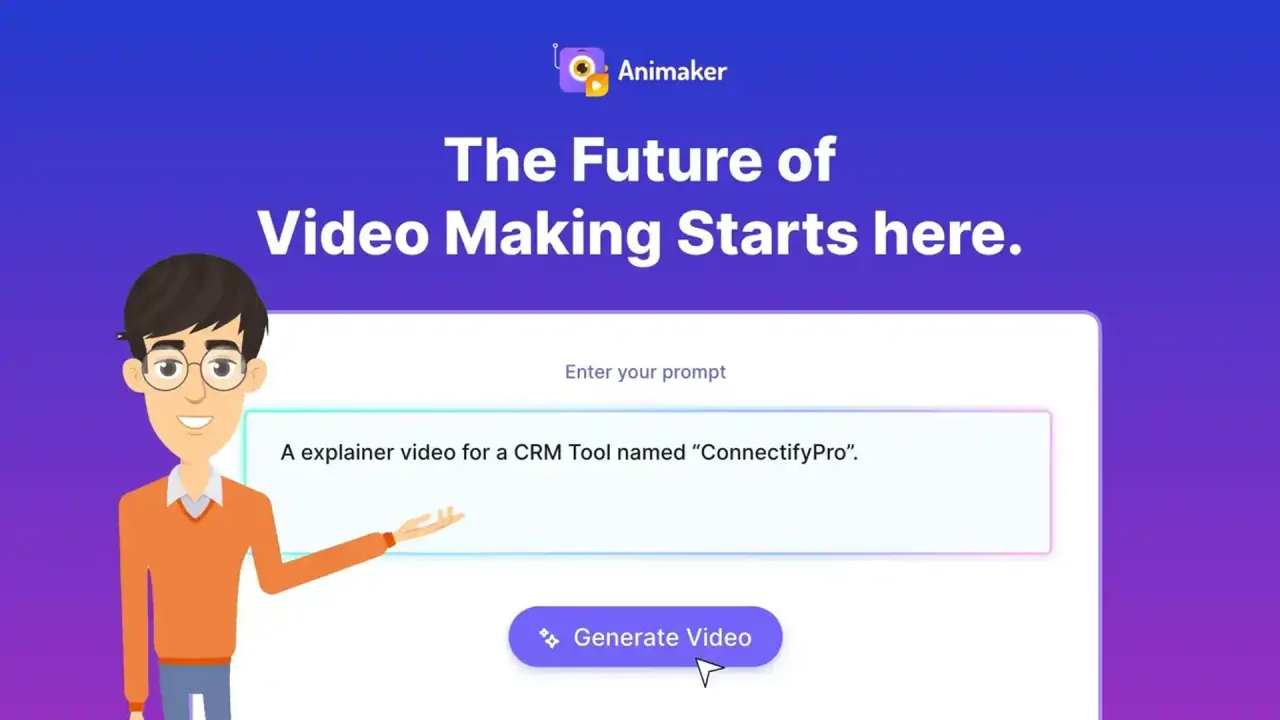
Animaker interface preview
Animaker logo

Animaker

Animaker turns text prompts into editable animated videos with a character builder, AI voiceovers, subtitles and translation, aimed at trainers, HR teams and marketers.

VideoVideo Generation#Animation#Explainer#Text To Video
View Pricing
Saves
Visits
Views
Pricing
Paid
Published
Oct 5, 2026
Domain
animaker.com
Community rating

Used this tool? Rate it

Rate this tool

Animaker Product Information

View Pricing
Tool Information
Saves
Visits
Views
Pricing
Paid
Published
Oct 5, 2026
Domain
animaker.com
Community rating

Used this tool? Rate it

Rate this tool

Featured Tools

Related Tools

View Pricing

What is Animaker?

Animaker is an online animation maker that turns a single text prompt into an animated video, and the company pitches it at people with no prior animation or design experience. The generated draft can then be reworked in a scene-based editor with characters, stock assets, voiceovers and subtitles.

The service is run by Animaker Inc., a company headquartered in the United States whose operations are mostly in the United States and India. Its homepage claims 35,000,000+ users, a figure published by the company itself.

Free exports carry an Animaker watermark, and the pricing comparison marks commercial rights only for the Pro and Enterprise tiers rather than for every paid plan.

Core features

Animaker pairs an AI generator that produces a complete first cut with a manual editor for refining it.

Generation and editing

  • Editable AI drafts: A generated video comes with scenes, characters, voiceover, lip sync and transitions, and Advanced Edit opens it up for detailed changes.
  • Gen AI styles: The AI Video Generator currently offers four Gen AI styles: Cinematic, 3D, 2D vector and Realistic.
  • Image output: Choosing Image under the Generative Type setting turns a prompt into a still image instead of a video.
  • Templates: Thousands of video templates are available, and Animaker says a professional-quality animated video can be made from them in under 5 minutes.
  • Whiteboard and infographic videos: Whiteboard animation and infographic videos sit alongside text-to-animation, together with live collaboration and 4K export.

Characters and assets

  • Character builder: The custom character builder is presented as able to produce billions of unique animation characters, which teams can style for their brand.
  • Stock library: The asset library is described as 100M+ stock media, 70K+ icons and 30K+ music tracks and stickers.

Both are metered: each plan caps how many custom characters can be built, and premium stock draws on monthly asset credits.

Voice, subtitles and translation

  • Subtitles and voices: The homepage lists AI subtitles in 130+ languages, described as 99% accurate, plus 1,800+ voices across 200+ languages and accents.
  • Video translation: Finished animation videos can be translated into 100+ languages with one click.
  • Voice providers: The features page credits voice providers including ElevenLabs, Microsoft and Google, citing 1000+ voices in 100+ languages.

The language and voice counts are not consistent across Animaker's own pages. Besides the two figures above, the homepage FAQ says the voice generator covers 180+ languages and accents with up to 99% accuracy.

Guide

Making a video from a prompt

  1. Pick an animation category such as explainer, educational, intro or product demo, then type the idea in plain language or start from a sample prompt.
  2. Answer the follow-up questions Animaker asks in a short conversation so the generator understands the intended video.
  3. Review the generated draft and open Advanced Edit for detailed changes.
  4. Download the result as MP4, GIF or WebM at a resolution between SD and 4K, or publish it straight to social media channels; the maximum resolution and, on lower tiers, the available formats depend on the plan.

Publishing to YouTube with premium music

  1. Connect the YouTube channel you will publish to with your Animaker account.
  2. Upload the video directly from Animaker to that channel.

A video with premium tracks that is downloaded first and then uploaded to YouTube by hand will be flagged for copyright, because the licensing API does not work through that route.

Exporting for a learning management system

Animaker videos can be exported directly as SCORM packages for use in an LMS.

  1. Open the Download button in the top right corner and select Download Video.
  2. Choose SCORM from the file type dropdown and set the download quality.
  3. Confirm the download and wait for the video to render.

Animaker use cases and examples

  • Training and course content: For L&D course creators, Animaker frames animated video as a way to simplify complex concepts and make courses more engaging; the SCORM export connects this use case to an LMS.
  • HR communication: Onboarding, orientation and compliance videos are the HR use cases the company highlights.
  • Animated explainer video for marketing: Product descriptions, ad copy or campaign ideas can be turned into promotional videos, and explainer and product demo are among the prompt categories.
  • Personal videos: Birthday wishes, wedding invites and personal video resumes are listed as personal uses.

One named example on the homepage is a testimonial attributed to a global brand manager at GSK, who says the team created 2000+ videos with Animaker and saved $1.4 million. It is a customer quote hosted by Animaker, not an audited result.

Who is it for

Animaker positions itself for marketers, trainers and Fortune 500 teams that produce explainer, training, promo and onboarding videos at scale.

A reasonable fit for:

  • Trainers, HR staff and marketers without animation skills who start from prompts or templates.
  • Organisations that need shared production: the Enterprise plan adds team seats, real-time comments and task assignments, a company-wide resource library and admin controls.

A weaker fit for:

  • Anyone who must use videos commercially on a low budget. In the pricing comparison table, commercial rights show a dash for Free and Starter and Yes only for Pro and Enterprise.
  • Companies that require single sign-on on a smaller plan, because the comparison table marks SSO only for Enterprise.
  • Minors signing up on their own. The terms require users to have reached the age of majority where they live (typically 18 in the United States), or a parent or legal guardian must accept the agreement on the minor's behalf.

Platforms

  • Web: The main editor runs in the browser, and an account created on the Animaker web app logs in with the same credentials on the iOS app.
  • iOS: The US App Store lookup lists Animaker: AI Animation Maker from Animaker Inc as a free download that requires iOS 16.6 or later and carries a 4+ content rating. As captured on October 5, 2026, the same lookup showed an average of about 4.7 from 1,636 ratings; the lookup's rating fields can differ from what the store page displays.
  • Android: An Android app is offered for making animated videos on the go. As captured on October 5, 2026, its Google Play listing showed in-app purchases, a 3.9 rating with 575 reviews in the header and 559 in the ratings breakdown, an Everyone rating and 50K+ downloads.
  • Zoom: Animaker can connect to a Zoom account and pull in Zoom recordings for editing.

Pricing

Animaker pricing is listed in US dollars, with a free plan, self-serve paid plans and a custom-priced Enterprise tier. The pricing page opens in annual billing mode; the prices and allowances here reflect that default view as captured on October 5, 2026.

  • Starter: The Starter card shows $45/mo struck through beside $25/mo, with an active price of $300 per year and the note "Billed yearly."
  • Pro: The Pro card shows $79/mo struck through beside $43/mo, with an active price of $516 per year, also billed yearly.
  • Enterprise: Enterprise is custom-priced and adds 5000 Gen AI asset credits a year plus commercial and reselling rights.
PlanDownloadsMax qualityVideo lengthAI video creditsGenerative video
Free3/moDash in tableNot listed300/moDash in table
Starter10/moFHD15 min3000/mo90 sec/mo
Pro30/mo2K30 min5000/mo180 sec/mo
EnterpriseUnlimited4KUnlimitedCustom6000 sec/yr

Annual billing is available on every paid plan, and the pricing FAQ says it saves up to 45% compared with paying monthly; the page does not label what the struck-through figures represent. Starter also includes 200 Gen AI asset credits a month beyond the allowances in the table. Pro adds 300 Gen AI asset credits a month, commercial rights, version history and multiple download formats. Enterprise's unlimited downloads carry an asterisk that the captured page does not explain.

The free plan lets users create and download animated videos with basic animation tools, limited premium assets and watermarked exports. In the comparison table, the Free column shows a dash for video quality.

A Basic plan appears in FAQ text but not in the plan cards captured. The homepage FAQ lists four premium plans: Basic, Starter, Pro and Enterprise. The pricing FAQ puts Basic at $15/mo as the cheapest paid plan and says it already removes the watermark, which only free exports carry.

Overages and credits

  • Extra downloads past the monthly limit cost $15 each on Starter and $10 each on Pro.
  • Premium stock is capped by monthly asset credits (5 on Free, 20 on Starter, 45 on Pro); once those run out, each premium image costs $1 and each premium video asset $5 per project.
  • The pricing page reviewed does not explain how many AI video credits a single generation consumes.

Billing, cancellation and refunds

  • Payment is by Mastercard, Visa, Amex, Discover or JCB card.
  • Paid plans renew automatically and must be cancelled before the renewal date to avoid the next charge.
  • Cancellation is done from My Plan, and the plan stays active until the end of the current billing period.
  • The terms state that fees are paid in advance and are non-refundable, with no refunds for partial months, upgrades or unused months.
  • The one refund the terms describe applies when the service becomes unavailable because of technical problems or access is unreasonably delayed; in that case a refund of the price paid is the sole remedy.

Animaker alternatives

An independent software directory and a review platform's related-companies list both place Vyond next to Animaker, and the directory also names VideoScribe among its top competitors.

  • Vyond: Vyond describes itself as an enterprise-ready video creation platform, and its Vyond Go tool turns an idea, a document or a URL into a video. That makes it a candidate for teams whose source material is existing documents.
  • VideoScribe: VideoScribe concentrates on whiteboard animation and pitches it at learning and development, HR and marketing teams, the same audiences Animaker addresses with prompt-based generation and character animation.

Within this group, Animaker's case rests on its prompt-to-animation generator, its custom character builder and a free plan with watermarked exports.

Limitations

Usage rights by plan

  • Free plans are limited to personal and non-commercial use, and free users may not distribute their videos for revenue.
  • Monetization rights on platforms such as YouTube, Instagram and TikTok come only with the Pro or Enterprise plan.
  • Reselling Animaker videos to a third party requires the Enterprise plan.
  • Commercial use of content from the generative AI features also depends on the plan.
  • Third-party stock material grants no ownership, and it may not be used on a stand-alone basis or in logos, trademarks or other brand identifiers.
  • Animaker's music may not be used in TV shows, feature films, radio or podcast productions or traditional paid-media commercials; online ads such as pre-, mid- and post-roll are carved out of that ban.

Export and account rules

  • An export can be held "Under Review" when a spam control algorithm flags a possible terms violation; Animaker then emails for project details and releases the export after verification.
  • After a downgrade, exported videos and projects stay accessible, but premium assets from the previous plan no longer are.
  • The AI terms bar generating graphic nudity or pornography, hateful material, gore and false or deceitful material, among other categories.
  • Animaker warns that AI output may not always be accurate and that users are solely responsible for content created with Animaker AI.

Independent reports

  • In an independent media review published on 20 February 2023, voiceovers played a few seconds late during in-editor playback every time, although they were positioned correctly once rendered and exported.
  • The same review advised against using more than five characters in a scene because it risks more lag, and listed "laggy" performance among its reasons to avoid the service. The test predates the current AI features.
  • On a third-party review platform, the company-level profile showed a 4.5 rating from 645 reviews as captured on October 5, 2026, with 73% five-star and 14% one-star reviews.
  • That platform's AI summary of 125 recent reviews says most reviewers had a great experience, while some noted limited digital assets, no free trial before subscribing, strict refund policies and unexpected resolution restrictions.

Privacy and data

  • Animaker states that it does not sell personal information and gives access only to sub-processors that help deliver the service.
  • Customer data collected includes name, email address, phone number, business address, title, IP address and employer.
  • Services and data are hosted on AWS in the us-west-2 and us-east-1 regions and encrypted at rest with AES-256. Animaker says it is ISO 27001:2022 certified.
  • User data is deleted on request unless law or legitimate business purposes require keeping it. Content users have posted may still remain on Animaker after they leave.
  • Posting content grants Animaker and its partners and affiliates a non-exclusive, sub-licensable, transferable, worldwide, royalty-free license to process it for hosting, indexing, caching, tagging and all other lawful purposes.
  • The AI terms forbid using Animaker's AI output to create, train, test or improve machine learning or AI systems. Animaker may also publish details showing that content was AI-generated. Whether user uploads are used to train AI models is not stated in the policy pages reviewed.
  • The privacy policy promises breach notification within 72 hours.
  • The website and app are not meant for children under 13, and Animaker says it does not age-screen.
  • The Android listing's developer-provided data safety section says no data is collected or shared with third parties, which differs from the data categories in the privacy policy.

FAQ

Q1. Does Animaker's free plan add a watermark?

Yes. Free exports carry the Animaker watermark, and every paid plan from Basic upward exports without it. The free plan also caps downloads at 3 per month in the comparison table.

Q2. Can I monetize Animaker videos on YouTube?

Only on the Pro or Enterprise plan, which carry monetization rights. Free plans are limited to personal, non-commercial use, and the comparison table shows a dash for commercial rights on Starter.

Q3. Does Animaker offer refunds?

The terms describe fees as non-refundable, including partial or unused months. The exception they name is a refund when the service becomes unavailable because of technical problems or access is unreasonably delayed.

Q4. Does Animaker use my videos to train AI?

The privacy and data policy pages reviewed do not say whether user content is used for AI training. Separately, the AI terms prohibit users from using Animaker's AI output to train or improve their own AI systems.

Know a Similar Tool?
If you know other great AI tools, feel free to submit them to us