
Toolso.AI
Toolso.AI
All ToolsCategoriesTrendingLatest ToolsPricingBlog
Toolso.AI
Toolso.AI
Toolso.AI
Toolso.AI

Discover the best AI tools to boost your productivity

GitHubGitHubTwitterX (Twitter)YouTubeYouTubeTikTokEmail

Popular Categories

  • AI Writing
  • AI Image
  • AI Video
  • AI Coding
  • More Categories

Explore

  • Latest Tools
  • Popular Tools
  • More Tools
  • Submit Tool
  • Pricing

About

  • About Us
  • Contact
  • Blog
  • Changelog

Legal

  • Cookie Policy
  • Privacy Policy
  • Terms of Service
  • Refund Policy
© 2026 Toolso.AI All Rights Reserved
Limited timeLimited-time offerFeatured Listing24h priority review · No backlink · 30 days featured$29.90then $59.90Price rises to $59.90 after Oct 31Ends in--:--:--Submit now
  1. Home
  2. All Tools
  3. Productivity
  4. Dr.Fone
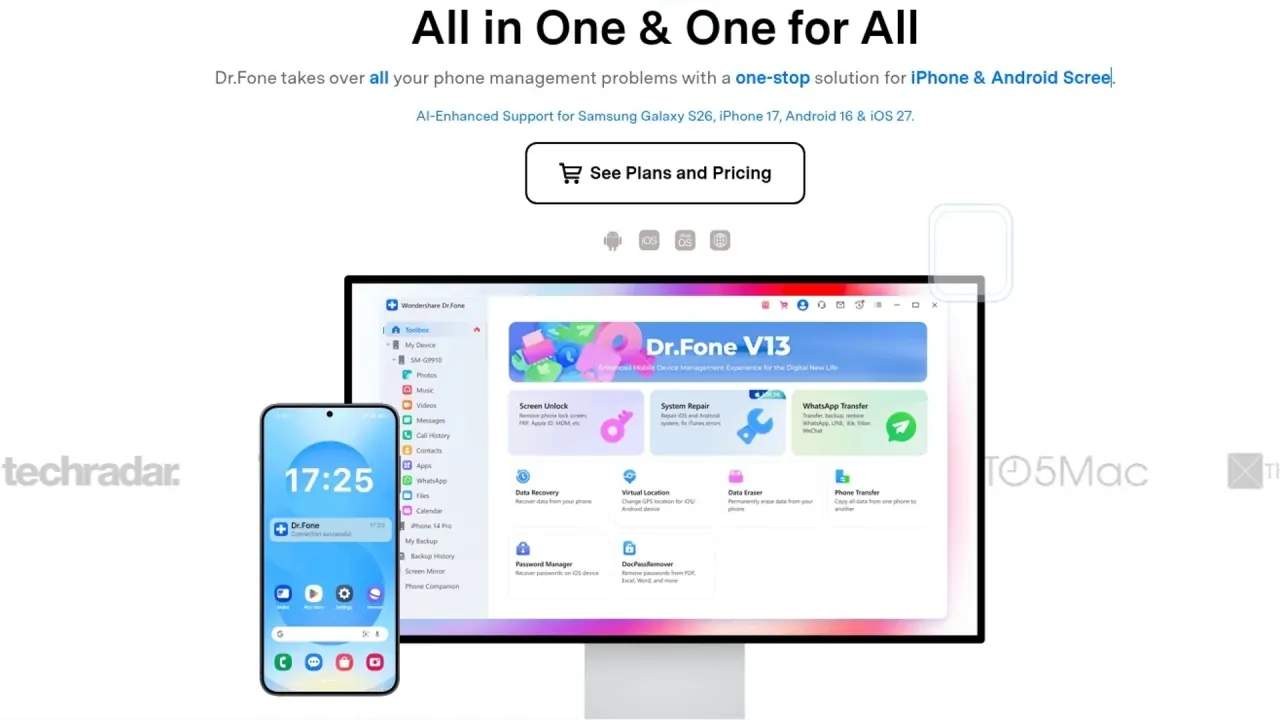
Dr.Fone interface preview
Dr.Fone logo

Dr.Fone

Wondershare's desktop toolkit for Windows and Mac that unlocks screens, bypasses FRP and Activation Lock, repairs iOS and Android, recovers deleted data and moves WhatsApp chats. Scans are free; finishing a task needs a paid module licence.

ProductivityAI Tool#Whatsapp#Photo Enhancement#Desktop Application
Try for Free
Saves
Visits
Views
Pricing
Freemium
Published
Oct 3, 2026
Domain
drfone.wondershare.com
Community rating

Used this tool? Rate it

Rate this tool

Dr.Fone Product Information

Try for Free
Tool Information
Saves
Visits
Views
Pricing
Freemium
Published
Oct 3, 2026
Domain
drfone.wondershare.com
Community rating

Used this tool? Rate it

Rate this tool

Featured Tools

Related Tools

Try for Free

What is Dr.Fone?

Dr.Fone is Wondershare's phone repair and data toolkit: desktop software for Windows and Mac that connects to an iPhone, iPad or Android device to remove screen locks, fix system faults, recover deleted data, move chats between phones and wipe a device before resale. Wondershare describes Dr.Fone as a one-stop solution that takes over phone management problems. On Google Play, the Android companion app is published by Shenzhen Wondershare Software Co., Ltd.

The product is sold as separate modules or as a Full Toolkit. Downloading and scanning cost nothing, but completing the job — exporting recovered files, finishing a transfer or removing a lock — requires a paid licence for that module.

Several headline features make Dr.Fone phone unlock software for Google FRP, iCloud Activation Lock, Apple ID and MDM locks. Wondershare frames them for legitimate owners and personal use, and some of them erase the phone.

Core features

Dr.Fone – Full Toolkit includes everything in Dr.Fone Basic plus Screen Unlock, Data Recovery, Virtual Location, WhatsApp Transfer, Phone Transfer, Data Eraser, System Repair and Password Manager. Dr.Fone Basic on its own transfers, manages, backs up and restores data across devices and mirrors a phone screen to a computer.

All modules run from one installer per desktop platform: Windows uses one package and Mac a separate one, and each licence then unlocks a single module or the whole toolkit. That structure is what lets buyers pay only for the one job they need.

Screen Unlock for iPhone and iPad

  • Lock types: one module covers screen passcode removal, Apple ID removal, Activation Lock, MDM, Screen Time and supported SIM-lock scenarios.
  • MDM profiles: the Remove MDM feature is described as removing MDM profiles without data loss or jailbreaking.
  • Other iOS tools: the same licence also removes Screen Time passcodes and iTunes backup encryption passwords and turns off the iPhone camera shutter sound.

Screen Unlock for Android

  • Screen locks: removes pattern, PIN, password, fingerprint and face locks on supported phones.
  • Google FRP: screen-lock removal and Google FRP removal are separate functions, so clearing a screen lock does not automatically clear FRP after a reset.
  • Samsung Snapdragon: Wondershare claims a 100% success rate for FRP bypass on Samsung Snapdragon devices using an EDL cable; no independent test of that figure was found in this round.
  • Coverage: Wondershare claims support for 32 Android brands and more than 2,000 phone and tablet models.
  • Xiaomi Mi account: Mi account locks go through the separate Dr.Fone Online Unlock service, not the desktop Android module.

Recovery, repair and transfer

  • Phone Transfer: moves data between iOS and Android devices.
  • Backup: wireless backup covers up to 24 data types, and incremental backup copies only new or changed items.
  • System Repair (Android): fixes Android system problems, opens Samsung Download Mode and repairs Samsung, Xiaomi, Redmi and POCO devices.
  • Data Recovery (iOS): recovers deleted photos, WhatsApp chats, messages and more from iOS devices.

Utilities

  • Password Manager: iOS only, because it is built to recover saved passwords on iPhone, iPad or iPod touch.
  • Virtual Location: changes the GPS location reported by iOS and Android devices.
  • Online Unlock: a web service for Samsung FRP removal that needs only the phone's IMEI number and no physical connection.

AI features

Wondershare markets an "AI-Powered FRP bypass tool" for Android 16 and Samsung S26/S25 devices. Wondershare also advertises "AI-Enhanced Support" for the Samsung Galaxy S26, iPhone 18 Pro, Android 16 and iOS 27. The pages checked in this round do not explain what the AI component does during unlocking. On mobile, the Android app uses AI to improve the clarity of blurry or low-resolution photos.

Guide

Every desktop module follows the same try-then-activate pattern:

  1. Install Dr.Fone on a Windows PC or Mac.
  2. Connect the phone by USB. An independent 2024 review notes that the phone must be plugged in, unlocked and set to trust the computer before any tool works.
  3. Run the free part of the chosen module: the free trial lets users scan, preview, back up and check compatibility in selected modules before paying.
  4. Activate the module to recover or export files, restore a backup, complete a transfer, run a full repair or finish an unlock.

For an Android screen lock, the workflow is to connect the phone to a computer, choose the device and the unlock mode, and follow the on-screen instructions.

A few utilities stay free after installation. Examples include one-click Recovery Mode for an iPhone stuck on the Apple logo, Samsung Download Mode, a HEIC-to-JPG converter and a root checker for Samsung devices.

Dr.Fone use cases

Wondershare ties individual modules to a handful of recurring phone situations:

  • Checking a used iPhone before buying: the phone verification report lists system version, storage condition, battery life and other details, along with a score.
  • Second-hand phone still tied to an old account: Wondershare pitches iCloud Activation Lock removal as a way to make second-hand phone sales usable for new owners.
  • Wiping a phone before selling it: Data Eraser permanently erases iOS or Android data, which Wondershare links to device resale value.
  • Getting data off a broken Android: Data Recovery targets lost Android files and WhatsApp data, including from broken phones.
  • Rolling back an iOS update: System Repair for iOS claims to fix 150+ iPadOS and iOS issues and to upgrade or downgrade iOS without data loss.
  • Moving chats to a new phone: WhatsApp Transfer backs up, restores and transfers WhatsApp messages and files, and also handles Viber, LINE and WeChat.

Who is it for

Wondershare frames Dr.Fone mainly around individual phone owners.

  • Owners locked out of their own phone: the iOS Screen Unlock module is intended exclusively for personal use, and commercial or illegal use is prohibited.
  • Teams managing many phones: business licences are available for 6–10, 11–15 or more devices; that sits alongside the personal-use wording on the iOS Screen Unlock module, which the pages checked do not reconcile.
  • Students and schools: Wondershare lists education and student discounts and academic licences.
  • Not a fit for unclear ownership: the Android app offers unlocking of supported Android devices for device owners, and the FRP tools are framed the same way.

Platforms

Dr.Fone is primarily desktop software, with separate mobile apps and web services covering a narrower set of tasks.

  • Desktop: Windows 11, 10, 8.1, 8 and 7, or macOS 10.13 or later, with a 1 GHz processor, 7 GB of free disk space and 1 GB of RAM (2 GB recommended).
  • Phones: Android 5.0 or later and iOS 5.0 or later, with iOS 26 and Android 16 named as the latest supported versions.
  • Interface languages: 13, including English, German, French, Spanish, Portuguese, Russian, Arabic, Japanese, Korean and both Chinese scripts.
  • Mac gaps: Snapdragon FRP removal is available on Windows now, with Mac support listed as coming soon.
  • Android app: Dr.Fone: Photo & Data Recovery bundles data transfer, chat transfer, deleted-data recovery, system repair, device unlock, a privacy space, virtual location and AI photo enhancement.
  • Store signals: the Android app showed 10M+ downloads and a 3.8-star rating from roughly 25,000 reviews as captured on October 2, 2026.
  • iOS app: a separate Dr.Fone app for iOS focuses on cleaning iPhone storage and blocking apps.

Pricing

US-dollar list prices for Windows licences, as captured on October 2, 2026:

PlanMonthlyAnnualPerpetual
Full Toolkit$79.95$99.95$115.95
Dr.Fone Basic$29.95$39.95$49.95
Screen Unlock (Android)$29.95$39.95$49.95
Screen Unlock (iOS)$34.95$49.95$59.95

Each price sits next to a higher struck-through figure (for the Full Toolkit, $99.95, $139.95 and $162.95), and the pages checked do not say what that higher figure represents.

  • Renewal: the annual plan auto-renews and includes software updates, major upgrades and technical support during the subscription; its auto-renewal can be cancelled at any time.
  • Perpetual scope: a perpetual licence covers the purchased major version, so updates from 13.1 to 13.9 are included while moving from version 13 to 14 may require an additional purchase.
  • Device limits: Wondershare's licence FAQ says one licence activates up to 2 computers and 5 mobile devices. The Full Toolkit product page instead lists 1–5 mobile devices and 5 PCs, so the two pages disagree for the Toolkit.
  • Online Unlock: plans for FRP, SIM, iCloud and IMEI services start from $0.99.
  • Toolkit checkout deal: an optional deal takes 10% off the Full Toolkit when the buyer adds a Dr.Fone App subscription on a 3-day free trial, with no charge before Day 3.
  • Payment and support: payment options vary by country, from Visa, Mastercard and American Express in the US to Alipay or WeChat Pay in China. Support runs over live chat and email with responses guaranteed within 24 hours.

Dr.Fone alternatives

For phone data recovery alone, independent roundups of tested iPhone recovery apps list Dr.Fone next to recovery-focused tools. Two of them differ from Dr.Fone mainly in what the free version allows:

  • Stellar Data Recovery for iPhone: recovers lost data from the iPhone itself and from iTunes and iCloud backups. Its free trial version scans and previews lost data before purchase.
  • EaseUS MobiSaver: the Free edition recovers one photo or video and five contacts each time, while the Professional edition removes those caps.

Dr.Fone's recovery trial scans and previews files but exports nothing until the module is activated, whereas MobiSaver Free allows small recoveries at no cost. Dr.Fone's case rests on bundling recovery with unlock, repair and transfer modules under one licence.

Limitations

Lock removal conditions

  • Ownership: Wondershare's FRP guidance says to remove FRP only on a device you legally own and warns against unverified APKs and cracked files.
  • Data loss on Android: data-preserving screen-lock removal is limited to select supported Samsung models, and other device workflows erase data.
  • Resets on mobile: in a small number of cases, Android security design may require a reset to remove the lock.
  • Activation before results: the iPhone unlock trial only reviews supported unlock options; activation is required to complete an iPhone unlock.

Conflicting compatibility claims

Wondershare's compatibility table for iCloud Activation Lock lists iPhone XS through iPhone 17 models as supported on iOS 18.6–18.7.1 and iOS 26.0–26.1. The homepage, by contrast, says Activation Lock bypass fully supports the latest iPhone 18 Pro and iOS 27, so the pages give different support ranges.

Independent findings

  • Stability: a 2024 independent tech-media review found that the data recovery tool crashed more than once during its initial scan on an M1 Pro MacBook Pro, and that the initial scan took around 80 minutes.
  • Ratings: a third-party review platform showed a 4.2 score from 4,986 reviews of the Wondershare Dr.Fone business profile as captured on October 2, 2026, with 69% five-star and 19% one-star ratings; the company invites its customers to review there.
  • Recurring complaints: the same platform's automated summary of 664 recent reviews notes difficulties obtaining refunds after software failures and advertised features not working on some devices.

Refunds and renewals

  • Short window: the Dr.Fone series has a refund window of 7 days from the initial payment, compared with 30 days for most other products bought directly from Wondershare.
  • Money-back terms: Wondershare's 7-day money-back guarantee applies if the product does not perform as intended, subject to the refund policy.
  • Excluded reasons: refunds based solely on change of mind or unmet subjective expectations are not eligible.
  • Cancellation timing: Wondershare asks subscribers to cancel at least 24 hours before the billing period ends to avoid the next charge.
  • App-store purchases: anything bought through the Apple App Store, Google Play or a reseller is refunded by that seller, not by Wondershare.
  • Checkout add-ons: optional services such as Extended Download Service or Download Insurance Service qualify for a refund when bought without realizing they were optional. The 2024 independent review also found a removable download-insurance add-on at checkout.

Privacy and data handling

Data handling differs between the desktop software, Wondershare's account services and the Android app.

  • Local processing: Wondershare states that the desktop software scans and displays phone data on the PC or Mac and does not upload it to the cloud.
  • Policy scope: Wondershare's privacy policy covers the Dr.Fone application on iOS, Android, Windows and Mac.
  • Device identifiers: that policy lists device and network data such as IMEI, Android ID, OAID, device model and IP address among the data it may collect.
  • Model training: usage analysis for improving services is marked as not used for AI model training; the pages checked do not address training for Dr.Fone's own AI features.
  • Android app disclosures: the Google Play listing says the app may share files and docs with third parties and may collect location, photos and videos and five other data types, with data encrypted in transit and deletion requests accepted.
  • Vendor security badges: the Dr.Fone website displays "Zero-Data-Retention Architecture", "GDPR Compliant" and "AES-256 Encryption" badges, which are vendor statements rather than audited findings.

FAQ

Q1. Is Dr.Fone free?

Dr.Fone is free to download, and the trial lets you scan, preview, back up and check compatibility in selected modules. Recovering files, completing a transfer, running a full repair or finishing an unlock requires activating a paid module. Online Unlock plans start from $0.99.

Q2. Does Dr.Fone erase my phone when it removes a screen lock?

It depends on the device. On Android, data-preserving removal is limited to select supported Samsung models and other workflows erase data. On iPhone and iPad, MDM profile removal is described as working without data loss.

Q3. How long do I have to ask for a refund?

The Dr.Fone series has a 7-day refund window from the initial payment. Change-of-mind requests are not eligible, and purchases made through app stores or resellers are refunded by that seller.

Q4. How many devices does one licence cover?

One Wondershare page says a licence covers up to 2 computers and 5 mobile devices. The Full Toolkit page lists 5 PCs instead. Business licences cover 6–10, 11–15 or more devices.

Q5. Does Dr.Fone use AI?

Partly. Wondershare labels its Android FRP bypass as AI-powered and advertises AI-enhanced support for new devices, and the Android app includes AI photo enhancement.

Know a Similar Tool?
If you know other great AI tools, feel free to submit them to us