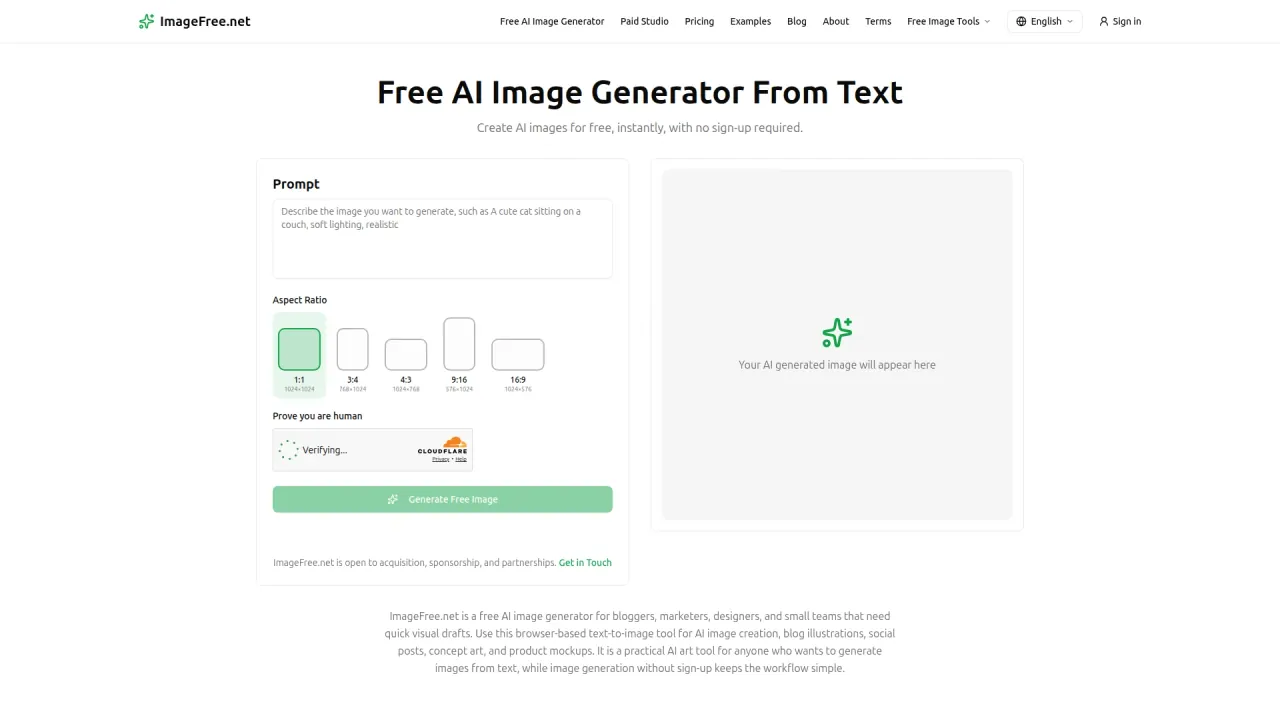

ImageFree.net turns written prompts into PNG images in five aspect ratios up to 1024 pixels, with free photo editing, background removal and 2× upscaling. An optional paid studio sells credits for a priority queue.
Used this tool? Rate it
Used this tool? Rate it
ImageFree.net is a free AI image generator that runs in the browser: you write a prompt, pick an aspect ratio and generate, and the free generator asks for no sign-up, no credits and no account. The same site bundles three companion tools, so in practice it is a small four-part toolkit covering text-to-image generation, instruction-based editing of an uploaded photo, background removal and 2× enlargement.
The project started as a side project built around one question: whether AI image creation could work without an account, credits or a complicated setup. The site names Z-Image-Turbo, described as an open-source AI model, as the model powering it. An optional paid studio now sits next to the free tools (see Pricing).
The name is generic. ImageFree.net is distinct from a similarly named free image-generator site on a different domain, and neither site links to the other on the pages checked. The official pages checked do not name the company or individual that operates ImageFree.net.
For a sense of scale, a third-party AI tool directory estimated 82.0K monthly visitors for the site, as captured on October 4, 2026. That number is the directory's own estimate, not a figure reported by ImageFree.net.
The text-to-image generator works with five fixed aspect ratios, each tied to one output size:
| Aspect ratio | Output size (pixels) | Orientation |
|---|---|---|
| 1:1 | 1024×1024 | Square |
| 3:4 | 768×1024 | Portrait |
| 4:3 | 1024×768 | Landscape |
| 9:16 | 576×1024 | Portrait |
| 16:9 | 1024×576 | Landscape |
Downloads are PNG files, a format the site says preserves quality and supports transparency. Style is set mainly through the prompt: naming a reference such as watercolor, anime or 3D render steers the result toward that look. Generated images come without a watermark.
Behind the form, a prompt or uploaded image goes to the processing system, is scheduled on available GPU capacity, runs through the matching AI model and comes back to the browser for download.
The upload caps differ sharply between tools. The 1MB ceiling on the upscaler is the tightest, so photos above that size cannot go straight into it.
A separate paid studio sends jobs through a priority queue, where each image generation costs 1 credit and each edit costs 3 credits regardless of the selected size.
The free generator keeps no gallery, so an image that is worth keeping has to be downloaded before the page is closed.
Each tool returns a downloadable file, so outputs can be passed along by uploading them to the next tool. In a product-image test published on the ImageFree.net blog, a generated image was sent to the AI photo editor with an instruction to lower saturation, add window light and leave the composition alone; the requested mood improved, but the instruction to keep the composition unchanged was not followed literally. The same run returned finished generator and editor files, while the background-removal and upscaling requests stayed queued and were not counted as results.
The site positions the generator for blog illustrations, social posts, concept art and product mockups, with general AI image creation alongside those tasks. Four prompt-and-output examples on the homepage span photography, product imagery, illustration and nature scenes, and can serve as starting templates. The product example, for instance, asks for a luxury watch on white marble with soft shadow, studio lighting and a minimalist, high-end look.
On the editing side, typical requests are plain-language changes to an existing photo, such as changing the background to a beach scene or removing a person in the background.
Product imagery comes with a stated boundary. The product-image test used a fictional, unbranded bottle and describes the result as suitable for concept development, not for representing a real product's packaging or contents.
Not every job needs all four tools. The site's own examples are narrow: a product seller may only need background removal, and a writer may generate one article image and stop there.
ImageFree.net is aimed at bloggers, marketers, designers and small teams that need quick visual drafts. No design background is required: the interface asks only for a description and a format.
It is a weaker match in these situations:
The free generator and companion tools cost nothing. Paying buys priority, not access:
| Option | Price | Credits | Validity | Billing |
|---|---|---|---|---|
| Free tools | Free | No credit counter | Not applicable | None |
| Monthly | $15.99 | 5,000 credits every billing period | Credits expire at the end of each billing period, no rollover | Renews monthly until canceled |
| Credit pack | $17.99 | 5,000 one-time credits | Valid for one year from purchase | No recurring charge |
Subscription credits are spent before credit-pack credits, and within each type the credits that expire sooner go first. Generated and uploaded paid images are kept for 30 days, and the free tools remain usable without signing in.
ImageFree.net promises no trials, no limits, no daily credit balance and no surprise paywall, and says the generator will always be free to use for everyone. It credits open-source models, self-operated infrastructure and unobtrusive advertising for keeping the free service running without artificial usage limits.
The legal text has not caught up with the paid tier. The Terms of Service, last updated July 25, 2026, call most current tools free and possibly ad-supported, describe paid features, subscriptions and priority processing as something that may be offered in the future, and say price, renewal, credit, cancellation and refund terms will be shown before purchase. The pricing page checked shows no refund policy.
Two alternatives move the trade-off in opposite directions: one toward full control of the same model, one toward an account-based product with more settings.
The model ImageFree.net credits is published under the Apache-2.0 license. Its model card says it fits comfortably within 16G VRAM consumer devices, so owners of such a GPU can run it locally without a hosted queue or third-party data retention. The cost is setup work, and the pages checked do not disclose which settings the hosted site uses, so local results need not match its output.
Leonardo.Ai meters use instead of offering open-ended free generation: free users get 150 daily tokens. Token cost may vary with the number of reference images used, settings, image size and the number of images being generated. That makes it the closer fit when reference images matter, a feature the ImageFree.net generator does not offer, at the price of an account and a daily budget.
The no-limits promise sits alongside explicit controls. The terms reserve the right to apply usage limits, queues or temporary restrictions to prevent abuse and maintain fair access. The privacy policy adds that IP-based rate-limit records normally expire after short operational windows, while an abuse lock may remain for up to 24 hours.
The service processes submitted prompts and images, technical request data such as IP address, browser type and page URL, and usage events such as page views and tool interactions.
Retention statements differ between pages. The homepage FAQ says prompts, task records and generated images are permanently deleted after 24 hours. The privacy policy is narrower: prompts and task records may sit in cache and task systems for up to 24 hours when caching is enabled. Uploaded files and generated results may stay with object-storage and processing providers until removed under operational or provider lifecycle rules.
Advertising and outside processors are part of the setup. Google AdSense runs on the site, and Google and other vendors may use cookies, web beacons, IP addresses or other identifiers to serve, personalize and measure ads. Data is shared with Google for advertising and analytics, Cloudflare for human verification and infrastructure, AI inference providers, and hosting, object-storage and database providers, any of which may process it in other countries.
Two descriptions of the processing chain sit side by side. One page describes open-source models running on self-operated GPU infrastructure with request scheduling, while the privacy policy lists outside AI inference providers among the recipients of prompts and images; the pages checked do not say which requests go where.
Users can ask, by contacting the service, about deletion of data that can reasonably be linked to their request. The privacy policy states that no account, name, email address or payment information is required to use the tools; in the policy text checked, no section covers the sign-in or payment data of the paid studio.
Yes, within limits. The terms say ImageFree.net does not claim ownership of prompts, uploads or outputs, and outputs may be used for personal or commercial purposes, subject to applicable law and third-party rights. The site does not guarantee that an output is unique, copyrightable or free from third-party rights.
The site credits Z-Image-Turbo, which belongs to Z-Image, an image generation model family its developers describe as having 6B parameters. The model card highlights photorealistic generation and bilingual English and Chinese text rendering; those are properties of the model itself, and ImageFree.net does not state that its hosted version keeps them. The pages checked do not name the models behind the photo editor, background remover or upscaler.
Processing time depends on server load and prompt complexity: straightforward descriptions typically render within seconds, while highly detailed or unusual requests may take longer. When an image does not appear, the contact page suggests refreshing and trying a simpler prompt, noting that the servers may be under high traffic. If a finished image will not download, right-clicking it and choosing Save Image As, or switching browsers, is the suggested workaround. Support typically replies to inquiries within 24-48 hours.
The privacy policy says submitted prompts and images are not used to train ImageFree.net's own AI models. It makes no statement about training by the outside AI inference providers that process requests. The homepage also asks users not to submit confidential or sensitive information.
